Hi all, I have a bosh dishwasher registered in Home Connect.
I’ve added the official home connect integration in hassio and I have access to the various sensors.
One thing that I’m not able to do is to start a program at a specific time during the night. I wonder if anyone has succeeded doing so?
I saw there are options I can add when I start a program, but I can’t find anywhere how to fill in such options.
Any help?
Ok I’ll answer this myself as I played with the HC apis and found a way to do this.
Here is the automation I wrote to send delayed start to my dishwasher via Home Connect
I wrote a script that builds on this, allows choosing the program, fixes the relative start time, and uses the new non-deprecated API. Use if you want!
script:
  dishwasher_delay_start:
    mode: restart
    fields:
      program:
        required: true
        name: Program
        description: "The dishwasher program to run."
        default: dishcare_dishwasher_program_quick_65
        selector:
          state:
            entity_id: select.dishwasher_selected_program
      delay:
        required: true
        name: Delay Hours
        description: "How long you like to delay the start time."
        default: 2
        selector:
          number:
            min: 0
            max: 5
            step: 1
            unit_of_measurement: hours
            mode: slider
    sequence:
      - action: home_connect.set_program_and_options
        data:
          device_id: DEVICE_ID
          affects_to: active_program
          program: "{{ program }}"
          b_s_h_common_option_start_in_relative: "{{ delay | int * 3600 }}"
Happen to have a clue on how to start the last used program?
I’m asking, as i always use the AI optimised program, which is not available as selection within HA
I believe that sensor.dishwasher_selected_program (or whatever your sensor is named) contains the last selected program.
Unfortunately script default values don’t support templates. You could call the script and pass in your selected program from the sensor, but the self contained script I posted can’t support that.
If you have a most common program, and most used delay, you can adjust the variables in the script when you add it.
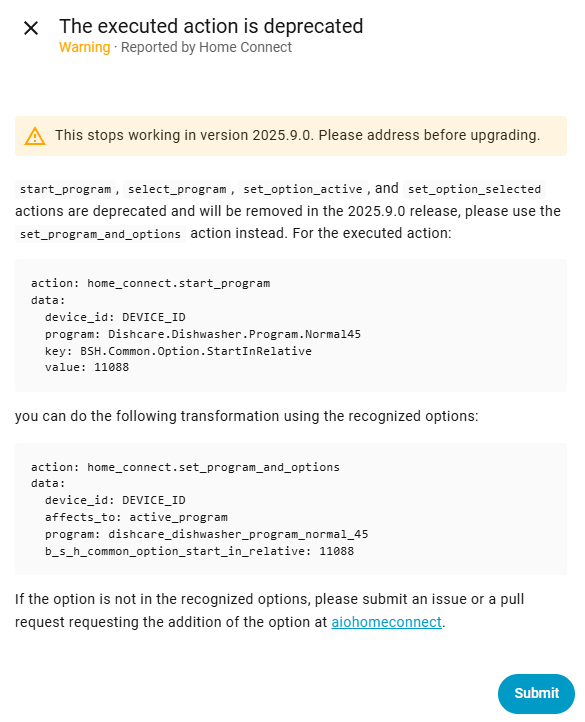
I’ve been getting this deprecated message for a while now and have finally found out how to get the automation to work with the new actions menu for Home Connect.
this post was great to get me started back in Jan, I hope this helps someone in the future.
Create the new action: Add action → Other actions → Home Connect → Set program and options
Select your Device ID
Affects to: Active program
Tick Program and set your preferred Cycle, mines ‘Normal 45C’
Open the Dishwasher options menu and tick ‘Start in relative’
This is where it gets tricky, it wants the value in seconds.
add 1 second
use the 3 dots and change the action to “Edit in YAML”
replace the 1 with this, including the “”: “{{ (as_timestamp(now().replace(hour=23, minute=59, second=59, microsecond=999999) + timedelta(seconds=1)) - as_timestamp(now())) | int }}”
Save automation
You should now be able to view in “edit in visual editor” again and it looks like this
Just to add that one can use the selected program as active program by entering program: "{{ states('select.dishwasher_selected_program') }}" in yaml mode.
This ensures that you can select the right program on your dishwasher and the HASS automation will use that as the active program with the correct delay (in seconds) to start at midnight.
NB1 I have learned that simply setting affects_to: the selected program in combination with b_s_h_common_option_start_in_relative is not allowed by the home connect API, hence the indirect way to do this via program: "{{ states('select.vaatwasser_selected_program') }}" above.
NB2 I use the cheapest-energy-hours macro to select an optimal start time based on dynamic energy prices, but that makes the code much more complex so I stuck to the OP’s goal to start at midnight for clarity here.
I hope this helps anyone wanting to do something similar.