Home Keeper - extensible Home maintenance tracking

Home Keeper — a maintenance & chore tracker for Home Assistant

GitHub: GitHub - prestomation/ha-home-keeper: Home Keeper is a Home Assistant plugin for tracking home maintenance and chores with deep HA integration · GitHub
Docs: Home Keeper
Install through HACS as a custom repository (category: Integration).

I wanted a decent way to track home maintenance in HA — filter changes, flushing the water heater, the fire extinguisher check I forget every year — and I wasn't happy with what was already out there. The UIs felt clunky, and none of them were really built to play nicely with the rest of Home Assistant. I also knew from the start I wanted this designed so other integrations could push tasks into it. The more things that can feed it, the more useful it gets for everyone, so that network effect was a goal rather than an afterthought.

So I built Home Keeper. It gives you a sidebar panel, a dashboard card, normal HA to-do and calendar entities, and per-device sensors — all backed by a task engine that actually understands recurrence.
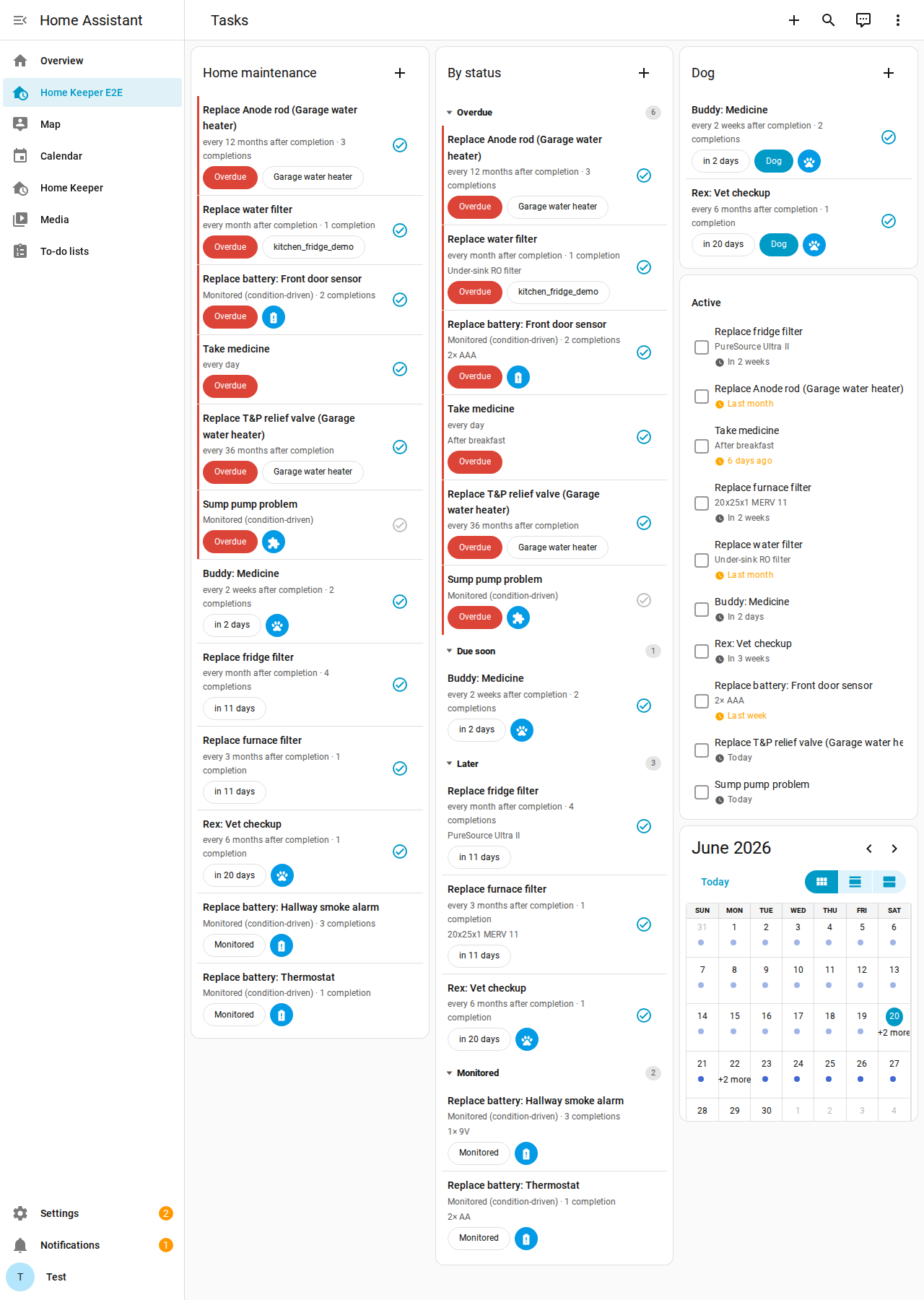
There are four kinds of tasks:

  • Floating — every N days/weeks/months after you last did it (fridge filter, walk the dog)
  • Fixed — locked to the calendar no matter when you actually do it (weekly garbage, monthly bills)
  • One-off — do-once, with a due date; it goes dormant after you finish instead of vanishing
  • Triggered — no schedule at all; another integration arms and clears it

A few other things it does:

  • A dashboard card with one-tap Done, inline add/edit, and filtering/grouping (including by label, so you can have a card just for the dog, one for the car, etc.)
  • "Appliances" — give a dumb fridge or furnace a real device page with metadata, wear-item tasks, spare-part inventory, and a CSV export for insurance
  • Optionally log a note, cost, photo, and who did it on each completion
  • Fires events for everything, which show up as device triggers in the automation editor ("task became overdue", etc.)
  • Everything is also a home_keeper.* service, so automations/scripts/voice can drive it
  • Localized in 16 languages

On the "built for other integrations" part: there's a triggered task type meant for third-party integrations to arm and clear tasks. The first one using it is Home Keeper — Battery Notes, which turns Battery Notes low-battery alerts into replacement tasks and keeps both sides in sync. I've also got a pet-care integration, Pawsistant, in the works on the same idea.

Still early, so I'd love feedback, bug reports, or feature ideas — GitHub issues is the best spot. Hope someone else finds it useful.
Yes I built this using AI. I'm a software developer by day so know how to apply these tools to great effect.

4 Likes

Giving this a try, thank you.

1 Like

Feature request: Allow the card to become hidden if no tasks match the selected filter. Or at least give us a sensor that we can use in a conditional card, to hide HK cards if empty.

Otherwise, this is a really good app and has lots of uses in Home Assistant. Thanks for all the work it took to get to this point. Hopefully you will consider this feature request.

Art - aka Kartcon

1 Like

Thanks for the suggestion! I’ve included it in release 0.11.0. please let me know of any other suggestions you may have

1 Like

New 'hide_when_empty: true" feature is GREAT!! This allows me to place the cards front and center on my dashboard and only visible when needed. Thanks so much!

1 Like

So happy to finally see such a thorough solution to this problem. Seriously, I don’t think people realize how many Home Assistant extensions are just a variation of “track a recurring task.” I hope this really takes off and becomes a core component of HA.

As I’m swapping out an older solution for Home Keeper, I did come across one bit of confusion. I have a zigbee button that I use to mark a specific task as done. When I build the automation, using the Action - Home Keeper: Complete Task, it asks for a Task ID. Is this an internal ID that is exposed somewhere (if so, I can’t easily find it), or is it just asking for the free-form text name of the task (in which case, I’d suggest changing the description to make that clearer, if possible)?

Thanks!

1 Like

Thank you for the kind words!

TBH all the services are a bit of an afterthought, thank you for providing this feedback. I will get this addressed right away. The next version will have comprehensive documentation of all the events and actions, something that’s already in main. For now, you can use the built-in todo. services against the HomeKeeper TODO list and complete tasks by name.

And yes, I see new task management systems every week. I had been trying them out for a while before realizing none of them were going to be the serious solution I knew was possible, thus Home Keeper was born!

0.18.0 addresses this.

Entities now list their IDs in the dashboard with copy button.

The home keeper services now accept Id or name for all entity types as well if you prefer that.

Awesome. Thanks for all the hard work on this!

1 Like

Hi,

First of all I want to thank you as I’m getting a blast creating a lot of things that were missing for me to be created easily and Home Keeper is fixing that gap.

I’m creating this message here instead of GitHub as i’m not sure it’s an issue, feature request or support on using this integration :).
Let me know if you prefer me to create an issue on Github for this.

Here is my use case and I’m not sure what is best to be done with only Home Keeper, only HA automation or a bit of both: I’d like to get some notification about getting the trash bin out and back in when local collection truck is going to arrive.

Perfect situation from me would be:

  • Task for getting Trash out every Wednesday at 7pm (this one is easy and I got that created already)
  • If task was completed before 7am on Thursday then create a new Task to get the trash bin back in at 8pm on Thursday.
  • If the task was not completed before 9am on Thuersday then cancel this occurence and do not create the task to the trash bin in as it is too late to get trash collected.

So I believe that there are two things in my use case:

  • Conditionally create a new different task on Home Keeper if a task is completed before a specific time. Not sure if this should be automation or if it is something Home Keeper might be able to do.
  • Conditionnaly cancel an occurence of a task on Home Keeper if it was not completed before a specific time.

The other thing that is definitively something that would be awesome would be a way to easily duplicate tasks.
For example I created a task to water flowers depending on humidity level of the ground based on the nearby sensor. I have ten sensors like that so is there a way for me to easily duplicate the task configuration and only adjust the sensors and values ?

1 Like

Thank you for trying home keeper and I’m pleased you are finding it useful. GitHub is generally the best place for both of your questions, even if they are not feature requests! If you don’t mind please open separate issues for each question. The duplicate seems like a no-brainer. The other I will have to think more about.

1 Like

Hi,
Is there a way to view or expose the count of over due tasks as an entity? Would like to use it as a badge.

1 Like

Not today but this is a very reasonable request. I’ve opened this issue for you

This will be implemented in the next stable release (this week sometime)

1 Like

Thanks. Will follow the issue