Home Wizard new stup - Authentication method

Hi there,

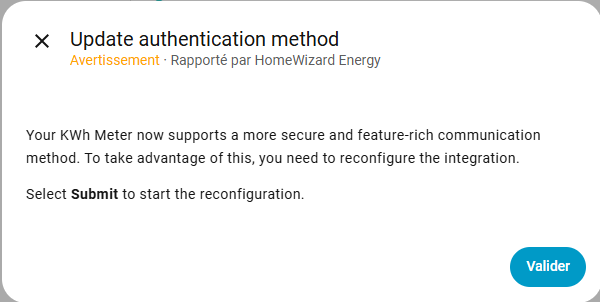
I am receiving in the HA updates a statement that Home Wizard Energy now supports a new authentication method :

Issue is I am trying to push the button on the device, but nothing happens - at least it fails.

Also I have 3 devices … a P1 meter, a KwH meter and a water Meter … it even doesn’t say which device is conerned.

Do you know more about this warning message ?

Many Thanks !

I have the same problem!

Also the message says “push the button” but my device SDM360 has three buttons, which button do they mean?

Also have the “problem”.

Some more info here:

Closest solution:

Quickly solved by:
On Homeassistant Press button to ‘repair’.
Message shows: ‘push the button on meter’
I presss the wifi button on meter until display goes blank. (1 second press)
On Homeassistant GUI press ‘continue’ (need to be within 30 seconds)
After few seconds i see message that the issue is resolved

That solved the issue for me. It’s really only a very short press on the WiFi button, more like 700 to 900 milliseconds.

1 Like

I have no button to repair, Home Assistant only shows
“Select Submit to start the reconfiguration”.

Same here :man_shrugging:t2:

Hello, i’m new here and have the same issue as all of you. My problem is that i have 5 homewizard devices and ha does not tell me wich device i have to re-authenticate.
Anyone have any tips?

I am working to resolve this. See HomeWizard update authentication repair does not handle multiple simultaneous repairs properly. · Issue #154012 · home-assistant/core · GitHub.

For now, the first message will show the name. “Your {title} now supports a more secure and feature-rich…”.

The title is the name of the configuration, so in the case of the screenshot it is ‘KWh Meter.

My current suggestion is to rename the name of the config entry (so not the device name). You can do this by pressing the 3 dots on the right of (in my instance) ‘KWh Meter’. Then reload the integration.

That solved the problem for me, thanx!

I have the same issue after installing a HomeWizard P1 meter. After starting the reconfiguration I get “an unknown error occurred”. I have tried several of the workarounds I found in this thread, but all to no avail. I also have a HomeWizard Watermeter and a HomeWizard EnergySocket. These two devices do not report any issues. With regard to the P1 meter I will wait for a fix for this issue.
yeah that worked for me to. your hint with the 700 - 900 ms was the key. I tried it before and a 2 s push would always start the AP mode… thx

1 Like
