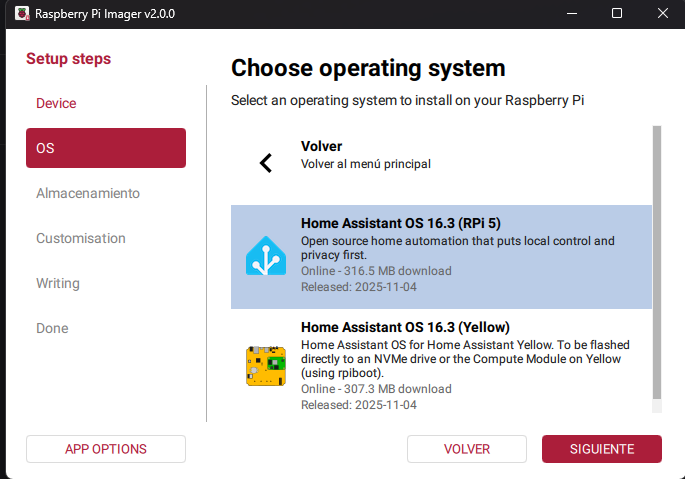
I’ve just installed Home Assistant OS 16.3 using the Raspberry Pi Imager 2.0.0 in a M.2 NVMe drive on a Raspberry Pi 5 8GB.
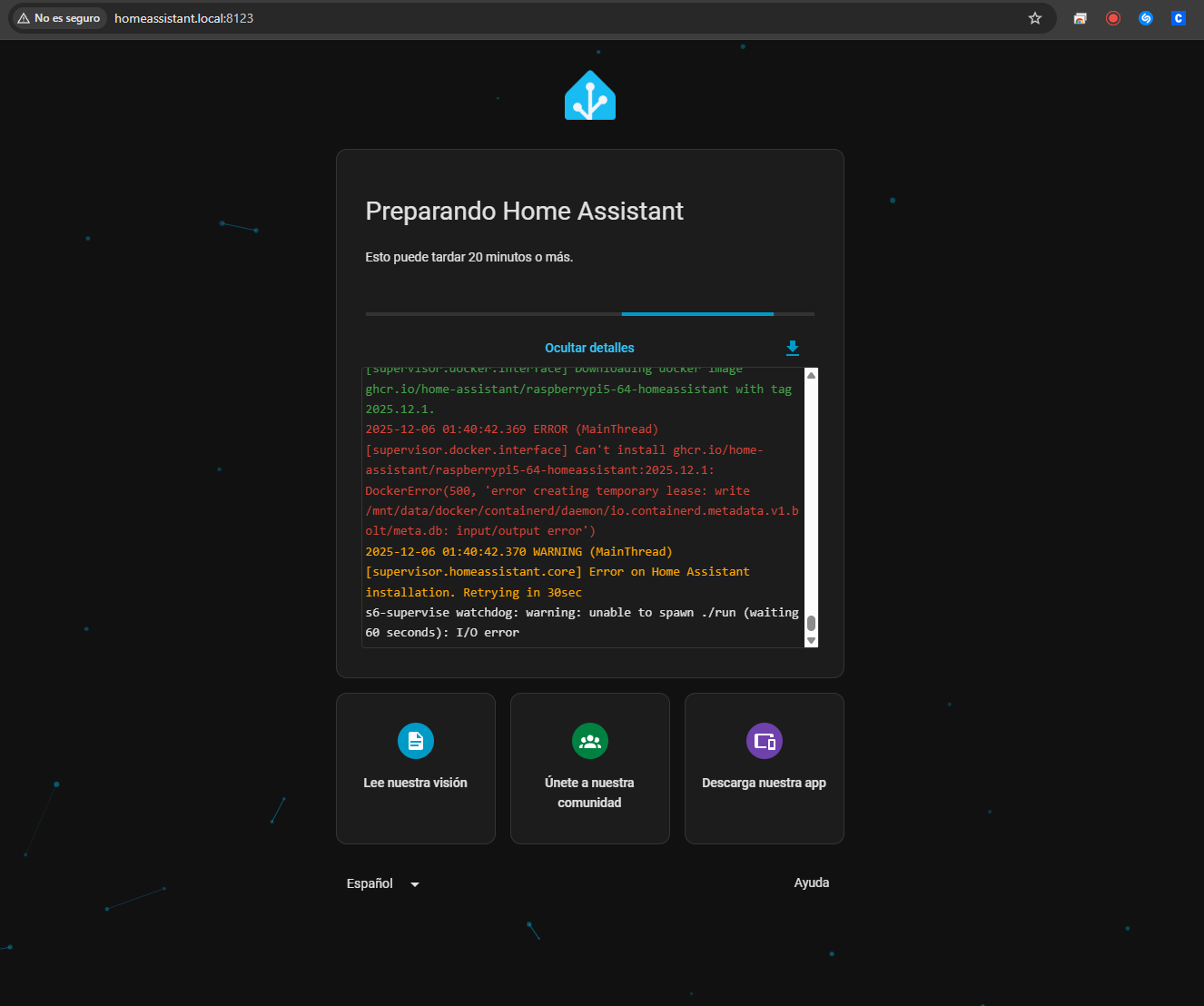
The homeassistant server boots up well as I can see homeassistant.local:8123 on my local network. It started the installation, but it fails trying to install the image Package raspberrypi5-64-homeassistant · GitHub as I see in the logs.
This is the image I installed. I know it runs docker on the background of the OS but I can’t have control on that right?
You know which is the thread of the other person that had a similar problem? I checked the forum and didn’t see any related to this OS fresh installation
The other person had issues that ultimately led to looking at writing to their SD Card, with possible media issues. Hence the question about your SSD drive. How formatted, what called, how connected, what capacity, etc.
My thought might be to go back and look at how your image got onto your SSD drive. Go back a version as the Raspberry Pi Imager is only updated recently.
Are there language issues, with installation routines assuming English only, and no other language support? These could be in the imager software or the image you are installing.
The other thing is the HomeAssistant OS image file they are using is faulty, with poor installation/setup routines. In which case reporting that back to the developers via GitHub should be done.
Note by now a new image for December may have been released for you to download and experiment with.
The joys of fast moving open source software, all cobbled together, hoping that each component is robust!
After doing some tests and try 'n error, I got it working.
My setup was the Pi5 with the M2 NVMe SSD Drive connected and installed the OS 16.3 on it.
I DIDN’T have a microSD inserted. When I inserted the microSD, it just was able to go on and install, but I see in HA that it is installed on the SSD drive.
So I don’t exactly know why I had to connect a microSD card, but yup, it eventually worked
A wild guess, but is the imager program hard coded to write the configuration file needed during installation direct to the SDCard, rather than the selected destination drive for the image file that is downloaded? It does that as the final step before finishing. That would be a bug that would explain why so many of these problems, all similar, have started to be reported for HomeAssistant new installs, all around the same time as the new Rasoberry Pi imager version 2.0 was released. Where a SDCard was present, the install program would pick up the parameters, but where not, it will possibly hang. If the SDCard was not present during the write stage, is there error checking and feedback for this?
The config file is a text file, only used once by the OS installation software and then removed as it could store sensitive information such as WiFi SSID passwords.
This could be confirmed by listing the root directory of the SDCard and the SSD drive immediately after the image process was complete, before the devices are dismounted, to see if the config file is present, and what drive it is found on. A list of both would be appreciated.
Of course this all relies on you actually going into the customise settings panel and saving your updated information. You did do that, didn’t you?
Some info on that config file you may find interesting.
I went through a lot of up & downs . I thought I got it working but it just kept crashing HA randomly.
So, investigated further and found that some had better experience installing the OS with Balena Etcher instead of the Pi Imager. I went that way and it seemed to work better (at least I didn’t have to have the sd card inserted).
But it just crashed again, randomly, and started a race to try and get the logs of the application while having a small window of time before crash (sometimes not even 10 seconds ).
At some point I got the logs and found this…
2025-12-07 02:58:34.608 homeassistant kernel: nvme nvme0: controller is down; will reset: CSTS=0xffffffff, PCI_STATUS=0x10
2025-12-07 02:58:34.713 homeassistant kernel: nvme nvme0: Does your device have a faulty power saving mode enabled?
2025-12-07 02:58:34.713 homeassistant kernel: nvme nvme0: Try "nvme_core.default_ps_max_latency_us=0 pcie_aspm=off pcie_port_pm=off" and report a bug
2025-12-07 02:58:34.713 homeassistant kernel: nvme 0001:01:00.0: enabling device (0000 -> 0002)
2025-12-07 02:58:34.714 homeassistant kernel: nvme nvme0: Disabling device after reset failure: -19
2025-12-07 02:58:34.714 homeassistant kernel: Buffer I/O error on dev nvme0n1p7, logical block 6467, lost async page write
2025-12-07 02:58:34.714 homeassistant kernel: EXT4-fs warning (device nvme0n1p8): ext4_end_bio:353: I/O error 10 writing to inode 821584 starting block 40511517)
Oh boy I’m in trouble…
What was actually happening was that my nvme drive was crashing due to incompatibility of the M2 HAT I have (Argon Neo5) and my NVMe M2 drive (Patriot P320 256GB).
The biggest problem was that the drive did actually work, but eventually the controller explodes and the the drive goes in a read-only mode and that makes HA to just completely brake apart.
So, lesson learned. Check compatibility of the chosen M2 HAT for the RPI5 with the selected M2 NVMe drive, even though there is not much info out there or it’s outdated, so you might have to just try 'n error.
Now I’m just making the most out of Amazon’s return policy until I find a compatible drive
Thanks for the followup. It would appear that that the issue was hardware rather than software, but interesting about your experience with Etcher vs Imager.
The Argon device has been the subject of heavy discounting as vendors attempt to move it off their shelves, hoping there are applications that may not cause issues, or there are people that buy without heeding the incompatibility warnings of errors such as yours.
Be sure to write a review on Amazon so people buying know about the incompatibilities. You will be doing the vendor a favor also, not having to process returns so much…
Argon40 neo5, Samsung evo970 250, i installed raspbery pi Imager NMVE/ USB to change Boot, loaded own image (HA-image from HA-Homepage), i am not shure that Docker is not present, i had indications on logs… Before i installed HA i had Docker on my SSD.
Argon has only Samsung 980 on their Compatability list.
Yup. Little update here. I finally have been able to install it on an SSD, but Samsung EVO was too expensive for the use I wanted to give it. So I started my hunt for an SSD that is cheap enough and works well.
I found that Lexar NM620 M.2 256GB works!!! The price was 30€ (now double because of the drives price gone up), way cheaper than the samsung ones.
So in case someone has an Argon Neo5 Case (With the M.2 HAT) and wants to use one compatible and at a good price, this works!!


 ).
).