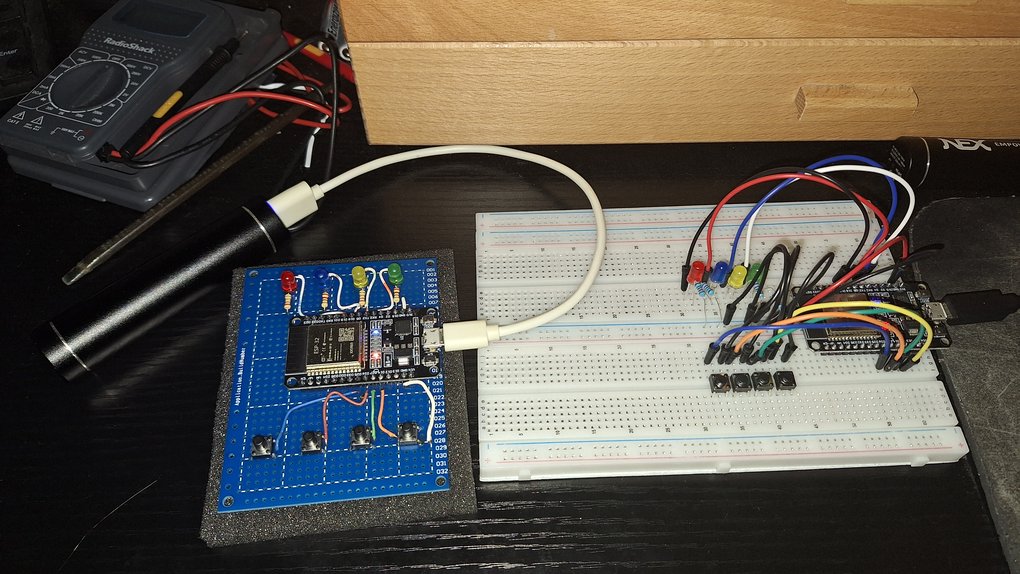
Homemade remote with pushbuttons and LED indicators

We had several timers plugged into outlets that turned lamps on when it got dark and turned them off at bedtime. I got tired of having to frequently reprogram them all during spring and fall as sunset time changed so I got interested in home automation. I started reading up on Home Assistant and bought a Raspberry Pi.

I wrote some code to send data from my weather station to HA using MQTT. I had existing code on my server that received the data from the weather station, wrote it to a Postgresql database, and forwarded it to a Valkey server. I have sensors for the weather station in most rooms in the house and this data is included in all of these reports. I have most of the readings on the HA homepage.

The Pi got me intrigued. I graduated from an electronics tech school about 44 years ago. I lasted two years in field service before moving on to software but I have always enjoyed playing with electronics. The Pi opened my eyes to what’s available today with SoC’s, sensors, and all sorts of cool stuff and it’s pretty cheap. So I set out to build myself a remote.

I got some ESP32 development kits and some breadboards. I hooked up some switches and LEDs and started playing with ESPHome. The remote has four push buttons and four LEDs. Each button can generate single, double, and long press events. Button 2 turns a lamp on. Double click turns it on full brightness. Holding button 2 increases brightness. Holding button 1 decreases brightness. Pressing button 1 turns it off. Button 3 toggles an outlet. Button 4 sets away mode.

I use the LED’s as indicators. I wrote some automation that watched the temperature in the living room and if it falls below 69 degrees during the day then the remote’s red LED turns on. This tells me to go check for a low fuel or ignition failure in the fireplace insert. Enabling away mode turns on the yellow LED. I just got some circuit boards and bought packages of assorted LEDs, switches and resistors so I built a second remote on a circuit board.

I haven’t had this much fun in a long time. These are home projects combining my interests in electronics and programming for a useful purpose.

Anyway, my lights now turn on at night when my weather station says it’s dark outside. If anyone is interested I could try to post pictures and code.
That is the purpose of this category.

The main esphome file:

substitutions:
  switch_pins: [ 25, 26, 27, 14 ]
  light_pins: [ 19, 18, 17, 16 ]
  devname: esp-board-1
  onboardPin: 2

esphome:
  name: ${devname}
  friendly_name: ${devname}

esp32:
  board: esp32doit-devkit-v1
  framework:
    type: arduino

# Enable logging
logger:

# Enable Home Assistant API
api:
  encryption:
    key: "..."

ota:
  - platform: esphome
    password: "..."

wifi:
  networks: !include { file: networks.yaml }
  # Enable fallback hotspot (captive portal) in case wifi connection fails
  ap:
    ssid: "${devname} Fallback Hotspot"
    password: "..."

captive_portal:

interval: !include { file: connectionState.yaml }

binary_sensor:
  - !include { file: button.yaml, vars: { button: 1, pin: 25 } }
  - !include { file: button.yaml, vars: { button: 2, pin: 26 } }
  - !include { file: button.yaml, vars: { button: 3, pin: 27 } }
  - !include { file: button.yaml, vars: { button: 4, pin: 14 } }

output:
  - platform: ledc
    id: red_led
    pin: ${light_pins[0]}
  - platform: ledc
    id: blue_led
    pin: ${light_pins[1]}
  - platform: ledc
    id: yellow_led
    pin: ${light_pins[2]}
  - platform: ledc
    id: green_led
    pin: ${light_pins[3]}
  - !include { file: connectionStateOutput.yaml }

light:
  - platform: monochromatic
    name: "Red Led"
    output: red_led
  - platform: monochromatic
    name: "Blue Led"
    output: blue_led
  - platform: monochromatic
    name: "Yellow Led"
    output: yellow_led
  - platform: monochromatic
    name: "Green Led"
    output: green_led
  - !include { file: connectionStateLight.yaml }

This is the included connectionState.yaml. It flashes the onboard LED while connecting to the wifi network, flashes a bit faster while connecting to Home Assistant, and goes on solid once connected.

- interval: 1s
  then:
    if:
      condition:
        wifi.connected:
      then:
        - if:
            condition:
              api.connected:
            then:
              - output.ledc.set_frequency:
                  id: onboard_led_out
                  frequency: 1000Hz
              - light.turn_on:
                  id: onboard_led
                  brightness: 50%
                  transition_length: 0s
            else:
              - output.ledc.set_frequency:
                  id: onboard_led_out
                  frequency: 5Hz
              - light.turn_on:
                  id: onboard_led
                  brightness: 50%
                  transition_length: 0s
      else:
        - output.ledc.set_frequency:
            id: onboard_led_out
            frequency: 2Hz
        - light.turn_on:
            id: onboard_led
            brightness: 50%
            transition_length: 0s

This is the button definition file button.yaml.

platform: gpio
pin:
  number: ${pin}
  inverted: true
  mode:
    input: true
    pullup: true
id: switch_${button}
name: Button ${button}
filters:
  - delayed_on: 100ms
  - delayed_off: 100ms
on_multi_click: 
  - timing: [ON for at most 349ms, OFF for at least 350ms]
    then:
      - logger.log: "Button ${button} single click"
      - homeassistant.event:
          event: esphome.remote_button_pressed
          data:
            device: ${devname}
            button: "button ${button}"
            type: "single"
  - timing: [ON for at most 349ms, OFF for at most 349ms, ON for at most 349ms, OFF for at least 350ms]
    then:
      - logger.log: "Button ${button} double click"
      - homeassistant.event:
          event: esphome.remote_button_pressed
          data:
            device: ${devname}
            button: "button ${button}"
            type: "double"
  - timing: [ON for at least 350ms]
    then:
      - logger.log: "Button ${button} long click"
      - homeassistant.event:
          event: esphome.remote_button_pressed
          data:
            device: ${devname}
            button: "button ${button}"
            type: "long"

These are for the onboard LED. connectionStateOutput.yaml:

platform: ledc
id: onboard_led_out
pin: ${onboardPin}

connectionStateLight.yaml:

platform: monochromatic
id: onboard_led
internal: true
output: onboard_led_out
2 Likes