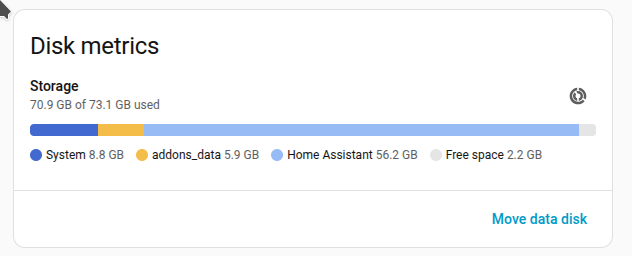
I have a VirtualBox HAOS image which is ~75GB in size and shows HA taking up 56GB and my problem is I need access to a USB device and VirtualBox keeps locking up so I want to move it to an rPi. I've tried KVM and have it working on KVM but it can't do bridging over WiFi and I've not been able to get the networking setup so my espHome devices are connectable since they are on the WiFi subnet which is different than the LAN network. So trying a 4GB rPi 4.
vboxmanage showmediuminfo ./haos_ova-15.2.vdi
UUID:           e9998543-35d6-4025-b820-4a6b6bae0ffd
Parent UUID:    base
State:          locked write
Type:           normal (base)
Location:       /opt/HomeAssistant2/haos_ova-15.2.vdi
Storage format: VDI
Format variant: dynamic default
Capacity:       76816 MBytes
Size on disk:   72716 MBytes
Encryption:     disabled
Property:       AllocationBlockSize=1048576
In use by VMs:  ha2 (UUID: b8f7ca78-5799-494b-b32e-03d07f30b962)
My backup is failing because of disk space and it's likely wanting to store a 33GB backup file and I don't have the space. I've even run a command from the VM login which said it reduced the /mnt/data partition by 52GB but nothing I've found actually shrinks the image or data usage inside the image.
Any gurus have a pulse on what I'm doing wrong or can do to figure this out?
I support what SG said about not using Pi's for serious HA nodes. To resolve your backup problem, break the problem down into multiple manual backup jobs.
Assuming you are using the built-in backup, backup just HA, then a selection of apps, etc.
Yes, the goal is HA OS on an rPi which I'll run on the same Wifi subnet my espHome devices are on. I will try multiple partial backups and see what it'll take to get one to succeed. Thx
UPDATE: Apps are only 3GB and the other 50GB are HA system with most being data. I've tried multiple times to purge and repack the sqlite db but it doesn't work because I need another 53GB of storage free. ie the db needs equal amount of free space to do anything. Likely to keep a backup copy should the action fail.
I have 1 small KVM VM with a new installation of haos v17.3 to try the backup restores on before going through the steps on an rPi.
I would have no problem losing the data if I could just backup/restore all my dashboards, activations, scripts and apps.
oh gawd, in the VM haos is in a docker container.... I need to get the home-assistant_v2.db(star) files off of that system and onto my Linux box so I can run a downloaded version of sqlite3 to fix and purge the database but I can't get the db out of the docker container and can't stop HA to keep the db cleanly stopped.
I'm trying scp of the db files from within the Terminal of HA/docker/VDI and see what that does. How I'm going to put them back is another story.
We'll see what 'sqlite3 home-assistant_v2.db "VACUM;"' does to the db
UPDATE: I got into docker container
VitrualBox console: ha> login
ha core stop
docker ps -a
docker exec it [docker container ID for homeassistant] bash
testing the network it's A-OK, cd /homeassistant
scp ./home-assistant_v2.db loginID@HostName:[directory]
And since the db is closed now there are no other files but the db file to xfer.
From here I will try to vacuum it down to a smaller size using sqlite3 commands.
For anyone finding this, the home-assistant_v2.db file contains only the historic data so if you stop ha core and move that file off of the VDI, delete it on the VDI and restart the ha core, then you will have a much smaller full system backup file.
The rPi installation wasn't easy either since for some reason it would not enable the ethernet port so no network until I setup WiFi manually doing the following after flashing the uSD image:
mkdir haDisk
sudo mount -t auto /dev/sde1 haDisk
sudo mkdir -p haDisk/config/network
vi haDisk/config/network/my-network
That's where I setup my wifi based on How to Install Home Assistant and Connect to WIFI on Raspberry PI | Smart Home Circle
But after getting to the starting up homeassistant.local:8123 page and selecting restore backup it would fail. So I just setup the default and went to settings/system/backup/... and uploaded my backup and then that and it worked.