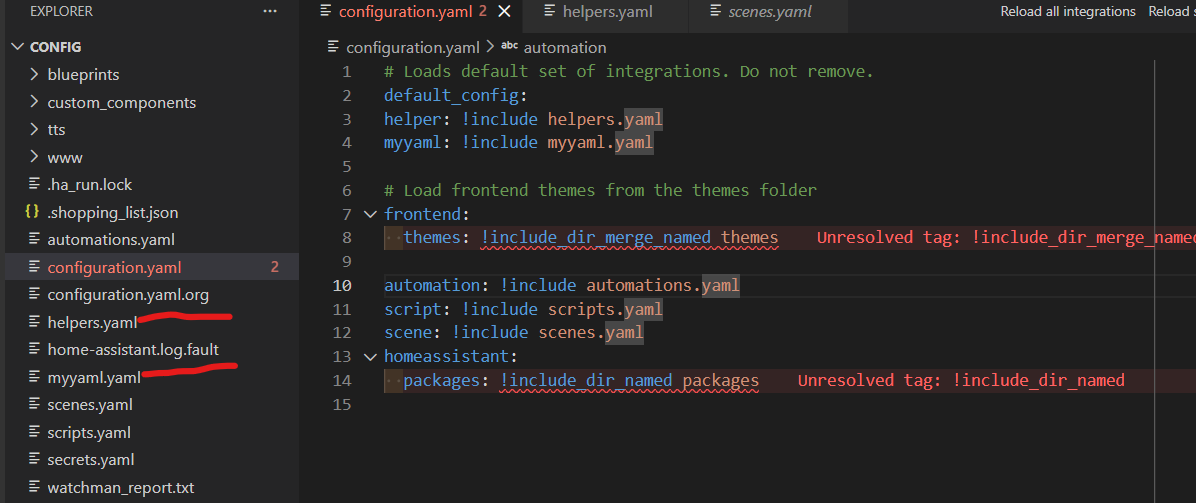
I’ve looked at several threads regarding adding include files to configuration.yaml but I still keep getting this error:
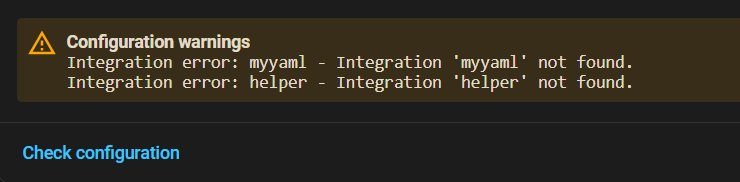
I’ve added the helper.yaml and myyaml.yaml like this:
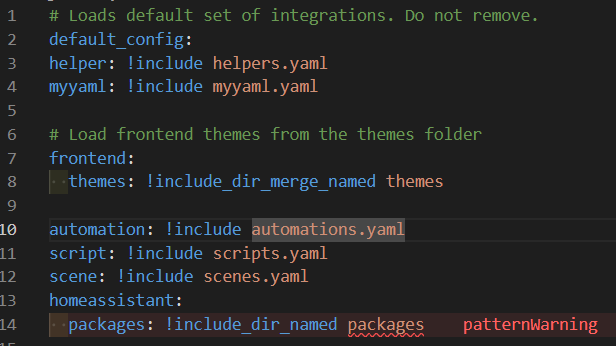
Not sure about the pattern warning either.
-Thanks
I’ve looked at several threads regarding adding include files to configuration.yaml but I still keep getting this error:
I’ve added the helper.yaml and myyaml.yaml like this:
Not sure about the pattern warning either.
-Thanks
Do you have those files in the same directory as the configuration.yaml?
Yes, they are there. There is a bit of YAML in the helpers.yaml and I copied this file to myyaml.yaml for testing purposes.
May be it is the order and location. In my configuration.yaml All yaml includes are below automation: and in alphabetical order followed by
frontend: then
browser: then
homeassistant: then
any packages.
Neither helper nor myyaml are integrations… what are you actually trying to accomplish with those files?
Have you read the docs?
https://www.home-assistant.io/docs/configuration/splitting_configuration/
https://www.home-assistant.io/docs/configuration/packages
The VSCode extension for HA is woefully out of date, at this point most warnings it gives are false positives.
Thanks, I’ll try your suggestion.
I’m just trying to include .yaml files so they are separate from configuration.yaml and organized by type. I started trying to include a helpers.yaml.
That’s a shame about VS Code add-on. I also use VS Code + SSH to open HA files remotely from my Windows machine, which is a bit different.
What I can read from the screenshot…you donot seem to have a ‘packages’ folder. If indeed the case, create that, move the two files in it and remove the separate lines for helper and myyaml from the configyml. Then restart. If the formatting in those two files is OK, it will pick it up
First, you might want to consider using something different than “helpers”. The term “Helpers” in HA is pretty much exclusively used for entities that are created via the GUI, so using it otherwise might just end up causing confusion. But it’s your choice.
Instead of “including” those in your configuration.yaml file, just move the files into the directory you have set up for Packages. Based on the screenshot in the top post, that’s packages.
You are using the !include_dir_namedmethod so your package files will have the same indentation structure as configuration.yaml.
One thing to remember, whenever you add a new integration via YAML or add a new file, you will need to restart HA for it to take effect.
Thanks I’ll give the packages directory a try. I was reading the packages documentation at the link you provided.
As stated above already neither “helper” nor “myyaml” are integrations.
Another term used for integration is “domain”. They aren’t exactly the same but they are close enough for the discussion at hand to illustrate but for additional info some integrations are domains unto themselves (switch, light, etc) other integrations create domains within themselves. Like the zwavejs integration provides the interface between HA and your zwave system. But the zwavejs integration provides HA the domains exposed by the different devices in zwavejs (switch.x or light.y etc).
configuration.yaml is a text file organized into key:value pairs. the top level key (the one all the way to the left margin) is going to be the integration or domain with the code for the integration or domain configuration located indented under that domain key.
Domains are very specific. you can’t just randomly make up integrations/domains and put them in configuration.yaml. Or anywhere else for that matter. You would have the same problem if you did the same thing in a package folder as well.
all integrations/domains are listed in the docs under the integrations section. if you look there you won’t find any integration that says “helper”. so you can’t have “helper:” as a top level key in HA. as you’ve found it will complain that it can’t find the “helper” integration anywhere in the list of integrations that HA knows about.
even if you use packages if you try to do the same thing there it will also give you errors because packages are literally nothing other than a mini version of configuration.yaml and all of the same domain/integration/key/value rules apply there just as they do in configuration.yaml.
Thank you for the info. I wound up placing myyaml.yaml in the packages. No errors yet!
yes as long as the syntax structure of myyaml.yaml is consistent with the requirements of configuration.yaml you won’t have any problems.