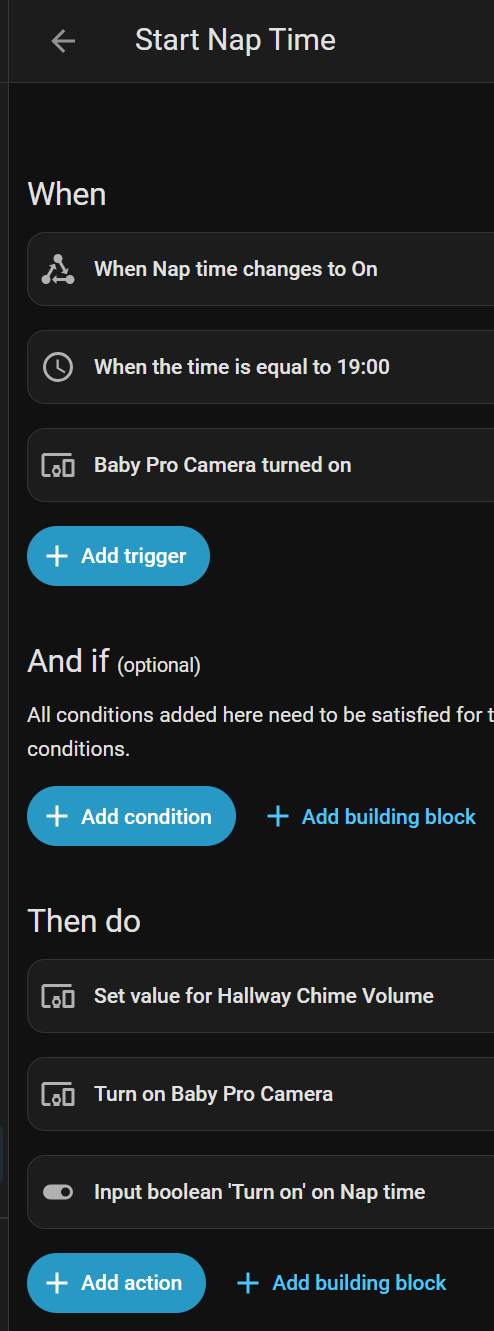
I have an automation that I think is working as it is. However it feel a bit “circular”, so I wonder if there is a better, more idiomatic, or more “correct” way to implement what I want.
My dashboard has a tile card with a “Nap time” boolean helpeas the entitiy - so this can be used as a single button to start or stop nap time, and reflects if nap time is currently on or not.
The triggers to the automation are then:
The boolean helper changes to a specific state
It is a specific time of day
The baby cam is manually switched on
The automation actions then do:
Reduce the Ring Chime volume
Turn on the baby cam (in case it was one of the triggers other than 3)
Turn on the nap time boolean (in case it was one of the triggers other than 1)
There is a similar automation to Stop nap time that has the exact opposite triggers and actions.
As you can see, two of the triggers are the same as the actions… which feels a bit wrong to me but are needed to cover all actions when different triggers might be used. Am I thinking about this correctly? Is there a clearer way to implement what I want?
(I know that I could use Trigger IDs and some additional logic to affect if certain actions run or not, but that feels like adding more complexity on top of existing complexity)
How about separate automations? Then each could have a condition to stop it running if one of the others had already triggered (if “nap time” was already on, for example). There’s really no advantage in cramming everything into one.
Thank you for the suggestion. I had initially avoided this because the actions are almost all the same for all of those separate automations (i.e. turn on the baby cam and mute the Chime) so it kind of felt like it should be a single automation.
But I’ve tried this now though. It does feel better, but maybe not exactly “correct”? Leaving it this way for now at least, sans any other suggestions.
You could put all the triggers in 1 automation and use trigger ID’s to use a choose in the actions based on the trigger ID’s.
So for the example you have there, use ‘ON’ as trigger ID and use that for those 3 actions.
The other 3 triggers could be ‘OFF’ with their respective actions.
Upvote for trigger IDs. I used to to have so many erroneous automations, but once I discovered trigger IDs I was able to consolidate so much and streamline everything.