I thought that there might have been something on the HomeAssistant device…like some sort of cache there. Didn’t know that message means clearing the browser cache. 
All PLs have been closed.
Dozens of messages highlighting a real problem, yet the intention is not to fix it.
I will never understand developers.
Thanks anyway to @nethershaw for trying.
By(t)e
1 Like
Who’s this Futzy guy and after all that time you would think he’d be done tinkering already.
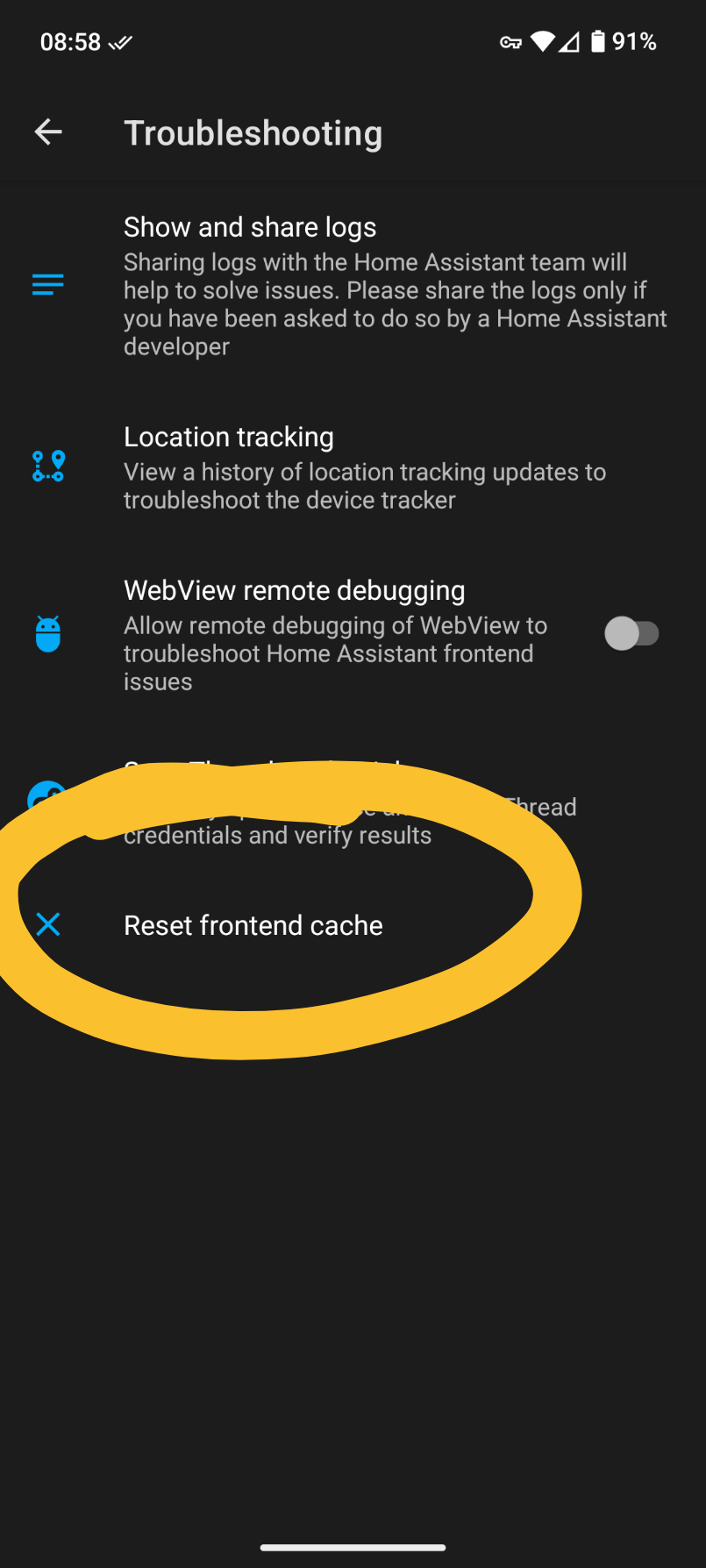
This is only possible for PC browsers and not mobile. There actually is a menu item to clear the front end cache in the companion apps. Both Android and IOS have it here:
- Settings → Companion app → problem solving → Reset front end cache
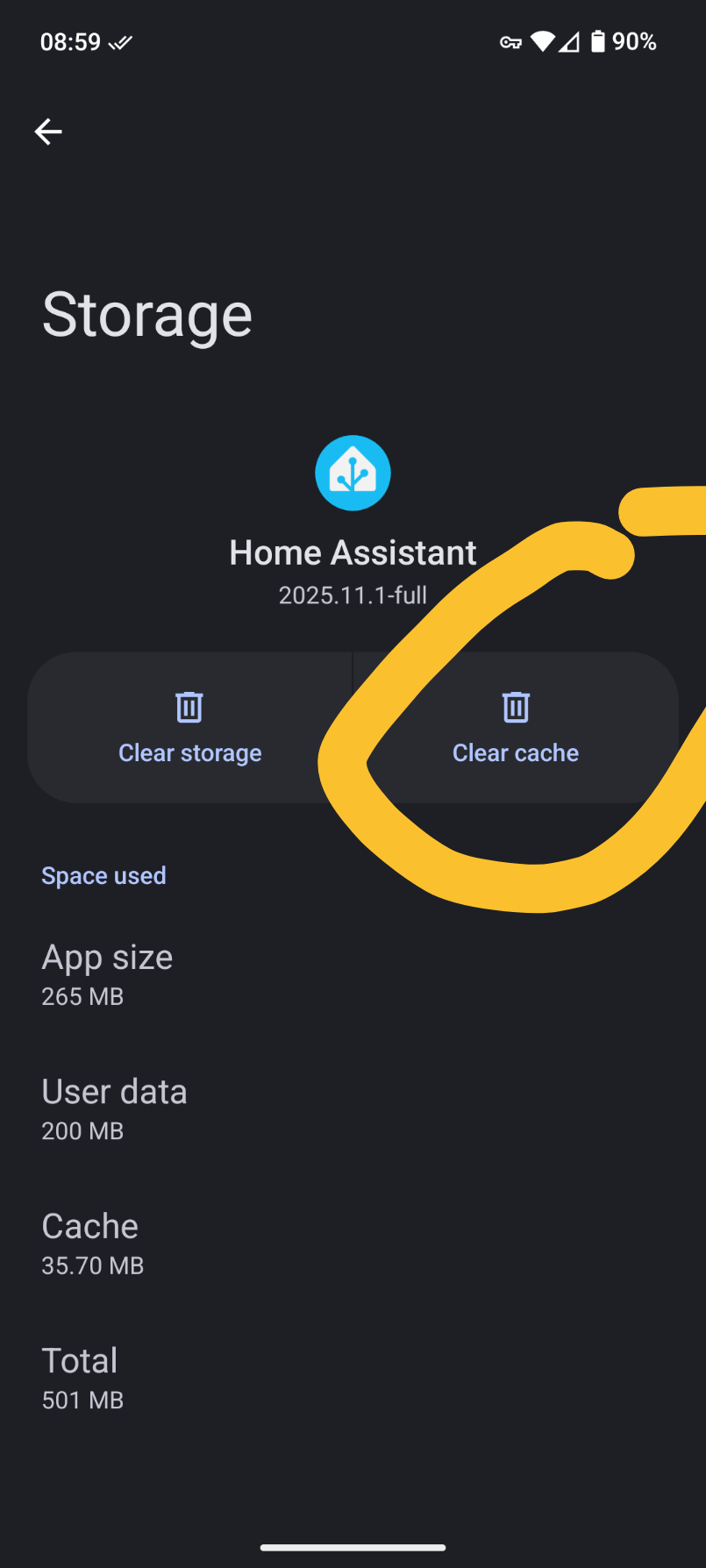
On Android you have the alternative to clear the app data cache for the companion app via the app settings (note it is not called browser cache there either). For browsers it is clearing the browser cache - this is browser specific how to do it.
1 Like
Just wow… You’d think HA would rephrase this by now. I’m not gonna brag about my exp. here, but what a strange way of phrasing to clear your client-side cache. Whether were talking browsers or client-side applications, I wouldn’t think of phrasing it that way and apparently I’m not alone by looking at the comments. I’m sitting there looking at that message thinking it had something to do with the GUI end of the server interface… Not my clients & browsers… Please for the love of everything, rephrase this HA. 
27 years in enterprise infra (syseng, neteng) here. “You need to manually clear the frontend cache after updating” is a really weird, obscurantist, technically-correct way of saying “You need to manually clear your app or browser cache after updating.”
81k views, 355 likes and 106+1 comments on just this thread alone, related to frontend cache. One thing is is common… “Clear frontend cache” is uncommon no matter how much computer experience anyone in this thread or many others have. “Clear Browser or App Cache” would be much better and more common wording.
First time I come across this after installing HA I had to search the forum to figure out what it meant, for fear of not knowing how to do it properly.
Surfacing the “Clear App Cache” menu item so it is not buried so deep in the troubleshooting section would be handy too. Quite honest it should be available in the “3 dot menu” that pops up when clicking edit on any dashboard.
For browsers a similar menu item. “Reload Frontend” to force the frontend to reload, like the pop up when installing some dashboard cards.
I think we’re referring to the same “clear cache”, but just wanted to clarify something since it was a bane for me once.
For Android, I tried the reset cache in Settings > Companion App > Troubleshooting> “Reset Frontend Cache” once however I won’t do it again.
Clearing via the companion app caused loss of association with Browser Mod which was a pain to get reconfigured. This was a few months back when sidebar changes were new and I’d just configured Browser Mod to make everything right for each device. I believe their team has since added a feature to reassociate which streamlines that issue, but nonetheless it was an issue vs my normal practice.
My normal practice for Android is via App Info > Storage > “Clear Cache”.
On a PC holding shift and hitting Ctrl-R or clicking Reload seems to work.
All that said, this was a confusing UX for me until I understood it.
1 Like
The one task that the App Info > Storage > “Clear Cache” won’t do is clear the Application cache which is usually what users refer to as Frontend cache as far as Home Assistant is concerned. This is a cache where Home Assistant caches resources on top of Browser cache. Not clearning this can still cause issues, but to do with what is your starting page as this is what will be cached in the Application cache. This will often pop up to annoy you as an issue when you return to the companion app at the start page which is in the Application cache. Browser Mod actually detects this and provides a Reload option which calls browser_mod.refresh which does clear the Application cache - and I have seen this popup days after I have updated Browser Mod in Companion App. NOTE: This does not clear the Browser cache but for a well behaving Home Assistant with well behaving Custom elements that update js resource tags (as HACS does for you, and Browser Mod does for its js resource) then usually clearing Browser cache is less of an issue. But if you do need to 1) clear Browser cache and 2) clear Application cache and 3) Not clear localStorage, then a) App Info > Storage > “Clear Cache” and b) browser_mod.refresh for the Browser would do it for you. [b) could also be a javascript action on custom:button-card - see HERE for the javascript you need to run]
Yes, and you could always rename back to previous, but it was not clear.
1 Like
Thanks for the explanation on what’s happening, and the awesome work on Browser Mod. I guess I’ve been getting away with it between my app info reload and the reload suggestions. I’d noticed the reload suggestion and didn’t realize it was Browser Mod suggesting that. Very cool.
2 Likes
In 42 years in the IT industry, I have never heard the term ‘frontend cache’ used as a synonym for ‘browser cache’.
A ‘frontend cache’ was always referred to as a cache integrated into the program that had to be emptied separately via the GUI or a directory or a database.
Just write: ‘You need to manually clear the frontend cache (browser cache) after updating.’
Everyone should be happy with that.
2 Likes
The problem here is Home Assistants fault description. If it had said “manually clear your browser cache” you would have got it straight away.
3 Likes
it’s almost 2026 and HA is still deciding if it wants to be a consumer product. i think it prefers its elitist status, and obfuscates language to this end. i’m not brilliant, neither stupid, but after a year of stumbling through iterations of HA i find the lack of basic (idiot proof) support troublesome. i literally have to teach myself everything from containers to dashboards with no easily digestible compendium or logical ‘base camp’ ala freecodecamp et al to assist with basics and new transitions. i understand this is an operation system and inherently difficult, but there needs to be a cohesive educational effort to get the masses involved. i hope this is taken as meant, positive input to help improve the system for ALL users. i know after a year i still feel like a moron and would not feel adequate to assist others with implementtion of HA, i wish there was a buddy system, or a licensed HA ‘navigator’ system to help more and more users (which would sell more zwav’s and voice asst’s and cloud services.) thanks to all those who spend too much of their life trying to make ours easier. if you read all of this thx, u don’t need to clear your stashh, i mean cache, or front end or whatever…
3 Likes
I’m another old bloke with 40 years working in IT who was puzzled by “clearing the front end cache”, and thought, “well it can’t be the browser cache, or the message would have said so” and starting searching for the front end cache. And it was only this post where I learned the Companion App has an option to clear the front end cache, but I would never have found the option buried in the menu. If only the message had mentioned “browser cache / Companion App cache” I would have saved a lot of time.
3 Likes
Well I wrote my first program (in Algol, input on paper tape) in 1969 so that’s 56 though I wasn’t doing stuff professionally till 1974. And yes, I still ask dumb newbie questions about HA.
1 Like
Add me to the list of old farts who didn’t know the frontend cache was the browser cache. Maybe make the language a little more straightforward.
2 Likes
thank you so so much sir!
Guess I get to be the first sucker of 2026 to come here after seeing “You need to manually clear the frontend cache after updating”!
Will clear my browser cache now, thanks…but it does seem like it would have saved a lot of people (including myself) time over the last 2+ years to simply change the doc to add “browser cache”
It’s called frontend cache in both of the mobile apps though and even has a button to do it.
but it’s one of those things (this thread being testament to the fact) that makes sense to the developers because they’re deep into it and used to the terminology but not to the average Joe.
and yes there’s a button, but it’s deeply buried in a place that’s not really straightforward. i wouldn’t expect to look somewhere called “troubleshooting” for something that is a very routine and frequently needed function.