After playing with Atom+rs485, I returned back to hacking Dominus interface. Here is a simple python code for reading/writing single PDU. It connects to Dominus local TCP port 2000. Code is made with GPT based on decrypted Dominus app android code and network sniffer.
#!/usr/bin/env python3
"""
Immergas CLI tool
-----------------

This script can:
1. Generate authentication string from MAC + password
2. Connect to heater on TCP port 2000
3. Drain the echoed auth string sent back by the heater
4. Read a single PDU
5. Write a single PDU value

It is intentionally small and easy to study.

Examples
--------

Read zone 1 current temperature:
python3 read_immergas_pdu.py \
  --host YOUR_DOMINUS_IP_ADDRESS \
  --mac YOUR_DOMINUS_MAC_ADDRESS \
  --password YOUR_DOMINUS_PASSWORD \
  read --pdu 2011 --temp

Read boiler status:
python3 read_immergas_pdu.py \
  --host YOUR_DOMINUS_IP_ADDRESS \
  --mac YOUR_DOMINUS_MAC_ADDRESS \
  --password YOUR_DOMINUS_PASSWORD \
  read --pdu 2000

Write zone 1 target to 22.6 °C:
python3 read_immergas_pdu.py \
  --host YOUR_DOMINUS_IP_ADDRESS \
  --mac YOUR_DOMINUS_MAC_ADDRESS \
  --password YOUR_DOMINUS_PASSWORD \
  write --pdu 2015 --temp-value 22.6

Write boiler status to HEATING (3):
python3 read_immergas_pdu.py \
  --host YOUR_DOMINUS_IP_ADDRESS \
  --mac YOUR_DOMINUS_MAC_ADDRESS \
  --password YOUR_DOMINUS_PASSWORD \
  write --pdu 2000 --value 3
"""

import argparse
import hashlib
import socket
import sys
import time
from dataclasses import dataclass

# Character maps used by Immergas encoding
MAP1 = "ABCDEFGHIJKLMNOPQRSTUVWXYZabcdefghijklmnopqrstuvwxyz0123456789 "
MAP2 = "0SFGLcTdjaxZPyeK9QhptB5v7zJH3Mq1VibDfCAN6EgYRwXlo8Wk4mun2rOsUI="


@dataclass
class Reply:
    """Decoded 7-byte reply frame"""
    reply_type: int
    pdu: int
    value: int
    raw_frame: bytes


def normalize_mac(mac: str) -> str:
    """Remove separators and lowercase MAC address"""
    return mac.replace(":", "").replace("-", "").lower()


def make_auth(mac: str, password: str) -> str:
    """
    Build Immergas auth string (#D...)

    Steps:
    1. MAC without separators
    2. MD5(password) -> first 12 hex chars
    3. Build plain text: "MAC md5"
    4. Encode using custom alphabet with shift=2
    5. Prefix with #D
    """
    mac12 = normalize_mac(mac)
    md5_12 = hashlib.md5(password.encode("utf-8")).hexdigest()[:12]
    plain = f"{mac12} {md5_12}"

    encoded = []
    n = len(MAP1)
    for ch in plain:
        idx = MAP1.find(ch)
        if idx == -1:
            encoded.append(ch)
        else:
            encoded.append(MAP2[(idx + 2) % n])

    return "#D" + "".join(encoded)


def calc_crc(body: bytes) -> int:
    """
    Custom CRC used by Immergas protocol

    Notes:
    - polynomial: 4129
    - initial value: 0xFFFF
    - processed bit-by-bit, LSB first
    """
    poly = 4129
    crc = 0xFFFF

    for c in body:
        for _ in range(8):
            if (crc & 1) == (c & 1):
                crc >>= 1
            else:
                crc = (crc >> 1) ^ poly
            c >>= 1

    return crc & 0xFFFF


def build_read_frame(pdu: int, req_type: int) -> bytes:
    """Build 7-byte read request, using req_type 0x00 or 0x80"""
    body = bytes([
        req_type,
        (pdu >> 8) & 0xFF,
        pdu & 0xFF,
        0x00,
        0x00,
    ])
    crc = calc_crc(body)
    return body + bytes([(crc >> 8) & 0xFF, crc & 0xFF])


def build_write_frame(pdu: int, value: int, req_type: int = 0x90) -> bytes:
    """
    Build 7-byte write request.

    We use 0x90 because it is confirmed by captures for writes.
    """
    body = bytes([
        req_type,
        (pdu >> 8) & 0xFF,
        pdu & 0xFF,
        (value >> 8) & 0xFF,
        value & 0xFF,
    ])
    crc = calc_crc(body)
    return body + bytes([(crc >> 8) & 0xFF, crc & 0xFF])


def recv_exact(sock: socket.socket, length: int) -> bytes:
    """Receive exactly N bytes or raise an error"""
    data = bytearray()
    while len(data) < length:
        chunk = sock.recv(length - len(data))
        if not chunk:
            raise ConnectionError("Socket closed")
        data.extend(chunk)
    return bytes(data)


def decode_reply(reply: bytes, expected_pdu: int) -> Reply:
    """Validate CRC and expected PDU, then decode the 7-byte reply"""
    if len(reply) != 7:
        raise ValueError(f"Reply must be 7 bytes, got {len(reply)}")

    crc_rx = (reply[5] << 8) | reply[6]
    crc_calc = calc_crc(reply[:5])
    if crc_rx != crc_calc:
        raise ValueError(f"CRC mismatch: rx=0x{crc_rx:04x}, calc=0x{crc_calc:04x}")

    pdu = (reply[1] << 8) | reply[2]
    if pdu != expected_pdu:
        raise ValueError(f"Wrong PDU in reply: got {pdu}, expected {expected_pdu}")

    value = (reply[3] << 8) | reply[4]
    return Reply(reply_type=reply[0], pdu=pdu, value=value, raw_frame=reply)


def drain_post_auth(sock: socket.socket, timeout: float, debug: bool) -> None:
    """
    After auth, this heater echoes the auth string back as plain ASCII.
    Drain that text before sending the binary request frame.
    """
    time.sleep(0.2)
    original_timeout = sock.gettimeout()
    sock.settimeout(0.2)

    drained = bytearray()
    try:
        while True:
            chunk = sock.recv(256)
            if not chunk:
                break
            drained.extend(chunk)
            if len(chunk) < 256:
                break
    except socket.timeout:
        pass
    finally:
        sock.settimeout(original_timeout if original_timeout is not None else timeout)

    if debug and drained:
        print("RX post-auth:", drained.hex(" "))
        try:
            print("RX post-auth ascii:", drained.decode("ascii", errors="replace"))
        except Exception:
            pass


def connect_and_auth(host: str, port: int, mac: str, password: str, timeout: float, debug: bool) -> socket.socket:
    """Open socket, send auth string, and drain any immediate echoed auth data"""
    auth = make_auth(mac, password)
    sock = socket.create_connection((host, port), timeout=timeout)
    sock.settimeout(timeout)
    sock.sendall(auth.encode("ascii"))
    drain_post_auth(sock, timeout=timeout, debug=debug)
    return sock


def read_pdu(host: str, port: int, mac: str, password: str, pdu: int, timeout: float, debug: bool) -> Reply:
    """Connect, authenticate, read one PDU, close connection"""
    last_error = None

    # Use a fresh connection for each request variant.
    for req_type in (0x00, 0x80):
        try:
            with connect_and_auth(host, port, mac, password, timeout, debug) as sock:
                frame = build_read_frame(pdu, req_type)

                if debug:
                    print("TX auth:", make_auth(mac, password))
                    print("TX frame:", frame.hex(" "))

                sock.sendall(frame)
                reply = recv_exact(sock, 7)

                if debug:
                    print("RX frame:", reply.hex(" "))

                return decode_reply(reply, expected_pdu=pdu)
        except Exception as exc:
            last_error = exc

    raise RuntimeError(f"Failed to read PDU {pdu}: {last_error}")


def write_pdu(host: str, port: int, mac: str, password: str, pdu: int, value: int, timeout: float, debug: bool) -> Reply:
    """Connect, authenticate, write one PDU value, close connection"""
    with connect_and_auth(host, port, mac, password, timeout, debug) as sock:
        frame = build_write_frame(pdu, value, req_type=0x90)

        if debug:
            print("TX auth:", make_auth(mac, password))
            print("TX frame:", frame.hex(" "))

        sock.sendall(frame)
        reply = recv_exact(sock, 7)

        if debug:
            print("RX frame:", reply.hex(" "))

        return decode_reply(reply, expected_pdu=pdu)


def print_reply(reply: Reply, show_temp: bool = False) -> None:
    """Human-readable output"""
    print("Reply type:", f"0x{reply.reply_type:02x}")
    print("PDU:", reply.pdu)
    print("Raw value:", reply.value)
    print("Raw value hex:", f"0x{reply.value:04x}")
    print("Frame:", reply.raw_frame.hex(" "))

    if show_temp:
        print("Temperature:", f"{reply.value / 10.0:.1f} °C")


def build_parser() -> argparse.ArgumentParser:
    parser = argparse.ArgumentParser(description="Read or write a single Immergas PDU")

    # Common connection/auth settings
    parser.add_argument("--host", required=True, help="Heater IP address")
    parser.add_argument("--port", type=int, default=2000, help="Heater TCP port")
    parser.add_argument("--mac", required=True, help="Heater module MAC address")
    parser.add_argument("--password", required=True, help="Heater password")
    parser.add_argument("--timeout", type=float, default=2.0, help="Socket timeout in seconds")
    parser.add_argument("--debug", action="store_true", help="Print auth echo and raw TX/RX frames")

    sub = parser.add_subparsers(dest="command", required=True)

    # Read command
    read_cmd = sub.add_parser("read", help="Read a single PDU")
    read_cmd.add_argument("--pdu", type=int, required=True, help="PDU number, for example 2011")
    read_cmd.add_argument("--temp", action="store_true", help="Interpret value as tenths of degrees C")

    # Write command
    write_cmd = sub.add_parser("write", help="Write a single PDU")
    write_cmd.add_argument("--pdu", type=int, required=True, help="PDU number, for example 2015")

    value_group = write_cmd.add_mutually_exclusive_group(required=True)
    value_group.add_argument("--value", type=int, help="Raw 16-bit value to write")
    value_group.add_argument("--temp-value", type=float, help="Temperature to encode as value*10")

    write_cmd.add_argument("--temp", action="store_true", help="Also print echoed reply as temperature")

    return parser


def main() -> int:
    parser = build_parser()
    args = parser.parse_args()

    try:
        if args.command == "read":
            reply = read_pdu(
                host=args.host,
                port=args.port,
                mac=args.mac,
                password=args.password,
                pdu=args.pdu,
                timeout=args.timeout,
                debug=args.debug,
            )
            print_reply(reply, show_temp=args.temp)
            return 0

        if args.command == "write":
            raw_value = args.value
            if raw_value is None:
                raw_value = int(round(args.temp_value * 10.0))

            reply = write_pdu(
                host=args.host,
                port=args.port,
                mac=args.mac,
                password=args.password,
                pdu=args.pdu,
                value=raw_value,
                timeout=args.timeout,
                debug=args.debug,
            )
            print_reply(reply, show_temp=args.temp or (args.temp_value is not None))
            return 0

        parser.error("Unknown command")
        return 2

    except Exception as exc:
        print(f"ERROR: {exc}", file=sys.stderr)
        return 1


if __name__ == "__main__":
    raise SystemExit(main())
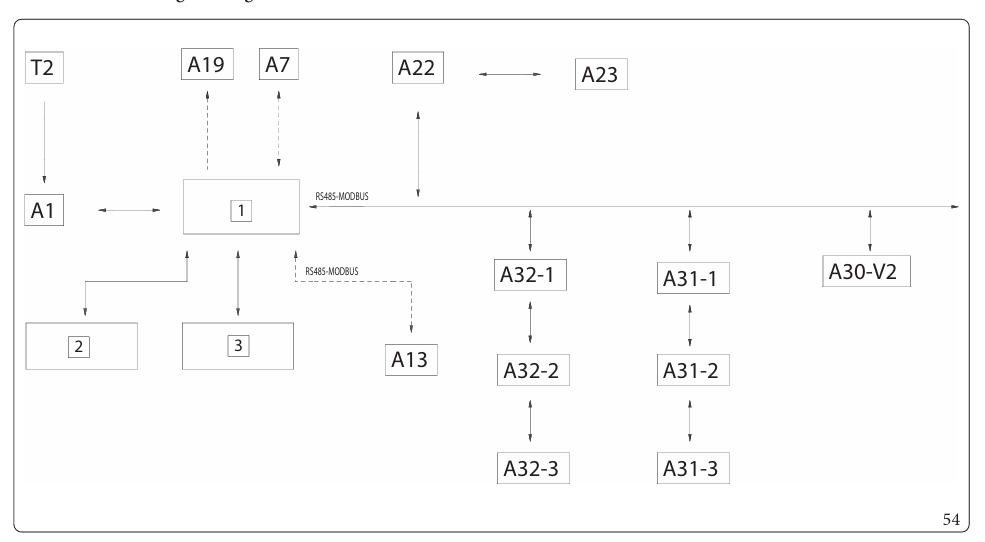
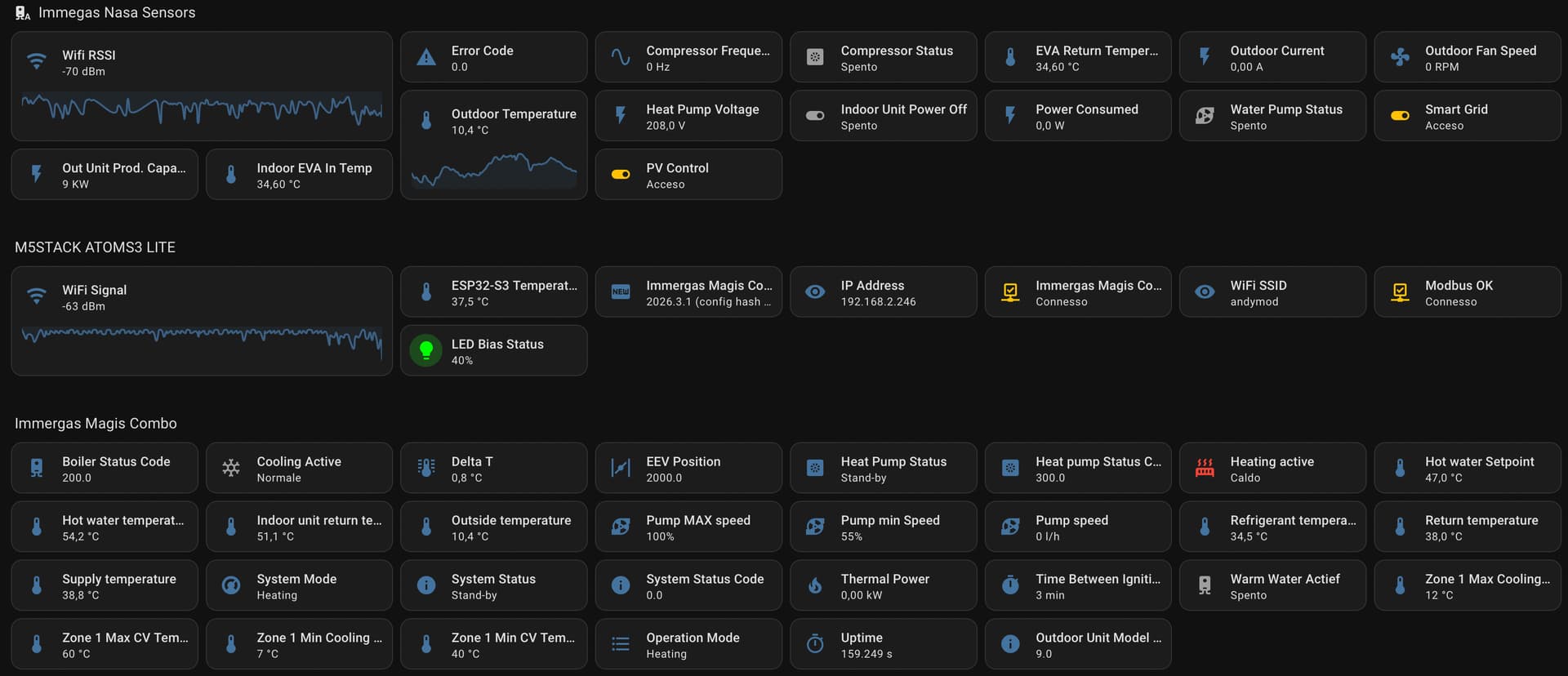
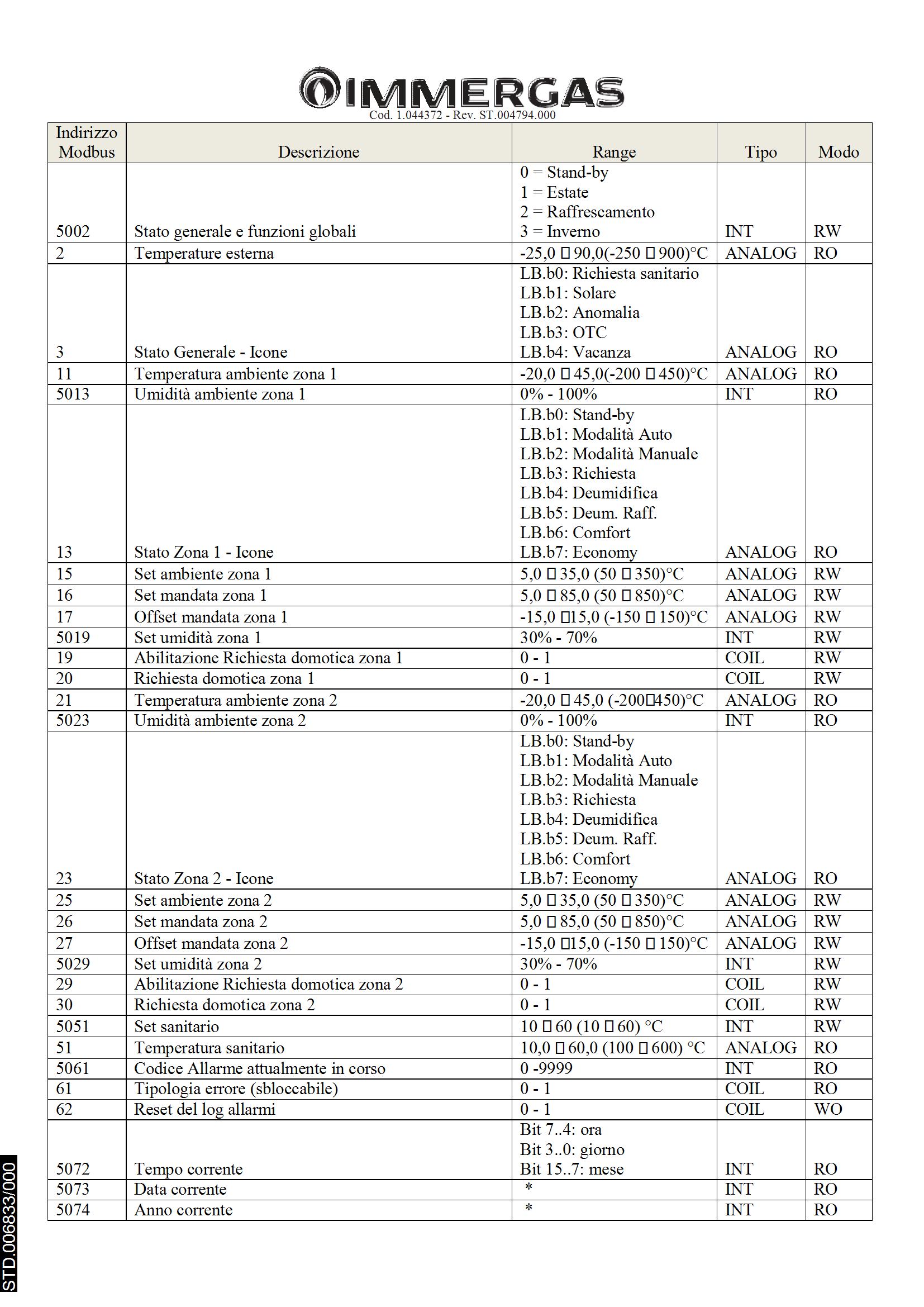
 and it’s really frustrating, because I can change my DHW temperature and have better usage of my PV energy, but can’t heating…