How to create a script or action to clean specific room ECOVACS X2

Hello
can anyone help me creating some script to clean specific room with my X2 deebot of ECOVACS?
in the past I used a script like this:

alias: pulisci_bagno_matrimoniale
sequence:

  • target:
    entity_id: vacuum.ambrogio
    data:
    command: spot_area
    params:
    rooms: 0
    cleanings: 1
    action: vacuum.send_command
    mode: single
    icon: mdi:toilet

but now with the new ECOVACS command it doesn’t work anymore. I can’t find anything about docs, which are the new command, syntax, etc.

Could someone help me?

I found something and tried this on action:

action: vacuum.send_command
target:
entity_id: vacuum.ambrogio
data:
command: clean_V2
params:
act: start
content:
type: freeClean
value: 1,0

It seems to work, is it correct?
anyone knows some other command?
the value i think that 1 is number of cleanings and 0 the room

something to set the vacuum fan, water level befor cleaning?

Thank you very much

Does anybody have any update here?
I have the T30S Pro. I can do a normal clean through HA (all rooms, one set water setting, one pre-defined vacuume setting, …) but I cannot select what room to clean.

The rooms that I set up in the Ecovacs app are appearing under attributes.

There is a instructions in german:

It works in my homeassistant

1 Like

Thank you. I’ll try it

Hi, did it work ?

Hi, for me no. Seems the X2 Omni model has different command

1 Like

Has anyone found out the way to do this with the new official ecovacs intyegration?
i used the same script parameters as OP, but it doesnt seem to work anymore…

- action: vacuum.send_command
    data:
      command: spot_area
      params:
        rooms: "{{ roomnr }}"
        cleanings: 1
    target:
      entity_id: vacuum.imelbot

this doesnt work. and its the same as that german page is showing, so that doesnt help.
@Nazza, Where did you find this clean_V2 example?

1 Like

Someone wrote it as exaple on the discussion page under some issues

Anyone know of a way to get it to automatically clean around specific furniture? I know you can manually tell it to in the ecovacs app so wondering is that’s exposed to HA and I’m just missing it or if there is a script that would work.

I have a T30S and the spot_command ‘works’ it just always cleans room 0 as the first room, replacing the actual room that is the first in the rooms list?

Not sure if anyone else has come across this or how to resolve it?

Looking into the debug it looks like HA is doing the right thing,

service: vacuum.send_command
target:
  entity_id: vacuum.scrubi_wan_kendustie
data:
  command: spot_area
  params:
    rooms: [11]
    cleanings: 1

sending

"body": {
  "data": {
    "act": "start",
    "type": "spotArea",
    "content": "[11]",
    "count": 1
  }
}

And yet the robot responds with

"cleanState": {
  "cid": "122",
  "router": "plan",
  "motionState": "working",
  "content": {
    "subContent": {
      "type": "spotArea",
      "value": "0"
    }
  }
}

i believe you should just put it in as 11, so without the brackets etc

Genius! TY

I also have a Deebot X2 Omni, and the following code works for me:

action: vacuum.send_command
target:
  entity_id: vacuum.deebotX2
data:
  command: clean_V2
  params:
    act: start
    content:
      type: freeClean
      value: 1,0

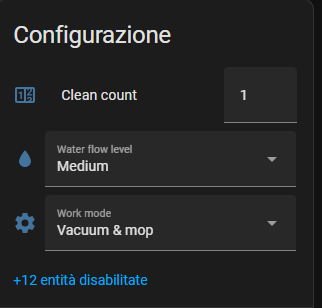
That said, I’d love to add the ability for the Deebot to run a vacuum-only session, rather than both vacuuming and mopping. I initially thought this could be controlled by the “mode” attribute, but I haven’t had any success getting that to work. Any ideas or suggestions?

1 Like

you can, you should have the “work mode” select like this in the attached files

I got it now :slightly_smiling_face:

like this its working for room 8

service: vacuum.send_command
target:
  entity_id: vacuum.wischroboter
data:
  command: clean_V2
  params:
    act: start
    content:
      type: freeClean
      value: "1,8"

room 7 and 4

service: vacuum.send_command
target:
  entity_id: vacuum.wischroboter
data:
  command: clean_V2
  params:
    act: start
    content:
      type: freeClean
      value: "1,7;1,4"

I created a script to clean all rooms as follows:

alias: Staubsauger Start (alle Zimmer)
sequence:
  - target:
      entity_id: vacuum.wischroboter
    data:
      command: clean_V2
      params:
        act: start
        content:
          type: freeClean
          value: 1,2;1,9;1,8;1,5;1,3;1,7;1,4
    action: vacuum.send_command
mode: single

If you only want to clean a specific room, create a script like this:

alias: Staubsauger Start Flur
sequence:
  - target:
      entity_id: vacuum.wischroboter
    data:
      command: clean_V2
      params:
        act: start
        content:
          type: freeClean
          value: 1,5
    action: vacuum.send_command
mode: single
description: ""

For the dashboard, you can create buttons for each room to press like this:

type: vertical-stack
cards:
  - type: markdown
    content: "### Einzelnes Zimmer saugen:"
  - type: horizontal-stack
    cards:
      - type: button
        name: Badezimmer
        icon: mdi:bathtub
        show_name: true
        show_icon: true
        tap_action:
          action: call-service
          service: script.staubsauger_start_badezimmer
      - type: button
        name: WC
        icon: mdi:toilet
        show_name: true
        show_icon: true
        tap_action:
          action: call-service
          service: script.staubsauger_start_wc
      - type: button
        name: Küche
        icon: mdi:fridge
        show_name: true
        show_icon: true
        tap_action:
          action: call-service
          service: script.staubsauger_start_kuche
      - type: button
        name: Wohnzimmer
        icon: mdi:sofa
        show_name: true
        show_icon: true
        tap_action:
          action: call-service
          service: script.staubsauger_start_wohnzimmer

Or a main button to clean all:

type: button
name: Alle Zimmer
icon: mdi:robot-vacuum
tap_action:
  action: call-service
  service: script.staubsauger_start_alle_zimmer

And here is the Stop Script or Return to Base button:

alias: Staubsauger Stop
sequence:
  - target:
      entity_id: vacuum.wischroboter
    data:
      command: clean_V2
      params:
        act: stop
        content:
          type: freeClean
          value: 1,0
    action: vacuum.send_command
description: ""
alias: Staubsauger Zurück zur Basis
sequence:
  - target:
      entity_id: vacuum.wischroboter
    action: vacuum.return_to_base
    data: {}
description: ""

I hope this method will soon be included in the official Ecovacs Home Assistant integration.
I would love to see this also working in the great deebot integration as well :wink:
Hopefully the developer reads this thread.

yes

This is a single room vacuum only:

service: vacuum.send_command
target:
  entity_id: vacuum.deebot
data:
  command: clean_V2
  params:
    act: start
    content:
      type: freeClean
      value: 1,6

step 1.set work mode

step 2.send command

action: vacuum.send_command
target:
  entity_id: vacuum.deebotX2
data:
  command: clean_V2
  params:
    act: start
    content:
      type: freeClean
      value: 1,0

Just in case anyone is looking for the way to do this with a Ecovacs Deebot T30s Pro:

step 1.set work mode

step 2.send command

target:
  entity_id: vacuum.deebot
data:
  command: spot_area
  params:
    rooms:
      - 1
      - 8
    cleanings: 1
action: vacuum.send_command

This will clean room 8.

For multiple rooms just keep adding room numbers:

target:
  entity_id: vacuum.deebot
data:
  command: spot_area
  params:
    rooms:
      - 1
      - 8
      - 9
    cleanings: 1
action: vacuum.send_command


Thank you, everyone! This really helped me set up buttons for cleaning individual rooms with my Ecovacs Deebot X1 Omni, like this:

  1. Create a script for each room as follows:
alias: Clean Hallway
sequence:
  - target:
      entity_id: vacuum.kayut
    data:
      command: spot_area
      params:
        rooms:
          - 1
          - 0
        cleanings: 1
    action: vacuum.send_command
mode: single
description: ""
  1. Create a button for each script as follows:
type: vertical-stack
cards:
  - type: markdown
    content: "### Clean Single Room:"
  - type: horizontal-stack
    cards:
      - type: button
        name: Clean Hallway
        icon: mdi:coat-rack
        show_name: true
        show_icon: true
        tap_action:
          action: call-service
          service: script.clean_hallway
1 Like