Hello everyone,
I’m developing a smart speaker project using ESP32-S3 running ESP-IDF on ESPHome 2026.1.3.
Current configuration: I’ve enabled captive_portal: to use the /wifisave path. My app will send POST commands here to set up WiFi for the device.
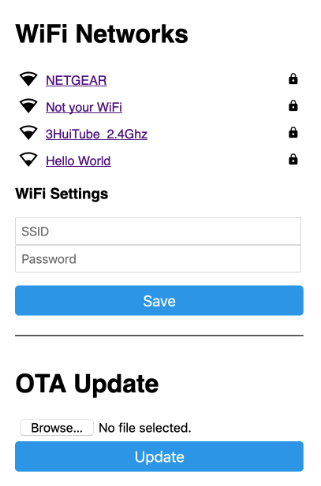
Problem: Every time the phone connects to the ESP32’s WiFi AP, the operating system (iOS) automatically pops up a WiFi login request window (page 192.168.4.1). Although the setup eventually succeeds after about 20 seconds, the user is forced to remain in the operating system’s popup window. API calls from my app seem to only pass after this delay. I want to completely eliminate this annoyance by preventing the popup window from appearing in the first place, while still being able to access the /wifisave endpoint.
Desire:
Completely disable this automatic popup window when connecting to the AP.
Thank you!
api:
  id: api_instance
  reboot_timeout: 0s
  on_client_connected:
    - media_player.volume_set:
        id: speaker_media_player_id
        volume: 0.3
    - if:
        condition:
          api.connected:
            # state_subscription_only: true
        then:
          - esp32_ble_tracker.start_scan:
              continuous: true
          - delay: 1s
          - script.execute: send_mqtt_status

wifi:
  ssid: !secret wifi_ssid
  password: !secret wifi_password
  power_save_mode: none
  fast_connect: true
  # passive_scan: true
  reboot_timeout: 0s  # Never reboot

  on_connect:
    - script.execute: led_connected

  output_power: 18.5dBm

  on_disconnect:
    then:
      - esp32_ble_tracker.stop_scan:
      - delay: 10s
      - if:
          condition:
            and:
              - not:
                  wifi.connected:
              - not:
                  binary_sensor.is_on: wifi_ap_active
          then:
            - script.execute: led_ready

  ap:
    password: "QGg4ajvG9juq"
    channel: 6
    ap_timeout: 0s

# Captive portal for WiFi configuration
captive_portal:
This is the WiFi login request window (page 192.168.4.1):