How to integrate Growatt inverter over modbus serial

Hey together,

that’s my third day with Home Assistant.
I want to integrate my Growatt PV inverter over a RS485 to USB Cable into my Home Assistant.

So far so good.

I started with the modbus configuration in the configuration.yaml

modbus:

  • name: modbus_hub
    type: serial
    port: /dev/ttyUSB0
    baudrate: 9600
    bytesize: 8
    method: rtu
    parity: E
    stopbits: 1

Question: Do i have a chance to simply check if the modbus connection is working?
Should there pop up an entity if the connection is established?
Or what else should i do to get a connection to the USB Port?

If the connection will work, which parameter do i need for the energy dashboard?

I hope someone could help me.

Thank you!

Hi @sandbank93,

Were you able to integrate Growatt on modbus serial?

@okanano
i have the same problem
this modbus code is in my confuguration ymal
and I have installed an integration with solax inverter modbus but the integration keeps failing it is a growatt mic 2500tl-x
does anyone have an idea what the problem is ?
greetings jurgen

Hi,

Wanted to report my successful attempt to connect my Growatt MOD 7000TL3-X via modbus to Home Assistant.

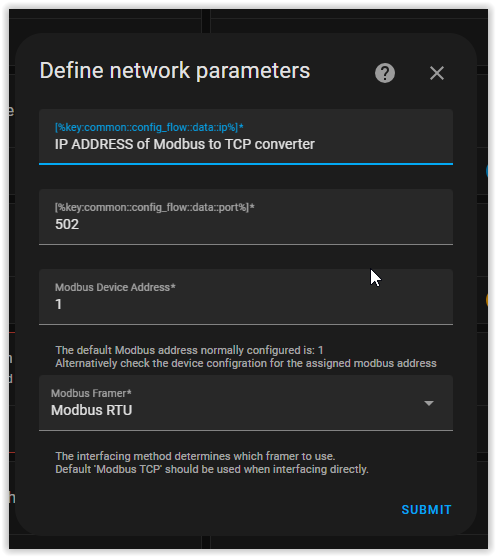
Did it via a Modbus to TCP converter: Waveshare RS485 TO ETH
Config:

And the HA custom component:

Device config:
image


Device:


2 Likes

Wow, another solution. However I got here as I was looking for an option to write values to growatt invertor/battery, for example set solar limit or change battery modes. In this screenshot I only see HA sensors. Is there a way to control the growatt invertor as well?

1 Like

With this you can wirte values, but the integration only supports inverter state atm.

ah, ok, so it is possible to set the xx% limit solar output value.

I assume this is “just” as modbus write, right? So other addresses should work pretty similar.

No not the limit in %, but only on/off

Hi, how did you connect the Waveshare RS485 with ETH to the Growatt Inverter. Did you use the Sys Com port? If so, which pins have you connected to the A and B outputs of Waveshare?

Hi @TheoHendriks,

Yes the sys com port pinout below:

Interesting as waveshare does state that this device does not support modbus - i have ordered another type (USR-W610).
Futhermore the intergrations GitHub - WouterTuinstra/Homeassistant-Growatt-Local-Modbus: Provides Home Assistant sensors for Growatt inverters that you can connect directly using modbus protocol and Homeassistant-Growatt-Local-Modbus/README.md at master · brupje/Homeassistant-Growatt-Local-Modbus · GitHub do also not seem to work (failure in pymodbus library : [pymodbus.framer.rtu_framer’] )

Is it possible to use this modbus integration with a modbus proxy ?

I am using evcc as a PV surplus charger with my pulsar Plus wallbox from wallbox.
This is running on HA as addon and I have configured the modbus proxy this way.
I am using a simple ftdi USB adapter which is connected to the Growatt SPH 4600

The integration works if I use this with the USB setup but then I get error messages on the evcc add on like this

This is my modbus Proxy setup

- port: 5022
  device: /dev/serial/by-path/platform-fd500000.pcie-pci-0000:01:00.0-usb-0:1.3:1.0-port0
  baudrate: 9600
  comset: "8N1"
- port: 5023
  uri: 192.178.168.2:502
  rtu: true  

I got a connection error when setting up the connection to
192.178.168.2
502

Any ideas ?

Hast du das zufällig mittlerweile mit der Einbindung vom Growatt in evcc hinbekommen?

ja, das war ein defekter USB Stick