There is a new “Quick search” Hotkey in 2026.2: CTRL+K
That’s great, except that if you use Edge (or Chrome, which has the same problem) on Windows, it’s the worst possible key combination, because that combination is already used to launch an Internet search
So if this is frustrating for you you can do the following:
open the registry editor
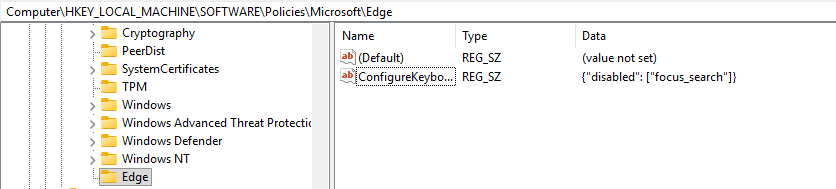
Find the Computer\HKEY_LOCAL_MACHINE\SOFTWARE\Policies\Microsoft\Edge key (if the Edge key does not exist create it)
add a new string value: ConfigureKeyboardShortcuts
change its value to {“disabled”: [“focus_search”]}
Note: As Edge is my primary browser I did not look at a solution for Chrome
To automate: edit a file called fix.reg and enter
Windows Registry Editor Version 5.00

[HKEY_LOCAL_MACHINE\SOFTWARE\Policies\Microsoft\Edge]
"ConfigureKeyboardShortcuts"="{\"disabled\": [\"focus_search\"]}"
Interesting. I never use Ctrl-K in my browsers, so I didn’t even realize there was a conflict. I checked, and that shortcut is used by all the big browsers, including Chrome and Firefox. It does seem an odd choice.
This shortcut is widely used, and many sites and extensions override its behavior.
For example, on the forum, it does what you describe.
In addition, depending on how you access HA with a browser (local, tunnel, etc.), it may behave differently…