The apostrophe came from copying the code, it is not in the cards config.
Concerning the button-card-Version: I do not have any entry in HACS which is called button:card. 
I have a directory: homeassistant/www/button-card.js
When I want to add a card to the dashboard I find it, named "Button-Card - A massively customizable custom button card". Maybe this a different button card?
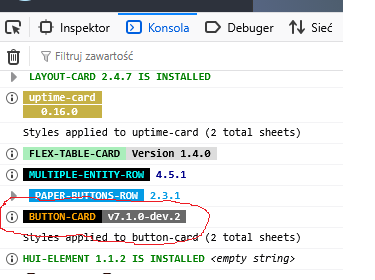
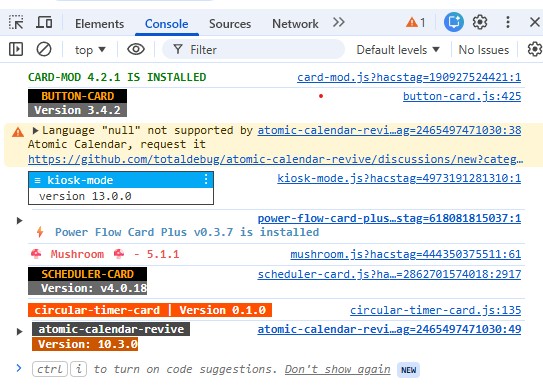
Yes, don't update it now, as other things might break. I'll try to check working syntax.
Edit: the oldest version available in HACS is 5.0.0, so that's a dead end. I don't think you should use such an old version of the card, so maybe try some of the suggestions others have.
If you really want to stick with this old card - it complains about the entity_id, so you could try variants like (try without any code, just "normal" actions, and if it works, then add the code):
tap_action:
  action: call-service
  service: input_boolean.turn_on
  entity_id: input_boolean.myinput
or
tap_action:
  action: call-service
  service: input_boolean.turn_on
  data:
    entity_id: input_boolean.myinput
or
tap_action:
  action: call-service
  service: input_boolean.turn_on
  service_data:
    entity_id: input_boolean.myinput
It's not the automation that you are tracking, it's the pump, correct? Buttons don't have an "on state" they just fire an event. They can be pushed and that's it.
I'm not sure why you are messing with the button card. With my above template button all you need is:
type: entities
entities:
  - button.push_me
And once the pump is running it cannot be pushed. You can style the button if you like or change its icon, and so on, or make it vanish:
type: entities
entities:
  - button.push_me
visibility:
  - condition: state
    entity: button.push_me
    state_not: unavailable
But the button entity functionality should be separate from the dashboard display.
Do you also want to have something that indicates the pump is currently running?
@slimak, thank you very very much for your help. I will try your alternative syntax tomorrow and come back then.
But how can I update to the latest available version. I think I do not have so much buttons built with the integration, so there is not so much stuff which can break. Your version is 7. How to get it, outside HACS?
The reason for meesing with the button card is that this solution would best fit in what I already have. The button is just one of three different triggers for my automation. So if I could solve the button-issue everything will work fine.
Your solution might work even better but I have to deal with it in detail. And I might have to rethink my whole automation.
Maybe in the end it turns out that I will pick up your idea. Thank you for your help!
According to the button-card documentation you just need to replace the .js file and clear your browser cache.
You could also remove the old button-card (.js file and dashboard resource), and then reinstall it via HACS.
Do you mean there's three different ways to turn on the pump? And whenever the pump is running you want the button to not be available for pushing? Is that correct?
Just turning on the pump (even if the remote switch has a manual button) would make the button unavailable.
By the way, could you post your automation so it's more clear what you are after?
Here is the automation:
It is triggered by a physical wall button, an alarm sensor from my mobile phone and by the button-card within HA.
A timer is startet (3 minutes) after triggering and the pump is started. When the timer is idle the pump stopps again. A restart of the automation is possible not before 30 minutes since its last start.
Indeed you are right, the button has no state and thats the reason you can toggle the button (on PC or on the mobile) although the pump is running exactly for 3 minutes - and is not to stop manually during this time. But when I use a switch it can happen, that the user accidently switches the pump on and off again (especially when you use a mobile phone). Thats the reason why I want a solution which keeps the pump running for 3 minutes, no matter what happens with the button.
alias: Zirkulationspumpe steuern mit Timer
description: ""
triggers:
  - trigger: switch.turned_on
    target:
      entity_id: switch.shellyplus1pm_80646fe3598c
    options:
      for: "00:00:00"
    id: buttongedrueckt
    enabled: false
  - trigger: time
    at: sensor.sm_g781b_next_alarm
    weekday:
      - mon
      - tue
      - wed
      - thu
      - fri
      - sat
      - sun
    id: handywecker
  - trigger: state
    entity_id:
      - switch.shelly1minig3_48f6ee87f7f8
    from:
      - "off"
    to:
      - "on"
    id: tasterbadtuer
  - trigger: state
    entity_id:
      - input_boolean.power_zirkpump
    from:
      - "off"
    to:
      - "on"
    id: button_power_zirkpump
conditions:
  - condition: template
    value_template: >-
      {{ (as_timestamp(now()) -
      as_timestamp(state_attr('automation.zirkulationspumpe_steuern_mit_timer',
            'last_triggered') | default(0, true))) > 1800 }}
  - condition: or
    conditions:
      - condition: state
        entity_id: person.edgar
        state:
          - home
      - condition: state
        entity_id: person.christine
        state:
          - home
actions:
  - choose:
      - conditions:
          - condition: trigger
            id:
              - buttongedrueckt
        sequence:
          - action: timer.start
            target:
              entity_id: timer.zirkulationspumpe
            data:
              duration: "00:03:00"
          - wait_for_trigger:
              - event_type: timer.finished
                event_data:
                  entity_id: timer.zirkulationspumpe
                trigger: event
          - action: switch.turn_off
            metadata: {}
            target:
              entity_id: switch.shellyplus1pm_80646fe3598c
            data: {}
      - conditions:
          - condition: trigger
            id:
              - handywecker
        sequence:
          - action: switch.turn_on
            metadata: {}
            target:
              entity_id: switch.shellyplus1pm_80646fe3598c
            data: {}
          - action: input_boolean.turn_on
            metadata: {}
            target:
              entity_id: input_boolean.power_zirkpump
            data: {}
          - action: timer.start
            target:
              entity_id: timer.zirkulationspumpe
            data:
              duration: "00:03:00"
          - wait_for_trigger:
              - event_type: timer.finished
                event_data:
                  entity_id: timer.zirkulationspumpe
                trigger: event
          - action: switch.turn_off
            metadata: {}
            target:
              entity_id: switch.shellyplus1pm_80646fe3598c
            data: {}
          - action: input_boolean.turn_off
            metadata: {}
            target:
              entity_id: input_boolean.power_zirkpump
            data: {}
      - conditions:
          - condition: trigger
            id:
              - tasterbadtuer
        sequence:
          - action: switch.turn_on
            metadata: {}
            target:
              entity_id: switch.shellyplus1pm_80646fe3598c
            data: {}
          - action: input_boolean.turn_on
            metadata: {}
            target:
              entity_id: input_boolean.power_zirkpump
            data: {}
          - action: timer.start
            target:
              entity_id: timer.zirkulationspumpe
            data:
              duration: "00:03:00"
          - wait_for_trigger:
              - event_type: timer.finished
                event_data:
                  entity_id: timer.zirkulationspumpe
                trigger: event
          - action: switch.turn_off
            metadata: {}
            target:
              entity_id: switch.shellyplus1pm_80646fe3598c
            data: {}
          - action: input_boolean.turn_off
            metadata: {}
            target:
              entity_id: input_boolean.power_zirkpump
            data: {}
      - conditions:
          - condition: trigger
            id:
              - button_power_zirkpump
        sequence:
          - action: switch.turn_on
            metadata: {}
            target:
              entity_id: switch.shellyplus1pm_80646fe3598c
            data: {}
          - action: timer.start
            metadata: {}
            target:
              entity_id: timer.zirkulationspumpe
            data:
              duration:
                hours: 0
                minutes: 3
                seconds: 0
          - wait_for_trigger:
              - trigger: event
                event_type: timer.finished
                event_data:
                  entity_id: timer.zirkulationspumpe
          - action: switch.turn_off
            metadata: {}
            target:
              entity_id: switch.shellyplus1pm_80646fe3598c
            data: {}
          - action: input_boolean.turn_off
            metadata: {}
            target:
              entity_id: input_boolean.power_zirkpump
            data: {}
            enabled: true
mode: single
This is a hot water recirculation system? I have one and have a very similar situation with multiple buttons and timers.
Is it correct that the physical switch is really like an on/off wall switch, and you want to turn the pump on only when you turn the switch on? (Turning it "off" does nothing?) I'm confused because the entity name seems like a Shelly 1 Mini relay.
And switch.shellyplus1pm_80646fe3598c is the pump, correct?
This is all correct?
- The pump can be started a few different ways
- The pump can only run for three minutes
- Once the pump is started it should not run again for 30 minutes
And this is always the case -- you wouldn't want to manually run the pump for, say, two hours.
You are right to use timers. If your pump switch has an auto-off parameter considering setting that too -- as you don't want to to keep running if HA stops.
May I suggest thinking about it a bit differently? Focus on events. You can avoid all the wait_for_trigger and the odd condition on when the automation last run as well as the redundant control of the pump.
Start with separate automations:
#1 Automation
Trigger: pump turns on: (not just from off, but maybe from unavailable. So just "on")
Actions:
- set the pump turn off timer (3 minutes)
- set a separate 30 minute time
#2 Automation
Trigger 3 minute timer finished
Action: turn off pump
#3 Automation
Triggers: (switch, HA button, etc)
Conditions:
- someone is home. (zone.home > 0)
- 30 minute timer is not running
Action: turn on the pump.
Extra: #4 might be when HA starts check if the pump is on and the timer is off, and set the 3 minute timer or just turn off the pump. This is because the timer might finish when HA is off.
Of course, those can be combined into a single automation.
Minor tip: if you name your devices after the things they are controlling (instead after the name of the device) you might find in six months the automations are easier to understand, and/or if you replace a device you don't have to edit your automations again.
Then the UI stuff is separate. If you use the template button with it being unavailable when the pump is running (or maybe when the 30 minute timer is running) you can make it not something that can be pushed. But it doesn't really matter as pushing it won't do anything until 30 minutes is up.
I have an intense dislike of timers (I view them as unnecessary complexity), preferring to use the delay_on/off attributes of template binary sensors to achieve (almost **) the same result.
** - Timers are slightly better when HA restarts, but for most cases the difference isn't important enough to worry about (as others have stated using a delay inside an automation doesn't survive restarts, hence should be avoided).
Anyway, if we break the overall problem you are trying to solve into smaller parts we can solve each part separately:
#1 - The Pump Should Run for 3 Minutes.
Create a template binary sensor on the running state of the pump with a 3 minute delay_on:
- binary_sensor:
    - name: "Pump Running"
      unique_id: pump_running
      state: >
        {{ is_state("switch.pump", "on") }}
      delay_on:
        minutes: 3
Then create an automation triggered by the state of the TBS above, such that when the TBS switches on (3 minutes after the pump turns on), you turn off the pump.
mode: single
triggers:
  - trigger: state
    entity_id:
      - binary_sensor.pump_running
    to:
      - "on"
conditions: []
actions:
  - action: switch.turn_off
    target:
      entity_id: switch.pump
#2 - Lockout the Pump for 30 minutes
30 minutes + the 3 minute runtime of the pump is 1,980 seconds.
So we just need an automation with a condition that prevents running for 1980 seconds.
mode: single
triggers:
   ... Whatever trigger conditions you have to start the pump

conditions:
  - condition: template
    value_template: >
      {{
        this.attributes.last_triggered is none or
        (now() - this.attributes.last_triggered).total_seconds() > 1980
      }}

actions:
  - action: switch.turn_on
    target:
      entity_id: switch.pump
#3 - Display Status
I am not an artistic person.
So I will say, follow the other contributors advice for how to display the current status.
You have two actual conditions you may want to display:
- If the pump is currently running.
- If the automation is still in lockout state (repeat the condition listed above).
Hehe. I have an intense dislike for long running automations. 
For pumps you really want things to not depend on HA not restarting.
Completely untested, but the same thing....
Updated example without all the typos:
$ cat config/packages/foo.yaml

timer:
  pump_turn_off:
    restore: true

  pump_delay:
    restore: true


template:

  # Just to mock up a fake switch
  - switch:
      - name: Pump Motor
        default_entity_id: switch.pump_motor
        optimistic: true
        # hasn't been updated yet...
        turn_on:
          - stop: ''
        turn_off:
          - stop: ''

  - button:
      - name: Push Me
        unique_id: push_me_button
        availability: "{{ not is_state('timer.pump_delay', 'active') }}"
        press:
          - event: turn_on_pump

automation:
  - id: control_recirc_pump
    alias: Control the recirculation pump
    mode: queued

    triggers:

      - id: pump_turned_on
        trigger: state
        entity_id: switch.pump_motor
        to: 'on'

      - id: turn_off_pump
        trigger: event
        event_type: timer.finished
        event_data:
          entity_id: timer.pump_turn_off

      # From the button event above
      - id: turn_on_pump
        trigger: event
        event_type: turn_on_pump

      # Other ways to turn on the pump
      - id: turn_on_pump
        trigger: state
        entity_id: light.bath_light
        to: 'on'

      - id: turn_on_pump
        trigger: time
        at: input_datetime.some_recirc_schedule


    actions:
      - choose:

          # 1 - Pump just turned on, set timers
          - conditions:
            - condition: trigger
              id: pump_turned_on
            sequence:
              - action: timer.start
                target:
                  entity_id: timer.pump_turn_off
                data:
                  duration: "00:00:10"
              - action: timer.start
                target:
                  entity_id: timer.pump_delay
                data:
                  duration: "00:00:20"


          # 3 minute timer finished
          - conditions:
            - condition: trigger
              id: turn_off_pump
            sequence:
              - action: switch.turn_off
                target:
                  entity_id: switch.pump_motor

          # 3 Turn the pump on based on some event
          - conditions:
            - condition: trigger
              id: turn_on_pump
            - condition: state
              entity_id: timer.pump_delay
              state: 'idle'
            sequence:
              - action: switch.turn_on
                target:
                  entity_id: switch.pump_motor
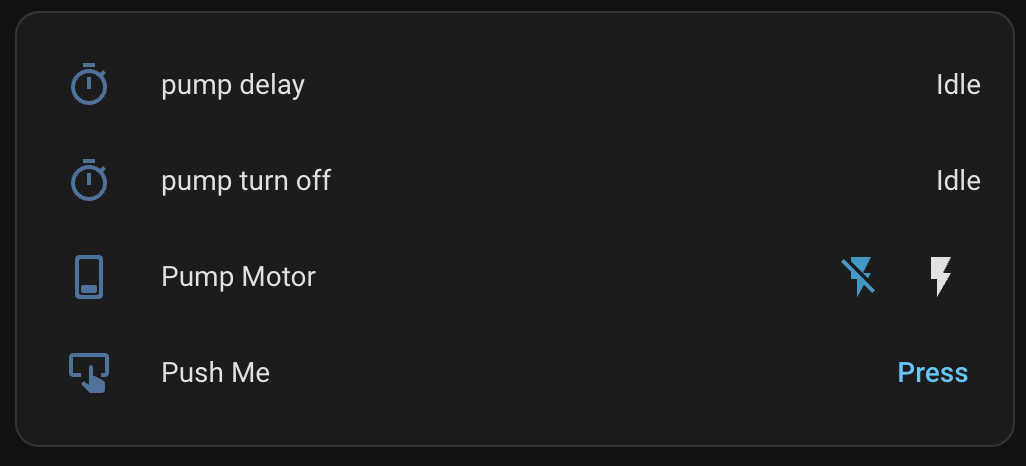
type: entities
entities:
  - entity: timer.pump_delay
  - entity: timer.pump_turn_off
  - entity: switch.pump_motor
  - entity: button.push_me
I am the same - my longest running automation is approximately 2 seconds and that is because I have some delay statements to create a pause between transmission of IR codes.
Except for automations that send IR codes, all of my automations are instantaneous (no delays at all).
Thats why I use TBSs - on HA restart they will initially reset to off state since they don't "Know" what the state was for the last 3 minutes (after a restart), however 3 minutes later they have 3 minutes of history, so they will know the pump has been on for that long and turn it off.
Sure you can argue that's 3 minutes longer than it should be and timers might have turned the pump off immediately on HA restart.
However my counter argument to that is that HA could crash and never come back, if its important to you that the pump isn't left running you should use a hardware solution anyway, specifically my smart plugs have a built in timer that I can set to turn themselves off after say 4 minutes, that would avoid the problem.
Edit
Giving it some more thought, if you are okay with relying on the hardware timer, you could set that to 3 minutes and then completely omit everything I said in section #1 since the hardware is effectively doing the same thing.
Sorry @chincilla, not trying to go off on a tangent here with your thread.
@dtrott, am I missing something here?
Triggering on that binary sensor isn't happening for me when I restart HA.
I'm using this slightly modified version (I have a test HA with a single zen15 zwave switch):
template:
  - binary_sensor:
      - name: "Pump Running"
        unique_id: pump_running
        state: >
          {{ is_state("switch.test_zen_15", "on") }}
Oddly, the state for No, it's not updating the DB when I restart.binary_sensor.pump_running is updated in the states DB when I restart:
But the trigger doesn't fire because (apparently) there's no state change:
trigger: state
entity_id:
  - binary_sensor.pump_running
to:
  - 'on'
Even removing the to: in the trigger and/or adding a delay_on: to the template doesn't make it trigger. Are you able to make it work?
There is yet another way to achieve all of this, and it's possible without using any timers or delays (aligned with all the wishes and opinions).
When the pump starts, set an input datetime helper to the end time (now() + timedelta(minutes=30)). Have an automation trigger using that helper to turn the pump off. In the button card, show the button as on/active by checking whether the helper's time is in the future.
I have one correction to make:
restart they will initially reset to `off``
In my testing, after HA restart the initial state will be the same as it was when HA shutdown.
I am not sure if this:
- Has always been the case (if so, this is my mistake).
- Has been changed in one of the updates.
- Changed as a result of my change to my Z2M configuration (turning on retain).
- The ordering of entities in my configuration files.
- ...
However, that correction has not effected the design/my tests cases.
What is your test case?
I have tried three cases (note I reduced the time to 1 minute to save sitting around), and I used a switch that has local control, so I can change its state while HA is down:
#1 - The switch is turned on > 1 minute before HA restart
This is the normal case, the automation fires and turns off the switch.
Restarting with the switch in the off state does nothing.
#2 - The switch is turned on a few seconds before HA restart.
As the HA goes down the TBS is still off (since the timeout hasn't occurred).
Even if I wait an extended period of time.
When HA comes back up the TBS will still be off.
However after 1:17 (there is a 17 seconds delay for HA startup) the automation fires and turns off the switch.
#3 - The switch is turned on while HA is down.
This test was just run for completeness - its a situation that can happen in my setup, but it wouldn't happen in the OP's case.
Same as case #2 - the switch is turned off 1:17 after HA startup begins.
Misc Improvement
If you reload the configuration for the TBS it will temporally switch to unavailable state during the reload that can cause issues (although probably not for the OP) to resolve that you may want to change the automation trigger condition to:
    from:
      - "off"
    to:
      - "on"
My argument wasn't about timers per se, it was about complexity - for some complex cases timers are your best option.
I will concede that using TBS can be verbose, but they are easy to reason about.
Additionally in a lot of cases they correctly** handle local changes that happen when HA is offline.
** - I am using the word "correctly" loosely here, they may not respond as quickly as timers would when HA comes back, but they typically fix the state eventually.
yes, it is.
The physical wall button is one (of three) options to turn the pump on. There is no priority betwenn these options. The wall button is mainly used when there is no mobile phone to hand. Or even guests will use the wall button.
I am going to assume that you have a Shell Plus 1PM
The manual for that says it has a configurable "Auto off" feature.
So you can just configure your hardware to turn off after 3 minutes.
That dramatically simplifies your automation requirements, to the point where you can do the entire implementation with a single template switch:
- switch:
    - unique_id: protected_switch
      name: "Protected Switch"
      state: >
        {{ is_state('switch.shellyplus1pm_80646fe3598c', 'on') }}

      turn_on:
        - condition: template
          value_template: >
            {{ is_state('switch.shellyplus1pm_80646fe3598c', 'off') and (now() - states.switch.shellyplus1pm_80646fe3598c.last_changed).total_seconds() >= 1800 }}
        - service: switch.turn_on
          target:
            entity_id: switch.shellyplus1pm_80646fe3598c

      turn_off: []

      availability: >
        {{ is_state('switch.shellyplus1pm_80646fe3598c', 'on') or (now() - states.switch.shellyplus1pm_80646fe3598c.last_changed).total_seconds() >= 1800 }}
The switch won't let you turn on the pump for 1800 seconds (30 minutes) since it was last turned off and the hardware takes care of turning the switch off.
Note: you might need to add some extra conditions in there to handle the state being unavailable or unknown.
Edit: Added the availability from a later post here, so that the entire config is together.