How to remove cursor from lvgl spinbox widget

I’m using a spinbox defined like this:

                     - spinbox:
                            id: spinbox_id
                            align: CENTER
                            text_align: CENTER
                            text_font: arial_24
                            width: 50
                            range_from: 50
                            range_to: 80
                            step: 1
                            rollover: false
                            digits: 2

which works fine, except the last digit of the setting has a cursor overlaid on it, like in the example shown in the documentation:
image
I’d like to remove the cursor, and found a recommendation for this in bare metal lvgl code:

lv_obj_set_style_local_border_opa(ta, LV_TEXTAREA_PART_CURSOR, LV_STATE_DEFAULT, 0);

but I’m not sure how to translate this to yaml.
Style the cursor part of your spinbox as required. Something like:

    - spinbox:
        cursor:
          bg_opa: transp

Exactly what styles you need to apply you can experiment with.

1 Like

Thanks. I also needed to add opa: transp, but it works great now.

1 Like

Not Getting Something quite right with this.
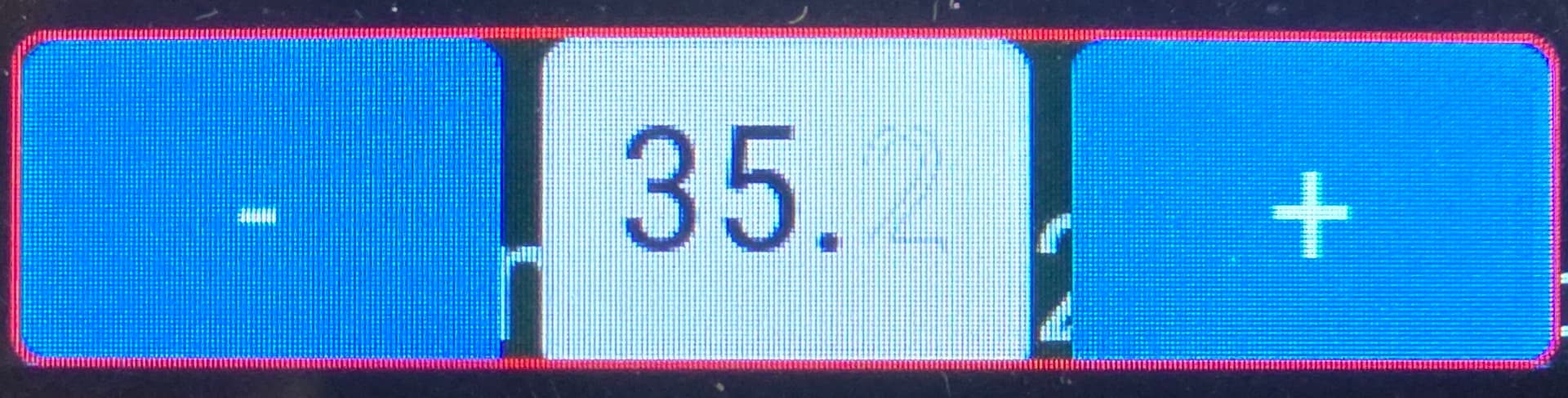
When I try & remove the cursor I get this.

The Outline of the Font, but no fill.

              - spinbox:
                  id: spinbox_id
                  align: CENTER
#                  text_align: CENTER
                  flex_grow: 1
#                  width: 70
                  height: 70
                  range_from: 30
                  range_to: 40
                  selected_digit: 0
                  rollover: false
                  digits: 3
                  decimal_places: 1
                  cursor: 
                    bg_opa: transp
#                  on_value:
#                    then:
#                      - homeassistant.action:

Anyone tell me what’s wrong.

Thanks.