How to set different name color for each entity in entities card?

Hello! I thought this would be a simple thing, but apparently not.

I have a basic Entities card, with two switch entities. I would like to have the name text of each entity be a different color - or, bonus points, maybe even selectively italicized.

My intent is to use card_mod; but I can’t for the life of me figure out how. Card-mod is working; other settings are having expected effects - but I’m stumped on this code.

I’ve tried all kinds of different approaches from various examples here and elsewhere on the web, to no avail - and I believe I’ve wasted much effort following old, deprecated solutions.

Here is the basic code I have (non-functioning).

  - type: entities
    title: "Color Test 4"
    show_header_toggle: false
    state_color: true

    entities:
      - entity: switch.in_wall_paddle_switch_120_277_qfsw_500s
        card_mod:
          style: |
            :host {
              color: blue; !important
            }

      - entity: switch.in_wall_paddle_switch_120_277_qfsw_500s_2
        card_mod:
          style: |
            :host {
              color: green; !important
            }

I threw the “!important” tags on there in desperation… Any suggestions would be appreciated.

Remove the - from type: entities and adjust yaml spacing. This works with my switch entities:

type: entities
title: "Color Test 4"
show_header_toggle: false
state_color: true

entities:
  - entity: switch.living_room_smart_plug
    card_mod:
          style: |
            :host {
              color: blue;
            }

  - entity: switch.washing_machine_power_plug
    card_mod:
          style: |
            :host {
              color: green;
            }

EDIT: This code is for an Entities card in UI Mode

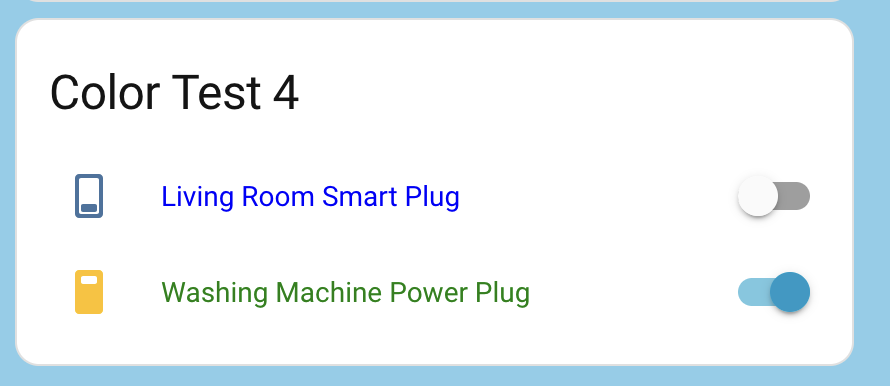
**EDIT2: I used this code to create an Entities Card in UI mode. This is how it looks in my Dashboard

The view this card is on is in an ‘include’ file; and in that file I tried your code as

cards:

type: entities
title: "Color Test 4"
show_header_toggle: false
state_color: true
  
entities:

  - entity: switch.in_wall_paddle_switch_120_277_qfsw_500s
    card_mod:
          style: |
            :host {
              color: blue;
            }

  - entity: switch.in_wall_paddle_switch_120_277_qfsw_500s_2
    card_mod:
          style: |
            :host {
              color: green;
            }

I got a ‘configuration error’ message upon refreshing lovelace.

I should note, other cards in this view function correctly with the
original “- type:” code and indentation; including cards using card_mod.

And the card I posted displays and functions - except there’s no effect on the entity name text colors.

Are you telling that you are using yaml-mode dashboards (ie where a code is defined in a user-created yaml file, not in some UI editor)?

Anyway, this is wrong since it should be like

cards:
  - type: entities
    …
…

If you are saying that the CARD’s code starts with that “cards” line - then it is also wrong since the “cards” option is a property of a view, not of Entities card.

1 Like

I assumed you were using Entities card in UI mode…my fault for assuming! :grimacing: I’m not familiar with dashboard yaml mode (yet).

The code I posted is for an Entities card that I created in UI Mode. Sorry for any confusion! I’ve edited my code post to make it clear.

There is no difference for a card’s code for storage or yaml dashboards. Just note that all cards in a VIEW’s code start with a “-“ since cards are inside a LIST.

So, this should be a working code for a card:

type: entities
…  
entities:
  - entity: switch.in_wall_paddle_switch_120_277_qfsw_500s
    card_mod:
      style: |
        :host {
           color: blue;
        }
  …

That’s exactly how I posted my suggested code!

His code had this first line:

- type: entities

I removed the -

type: entities

and adjusted the yaml spacing.

Btw, I sometimes post a code for a card starting with “-“ because I copy the code from a yaml file. And when a person sees a code starting with “-“ he should understand that the starting “-“ needs to be removed if the code is supposed to be placed in to UI editor as a “card’s code”.

1 Like

To all: thank your for the input. I do not use the UI for my lovelace views. I use YAML files; I prefer that mode.

My ui-lovelace.yaml file has a section:

views:
  # -----< Include Packaged View Files >-----
  - !include lovelace/llv_overview.yaml
  - !include lovelace/llv_notifications.yaml
  - !include lovelace/llv_schedules.yaml
  - !include lovelace/llv_security.yaml
  - !include lovelace/llv_sensors.yaml
  - !include lovelace/llv_debug.yaml

The “Color Test 4” card YAML I posted originally is in the file llv_debug.yaml included by the ui-lovelace.yaml file. The functionality of where the included files are located has been verified; this has been the structure I’ve used for years, and the other ‘llv_…’ views show up and function properly.

I have other cards using card_mod features that work as well; changing a card’s background color, title text color and sizing, etc.; so I am confident that card_mod is installed correctly (I did install the latest version when I first was trying to figure this out). So I don’t believe the problem lies there, either.

The card “Color Test 4” that I originally posted does indeed appear properly in the web view of that ‘llv_debug’ tab. I have also dropped in other card sections from other, working view files, just to verify that I don’t have a syntax or alignment issue.

I did not include the ‘cards:’ line in my original post. It is in the file, so I should have. I was focusing on the problem within the specific card definition - how to change the name text color of each entity in an entities card individually.

This morning, after all of your welcome suggestions, I re-edited the card definition, to return the ‘- type:’ format and indentation back to how it was originally, after having tried DeeDee’s original suggestion.

It now works.

I am at a loss to explain why. The name text of the first entity is now blue, and for the second, green.

My guess? Perhaps in cutting-and-pasting different examples from various places on the web in search of a solution, I inadvertently included some rogue non-printing character? No idea. But it works now, and indirectly you all contributed to a solution. Again, thank you for your help.

Just for completeness, here is the ‘cards:’ section of the view file, including another test card I used elsewhere while debugging some “turn light on at dusk” routines - just to show that the format of each card section is correct.

cards:

  - type: entities
    title: "Sun Settings Debug"
    show_header_toggle: false
    state_color: true
    theme: security
    entities:
    - entity: sensor.sun_next_rising
    - entity: sensor.sun_next_setting
    - entity: sensor.sun_next_dawn
    - entity: sensor.sun_next_dusk


  - type: entities
    title: "Color Test 4"
    show_header_toggle: false
    state_color: true
      entities:
      - entity: switch.in_wall_paddle_switch_120_277_qfsw_500s
        card_mod:
              style: |
                :host {
                  color: blue;
                }
      - entity: switch.in_wall_paddle_switch_120_277_qfsw_500s_2
        card_mod:
              style: |
                :host {
                  color: green;
                }

Now I’m off to figure out how to make the name text colors conditional, based on the state of a separate binary_sensor… Thanks again, all!
1 Like

OOPS!
After all that, my final post had the ‘entities:’ line in “Color Test 4” scooted over two spaces, instead of aligned under ‘state_color’.

Need more diet Coke. Fixed the indent, all is working…

1 Like

Glad you got it working! Thanks for sharing your code. As I mentioned, I’m not familiar with yaml mode for dashboards, so it’s been a great learning experience for me.

1 Like