Hi
I have installed on Dell 9020 mini
Home Assistant Operating System and
Home Assistant Add-on: Frigate (Full Access) 0.15.2
To use HW acceleration, I asked Gemini
A.I. Gemini says:
ad this in frigate.yml
global:
ffmpeg:
hwaccel_args:
- -hwaccel
- vaapi
- -hwaccel_device
- /dev/dri/renderD128
- -hwaccel_output_format
- vaapi
AND do this:
How to Enable GPU Hardware Acceleration for Frigate
To enable hardware acceleration for Frigate, you need to provide the Frigate add-on’s Docker container with access to your host machine’s GPU. This is done through a specific field in the Home Assistant add-on configuration, which is separate from the frigate.yaml file.
Step 1: Navigate to the Add-on Configuration
- In Home Assistant, go to Settings → Add-ons .
- Find and click on the Frigate add-on tile.
Step 2: Add the Device Path
- On the Frigate add-on page, select the Configuration tab.
- Scroll down until you find a field labeled “Devices” .
- In this field, you must add the path to your GPU device. For most Intel-based systems, this path is:
/dev/dri/renderD128 - Click the “Save” button.
Step 3: Restart the Add-on
- After saving the changes, go back to the Info tab of the Frigate add-on and click “Restart” .
By performing these steps, you are telling the Home Assistant Supervisor to map the specified device from your host machine into the Frigate Docker container. This is a critical step for hardware acceleration to work.
Verifying the Configuration
After restarting, you can check the Frigate logs to confirm that it is correctly accessing the GPU. You should see messages indicating that it is using the hardware for video decoding. If you have an Intel GPU, the logs should show it is utilizing the VAAPI driver.
If you are also configuring hardware acceleration in your frigate.yaml , make sure your FFmpeg input arguments are set correctly to use the new access you have granted. The add-on’s “Devices” field is what makes the GPU available; the frigate.yaml file is what tells FFmpeg to actually use it.
This section described has no such??
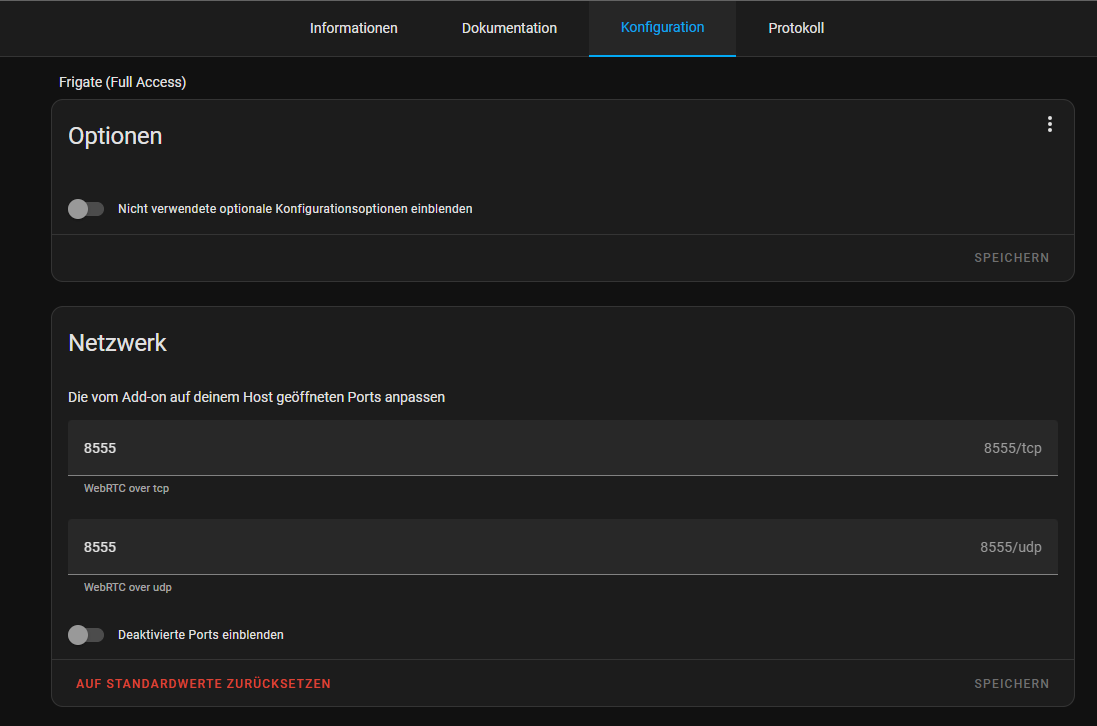
Is this true?
But as I’m a newbie I kindly ask for real How To here
many THX