Hi
I am trying to stop a button being pressed more than 1 time within 2 second interval
We have Ikea PRAKTLYSING cellular blind which work great on mZ2M and I have added the provuided buttons to Z2M also and these control the blind as expected.
However my mother has this habit of pressing a button multiple time thinking it will work faster, but with the ikea blinds if you press 3 or 4 times it does a reset and then disconnects the blinds from Z2M
I want to stop the button responding after the first press, tried to put a delay in the automation but this seems not quick enough to stop second or third press....
That's part of the device firmware. Nothing you do in home assistant will affect that.
Does the Button produce Double Press and Long Press Actions?
Pyberg
No is only single press, 2 button Up & Down button
if you press multiple times this is sent to the blinds and cause a problem
I want to stop the second and third press from sending. sort of disable the button after first press for 2 second
I considered setting 2 buttons one up and the other down but this will still have same issue of multiple sending signal
Tom
I am not disputing the firmware, just want to stop the button press more than 1 time in 2 seconds
What Tom said/implied is that HA never sees the event, neither does it control the resetting. The functionality you're describing is built into the device. The only way to change it is to change the firmware or get another kind of button, but long or multiple button presses is a very typical way to reset them.
Update: I misunderstood. It's the blinds reseting, not the button.
How is the device/button represented in HA?
This feels like embedded device reset is being triggered by the multiple presses.
Can you share your debounce Automation?
Hi Just to be clear the button sends signal to Home Assistant which then opens or closes the blinds.
They are not setup as Ikea devices through the Ikea hub
They run through an aotomation
I only put a 2 second delay after button press but did not work so deleted it
Also? 
It sounds like the remote is still paired to the blinds too?
If you take out that, it is only up to HA to decide what to do with the double click.
ofc it does mean that when HA is out, you cannot control the blinds anymore.
They go through an automation in Homasssistant
like below. Sorry dont know how to show raw code...
alias: Ikea remote 1 open
description: ""
triggers:
- domain: mqtt
device_id: b3396cd86421f122e7c78466bc5d75cf
type: action
subtype: open
trigger: device
conditions:
actions: - device_id: 2328d99115f2e47e087d60d528f887d0
domain: cover
entity_id: 3853068765d7ba852f7fe55e3210f622
type: open
mode: single
You can set debounce in Z2M too
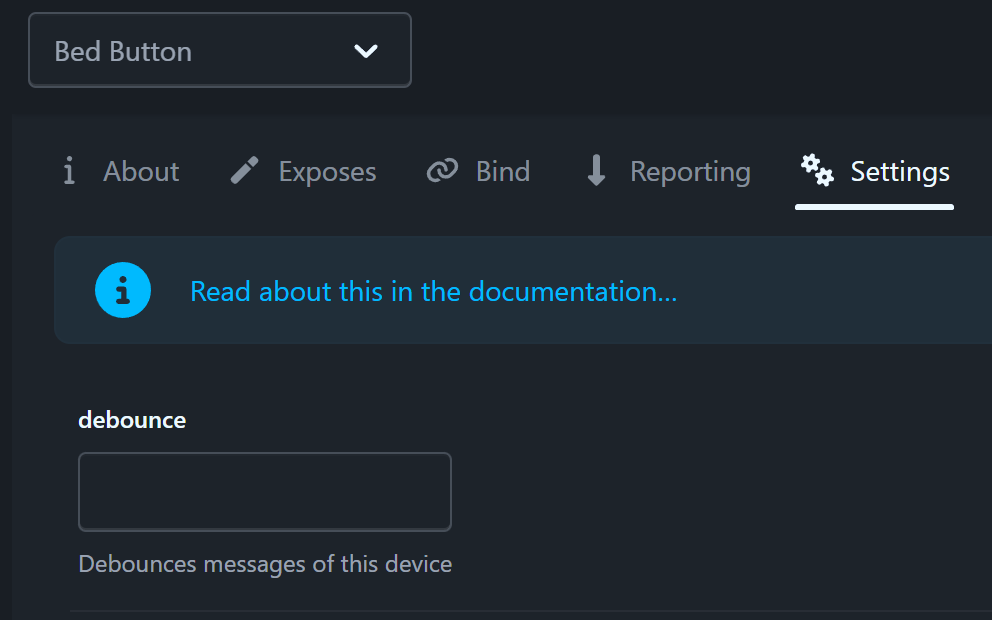
Ooo Did not know could do this will give it a try

Just trying to search on this. once found will try to implement
Adjusting Throttle is my best suggestion.
The minimum time between payloads in seconds. Payloads received whilst the device is being throttled will be discarded
throttle
Throttle processing of messages from this device. When setting e.g. throttle: 10 the first message from the device is processed but all other messages within the next 10 seconds are ignored. Be careful when using this option, unlike debounce that can ignore some attributes, this will drop the entire message.
debounce option has priority over throttle; if both are present for one device, only debounce will have any effect.
Setting this option reduces the number of MQTT messages sent for a particular device. This is directly linked to how high the option is set. When used on misbehaving devices with proper values, it can drastically reduce the size of external databases that store history (like Home Assistant), and yet have little to no impact on the quality of said history.
Edit: This also assumes the Automation in HA is not active.
Where would I put the throttle command in here. Tried a could of places but it wont save due to error in yaml
alias: Ikea remote 1 close
description: ""
triggers:
- domain: mqtt
device_id: b3396cd86421f122e7c78466bc5d75cf
type: action
subtype: close
trigger: device
conditions:
actions:- device_id: 2328d99115f2e47e087d60d528f887d0
domain: cover
entity_id: 3853068765d7ba852f7fe55e3210f622
type: close
mode: single
The settings I am referring too are in the Z2M UI, not the HA automation.
Oh OK probable best I keep away from this one dont want to screw up everything
OK
I just simply put a delay at the end of the automation for 2 seconds.
Not sure why but it did not work the first time I tried.
but this time worked ok. so solved my issue