How to turn on speaker in esphome m5stack Atomic Echo Base

I have an Atom3SR paired with Atomic Echo Base
And I cannot turn on the speaker using esphome. I’m trying to use it as a voice assistant.

If I install the Atomic Echo Base XiaoZhi Voice Assistant the speaker works.

If I install my custom esphome yaml immediately after, the speakers continues to work, even in home assistant as a media device, but when I unplug the device from power and power it back on, the speaker stops working.
In home assistant I can still play media on it but no sound comes from the speaker, I believe it is turned off somehow and I don’t know how to turn it on.

I tried to replicate the commands in the xiaozhi-esp32 to esphome but I can’t turn the speaker on.
I tried to define a custom i2c_device

i2c_device:
   id: test
   i2c_id: bus_b
   address: 0x43

and on button press to

      - logger.log: "Init echo base. id(test)"
      - lambda: !lambda |-
          id(test).write_byte(0x00, 0x07);
          id(test).write_byte(0xFF, 0x0D);
          id(test).write_byte(0x6E, 0x03);
          id(test).write_byte(0xFF, 0x05);

Here is the yaml, please ignore the extra code (for display,button etc.) and focus only on speaker and microphone.

Summary
substitutions:
  name: "atoms3r"
  device_name: "AtomS3R"
  micro_wake_word_model: okay_nabu

esphome:
  name: ${name}
  friendly_name: ${device_name}

esp32:
  board: m5stack-atoms3
  variant: esp32s3
  framework:
    type: esp-idf

wifi:
  networks:
    - ssid: !secret wifi_ssid
      password: !secret wifi_password
  id:
    wifi_id
  ap:

logger:

api:

ota:
  - platform: esphome
    password: "111"

captive_portal:
improv_serial:

i2c:
  - id: bus_a
    sda: GPIO45
    scl: GPIO0
    scan: true
  - id: bus_b
    sda: GPIO38
    scl: GPIO39
    scan: true

i2c_device:
   id: test
   i2c_id: bus_b
   address: 0x43

audio_dac:
  - platform: es8311
    id: es8311_dac
    bits_per_sample: 24bit
    sample_rate: 24000
    use_mclk: false
    i2c_id: bus_b

i2s_audio:
  - id: i2s_audio_bus
    i2s_lrclk_pin: GPIO6
    i2s_bclk_pin: GPIO8

microphone:
  - platform: i2s_audio
    id: echo_microphone
    i2s_din_pin: GPIO7
    adc_type: external
    pdm: false

speaker:
  - platform: i2s_audio
    id: echo_speaker
    i2s_dout_pin: GPIO5
    dac_type: external
    bits_per_sample: 32bit
    channel: left
    buffer_duration: 60ms
    audio_dac: es8311_dac

media_player:
  - platform: speaker
    name: Test
    id: echo_media_player
    announcement_pipeline:
      speaker: echo_speaker
      format: WAV
    codec_support_enabled: false
    buffer_size: 6000
    files:
      - id: timer_finished_wave_file
        file: https://github.com/esphome/wake-word-voice-assistants/raw/main/sounds/timer_finished.wav

voice_assistant:
  id: va
  microphone: echo_microphone
  media_player: echo_media_player
  noise_suppression_level: 2
  auto_gain: 31dBFS
  volume_multiplier: 2.0
  on_end:
    - delay: 100ms
    - script.execute: start_wake_word
  on_client_connected:
    - delay: 2s
    - script.execute: start_wake_word
  on_client_disconnected:
    - voice_assistant.stop:
  on_timer_finished:
    - voice_assistant.stop:
    - wait_until:
        not:
          microphone.is_capturing:

lp5562:
  - i2c_id: bus_a

sensor:
  - platform: mpu6886
    address: 0x68
    i2c_id: bus_a
    accel_x:
      name: "$device_name MPU6886 Accel X"
    accel_y:
      name: "$device_name MPU6886 Accel Y"
    accel_z:
      name: "$device_name MPU6886 Accel z"
    gyro_x:
      name: "$device_name MPU6886 Gyro X"
    gyro_y:
      name: "$device_name MPU6886 Gyro Y"
    gyro_z:
      name: "$device_name MPU6886 Gyro z"
    temperature:
      name: "$device_name MPU6886 Temperature"
  - platform: wifi_signal
    name: "WiFi Signal Sensor"
    update_interval: 120s

spi:
  clk_pin: GPIO15
  mosi_pin: GPIO21

color:
  - id: my_red
    red: 100%
    green: 0%
    blue: 0%
  - id: my_yellow
    red: 100%
    green: 100%
    blue: 0%
  - id: my_green
    red: 0%
    green: 100%
    blue: 0%
  - id: my_blue
    red: 0%
    green: 0%
    blue: 100%
  - id: my_gray
    red: 50%
    green: 50%
    blue: 50%

font:
  - file: "gfonts://Roboto"
    id: roboto_32
    size: 32
  - file: "gfonts://Roboto"
    id: roboto_24
    size: 24
  - file: "gfonts://Roboto"
    id: roboto_12
    size: 12

time:
  - platform: homeassistant
    id: esptime

switch:
  - platform: template
    name: Use listen light
    id: use_listen_light
    optimistic: true
    restore_mode: RESTORE_DEFAULT_ON
  - platform: template
    id: timer_ringing
    optimistic: true
    restore_mode: ALWAYS_OFF
    on_turn_off:
      - lambda: |-
          id(echo_media_player)
            ->make_call()
            .set_command(media_player::MediaPlayerCommand::MEDIA_PLAYER_COMMAND_REPEAT_OFF)
            .set_announcement(true)
            .perform();
          id(echo_media_player)->set_playlist_delay_ms(speaker::AudioPipelineType::ANNOUNCEMENT, 0);
      - media_player.stop:
          announcement: true
    on_turn_on:
      - lambda: |-
          id(echo_media_player)
            ->make_call()
            .set_command(media_player::MediaPlayerCommand::MEDIA_PLAYER_COMMAND_REPEAT_ONE)
            .set_announcement(true)
            .perform();
          id(echo_media_player)->set_playlist_delay_ms(speaker::AudioPipelineType::ANNOUNCEMENT, 1000);
      - media_player.speaker.play_on_device_media_file:
          media_file: timer_finished_wave_file
          announcement: true
      - delay: 15min
      - switch.turn_off: timer_ringing

display:
  - platform: ili9xxx
    model: ST7789V
    id: disp
    cs_pin: GPIO14
    dc_pin: GPIO42
    reset_pin: GPIO48
    rotation: 180
    invert_colors: true
    update_interval: 1s
    dimensions:
      height: 128
      width: 128
      offset_height: 1
      offset_width: 2
    lambda: |-
      it.rectangle(0,  0, it.get_width(), it.get_height(), id(my_blue));
      it.rectangle(0, 20, it.get_width(), it.get_height(), id(my_blue));
      it.strftime((128 / 2), (128 / 3) * 1 + 5, id(roboto_24), id(my_gray), TextAlign::CENTER, "%Y-%m-%d", id(esptime).now());
      it.strftime((128 / 2), (128 / 3) * 2 + 5, id(roboto_32), id(my_gray), TextAlign::CENTER, "%H:%M:%S", id(esptime).now());
      it.print(5, 5, id(roboto_12), id(my_yellow), TextAlign::TOP_LEFT, "ESPHome");
      if (id(wifi_id).is_connected()) {
        it.print(115, 5, id(roboto_12), id(my_green), TextAlign::TOP_RIGHT, "Online");
      }
      else {
        it.print(115, 5, id(roboto_12), id(my_red), TextAlign::TOP_RIGHT, "Offline");
      }

binary_sensor:
  - platform: status
    name: "Node Status"
    id: system_status
  - platform: gpio
    name: Button
    pin:
      number: GPIO41
      inverted: true
      mode:
        input: true
        pullup: true
    filters:
      - delayed_off: 10ms
    on_press:
      - logger.log: "Init echo base. id(test).read_byte"
      - lambda: !lambda |-
          id(test).write_byte(0x00, 0x07);
          id(test).write_byte(0xFF, 0x0D);
          id(test).write_byte(0x6E, 0x03);
          id(test).write_byte(0xFF, 0x05);
    on_release:
      - voice_assistant.stop:

text_sensor:
  - platform: wifi_info
    ip_address:
      name: ESP IP Address
    ssid:
      name: ESP Connected SSID
    bssid:
      name: ESP Connected BSSID
    mac_address:
      name: ESP Mac Wifi Address
    scan_results:
      name: ESP Latest Scan Results
    dns_address:
      name: ESP DNS Address

external_components:
  - source:
      type: git
      url: https://github.com/ssieb/esphome
      ref: lp5562
    components: [lp5562]
    refresh: 1min

output:
  - platform: lp5562
    id: red
    channel: 0
  - platform: lp5562
    id: green
    channel: 1
  - platform: lp5562
    id: blue
    channel: 2
  - platform: lp5562
    id: white
    channel: 3

light:
  - platform: monochromatic
    id: led
    name: backlight
    output: white
    restore_mode: always_on

script:
  - id: start_wake_word
    then:
      - wait_until:
          and:
            - media_player.is_idle:
            - speaker.is_stopped:
      - if:
          condition: voice_assistant.is_running
          then:
            - voice_assistant.stop
            - delay: 1s
            - voice_assistant.start_continuous:

micro_wake_word:
  on_wake_word_detected:
    - voice_assistant.start:
        wake_word: !lambda return wake_word;
  vad:
  models:
    - model: ${micro_wake_word_model}
Hey, did you ever get it to work? I am having the same problem with my AtomS3 paired with the Echo base. Cannot even get the mic to work…
Trying to play sounds as a media device, results in this error in the esphome logs:
[18:16:50][E][speaker_media_player.pipeline:112]: Media reader encountered an error: ESP_ERR_NO_MEM
[18:16:50][E][speaker_media_player:326]: The announcement pipeline’s file reader encountered an error.

I would to know as well.
Difference, I have the more basic AtomS3 Lite, still with the Echo base.

Basically I’m trying the create a Voice assistant unit just like the ready-made ESPHome project with the older M5Stack Echo but with newer hardware that are the AtomS3 Lite and Echo base.

I tried something, but that did not work. (At least the device does work, it’s not crashing.)

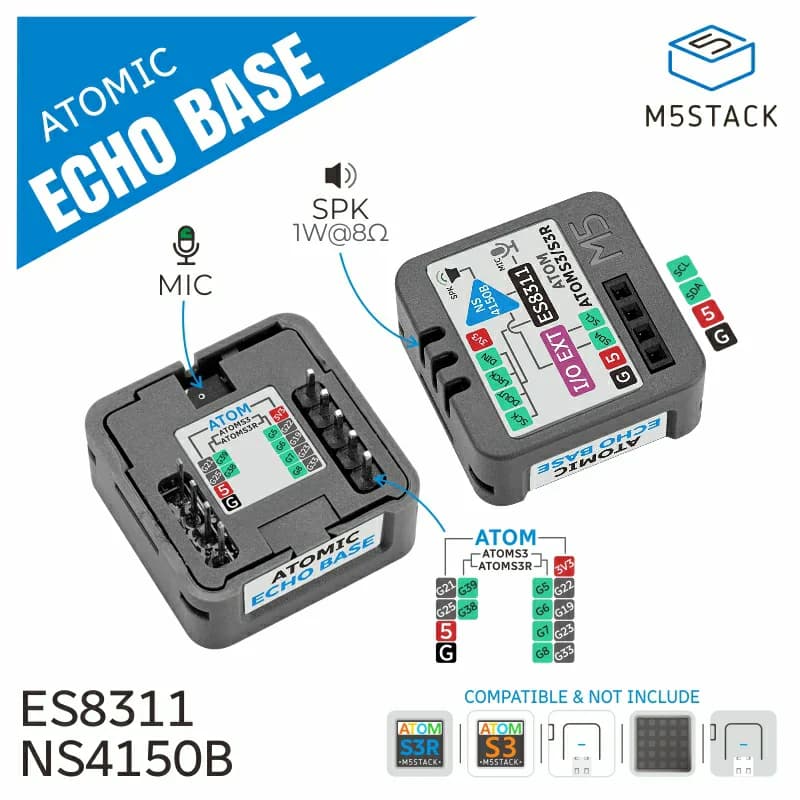
I took the Atom Echo project yaml and mostly changed the GPIO pin number to what I thought were the equivalent ones on the AtomS3-Lite+EchoBase based on the image below:

In summary, related to GPIO pins, I changed:

  • i2s_audio
    – i2s_lrclk_pin: GPIO33 → GPIO8
    – i2s_bclk_pin: GPIO19 → GPIO6
  • microphone
    – i2s_din_pin: GPIO23 → GPIO7
  • speaker
    – i2s_dout_pin: GPIO22 → GPIO5
  • binary_sensor/echo_button
    – number: GPIO39 → GPIO41
  • light/led
    – pin: pin: GPIO27 → GPIO35

Well, the LED and the button do work. It’s the microphone and speaker that do not.

In the end, to make it work, is it simply a matter of correctly mapping the pins or is there something more fundamental that also need to be changed?


My config:

esphome:
  name: m5stack-atoms3-lite
  friendly_name: M5Stack AtomS3-Lite

esp32:
  board: esp32-s3-devkitc-1
  variant: esp32s3
  flash_size: 8MB
  framework:
    type: esp-idf

# Enable logging
logger:

# Enable Home Assistant API
api:
  encryption:
    key: ""

ota:
  - platform: esphome
    password: ""

wifi:
  ssid: !secret wifi_ssid
  password: !secret wifi_password

  # Enable fallback hotspot (captive portal) in case wifi connection fails
  # ap:
  #   ssid: "M5Stack-Atoms3-Lite"
  #   password: ""

captive_portal:
    
esp32_ble_tracker:
  scan_parameters:
    active: true

bluetooth_proxy:
  active: true

########################
# Voice Assistant part #
########################

button:
  - platform: factory_reset
    id: factory_reset_btn
    name: Factory reset

i2s_audio:
  - id: i2s_audio_bus
    i2s_lrclk_pin: GPIO8
    i2s_bclk_pin: GPIO6

microphone:
  - platform: i2s_audio
    id: echo_microphone
    i2s_din_pin: GPIO7
    adc_type: external
    pdm: true
    sample_rate: 16000
    correct_dc_offset: true

speaker:
  - platform: i2s_audio
    id: echo_speaker
    i2s_dout_pin: GPIO5
    dac_type: external
    bits_per_sample: 16bit
    sample_rate: 16000
    channel: stereo  # The Echo has poor playback audio quality when using mon audio
    buffer_duration: 60ms

media_player:
  - platform: speaker
    name: None
    id: echo_media_player
    announcement_pipeline:
      speaker: echo_speaker
      format: WAV
    codec_support_enabled: false
    buffer_size: 6000
    volume_min: 0.4
    files:
      - id: timer_finished_wave_file
        file: https://github.com/esphome/wake-word-voice-assistants/raw/main/sounds/timer_finished.wav
    on_announcement:
      - if:
          condition:
            - microphone.is_capturing:
          then:
            - script.execute: stop_wake_word
      - light.turn_on:
          id: led
          blue: 100%
          red: 0%
          green: 0%
          brightness: 100%
          effect: none
    on_idle:
      - script.execute: start_wake_word
      - script.execute: reset_led

voice_assistant:
  id: va
  micro_wake_word:
  microphone:
    microphone: echo_microphone
    channels: 0
    gain_factor: 4
  media_player: echo_media_player
  noise_suppression_level: 2
  auto_gain: 31dBFS
  on_listening:
    - light.turn_on:
        id: led
        blue: 100%
        red: 0%
        green: 0%
        effect: "Slow Pulse"
  on_stt_vad_end:
    - light.turn_on:
        id: led
        blue: 100%
        red: 0%
        green: 0%
        effect: "Fast Pulse"
  on_tts_start:
    - light.turn_on:
        id: led
        blue: 100%
        red: 0%
        green: 0%
        brightness: 100%
        effect: none
  on_end:
    # Handle the "nevermind" case where there is no announcement
    - wait_until:
        condition:
          - media_player.is_announcing:
        timeout: 0.5s
    # Restart only mWW if enabled; streaming wake words automatically restart
    - if:
        condition:
          - lambda: return id(wake_word_engine_location).state == "On device";
        then:
          - wait_until:
              - and:
                  - not:
                      voice_assistant.is_running:
                  - not:
                      speaker.is_playing:
          - lambda: id(va).set_use_wake_word(false);
          - micro_wake_word.start:
    - script.execute: reset_led
  on_error:
    - light.turn_on:
        id: led
        red: 100%
        green: 0%
        blue: 0%
        brightness: 100%
        effect: none
    - delay: 2s
    - script.execute: reset_led
  on_client_connected:
    - delay: 2s  # Give the api server time to settle
    - script.execute: start_wake_word
  on_client_disconnected:
    - script.execute: stop_wake_word
  on_timer_finished:
    - script.execute: stop_wake_word
    - wait_until:
        not:
          microphone.is_capturing:
    - switch.turn_on: timer_ringing
    - light.turn_on:
        id: led
        red: 0%
        green: 100%
        blue: 0%
        brightness: 100%
        effect: "Fast Pulse"
    - wait_until:
        - switch.is_off: timer_ringing
    - light.turn_off: led
    - switch.turn_off: timer_ringing

binary_sensor:
  # button does the following:
  # short click - stop a timer
  # if no timer then restart either microwakeword or voice assistant continuous
  - platform: gpio
    pin:
      number: GPIO41
      inverted: true
    name: Button
    disabled_by_default: true
    entity_category: diagnostic
    id: echo_button
    on_multi_click:
      - timing:
          - ON for at least 50ms
          - OFF for at least 50ms
        then:
          - if:
              condition:
                switch.is_on: timer_ringing
              then:
                - switch.turn_off: timer_ringing
              else:
                - script.execute: start_wake_word
      - timing:
          - ON for at least 10s
        then:
          - button.press: factory_reset_btn

  - platform: template
    name: "Pressure State"
    id: pressure_state
    device_class: occupancy

light:
  - platform: esp32_rmt_led_strip
    id: led
    name: None
    disabled_by_default: true
    entity_category: config
    pin: GPIO35
    default_transition_length: 0s
    chipset: WS2812
    num_leds: 1
    rgb_order: grb
    effects:
      - pulse:
          name: "Slow Pulse"
          transition_length: 250ms
          update_interval: 250ms
          min_brightness: 50%
          max_brightness: 100%
      - pulse:
          name: "Fast Pulse"
          transition_length: 100ms
          update_interval: 100ms
          min_brightness: 50%
          max_brightness: 100%

script:
  - id: reset_led
    then:
      - if:
          condition:
            - lambda: return id(wake_word_engine_location).state == "On device";
            - switch.is_on: use_listen_light
          then:
            - light.turn_on:
                id: led
                red: 100%
                green: 89%
                blue: 71%
                brightness: 60%
                effect: none
          else:
            - if:
                condition:
                  - lambda: return id(wake_word_engine_location).state != "On device";
                  - switch.is_on: use_listen_light
                then:
                  - light.turn_on:
                      id: led
                      red: 0%
                      green: 100%
                      blue: 100%
                      brightness: 60%
                      effect: none
                else:
                  - light.turn_off: led
  - id: start_wake_word
    then:
      - if:
          condition:
            and:
              - not:
                  - voice_assistant.is_running:
              - lambda: return id(wake_word_engine_location).state == "On device";
          then:
            - lambda: id(va).set_use_wake_word(false);
            - micro_wake_word.start:
      - if:
          condition:
            and:
              - not:
                  - voice_assistant.is_running:
              - lambda: return id(wake_word_engine_location).state == "In Home Assistant";
          then:
            - lambda: id(va).set_use_wake_word(true);
            - voice_assistant.start_continuous:
  - id: stop_wake_word
    then:
      - if:
          condition:
            lambda: return id(wake_word_engine_location).state == "In Home Assistant";
          then:
            - lambda: id(va).set_use_wake_word(false);
            - voice_assistant.stop:
      - if:
          condition:
            lambda: return id(wake_word_engine_location).state == "On device";
          then:
            - micro_wake_word.stop:

switch:
  - platform: template
    name: Use listen light
    id: use_listen_light
    optimistic: true
    restore_mode: RESTORE_DEFAULT_ON
    entity_category: config
    on_turn_on:
      - script.execute: reset_led
    on_turn_off:
      - script.execute: reset_led
  - platform: template
    id: timer_ringing
    optimistic: true
    restore_mode: ALWAYS_OFF
    on_turn_off:
      # Turn off the repeat mode and disable the pause between playlist items
      - lambda: |-
              id(echo_media_player)
                ->make_call()
                .set_command(media_player::MediaPlayerCommand::MEDIA_PLAYER_COMMAND_REPEAT_OFF)
                .set_announcement(true)
                .perform();
              id(echo_media_player)->set_playlist_delay_ms(speaker::AudioPipelineType::ANNOUNCEMENT, 0);
      # Stop playing the alarm
      - media_player.stop:
          announcement: true
    on_turn_on:
      # Turn on the repeat mode and pause for 1000 ms between playlist items/repeats
      - lambda: |-
            id(echo_media_player)
              ->make_call()
              .set_command(media_player::MediaPlayerCommand::MEDIA_PLAYER_COMMAND_REPEAT_ONE)
              .set_announcement(true)
              .perform();
            id(echo_media_player)->set_playlist_delay_ms(speaker::AudioPipelineType::ANNOUNCEMENT, 1000);
      - media_player.speaker.play_on_device_media_file:
          media_file: timer_finished_wave_file
          announcement: true
      - delay: 15min
      - switch.turn_off: timer_ringing

select:
  - platform: template
    entity_category: config
    name: Wake word engine location
    id: wake_word_engine_location
    optimistic: true
    restore_value: true
    options:
      - In Home Assistant
      - On device
    initial_option: On device
    on_value:
      - if:
          condition:
            lambda: return x == "In Home Assistant";
          then:
            - micro_wake_word.stop:
            - delay: 500ms
            - lambda: id(va).set_use_wake_word(true);
            - voice_assistant.start_continuous:
      - if:
          condition:
            lambda: return x == "On device";
          then:
            - lambda: id(va).set_use_wake_word(false);
            - voice_assistant.stop:
            - delay: 500ms
            - micro_wake_word.start:

micro_wake_word:
  on_wake_word_detected:
    - voice_assistant.start:
        wake_word: !lambda return wake_word;
  vad:
  models:
    - model: okay_nabu
    - model: hey_mycroft
    - model: hey_jarvis

I can’t make it work either. As I mentioned in my first post the only way I can get the speaker to work is by first installing Atomic Echo Base XiaoZhi Voice Assistant then without unpluging the device from power I reflash it with the esphome config I posted and the speaker continue to work and is recognized by home assistant as a media device and can play any sound.
But if I unplug the power from the device and plug it back the speaker stops working and I cannot turn it on (but it’s still available in home assistant). I believe there is a command to enable/turn on the speaker that the XiaoZhi is using but I cannot figure out what that is.

1 Like

Following in case you’ve had any success

Hi, I tested Atom echo + base on UIFlow 2.0 and it’s working at first tentative. I post the code, maybe it can help someone more skilled than me to unlock it on esphome

Based on the setup above I tested the following config:

i2c:
  sda: GPIO25
  scl: GPIO21
  scan: true
  id: bus_a
  frequency: 100kHz #higher values lead to bus scanning failure

audio_dac:
  - platform: es8311
    id: es8311_dac
    bits_per_sample: 16bit
    use_mclk: True
    sample_rate: 48000
    i2c_id: bus_a
    use_microphone: True
    
    
i2s_audio:
  - id: i2s_audio_bus
    i2s_lrclk_pin: GPIO19
    i2s_bclk_pin: GPIO33  # labelled sck on Echo Base

microphone:
  - platform: i2s_audio
    id: echo_microphone
    i2s_din_pin: GPIO22
    adc_type: external
    pdm: true
    sample_rate: 16000
    correct_dc_offset: true

speaker:
  - platform: i2s_audio
    id: echo_speaker
    i2s_dout_pin: GPIO23
    dac_type: external
    bits_per_sample: 16bit
    sample_rate: 16000
    channel: stereo
    buffer_duration: 60ms
    audio_dac: es8311_dac

Logs are clean but it’s not working yet, although it’s making noises.
Any hint would be appreciated, thanks in advance.

Have you tried this config with the GPIO pin configuration from earlier in the thread? I’ve got something very similiar - but like you still not working. I was able to write a quick .cpp program - I know that mic / speaker is working on the echo - I had to import the M5EchoBase.h file to configure the EchoBase - I wasn’t able to get this working without that in the *.cpp / PlatformIO demo project I built.

I was trying to figure out if I could add a new hardware config to ESPHome for this combo - but I couldn’t even figure out where to start on github - so if anyone has pointers I am happy to try to take that on.

I’ve got the speaker working – here is my config. I took the M3CoreS3 repo and modified it for the ATOM.

#esphome:
##  name: m5atom-echo
##  friendly_name: M5Atom Echo
##  platform: ESP32
##  board: m5stack-atom


substitutions:
  name: test-device
  friendly_name: Test Device

esphome:
  name: ${name}
  name_add_mac_suffix: true
  friendly_name: ${friendly_name}
  min_version: 2025.5.0
  platformio_options:
    board_build.f_cpu : 240000000L
  libraries:
    - m5stack/M5Unified@^0.2.3
  on_boot:
    priority: -100
    then:
      - delay: 2s

esp32:
  board: esp32-s3-devkitc-1
  variant: esp32s3
  flash_size: 8MB
  framework:
    type: esp-idf

logger:
 level: VERY_VERBOSE
# Enable Home Assistant API
api:
  encryption:
    key: "**********"


ota:
  - platform: esphome
    id: ota_esphome
    password: "****************"


wifi:
  ssid: !secret wifi_ssid
  password: !secret wifi_password
  
  manual_ip: 
    static_ip: 0.0.0.0
    gateway: 0.0.0.0
    subnet: 0.0.0.0
    dns1: 0.0.0.0
    dns2: 8.8.8.8
    
  # Enable fallback hotspot (captive portal) in case wifi connection fails
  ap:
    ssid: "Test-Device Hotspot"
    password: "*********"

captive_portal:

external_components:
  - source:
      type: git
      url: https://github.com/mrpullen/M5AtomS3-EchoBase-Esphome
    refresh: 0s

globals:
  - id: speaker_volume
    type: int
    restore_value: no
    initial_value: '5'


# 
# Audio
# 

board_m5atoms3:

m5atoms3_audio:
  id: m5atoms3_audio_1
  i2s_bclk_pin: 6
  i2s_lrclk_pin: 8

microphone:
  - platform: m5atoms3_audio
    m5atoms3_audio_id: m5atoms3_audio_1
    id: m5atoms3_mic
    adc_type: external
    i2s_din_pin: 7
    pdm: false

speaker:
  - platform: m5atoms3_audio
    m5atoms3_audio_id: m5atoms3_audio_1
    id: m5atoms3_spk
    dac_type: external
    i2s_dout_pin: 5
    mode: mono
    num_channels: "1"
    sample_rate: "16000"


media_player:
  - platform: speaker
    name: "MP3 Speaker"
    id: mp3_media_player
    codec_support_enabled: true
    buffer_size: 12000
    volume_min: 0.4
    announcement_pipeline:
      speaker: m5atoms3_spk
      format: MP3


  - platform: speaker
    name: "WAV Speaker"
    id: wav_media_player
    codec_support_enabled: true
    buffer_size: 12000
    volume_min: 0.4
    announcement_pipeline:
      speaker: m5atoms3_spk
      format: WAV


binary_sensor:
  - platform: gpio
    pin: GPIO41
    name: "Play Tone Button"
    id: play_tone_button
    on_press:
      then:
        - script.execute: play_tone_script


script:
  - id: play_tone_script
    mode: restart
    then:
      - media_player.play_media:
          id: wav_media_player
          media_url: "https://github.com/m5stack/M5CoreS3-Esphome/raw/refs/heads/main/sounds/wav/click_1.wav"
          

After deploying this when I press the screeen I hear the click sound - so now it’s just sorting out how to get the actual media player and speaker to work as expected. I have a self hosted CA - and my home assistant has a cert issued from there -so having issues playing media directly… anyone know how to solve that I can test this end to end.

Latest configuration here - is working I can hear the voice and radio - it’s still a bit choppy need to work a bit more on how the buffering is working.

substitutions:
  name: test-device
  friendly_name: Test Device

esphome:
  name: ${name}
  name_add_mac_suffix: true
  friendly_name: ${friendly_name}
  min_version: 2025.5.0
  platformio_options:
    board_build.f_cpu : 240000000L
  libraries:
    - m5stack/M5Unified@^0.2.3
  on_boot:
    priority: -100
    then:
      - delay: 2s

esp32:
  board: esp32-s3-devkitc-1
  variant: esp32s3
  flash_size: 8MB
  framework:
    type: esp-idf
  
##    type: arduino  # Required for HTTPS and I2S audio

logger:
 level: VERY_VERBOSE
# Enable Home Assistant API
api:
  encryption:
    key: "*********"


ota:
  - platform: esphome
    id: ota_esphome
    password: "*******"


wifi:
  ssid: !secret wifi_ssid
  password: !secret wifi_password
  
  manual_ip: 
    static_ip: 0.0.0.0
    gateway: 0.0.0.0
    subnet: 255.255.255.0
    dns1: 0.0.0.0
    dns2: 8.8.8.8
    
  # Enable fallback hotspot (captive portal) in case wifi connection fails
  ap:
    ssid: "Test-Device Hotspot"
    password: "**************"

captive_portal:

external_components:
  - source:
      type: git
      url: https://github.com/mrpullen/M5AtomS3-EchoBase-Esphome
      ref: main
    refresh: 0s

globals:
  - id: speaker_volume
    type: int
    restore_value: no
    initial_value: '128'


# 
# Audio
# 

board_m5atoms3:

m5atoms3_audio:
  id: m5atoms3_audio_1
  
speaker:
  - platform: m5atoms3_audio
    m5atoms3_audio_id: m5atoms3_audio_1
    id: m5atoms3_spk
    buffer_size: 1024
    buffer_count: 16
    num_channels: "1"
    sample_rate: "48000"

media_player:
  - platform: speaker
    name: "WAV Speaker"
    id: wav_media_player
    codec_support_enabled: true
    buffer_size: 16384
    volume_min: 0.4
    announcement_pipeline:
      format: WAV
      speaker: m5atoms3_spk
      sample_rate: 48000
      num_channels: "1"

binary_sensor:
  - platform: gpio
    pin: GPIO41
    name: "Play Tone Button"
    id: play_tone_button
    on_press:
      then:
        - script.execute: play_tone_script


script:
  - id: play_tone_script
    mode: restart
    then:
      - media_player.play_media:
          id: wav_media_player
          media_url: "https://github.com/m5stack/M5CoreS3-Esphome/raw/refs/heads/main/sounds/wav/click_1.wav"
          

I will post again once I get the issue with the audio choppiness sorted out - then again when I get the mic and voice assistant working.

2 Likes

What I got so far is similar but still cannot make the sound clear I get only a static noise when playing any media.

substitutions:
  name: "atoms3r"
  device_name: "AtomS3R"
  micro_wake_word_model: okay_nabu # alexa, hey_jarvis, hey_mycroft are also supported

esphome:
  name: ${name}
  friendly_name: ${device_name}
  platformio_options:
    build_flags:
      # - "-w" # https://docs.platformio.org/en/lai2cdev/projectconf/sections/env/options/build/build_flags.html
      -DESP32S3
      -DBOARD_HAS_PSRAM
      -mfix-esp32-psram-cache-issue
      -DCORE_DEBUG_LEVEL=5
      -DARDUINO_USB_CDC_ON_BOOT=1
      -DARDUINO_USB_MODE=1

  on_boot:
    then:
        - logger.log: "Init echo base. id(i2cdev)"
        - lambda: !lambda |-
            ESP_LOGI("startup", "Initializing I/O expander to power on ES8311...");
            id(i2cdev).write_byte(0x07, 0x00);  // Set direction to output
            id(i2cdev).write_byte(0x0D, 0xFF);  // Set pull-up if needed
            id(i2cdev).write_byte(0x03, 0x6E);  // Invert logic (if needed)
            id(i2cdev).write_byte(0x05, 0xFF);  // Output HIGH (enable power)

esp32:
  board: m5stack-atoms3
  variant: esp32s3
  flash_size: 8MB
  framework:
    type: esp-idf

psram:
  mode: octal
  speed: 80MHz

wifi:
  networks:
    - ssid: !secret ssid
      password: !secret pass
  id:
    wifi_id
  ap:

# Enable logging
logger:

# Enable Home Assistant API
api:
  # encryption:
  #   key: "*****"

ota:
  - platform: esphome
    password: "******"

captive_portal:
improv_serial:

i2c:
  - id: bus_a
    sda: GPIO45
    scl: GPIO0
    scan: true
  - id: bus_b
    sda: GPIO38
    scl: GPIO39
    scan: true

i2c_device:
   id: i2cdev
   i2c_id: bus_b
   address: 0x43

audio_dac:
  - platform: es8311
    id: es8311_dac
    bits_per_sample: 16bit
    sample_rate: 48000
    use_mclk: false
    i2c_id: bus_b

i2s_audio:
  - id: i2s_output
    i2s_lrclk_pin: GPIO6
    i2s_bclk_pin: GPIO8

speaker:
  - platform: i2s_audio
    i2s_audio_id: i2s_output
    id: echo_speaker
    i2s_dout_pin: GPIO7
    dac_type: external
    bits_per_sample: 24bit
    sample_rate: 24000
    channel: left
    buffer_duration: 60ms
    audio_dac: es8311_dac
    use_apll: true
    mclk_multiple: 384

microphone:
  - platform: i2s_audio
    id: echo_microphone
    i2s_din_pin: GPIO5
    adc_type: external
    pdm: true
    sample_rate: 24000

media_player:
  - platform: speaker
    name: i2cdev
    id: echo_media_player
    announcement_pipeline:
      speaker: echo_speaker
      format: WAV
    codec_support_enabled: false
    buffer_size: 6000
    files:
      - id: timer_finished_wave_file
        file: https://github.com/esphome/wake-word-voice-assistants/raw/main/sounds/timer_finished.wav

I am using a device AtomS3r + Atomic echo base.
I present the code on which the sound works smoothly… now other peripherals…

esphome:
  name: z-atomecho
  friendly_name: Z_AtomEcho
  min_version: 2025.5.0
  platformio_options:
    board_build.f_cpu : 240000000L
  libraries:
    - m5stack/M5Unified@^0.2.3
  on_boot:
    priority: -100
    then:
      - delay: 2s


esp32:
  board: esp32-s3-devkitc1-n8r8 #esp32-s3-devkitc-1
  variant: esp32s3
  flash_size: 8MB
  framework:
    type: esp-idf

psram:
  mode: octal
  speed: 80MHz

# Enable logging
logger:
  level: DEBUG
  logs:
    sensor: WARN  # avoids logging debug sensor updates

# Enable Home Assistant API
api:


ota:
 

wifi:


captive_portal:

external_components:
  - source:
      type: git
      url: https://github.com/mrpullen/M5AtomS3-EchoBase-Esphome
      ref: main
    refresh: 0s

globals:
  - id: speaker_volume
    type: int
    restore_value: no
    initial_value: '128'


# 
# Audio
# 

board_m5atoms3:

m5atoms3_audio:
  id: m5atoms3_audio_1
  

#___________________________________________________
i2c:
  # Magistrala 1: Audio/Dotyk (G38/G39) - Używana przez ES8311 (0x18) i Dotyk (0x43)
  - sda: GPIO38
    scl: GPIO39
    id: i2c0
    frequency: 400kHz
    scan: True

i2s_audio:
  id: i2s_audio_bus
  i2s_lrclk_pin: GPIO6  
  i2s_bclk_pin: GPIO8  


speaker:
  - platform: i2s_audio
    id: i2s_speaker
    i2s_dout_pin: GPIO5 # wcześniej probowałem 5
    dac_type: external
    sample_rate: 48000
    bits_per_sample: 16bit
    channel: mono
    buffer_duration: 200ms


media_player:
  - platform: speaker
    name: "AtomSpeaker"
    id: speaker_media_player
    codec_support_enabled: true
    buffer_size: 16384
    volume_min: 0.0 
    volume_max: 0.5
    announcement_pipeline:
      format: WAV
      speaker: i2s_speaker
      sample_rate: 48000
      num_channels: "1"