I tried quite for while to trigger an Automation from a button, that I configured in helpers, in Node Red. Finally I did it with two automations - from this experience I figured out how to it in Node Red too. For many beginners, this in principle easy task, can be a challenge, because a helper button does not give any specific output when it is pushed, but only a timestamp. Here are my solutions:
alias: Toggle button.ev_immediate_charge start
description: ""
trigger:
  - platform: state
    entity_id:
      - input_button.ev_immediate_charge
condition:
  - condition: state
    entity_id: binary_sensor.ev_imediate_charging_run
    state: "off"
action:
  - service: variable.update_binary_sensor
    data:
      replace_attributes: false
      value: "true"
    target:
      entity_id: binary_sensor.ev_imediate_charging_run
mode: restart
initial_state: "on"
alias: Toggle button.ev_immediate_charge to stop
description: ""
trigger:
  - platform: state
    entity_id:
      - input_button.ev_immediate_charge
condition:
  - condition: state
    entity_id: binary_sensor.ev_imediate_charging_run
    state: "on"
action:
  - service: variable.update_binary_sensor
    data:
      replace_attributes: false
      value: "false"
    target:
      entity_id: binary_sensor.ev_imediate_charging_run
mode: restart
initial_state: "on"
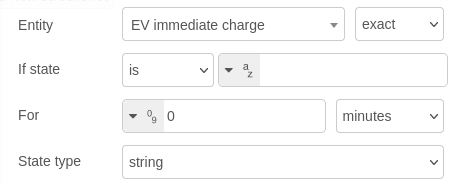
And here in Node Red:

In node red it is important to define the first (button) node as string: