It’s this one.
1 Like
This one does not have the hot water control. It is so frustrating. Hopefully someone with more knowledge will fix the badnest and restore hot water functionality.
1 Like
I was never able to control hot water with the badnest. Was it only for migrated accounts? I doubt someone could fix the badnest integration, since the API doesn’t seem to expose the information anymore. I’ll be more than happy to be proved wrong 
Yes I used to control hot water (I’m UK based) with a legacy Nest account login.
Can you confirm this is not working for you anymore as well? Did you migrate your account?
Hey guys, not sure if you’re aware of this, but if you install Homebridge (outside of HomeAssistant) + NestAccfactory plugin, you get everything working without any complicated Google Cloud Project and without paying any fees.
Can you get hot water control? I set up a home bridge server relay and installed nest AC factory but I’m not see the hot water control
Thanks
Mick
Hi,
Yes, it was added as Heatlink for Learning Thermostat (3rd gen, EU)
by Nest. It’s a switch, and upon turning on does a 30-minute boost (not sure if it’s customizable, 30 minutes works for me).
Got it,
Was that in as thermostat switch. Thought that were heat it actually does the hot water. I had a starling io hub but that’s not working since Google changed their API backend and they have just discontinued the product and have refused to update the firmware.
This is a better job anyway
Thanks
Mick
What’s the best way of avoiding the credential timing out? Happened a few times now…
It didn’t happen to me yet, I’m using it only for a few days. Usually after how many days do the credentials expire?
I don’t know, I only set up today but I’d to change my Google password and it meant relogging into the nest app which probably invalidated it… I also had left the browser logged in on my laptop so I closed that…to capture the token id to set cookies to allowed in the browser settings
It could be that changing password invalidates the token. Just check now after you changed it and see how long it lasts
1 Like
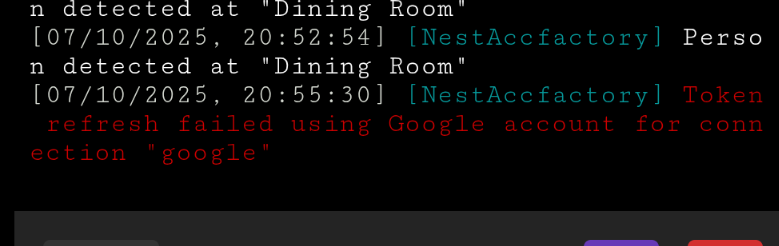
My account is not migrated to Google, not sure if this makes a difference. Mine is 3 days now and still going
Is there a way to use an old nest account? Or go back to one?
As far as I know, once you migrate, you can’t go back. But give it a go without changing the password and it should last longer
I’ve reset the credentials again this morning and will see how long it lasts. Lasted about 2 hours last night
Out of curiosity, why are you resetting the credentials? With the not-migrated account, I think I’ve read that once you log in, you just close the browser without logging out and the credentials stay valid.
When I see the error in the plugin log I have to go back through the config process and grab a fresh token and cookie to get it working. I’m not signed into chrome with my Google id, I dont know if that matters… when done I close the incognito tab.