OK, People have been successful using some type of mDNS relay helper, its just not so easy to figure out what the problem is when it doesn’t work.
Pretty cool integration 
I have Dirigera as a Matter edge router in Home Assistant. Most IKEA devices show up correctly, but Myggspray doesn’t appear at all.
Has anyone managed to get Myggspray working in HA via Dirigera? If so — how?
Just added my MYGGSPRAY motion sensors to HA successfully  You not only need to register the motion sensor on the DIRIGERA hub (via the IKEA Home App) first, but then also in Home Assistant. This does not happen automatically! I found a nice how-to here: IKEA DIRIGERA via Matter in Home Assistant - Björns Techblog (in German, but I assume you manage to translate it…)
I just added mine to Home Assistant. I didn’t use a hub. AppleTVs are my Thread Border router. I added the door sensors the same way.
Hey @bazcurtis how did you make that work, do you have the ATV outside of HA, or it’s added within the app? I’m fighting with this now for couple of days, I have added all Apple devices via the HA HomeKit Bridge, so basically instead of using the ‘native’ Apple bridge, all is exposed/added via the HA. I assume you have it the other way around? (sorry, might be confusing how I wrote it, but I hope you get what I mean).
In general what I seem to be having as an issue is that when ATV is added from HA, then the Thread/Matter does NOT work, at least that’s what all my AI friends told me and I should be using it outside.
On that note, if I remove the ATV from HA so it acts natively, how can I expose it to the HA after that for automations, etc…?
I suspect what needs to be done is, add the device to apple via the apple home app. Once it works correctly via apple home, then you ‘share’ that device from the apple home app, then add it to HA > matter integration > add device > use ‘yes it is already in use’ > if it doesn’t automatically detect the share then use the code from the apple sharing process.
I haven’t used this process, so I can’t say if the steps are exact or if it works any better than what you have tried.
if you have not already, please familiarize yourself with @ Matter - Home Assistant that should help you better understand how matter works and better troubleshoot.
Also, don’t rely on AI, you will most likely just cause yourself more confusion and heartache.
I think i’ve got the basics … however only one in my already about hundred tries in Home app I have gotten to a point of “adding device”, just to get that pairing failed and since then no matter how many resets I did, it either is stuck on connecting or setting up, but never kkable to get the pairing done… and yes, thats my plan, pair in Home, add/share credentials to HA
My Thread looks like this.
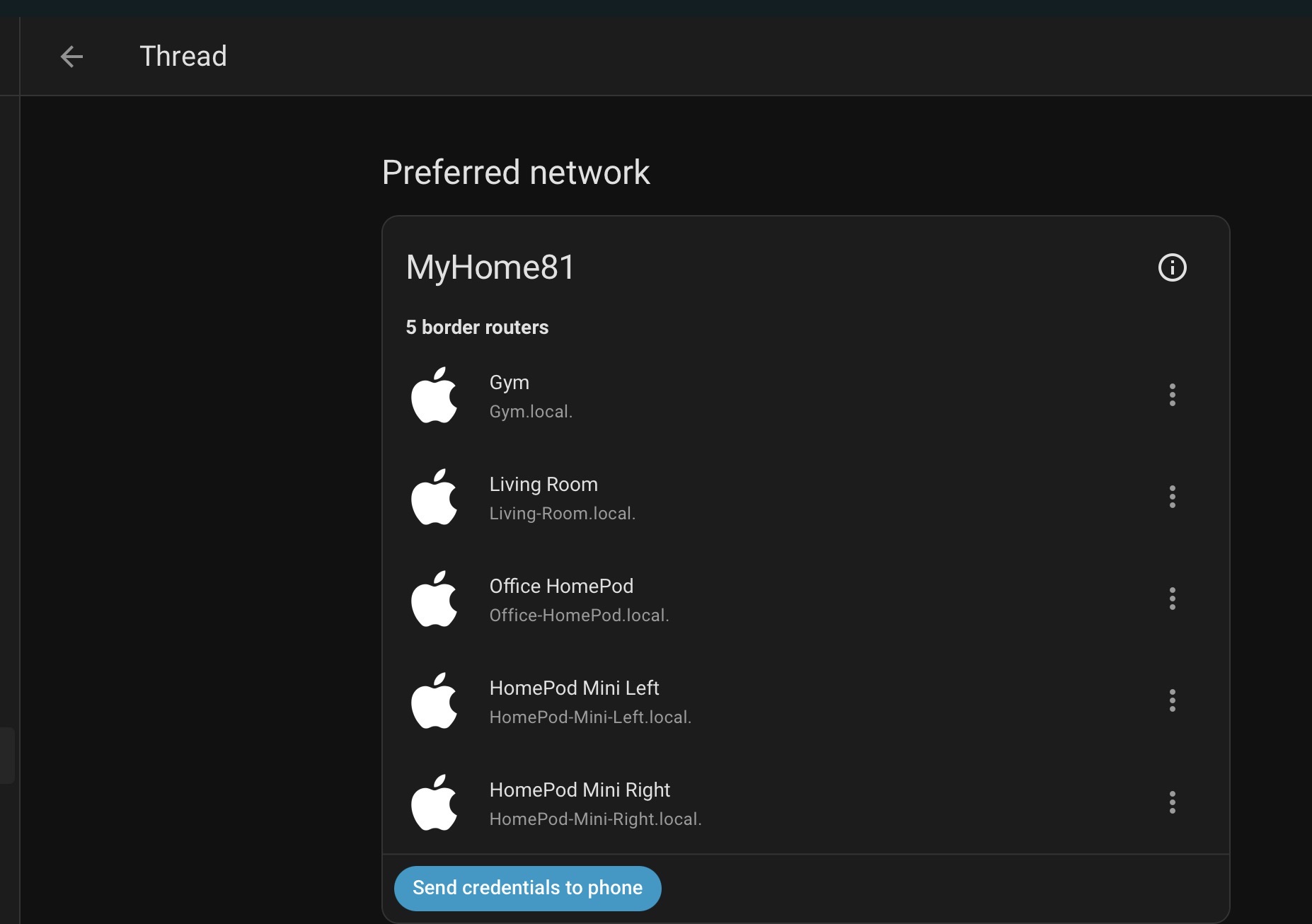
I can’t remember how they were added. I do have HomeKit Device installed. The only device that sees is the LG TV. All I did to add the IKEA devices was go to Settings, Devices, Add Device, pick Matter and scan the bar code. Picked the new option and it just worked.
The new devices are added to HomeKit via HomeKit Bridge. I just share them there for my wife’s convienance.
Matter looks like this

1 Like
Thanks for sharing, one more question - you are on Home Assistant OS, or via docker, else? what’s the installation method in your case?
In my case HA is on Docker, Matter - the standard docker image as well, Thread - more or less looks like yours with my Apple Devices. I do assume it’s just trickier to get the IKEA device, but I know that Matter on HAOS operates differently than on Docker, so perhaps I might need OBTR, but not 100% sure… so I’m just trying all possible, I do want to get this working
My Home Assistant runs on a Raspberry Pi 500. All my IKEA devices are now off the hub. The Zigbee devices connect to the ZBT-2 (used to be the ZBT-1) and the new IKEA devices directly as above.
1 Like
No need for OTBR as long as your Apple Homepods/etc. are Thread Border Routers and on the same LAN as HA and Matter Server with HA enabled for IPv6 (auto). Just pair your Matter over Thread device to Apple Home, then Have Apple share the device to HA’s Matter (add Matter Device->existing device). I will caveat, that I don’t have stand-alone Docker containers, but that’s how things work at a high level.
I have zero clue what’s wrong… none the less I did it exactly as @bazcurtis did, even though my setup is HA / Matter on Docker, Apple devices as he has… it didn’t want to do anything, last night there was the 26.2.1 iOS update… and this morning all paired absolutely fine. So problem solved without clue of what has happened. Thanks all for your replies though
Getting another ZXBT-2 is one option. Then you would run a border router in a container on the HA server. But you could use any Border router, it does not have to run on the HA server. I hapen to be using an Apple speaker that is in another room. It has a BR built into it. The BR’s job is to conect the Thread network to your WiFi network and pass data b oth ways. Hence the name “boder router”, in sits on the border of two networks.
Does anyone know if there is a way to adjust the distance of detection. I mounted the motion sensor on my front porch column so it would see you come up the drive way. I first mounted it with painters tape and I walked slowly up the driveway and it didn’t detect me until I hit the sidewalk which was perfect. So I mounted it and started setting up my automations. Well come to find out it detects when cars drive by in the street which is in the horizontal plane its not directly facing the street its running with it. I took a tape measure out and its 37 feet to edge of my drive way. I am sharing image for visual the motion sensor is attached to the middle column facing the driveway and not the street which makes it even more wild it still able to get the cars. Which are out in the street another 4 to 5 feet or more if they are on other side. I did mount it the 6.6 feet recommended which I didn’t factor in that i was up on the porch a few extra feet from where people come up the driveway. But still I tested all this I am so frustrated I hate to move this I should have gave it a longer term test now I am hoping there is way to adjust the settings.

Hi, I guess the mass of the object and direction play a role in this.
neither this myggspray nor the prior vallhorn (zigbee) provided any kind of detection sensitivity adjustment.
I would not expect that kind of option from any cheap motion sensor, most likely you would have to move to mmwave devices, perhaps such as everything presence one. I can’t remember which ones, but I remember some of them support motion zones where you can define what areas to include or exclude.
Other potential but more complicated options might include video camera with motion detection and analysis.
Or just reposition it and test more thoroughly. Perhaps aiming more downward, where the field of view misses more of the street.
I got one of these (well three actually) the other day. The many hours it took just to connect it to HA aside (down to the Android bug of not recognising my thread network) it is awful! It doesn’t trigger most of the time and when it does I’m already out of the zone I want it to turn the light on for. Then when I was laying in bed I could see the hall light turning on on it’s own, so it’s falsely triggering for no apparent reason. I was hoping to replace my Tapo motion sensor as I don’t want to have the Tapo hub sat there, but I think I need to get my £21 back from Ikea.
I do have the same problem with a Tuya PIR. It is automaticly triggering every 2 hours itself.
That makes the PIR useless for me
My experience with almost any ikea device other than remotes. They are very unreliable. Sure they’re cheap, but it’s still too expensive for something that you spend too much time on and won’t work nonethelless. Hard pass for me.
My experience:
- Myggspray in a small room by the doorway entrance. Take about 2-3 steps into the room before the light comes on. No false triggers. Previously had an Aqara FP2 which would turn on the light almost instantly, but had constant false triggers
- Myggspray outdoors under a rain protective cover (currently in temps ~0 to 10C). Would only trigger when less than ~3 to 4 meters away. Anything further away it would not trigger. No false triggers. I needed something that would trigger ~10m away so I removed it.