Quickly and easily use your last-chance IKEA RODRET remotes to set scenes, dim, and power lights.
To Do:
- Update to 2025.12: Triggering the holidays
 standards and schemas
IKEA RODRET E2201 Zigbee Smart Button - Blueprint

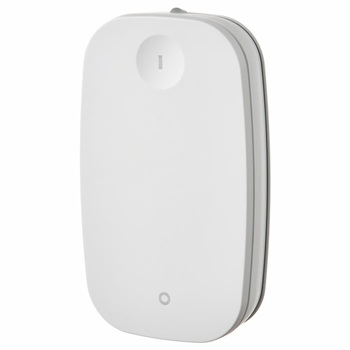
This blueprint provides automation for controlling lights with the IKEA RODRET E2201 Zigbee Smart Button in Home Assistant.
Options for use (tested with lights):
- Tap On

 → Brightness +25%, min 25%, max 100%.
 - Tap Off
 → Brightness -25%, floors at 1%, never powers off.
 - Hold On

 → 100% brightness OR activates optional scene.
 - Hold Off ⏻💡 → Powers light off completely.
Installation (options)
- OR Search for “IKEA RODRET E2201” in Settings > Automation & Secenes > Blueprints (tab) > “Discover more blueprints”
- OR Manually copy full yaml below to
/blueprints/automation/censay/ikea-rodret-e2201-zigbee-smart-button.yaml - OR Import a blueprint from this address: github.com/censay/haos-blueprints
Restart Home Assistant or go to Devleoper Tools and check all yaml to reload your yaml files including the new blueprint.
Usage
To use this blueprint, follow these steps:
- Navigate to the “Automations” section in the Home Assistant UI.
- Click on " + Create automation" in the corner button.
- Define how you want the buttons to work.
- Enjoy!
Inputs
The following inputs are required for this blueprint:
- Remote: Select the IKEA RODRET E2201 device(s).
- Light: Select the light to control.
- Full On Scene: Optional scene for hold on press.
Requirements
This blueprint is built from “Triggering the holidays” 2025.12 guidance so is designed to work best with…
- Home Assistant version 2025.12.1 or later.
License
This blueprint is licensed under the MIT License.
Contributing
Contributions are welcome! If you have any suggestions, improvements, or bug fixes, please submit a pull request or open an issue on this repository.
Credits
This blueprint was created by censay based on previous work by @damru.
Changelog
- Version 1.0.2: Tap On enforces minimum 25%, Tap Off floors at 1%.
YAML
blueprint:
  homeassistant:
    min_version: 2025.12.1
  author: censay
  domain: automation
  name: "💡 IKEA RODRET E2201 Zigbee Smart Button"
  description: |
    ✨ Changelog since 1.0.0:
    - 1.0.0: Removed brightness slider & force brightness inputs.
    - 1.0.1: Added optional Full On Scene input.
    - 1.0.2: Tap On enforces minimum 25%, Tap Off floors at 1%.

    📌 Expected Behavior:
    - Tap On ➕💡 → Brightness +25%, min 25%, max 100%.
    - Tap Off ➖💡 → Brightness -25%, floors at 1%, never powers off.
    - Hold On 🔆🎭 → 100% brightness OR activates optional scene.
    - Hold Off ⏻💡 → Powers light off completely.

  input:
    remote_devices:
      name: Remote
      description: IKEA RODRET E2201
      default: []
      selector:
        device:
          filter:
            - integration: zha
              manufacturer: IKEA of Sweden
            - integration: mqtt
              manufacturer: IKEA
          multiple: true

    light:
      name: Light
      description: Light to control
      selector:
        entity:
          filter:
            - domain: [light]
          multiple: false

    full_on_scene:
      name: Full On Scene
      description: Optional scene to activate when hold on is pressed. If left empty, defaults to 100 percent brightness.
      default: []
      selector:
        entity:
          filter:
            - domain: [scene]
          multiple: false

mode: restart
max_exceeded: silent

triggers:
  - trigger: event
    event_type: zha_event
    event_data: {command: 'on', cluster_id: 6, endpoint_id: 1}
    id: tap-on-zha
  - trigger: mqtt
    topic: +/+/action
    payload: 'on'
    id: tap-on-z2m

  - trigger: event
    event_type: zha_event
    event_data: {command: 'off', cluster_id: 6, endpoint_id: 1}
    id: tap-off-zha
  - trigger: mqtt
    topic: +/+/action
    payload: 'off'
    id: tap-off-z2m

  - trigger: event
    event_type: zha_event
    event_data: {command: move_with_on_off, cluster_id: 8, endpoint_id: 1}
    id: hold-on-zha
  - trigger: mqtt
    topic: +/+/action
    payload: brightness_move_up
    id: hold-on-z2m

  - trigger: event
    event_type: zha_event
    event_data: {command: move, cluster_id: 8, endpoint_id: 1}
    id: hold-off-zha
  - trigger: mqtt
    topic: +/+/action
    payload: brightness_move_down
    id: hold-off-z2m

variables:
  light: !input light
  full_on_scene: !input full_on_scene
  is_mqtt: '{{ trigger.platform == "mqtt" }}'
  is_zha: '{{ trigger.platform == "event" and trigger.event.event_type == "zha_event" }}'
  remote_devices: !input remote_devices
  remote_devices_names: '{{ remote_devices | map("device_attr", "name") | list }}'

condition:
  - condition: template
    value_template: >
      {% set selected_match = (trigger.event.data.device_id in remote_devices if is_zha)
         or (trigger.platform == "mqtt" and trigger.topic.split('/')[1] in remote_devices_names) %}
      {% set ikea_styrbar_match = is_zha
         and (device_attr(trigger.event.data.device_id, 'manufacturer') | default('', true) | lower == 'ikea of sweden')
         and ('styrbar' in (device_attr(trigger.event.data.device_id, 'model') | default('', true) | lower)) %}
      {{ selected_match or ikea_styrbar_match }}

actions:
  - choose:
      - conditions:
          - condition: trigger
            id: [tap-on-zha, tap-on-z2m]
        sequence:
          - variables:
              prev_brightness: '{{ (state_attr(light, "brightness")|int * 100 / 255) if is_state(light, "on") else 0 }}'
              new_brightness: >
                {{ [ prev_brightness + 25 , 100 ] | min }}
              adjusted_brightness: >
                {{ [ new_brightness , 25 ] | max }}
          - service: light.turn_on
            target: {entity_id: !input light}
            data: {brightness_pct: '{{ adjusted_brightness }}'}

      - conditions:
          - condition: trigger
            id: [tap-off-zha, tap-off-z2m]
        sequence:
          - variables:
              prev_brightness: '{{ (state_attr(light, "brightness")|int * 100 / 255) if is_state(light, "on") else 0 }}'
              new_brightness: >
                {{ [ prev_brightness - 25 , 1 ] | max }}
          - service: light.turn_on
            target: {entity_id: !input light}
            data: {brightness_pct: '{{ new_brightness }}'}

      - conditions:
          - condition: trigger
            id: [hold-on-zha, hold-on-z2m]
        sequence:
          - choose:
              - conditions: '{{ full_on_scene != [] }}'
                sequence:
                  - service: scene.turn_on
                    target: {entity_id: !input full_on_scene}
            default:
              - service: light.turn_on
                target: {entity_id: !input light}
                data: {brightness_pct: 100}

      - conditions:
          - condition: trigger
            id: [hold-off-zha, hold-off-z2m]
        sequence:
          - service: light.turn_off
            target: {entity_id: !input light}
Edit: If anyone knows why all my recent posts have become center aligned and cannot be forced back left, I would love to know 