Hi, I’m trying to setup my new IKEA timmerflotte sensor. Basically when the install gets to the thread configuration it keeps trying to setup with Google thread from my home hubs not the skyconnect that I’ve setup as a thread router. The skyconnect is set as preferred thread router but the timmerflotte insists on going for the Google instead and I can’t see a way to change this.
Any help with this would be appreciated. Cheers.
My four Timmerflottes work flawlessly in my HA-OTBR-only setup. Using multiple (O)TBRs currently leads to highly unstable systems - due to the big differences in Thread features and implementation robustnesses caused by the various Thread firmware and software versions in use. Also the HA (O)TBR Addon is outdated with Thread 1.3 and corresponding firmware/software that is one year old.
Using an Android phone ? I had no luck adding the IKEA matter devices using my Android phone. When using my iPhone, it worked ok. There are a lot of tips regarding this issue, clearing cache, re-syning credentials, but nothing solved this issue with my android phone. So if you have an iPhone laying around …
I setup a Timmerflotte without problem on Pixel 9XL with Skyconnect thread dongle. Have you sync credentials in the companion app?
Has anyone tested if you can add an action to activate Timmerflotte display aka show the temperature. What I mean is that if I have a motion sensor and a Timmerflotte in a room then the Display would be on when motion sensor is occupied and off when the motion sensor becomes not occupied.
Unfortunately I don’t have an iPhone I can use 
I think I did sync credentials (send credentials to home assistant) in the app but will try again tomorrow. Thanks
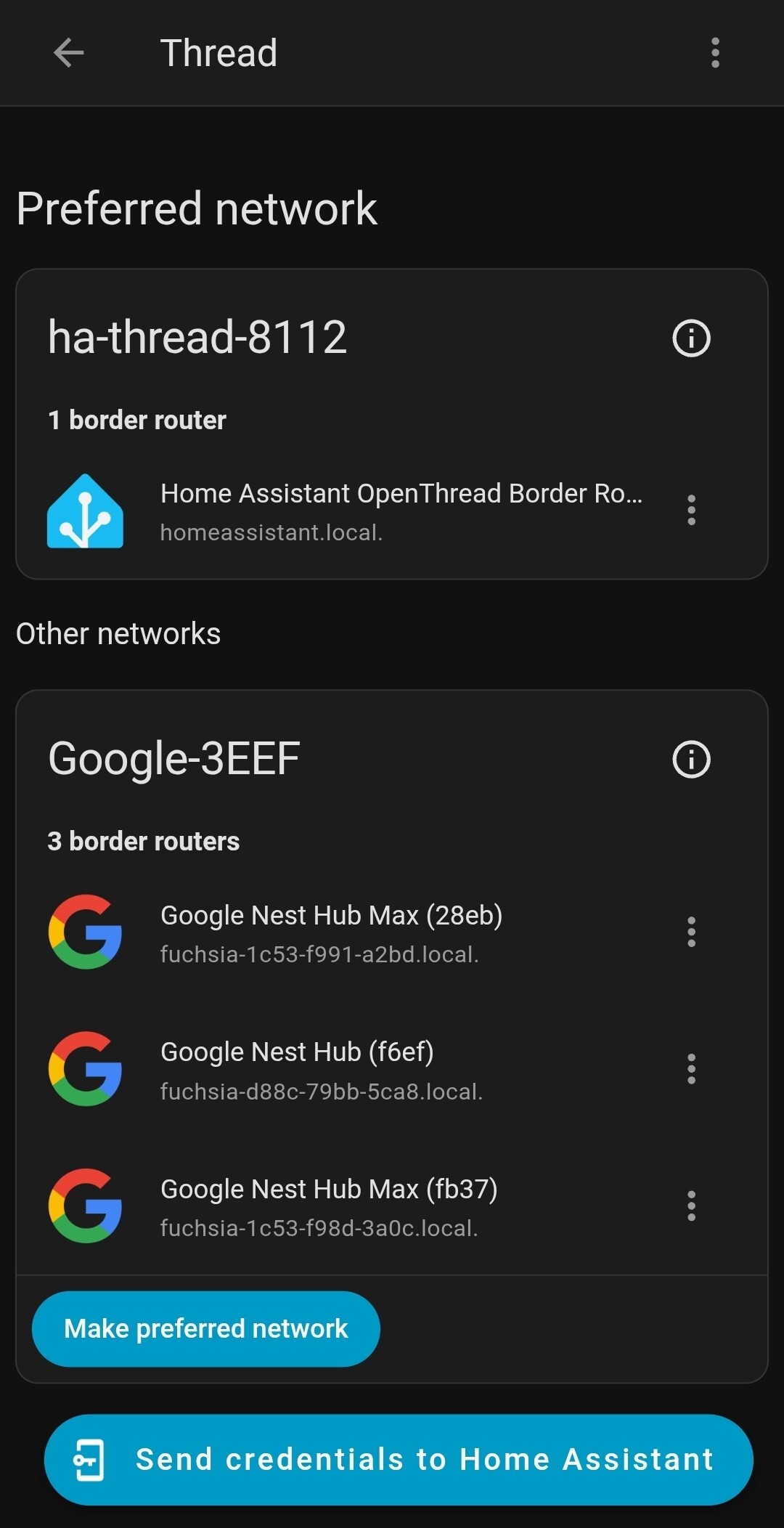
This is my thread network list. Should I delete the Google border routers which are what the timmerflotte seems to want to connect to?
Make sure you have the correct thread credentials on the Android.
On the Android Companion App open Settings → Companion App → Troubleshooting (I think that is what it is called in english, but it list logfiles and other tools to diagnostics as description of the item).
In this next window click the Sync Thread Login Credentials (Again it might not be named exactly that, but close to and there should not be that many options and it should be in the bottom)
It should say either something with “Added …” or “Already using the same credentials”.
The trick here is to run it again and make sure that it does not say “Added …” the second time.
If it does then you need to clear the Google Play Services Cache, which might clear a lot of other stuff, like login to services and credit card informations for Google Play and websites and so on, so make sure you know you informations before hand.
The way to clear the cache is Settings → Apps → See All Apps → Google Play Services → Storage and Cache → Manage Storage → Clear All Cache
Now repeat the syncing of the thread credentials above.
I think your Android device is already using Thread credentials for the Google network, and it will stick with that until you clear the Play cache/storage;
After this, you can sync the Thread creds from HA, but first make sure the ha-thread-8112 network has an icon of a “key in a phone” which requires you to click the 3-dots set credentials for use w. iOS/Android
I also have issues importing timmerflotte. Other ikea devices worked fine. So I cant spot the difference here.
When adding the device it fails in the last step (Adding device to home assistant). So it appears to be paired with the otbr but not imported. It even flashes twice which should indicate being paired.
What I have observed is when the led flashes twice, I believe it means that it has successfully commissioned to the phone itself (but not HA…yet) . Right after the led flashing twice event, I then see in the HA Matter Logs that HA Matter is starting up commissioning for that device (which means the phone has just started “sharing” the device with HA Matter Server). So in your case, check the HA Matter Server logs and see what is going on.
I’ve managed to get it connected via iPhone (Apple TV as border router) but it only lasts a day or two before it disconnects and I have to put it back into pairing mode and start all over again.