I have a Modbus controllable VFD for an air extractor which I want to regulate with a HA input_number.
The thing I’m stuggling with is how to control ESPHome Modbus with an input_number. I’m sure its something trivial, but I havent figured it out yet.
Right now I can control it from ESPHome using the Modbus number component, but that is non-persistant, so it’ll lose its state upon disconnection or restart.
The HA input_number saves the last state, so that is what I prefer to use.
What I am struggling with is, how do I use the ha_sensor (input_number) to set the speed in stead of the Modbus number?
I’ve asked ChatGTP and it pointed me to automation, what makes sense. But as usual it messes things up, so it cant give me a useful solution. I’ve also seen some other topics asking close to similar things, but I really can use some help here.
I tried to use suggestions from these topics, but havent been able to translate them to something that solves my problem;
“Right now I can control it from ESPHome using the Modbus number component, but that is non-persistant, so it’ll lose its state upon disconnection or restart.” Can you share this so I (or someone smarter) can see what you’d need to change so it reads the ha_sensor.
(Generally if you share more complete code, theres a bigger chance someone can help you.)
Tbh, I dont understand what you’re asking me to do. I’ve posted the Modbus number with which I can set the speed. As you know (most) ESPHome settings are non-persistent, while HA stores the last state. That’s why I’d like to use HA’s input_number to set the VFD’s speed.
Sorry I didn’t look closely enough, I thought you were making a number with modbus and then ussing it somewhere else, but the Modbus component creates a HA number sensor and changes are sent to your air extractor over modbus. Sorry.
Hopefully this is helpful:
Based on information from the following links [ Modbus Controller, Automation, On Boot ]
The code below should work. It sets the modbus value to equal the HA sensor value on initialisation and updates the value when the corresponding home assistant value is changed.
For me this works with changes made to the “sensor.set_frequency” correctly updating the “speed_jog_” value. Also if the device is turned of and “sensor.set_frequency” is changed, when it boots again the “speed_jog_” is updated on boot to the value from home assistant. You do still see the “speed_jog_” value in home assistant.
If you don’t want to see the value of “speed_jog_” in home assistant you can add “internal: true” resulting in the following code:
Thanks for these suggestions, it almost works
The ha_sensor value is being sent to speed_jog_ and the sliders are in sync.
The strange this is, though, the new value isnt sent to Modbus (?)
I have 2 sliders; the top one is the Modbus Number, the other one is the HA input_number.
If I move the top one, values are being sent to the VFD, so that works.
Sliding the input_number DOES control the Number value, but that new value is NOT sent to the VFD.
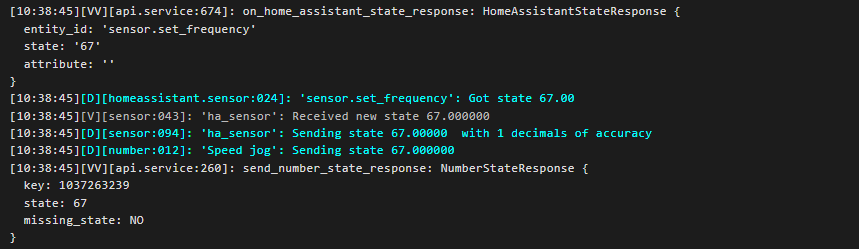
The new value also shows up in the logs.
So, moving the input_number slider indeed is being accepted by Number and the 2 sliders are synched, but only moving the Number slider results in Modbus commands being sent.
I tried a lambda_write, but that doesnt work either.
This code sends Modbus commands to the VFD, but only when the Number slider is moved.
number:
  - platform: modbus_controller
    modbus_controller_id: vfd
    id: speed_jog_
    name: "Speed jog"
    address: 0x1000
    register_type: holding
    value_type: U_WORD
    min_value: 15.00
    max_value: 50.00
    multiply: 200
    step: 0.5
lambda: "return x; "
write_lambda: |-
ESP_LOGD("main","Modbus Number incoming value =%f",x);
float speed_jog_ = x ;
payload.push_back(0x0106); // device address
payload.push_back(0x1000); // high byte address of the coil
payload.push_back(speed_jog_ * 200.00);
return (speed_jog_) ;