Your local HA ip-number 10.0.0.90 
Thanks
http://10.0.0.90:80 didn’t work. “Took too long”
Are you trying from your phone ?, or another device connected to Your Lan `?
my hp prodesk with virtual box oracle. wifi usb
thanks
What browser? Did you allow in firewall in Windows 11?
Are your hp prodesk with virtualbox connected to your lan over WIFI ?
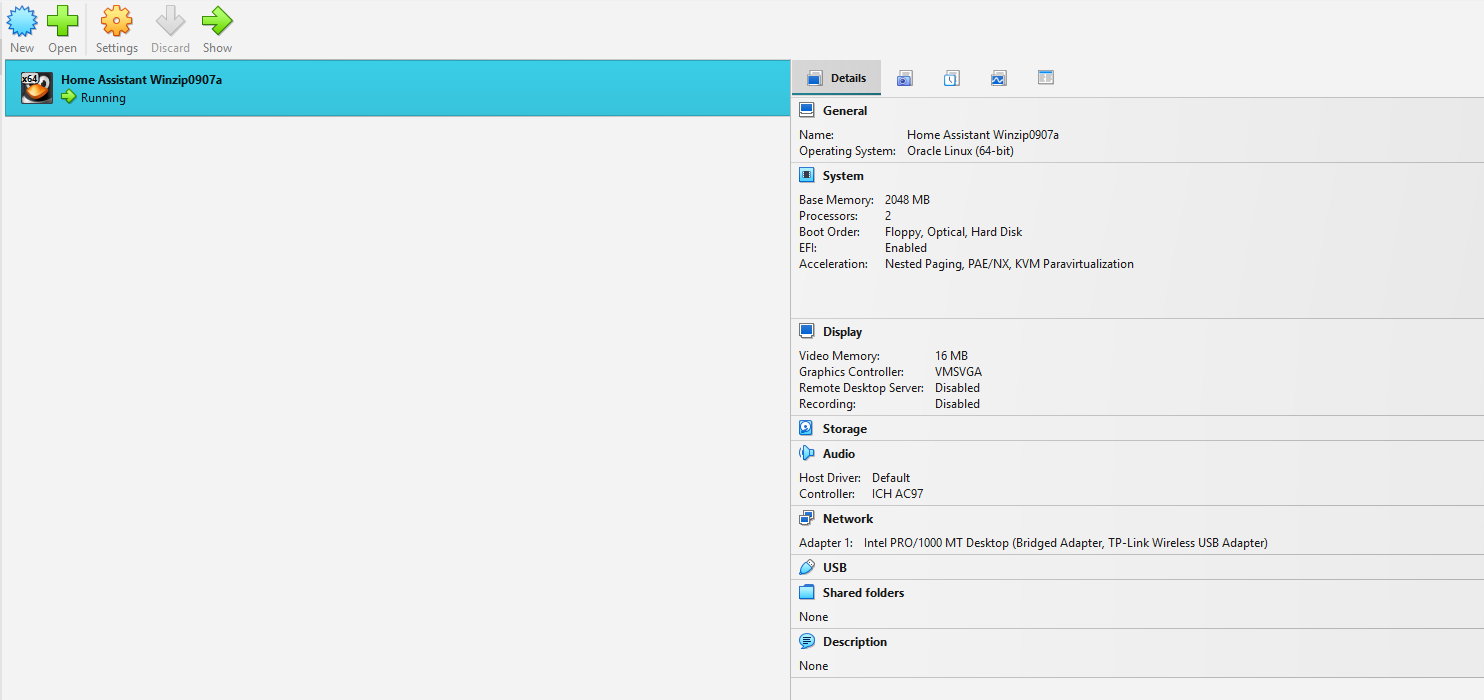
You need to set “Promiscuous Mode” to “Allow All” on your WIFI card(, check it’s settings maybe in bridge-mode-settings ) … decades ago i “tried” VirtualBox
And also try to access from a browser on your phone connected to same WIFI
Also please show the “header” of your browser, when you take a pic, so “people in the other end” can verify you i.e typed correct
You are aware that HA is a Server !, it’s suppose to run 24/7, and on over ethernet(yes wifi works, most of the time)
- But as you also started to install both virtualbox And your VM-file under your user-profile-file-structure this could also give you problems.
- Beside the fact that windows default “spins down” the Disk, going into sleep/or hibernate , This will definitely give you problems !
- Every time Windows(Microso-often) decide to force-Reboot do to an update “Poff” HA goes down
- Every time windows decides to “turn off” your USB-ports to “save power, HA probably wont respond”
- Etc Etc

So above requires you to make both virtualbox start upon boot of Your windows machine, and make virtuabox to startup HA upon startup-of virtualbox, and secure various settings in Windows allows HA to run properly.
PS: Using a windows device to run HA in a VM, basically requires you to “dedicate this device to HA”, only use windows to i.e browse the web, while troubleshooting etc.
Can you access http://10.0.0.90:4357 ?
no that link didn’t work. I did clear, delete all previous attempts of virtual box and files etc according to google ai help. This vb always is running when i come to computer. I don’t think it hibernates. The screen does and it wakes up no problem. Alexa said this setup should work which is why I went down this path. Never tried cell phone app.
I’m using chrome. Need to check w11 firewall. also running norton.
why? You don’t need Norton on W11, Defender is capable. You’re going to have a bad time if you have competing security software blocking ports and so on. One anti-virus is enough.