yes i did. Since the entities for air quality didn’t work after one of the last core updates, i deleted some of them and tried to set them up again. What version of the amazon media player and home assistant are you using?
Hi, I can’t get this to work. When I try and add the integration it keeps giving me a server 500 error when I try and login to the account (when it opens new web page to add details). Any idea? Put my login data in and then after trying to answer the text code bot check it just gives 500 error every time.
I enabled this and saw the entities under the integration but it does not list the AQS as a device
I am resurrecting this post again. Thanks to it, I have managed to integrate the air quality monitor into my HA dashboard, however I would like to create some automations using its values. For instance, I’d like to send a notification if CO rises above a certain level. Does anyone know if it’s possible or has tried this already?
I’m in the same boat. Were you ever able to figure out how to use its values to create automations?
Just in case people are trying to add Smart Air Quality Monitor (like me  ), we’ll have to wait a little bit : fix: restore Echo-connected devices by francescolf · Pull Request #2958 · alandtse/alexa_media_player · GitHub
1 Like
Dumb question, do I need an Alexa device in order to use this AQM with Home Assistant?
Seems to be the case if you want to use Alexa_media_player otherwise ont other thing seems to be possible here : Integrate Amazon Smart Air Quality Monitor - #45 by sashless
Thanks a lot for this great piece of work, I was able to reuse my sensor finally!!!
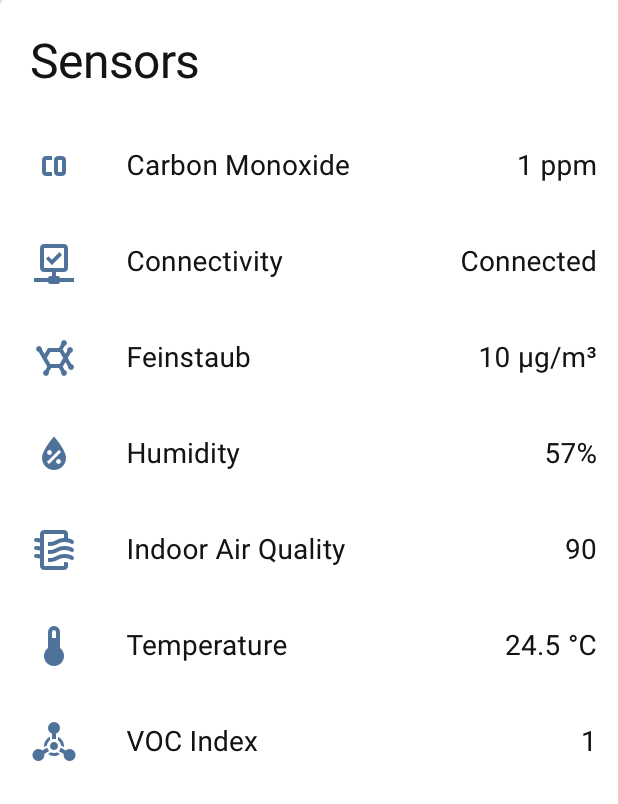
I was able to deploy some openhab on my docker server and did some re-work on the scripts that made it work for me a little more complete and leverage all available sensors.
/**
 * Gathers all sensor states and publishes them in a single MQTT message.
 * This should be used in a rule that triggers when any of the sensor items update.
 */
var pubState = () => {
  var broker = 'mqtt:broker:56d90ee02f'; // Your MQTT Broker Thing ID
  var topic = 'homeassistant/sensor/aqm/state';

  // Define all the item names
  var itemNames = [
    'Air_Quality_Monitor_Temperature',
    'Air_Quality_Monitor_Humidity',
    'Air_Quality_Monitor_Carbon_Monoxide',
    'Air_Quality_Monitor_VOC',
    'Air_Quality_Monitor_PM25',
    'Air_Quality_Monitor_Indoor_Air_Quality',
    'Air_Quality_Monitor_Connectivity'
  ];

  var payload = {};

  // Loop through each item, get its state, and add it to the payload
  itemNames.forEach(function(itemName) {
    var item = items.getItem(itemName);
    if (item && item.state !== 'NULL' && item.state !== 'UNDEF') {
      var value;
      // Handle connectivity as a string, others as numbers
      if (itemName === 'Air_Quality_Monitor_Connectivity') {
        value = item.state.toString(); // Keep as a string, e.g., "OK"
      } else {
        value = parseFloat(item.state); // Convert numeric sensors to numbers

        if (itemName === 'Air_Quality_Monitor_PM25') {
          // Convert from kg/m³ to µg/m³
          value *= 1000000000;
        } else if (itemName === 'Air_Quality_Monitor_Carbon_Monoxide') {
          // ** Convert fractional value to ppm **
          value *= 1000000;
        }
      }
      payload[itemName] = value;
    } else {
      console.warn('Item ' + itemName + ' has no valid state, skipping.');
      payload[itemName] = null;
    }
  });

  // Only publish if the payload has data
  if (Object.keys(payload).length > 0) {
    var msg = JSON.stringify(payload);
    console.debug('Publishing to MQTT - Topic: ' + topic + ' Message: ' + msg);
    actions.get('mqtt', broker).publishMQTT(topic, msg, false);
  } else {
    console.debug('Payload is empty, nothing to publish.');
  }
}

pubState();
And for the Topic Setup:
/**
 * Publishes the MQTT discovery configuration for all sensors to Home Assistant.
 * Run this script ONCE to set up the entities.
 */
var pubDiscovery = () => {
  var broker = 'mqtt:broker:56d90ee02f'; // Your MQTT Broker Thing ID
  var stateTopic = 'homeassistant/sensor/aqm/state';
  var device = {
    name: 'Amazon Smart Air Quality Monitor',
    identifiers: ['aqn']
  };

  // --- Temperature Sensor ---
  var tempConfig = {
    unique_id: 'aqmTemp',
    name: 'Temperature',
    device_class: 'temperature',
    state_topic: stateTopic,
    unit_of_measurement: '°C',
    value_template: '{{ value_json.Air_Quality_Monitor_Temperature }}',
    device: device
  };
  actions.get('mqtt', broker).publishMQTT('homeassistant/sensor/aqmTemp/config', JSON.stringify(tempConfig), true);

  // --- Humidity Sensor ---
  var humConfig = {
    unique_id: 'aqmHum',
    name: 'Humidity',
    device_class: 'humidity',
    state_topic: stateTopic,
    unit_of_measurement: '%',
    value_template: '{{ value_json.Air_Quality_Monitor_Humidity }}',
    device: device
  };
  actions.get('mqtt', broker).publishMQTT('homeassistant/sensor/aqmHum/config', JSON.stringify(humConfig), true);

  // --- Carbon Monoxide Sensor ---
  var coConfig = {
    unique_id: 'aqmCO',
    name: 'Carbon Monoxide',
    device_class: 'carbon_monoxide',
    state_topic: stateTopic,
    unit_of_measurement: 'ppm',
    value_template: '{{ value_json.Air_Quality_Monitor_Carbon_Monoxide }}',
    device: device
  };
  actions.get('mqtt', broker).publishMQTT('homeassistant/sensor/aqmCO/config', JSON.stringify(coConfig), true);

  // --- VOC Sensor (Corrected as an Index) ---
  var vocConfig = {
    unique_id: 'aqmVOC',
    name: 'VOC Index', // Renamed for clarity
    // REMOVED: device_class, as this is an index, not a concentration
    // REMOVED: unit_of_measurement, as this is an index
    icon: 'mdi:chemical-weapon', // Added a representative icon
    state_topic: stateTopic,
    value_template: '{{ value_json.Air_Quality_Monitor_VOC }}',
    device: device
  };
  actions.get('mqtt', broker).publishMQTT('homeassistant/sensor/aqmVOC/config', JSON.stringify(vocConfig), true);

  // --- PM2.5 Sensor (Feinstaub) ---
  var pm25Config = {
    unique_id: 'aqmPM25',
    name: 'Feinstaub',
    device_class: 'pm25',
    state_topic: stateTopic,
    unit_of_measurement: 'µg/m³',
    value_template: '{{ value_json.Air_Quality_Monitor_PM25 }}',
    device: device
  };
  actions.get('mqtt', broker).publishMQTT('homeassistant/sensor/aqmPM25/config', JSON.stringify(pm25Config), true);

  // --- Indoor Air Quality Sensor ---
  var aqiConfig = {
    unique_id: 'aqmIAQ',
    name: 'Indoor Air Quality',
    device_class: 'aqi',
    state_topic: stateTopic,
    value_template: '{{ value_json.Air_Quality_Monitor_Indoor_Air_Quality }}',
    device: device
  };
  actions.get('mqtt', broker).publishMQTT('homeassistant/sensor/aqmIAQ/config', JSON.stringify(aqiConfig), true);

  // --- Connectivity Sensor ---
  var connConfig = {
    unique_id: 'aqmConnectivity',
    name: 'Connectivity',
    device_class: 'connectivity',
    state_topic: stateTopic,
    payload_on: 'OK',
    payload_off: 'OFFLINE',
    value_template: '{{ value_json.Air_Quality_Monitor_Connectivity }}',
    device: device
  };
  actions.get('mqtt', broker).publishMQTT('homeassistant/binary_sensor/aqmConnectivity/config', JSON.stringify(connConfig), true);

  console.log('Finished publishing all MQTT discovery configurations.');
};

pubDiscovery();
I would also like to know this answer.
Hi everyone. I am trying to add my smart air quality monitor to HA using the HACS Alexa Media Player addon but once i configured everything, also checking “lookup for echo dot devices” but the air quality monitor sensor does not show up. I see other devices but that one no.
Can someone help me?
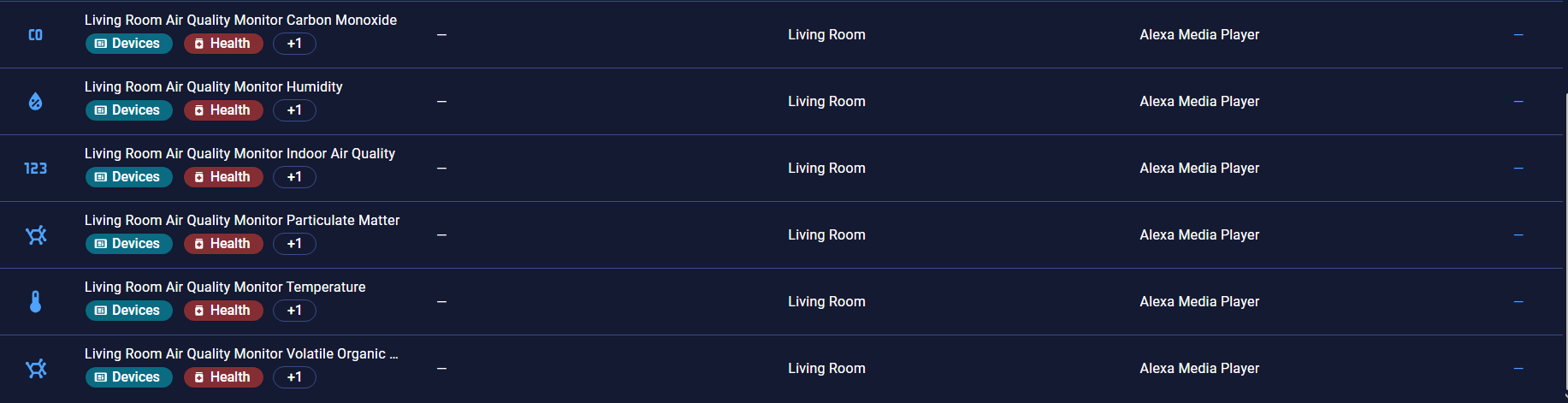
No more working since some days. Any solution for that?
Same here, only temperature is shown.