Integrate Philips Signify 'Wireless luminaire G2' Led Spots

Hello,

this is my first post and I’m new to ha and do not yet understand all the behind the scenes tech stuff - and probably never will :confused:

I started using HA because I’m in trouble with my shop lighting solution delivered by signify (former philips lightning). I have about 30 led spots of them installed in a 3-phase track (bluetooth, wifi, dimmable, fixed 4000K).

They can only be controled with their realy lousy app called interact pro. Within one years it happend two times, that all the spots lost their configuration and went out of control due to a software update they rolled out without beeing informed before. They sent three times a technician to handle a reset of all the spots but they failed and nobody knows how to properly reset them so far.

The Spots initial setup was accomplished with LCN1840/05 Interact Pro wireless gateway (it has the same look like the philips hue gateway but canot be discovered by HA).
After the last black out I removed the gateway and tried to set them up with bluetooth only which is possible too.

Now, all of a sudden, I discovered three of the spots in zigbee2mqtt. Their device type is ‘Router’.
In the Expose of the spot I can turn the light on and off, further it shows a power sensor which does report ‘Null w’ and a energy sensor which reports ‘46.98kWh’ which is probably the lifetime consumption(?).

Here is the generated definition of the dev console of the device:

const {onOff, electricityMeter, identify} = require('zigbee-herdsman-converters/lib/modernExtend');

const definition = {
    zigbeeModel: ['Wireless luminaire G2'],
    model: 'Wireless luminaire G2',
    vendor: 'Philips',
    description: 'Automatically generated definition',
    extend: [onOff({"powerOnBehavior":false}), electricityMeter({"cluster":"metering"}), identify()],
    meta: {},
};

module.exports = definition;

I tried some of the instructions here Support new devices on the Zigbee2MQTT site but could not yet implement the spot as a dimmable light. I’ve seen this error:

Failed to configure '0x0017880107abcdef', attempt 2 (Error: ConfigureReporting 0x0017880107abcdef/64 seMetering([{"minimumReportInterval":10,"maximumReportInterval":65000,"reportableChange":5000,"attribute":"instantaneousDemand"},{"minimumReportInterval":10,"maximumReportInterval":65000,"reportableChange":[0,100],"attribute":"currentSummDelivered"}], {"timeout":10000,"disableResponse":false,"disableRecovery":false,"disableDefaultResponse":true,"direction":0,"srcEndpoint":null,"reservedBits":0,"manufacturerCode":null,"transactionSequenceNumber":null,"writeUndiv":false}) failed (Status 'UNSUPPORTED_ATTRIBUTE') at Endpoint.checkStatus (/app/node_modules/zigbee-herdsman/src/controller/model/endpoint.ts:319:28) at Endpoint.configureReporting (/app/node_modules/zigbee-herdsman/src/controller/model/endpoint.ts:672:22) at setupAttributes (/app/node_modules/zigbee-herdsman-converters/src/lib/modernExtend.ts:55:13) at configure (/app/node_modules/zigbee-herdsman-converters/src/lib/modernExtend.ts:235:21) at Object.configure (/app/node_modules/zigbee-herdsman-converters/src/index.ts:140:25) at Configure.configure (/app/lib/extension/configure.ts:120:13) at EventEmitter.wrappedCallback (/app/lib/eventBus.ts:174:17))

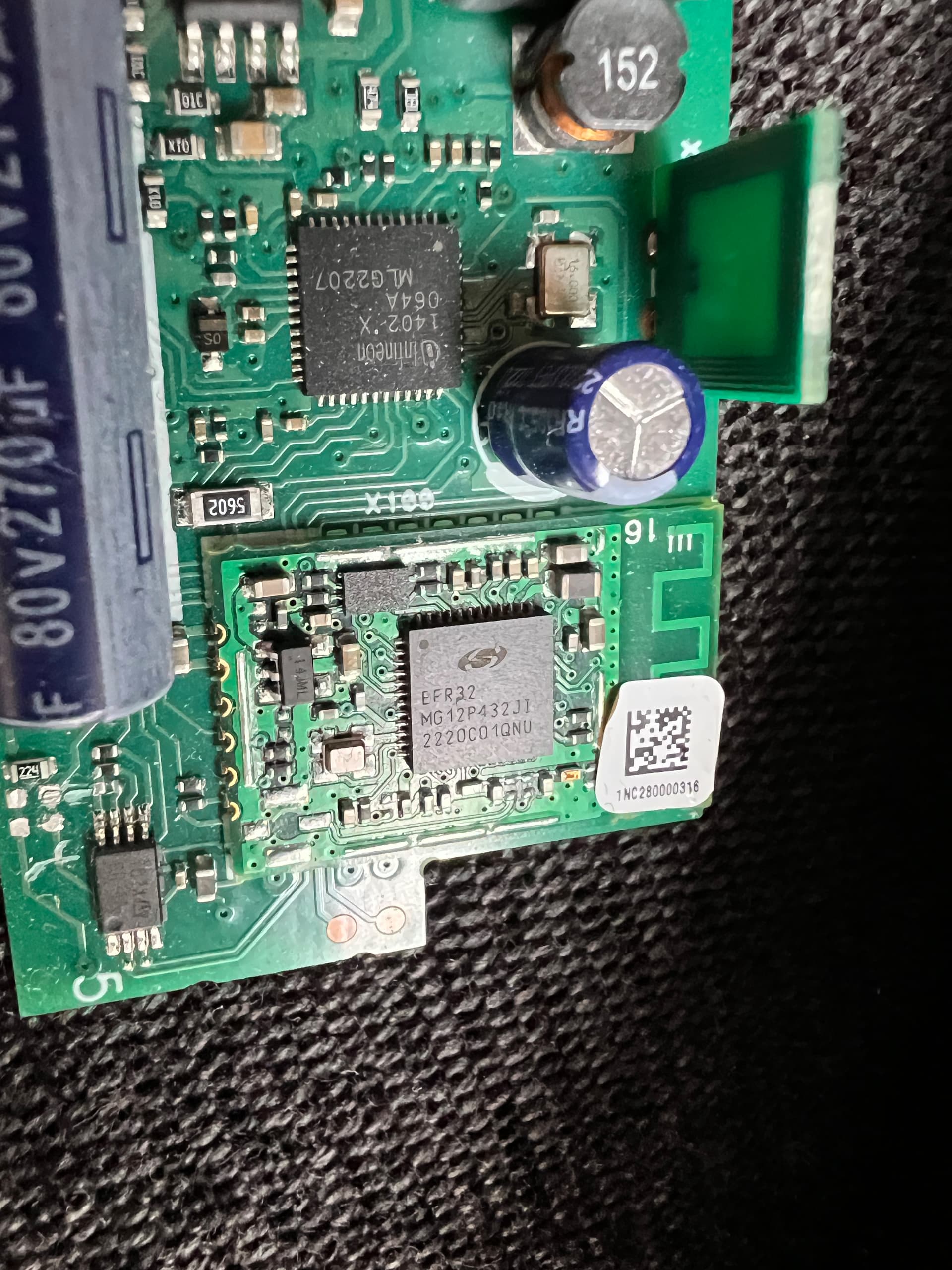
I was already so desperate that I opened the housing of the led driver of one spot to see, if there is a way to write some new firmware to them - but I don’t know if I would be able to do that.

Anyway, here is a insight to the driver board.

Thanks for reading till here, and finally the question:
Any chance to get this spots added to HA without rocket science?

Thank you
Tom

1 Like

Sorry for pushing.
May I forgot some more details about the setup:
My HA is installed on a synology nas in a VMM, using zigbee2mqtt with a sonoff USB Dongle.

I have a Philips Signify CoreLine Batten that presents itself in the same way.
It is an Interact Ready light as well.

With this code it works with basic functionality (dim and turn on and off):

const {philipsOnOff, philipsLight, philipsFz, philipsTz} = require('zigbee-herdsman-converters/lib/philips');

const definition = {
    zigbeeModel: ['Wireless luminaire G2'],
    model: 'Wireless luminaire G2',
    vendor: 'Philips',
    description: 'Interact Wireless Luminaire G2',
    extend: [philipsLight()],
};

module.exports = definition;

The light turns to full brightness when the connection is lost though (eg. Z2M restarts).
This might be an undocumented emergency light feature.

1 Like

Hi,

it’s been a while, and thanks to AI and a lot of frustration I were able to overtake those LEDs into HA:
Here is the process which helped me.
First of all @micheldejongh the power on behaviour which can be set in z2m only takes place when there was a power loss. These luminaires are multi-endpoint devices and there is a setting which is not available via z2m user interface. To have the brightness set to the previous one when turning them on you have to send the following topic once to the LED:
zigbee2mqtt/FRIENDLY_NAME_OF_THE_LED/64/set
Payload: {“level_config”: {“on_level”: 255}}
255 will set the device to ‘previous’ all other values between 0-254 will set the specific brightness where 0 is off and 254 is 100%.

But now to the whole process to get the LEDs out of the incredibly bad Philips Signify Interact system:
You will need a smartphone with the ‘Interact Pro’ app installed and with an account setup done. You will need this only once and it is free of charge as of today. Once you are logged in you must setup a project, within the project be sure you use bluetooth, not gateway!

Then you go to setup, create a network and from there you need to create a group, where you can add lights. Stop here where you see a warning message and/or a link “can’t find all lights?”. Just be ready at this point and be sure you have bluetooth turned on.

Now, the LED must be brought into a state, through switching sequences, to weaken its security mechanism. This is not yet the reset itself and it will not indicate a success through blinking as other smart LED devices behave!!!

I used a smart plug and the following automation for each on-off cycle as separate actions in an automation because you may have to play arround with the timings. This one worked for me (be carefull that you do not change neutral and line conductor when using a plug):

alias: Toggle Ikea Zigbee Plug
description: Toggles a Zigbee plug from on to off several times ending with state on
triggers:
  - trigger: state
    entity_id:
      - input_button.start_reset_cycle
actions:
  - action: switch.turn_off
    target:
      entity_id:
        - switch.ikeaplug01
    data: {}
  - delay:
      hours: 0
      minutes: 0
      seconds: 6
      milliseconds: 0
  - action: switch.turn_on
    target:
      entity_id:
        - switch.ikeaplug01
    data: {}
  - delay:
      hours: 0
      minutes: 0
      seconds: 3
      milliseconds: 0
  - action: switch.turn_off
    target:
      entity_id:
        - switch.ikeaplug01
    data: {}
  - delay:
      hours: 0
      minutes: 0
      seconds: 3
      milliseconds: 0
  - action: switch.turn_on
    target:
      entity_id:
        - switch.ikeaplug01
    data: {}
  - delay:
      hours: 0
      minutes: 0
      seconds: 3
      milliseconds: 0
  - action: switch.turn_off
    target:
      entity_id:
        - switch.ikeaplug01
    data: {}
  - delay:
      hours: 0
      minutes: 0
      seconds: 3
      milliseconds: 0
  - action: switch.turn_on
    target:
      entity_id:
        - switch.ikeaplug01
    data: {}
  - delay:
      hours: 0
      minutes: 0
      seconds: 3
      milliseconds: 0
  - action: switch.turn_off
    target:
      entity_id:
        - switch.ikeaplug01
    data: {}
  - delay:
      hours: 0
      minutes: 0
      seconds: 3
      milliseconds: 0
  - action: switch.turn_on
    target:
      entity_id:
        - switch.ikeaplug01
    data: {}
  - delay:
      hours: 0
      minutes: 0
      seconds: 3
      milliseconds: 0
  - action: switch.turn_off
    target:
      entity_id:
        - switch.ikeaplug01
    data: {}
  - delay:
      hours: 0
      minutes: 0
      seconds: 3
      milliseconds: 0
  - action: switch.turn_on
    target:
      entity_id:
        - switch.ikeaplug01
    data: {}
mode: single

Now you must be quick, because the weaker security state does not last for long time to my experience. You have to go close to the LED with your smartphone (5cm) and tap the “can’t find all lights? link.
Hopefully it finds the device and shows a reset button, quickly press the button and go to zigbee2mqtt “permit join” button.
z2m should now find the device and you will have some basic functionality: on/off, brightness.

If this does not work, you may want to place this external converter JS file into the zigbee2mqtt\external_converters directory (I commented out some lines during my painful journey to defeat these LEDs.):

import * as m from 'zigbee-herdsman-converters/lib/modernExtend';

export default {
    zigbeeModel: ['Wireless luminaire G2'],
    model: 'Wireless luminaire G2',
    vendor: 'Philips',
    description: 'Philips Wireless luminaire G2 (custom multi-endpoint)',
    extend: [
        m.deviceEndpoints({"endpoints":{"64":64,"65":65,"66":66,"80":80,"144":144}}),
        m.light({endpointNames: ['64']}),
        // m.electricityMeter({endpointNames: ['64']}),
        // m.illuminance({endpointNames: ['65']}),
        // m.occupancy({endpointNames: ['66']}),
        // If you want to experiment with group/remote commands, try also:
        // m.commandsOnOff({endpointNames: ['144']}),
        // m.commandsLevelCtrl({endpointNames: ['144']}),
    ],
    meta: {"multiEndpoint":true},
};

In the z2m configuration.yaml you point to this file like this:

advanced:
  external_converters:
    - external_converters/signify_wireless_luminaire_g2.js
  install_code:
    - 0x0017880100000000:0123456789ABCDEF0123456789ABCDEF1234

If you are lucky and still have the small QR-code sticker of the device at hand, this is the install code which you add as shown above: it is a prefix of 0x followed by the mac-address of the device without the colons, then there is one colon followed by the encrypted install code itself. I’m not sure if this is necesary but I had the ‘feeling’ it helped.

Please don’t blame on me for this lousy process but finally it worked and I have control over my 40+ LED devices and I can tell “Philips go and **** your self” (they flew in a ‘specialist’ from the Netherlands to Austria and he was not able to reset and configure the devices at all).

I also made a small ESP32 device with some rotary encoders (KY-040) for dimming and switching the lights on and off and it works much better and smoother as those “smart” switches from Philips Signify itself.