Integration of Sunlit battery

Hello,

I´m fairly new to home assistant so please be gentle.
I´m looking for a way to integrate my sunlit battery in home assistant and the deye inverter. I know the deye inverter has a web page which can be locally accesed but getting information from that page to HA i´m completely clueless.

The sunlit battery has an app which integrates the inverter, the battery and the shelly to just insert the power which is needed in the moment.

Thanks in advance

I’m sharing your request and currently running the sunlit system BK215/B215 with a shelly3EM Pro device. Runs smoothly and the sunlit app provides most of the necessary information, I just integrated shelly3EM Pro into my HA and I’m looking forward to get more out of it. So far, I only integrated the entities ‘total active energy’ and ‘total active returned energy’ in my energy dashbord… maybe some of the HA nerds can provide more support to get more out of it. Suppose one might be able to make use of template entities to use all attributes of the 3 phases….

Hey, it works now if you can put it together on your own.
A Christian W. figured it all out in the Sunlit forum.
Here’s a brief summary.
Everything the app gets, you also get…:
Install a man-in-the-middle proxy, e.g., with a plus certificate.
Then log the app’s traffic and extract the REST API token bearer and the SpaceID from SunLit.
Other messages reveal the possible entities later.

This only comes from the cloud about every 2 minutes, but can be processed automatically. This way, you can easily detect anomalies in your MPPT trackers, for example. And so on.
Here’s the post:

After much back and forth, I managed to integrate the PV input and SOC from the BK215 into the HA :raised_hands:t3: It’s not perfect, but at least I have data in the HA every few minutes. It’s controllable, of course…

The instructions from it:
https://paste.rs/7Ctdf.md

After this, I’m failing at the HA YAML, which always remains red in the checkbox, at the word template.
Unfortunately, I don’t yet know the difference between sensor and template.
Furthermore, the thing offers a ton of monitorable values. How do you integrate all the entities? A complete entry each time?
For the Energy Monitor, you also need the entities in kWh, not in watts.
There’s still some work to be done, send us your YAMLs :slight_smile:
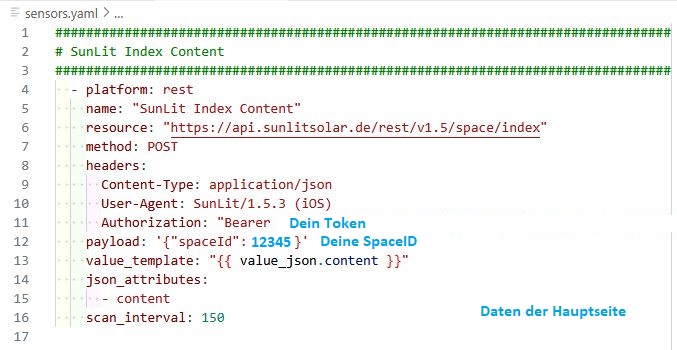
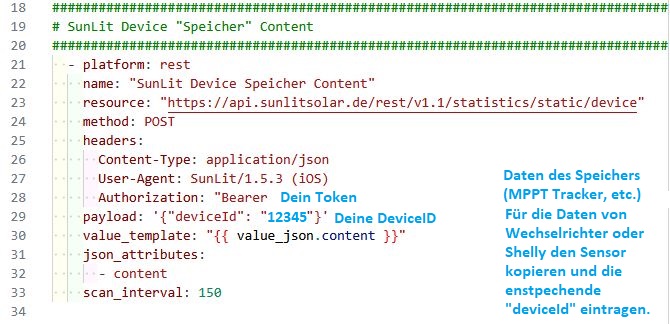
Finally, a few excerpts of what’s possible and how it’s implemented.

Feel free to post examples here; I’m stuck for it otherwise, but together we’ll get it done. Sunlit has been promising and not delivering for long enough.


    "content": {
        "deviceId": xxxxxx,
        "sn": "dcbdccc0815",
        "status": "Online",
        "subStatus": null,
        "deviceType": "ENERGY_STORAGE_BATTERY",
        "batterySoc": 67.0,
        "battery1Soc": 66.0,
        "battery2Soc": 70.0,
        "battery3Soc": 68.0,
        "chargeRemaining": 2.133333333333333,
        "dischargeRemaining": null,
        "fault": false,
        "inputPowerTotal": null,
        "outputPowerTotal": null,
        "off": false,
        "currentPower": null,
        "totalYield": null,
        "heaterStatusList": [
            false,
            false,
            false,
            false
        ],
        "totalAcPower": null,
        "dailyBuyEnergy": null,
        "dailyRetEnergy": null,
        "totalBuyEnergy": null,
        "totalRetEnergy": null,
REST-Sensor:

sensor:
  - platform: rest
    name: "SunLit Index Content"
    resource: "https://api.sunlitsolar.de/rest/v1.5/space/index"
    method: POST
    headers:
      Content-Type: application/json
      User-Agent: SunLit/1.5.3 (iOS)
      Authorization: "Bearer Dein_Token"
    payload: '{"spaceId": deine_spaceId}'
    value_template: "{{ value_json.content }}"
    json_attributes:
      - content
    scan_interval: 150

  - platform: rest
    name: "SunLit Device Speicher Content"
    resource: "https://api.sunlitsolar.de/rest/v1.1/statistics/static/device"
    method: POST
    headers:
      Content-Type: application/json
      User-Agent: SunLit/1.5.3 (iOS)
      Authorization: "Bearer Dein_Token"
    payload: '{"deviceId": "deine device_ID"}'
    value_template: "{{ value_json.content }}"
    json_attributes:
      - content
    scan_interval: 150

  - platform: rest
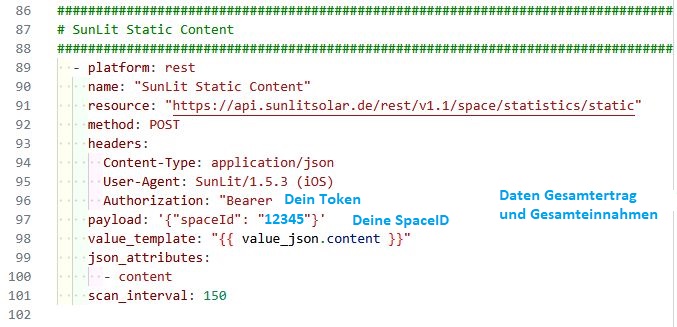
    name: "SunLit Static Content"
    resource: "https://api.sunlitsolar.de/rest/v1.1/space/statistics/static"
    method: POST
    headers:
      Content-Type: application/json
      User-Agent: SunLit/1.5.3 (iOS)
      Authorization: "Bearer Dein_Token"
    payload: '{"spaceId": "deine_spaceId"}'
    value_template: "{{ value_json.content }}"
    json_attributes:
      - content
    scan_interval: 150
  • sensor: is where you define real integrations (like REST, MQTT, etc.).
  • template: sensors are virtual sensors – they extract values from existing data (like the JSON from your REST sensor).

So first, you create one REST sensor to pull data from the API. Then, you create multiple template sensors that extract individual values (like PV input, SOC, yield, etc.).


Create dedicated YAML files (e.g. sunlit_sensors.yaml) and include them in your configuration.yaml:

# configuration.yaml
sensor: !include sunlit_sensors.yaml

Example Setup sunlit_sensors.yaml

  - platform: rest
    name: "SunLit BK215 SOC"
    resource: https://api.sunlitsolar.de/rest/v1.5/space/index
    method: POST
    headers:
      Content-Type: application/json
      Authorization: "Bearer YOUR_TOKEN_HERE"
    payload: '{"spaceId": 12345}'
    value_template: "{{ value_json.content.batterySoc }}"
    json_attributes:
      - content
    scan_interval: 180

  - platform: template
    sensors:
      sunlit_battery_1:
        friendly_name: "Battery 1 SOC"
        unit_of_measurement: "%"
        value_template: "{{ state_attr('sensor.sunlit_bk215_soc', 'content').battery1Soc }}"

      sunlit_pv_input:
        friendly_name: "PV Input Power"
        unit_of_measurement: "W"
        device_class: power
        value_template: "{{ state_attr('sensor.sunlit_bk215_soc', 'content').inputPowerTotal | default(0) }}"

This way, you only make one REST call, and split the values into as many template sensors as you need.


Convert PV Input Power (W) to kWh

Home Assistant does not automatically accumulate watt values over time. To convert PV input from watts to kWh, you can use the integration sensor.

Example: Create a kWh sensor from watt sensor

Assuming sunlit_pv_input provides watts:

sensor:
  - platform: integration
    source: sensor.sunlit_pv_input
    name: "SunLit PV Energy"
    unit_prefix: k
    round: 2
    method: trapezoidal
    unit_time: h
    device_class: energy
    state_class: total_increasing

This sensor will integrate watts over time into kilowatt-hours, which is required for the Energy Dashboard.

Make sure your sunlit_pv_input has device_class: power and updates regularly (e.g. every 2–5 minutes).

If you like, you can create template sensors via SettingsDevices & ServicesHelpers+ Create HelperTemplate

Hello Christian,
Cool that you came here.
My plan worked :slight_smile:

I’ll get to work on it. Thanks in advance.

So, for now, only sensors available at https://api.sunlitsolar.de/rest/v1.5/space/index can be created here.

For the sensors under Device List, these would probably require separate API calls, e.g., …/device/list

yes exactly! The endpoint https://api.sunlitsolar.de/rest/v1.5/space/index only returns a summary for one space (site), and that’s where the current REST sensors get their data from.

If you’re looking to access detailed per-device data (like individual inverters, batteries, heaters, etc.), then you’re right you’ll likely need to call another endpoint.


You can watch for requests in mitmproxy while you interact with the app especially when you tap on specific devices, view detailed performance graphs, open the “Device List”

That usually triggers additional API calls that might return more data, historical performance, per-device statistics, etc …

Yes, I see it now.

You posted faster than I could read.

I still have errors checking. I’ll delete everything and redo it.

Take your time.
Feel free to reach out if you get stuck or need help again.

I won’t go to bed until Sunlit talks to HA today…
We’ll see. Currently, the check is reporting a bunch of errors, even though I had your YAML exactly right (except for the token and ID, of course).

I’ll report any successes or failures.

I’d recommend only integrating the REST sensor first, without any template sensors.

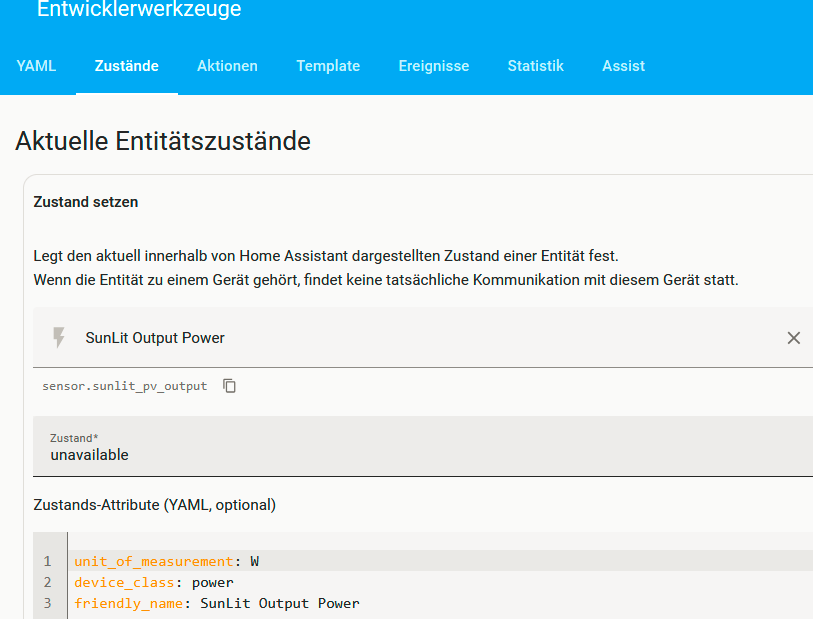
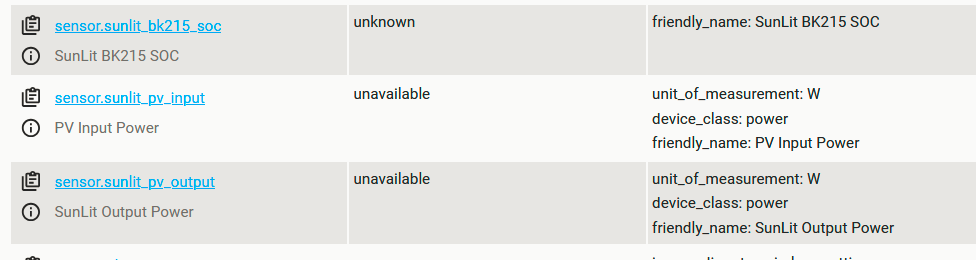
Then go to Developer Tools → States in Home Assistant and check if the sensor (e.g. sensor.sunlit_bk215_soc) appears and contains data.

Once that’s confirmed, you can safely build template sensors based on the available attributes without guessing or fighting with YAML errors.

I’m calling it a day for now, but feel free to post your progress.

I will try to help again tomorrow.

All right, I’m off now. I’m on a business trip tomorrow and probably won’t be in the forum.

So:
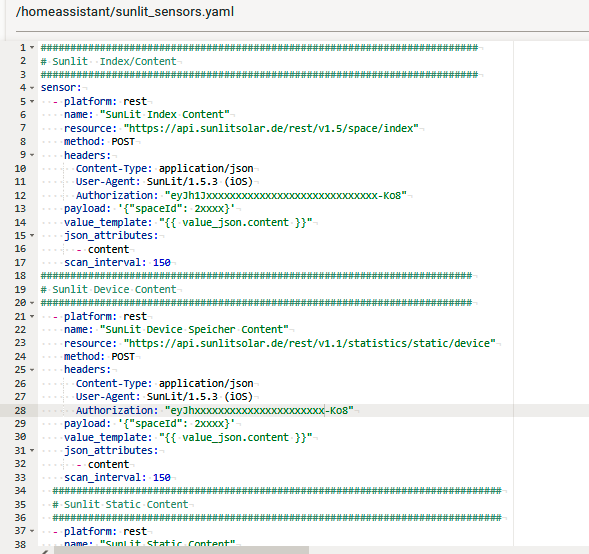
Created sunlite_sensors.yaml and implemented it there as per the forum
index content
device storage content
statistic content
; the YAML editor was also satisfied with it. (green dot)

However, there’s still a warning in the config check:
Invalid config for ‘sensor’ at configuration.yaml, line 120: required key ‘platform’ not provided

Line 120 is the link to sunlit_sensor.yaml
sensor: !include sunlit_sensors.yaml

I’ll stop there for now, thanks for your patience.
Question for tomorrow: Can you check the success of the API query in HA similarly to the proxy?
The templates will also be added to sunlit_sensor.yaml?
Greetings

Hi,
The following error message isn’t helping me.
First of all, I’ve only created these sensors three times.
grafik

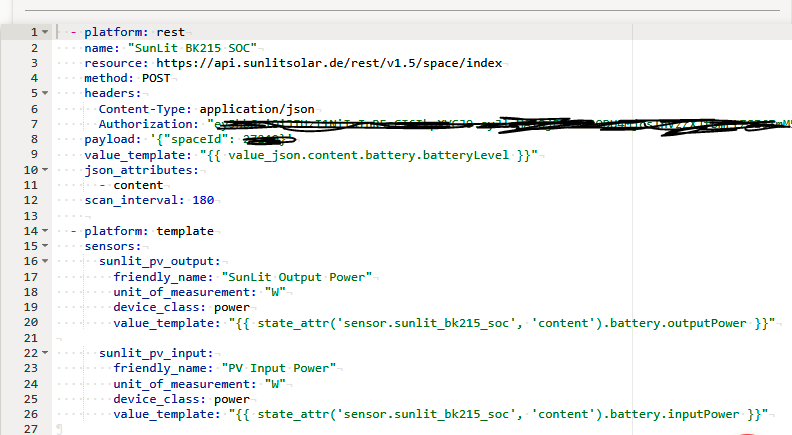
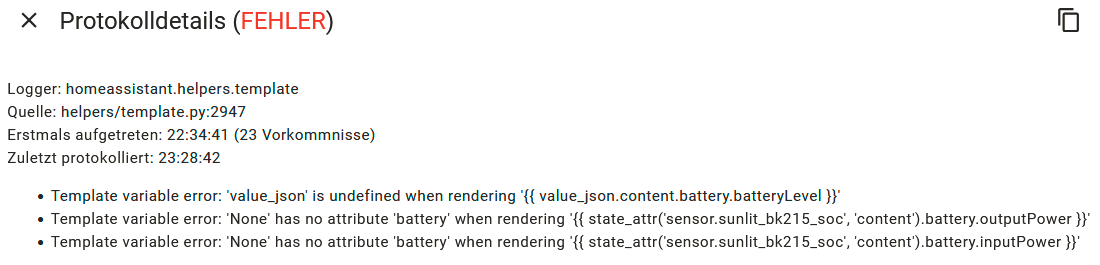
Now the “example: setup sunlit_sensors.yaml” worked. It started without errors, and the corresponding entities are being created. However, they still have no values. Unknown or zero watts. Where can I see the JSON data of the queries in HA?

Logger: homeassistant.helpers.event
Quelle: helpers/template.py:646
Erstmals aufgetreten: 21:33:36 (2 Vorkommnisse)
Zuletzt protokolliert: 21:33:36

EdiT:
Now I've found a configuration that's at least valid, and it also creates a sensor and two templates. However, I'm still not happy with it; the measured values ​​aren't displayed for some reason. All the logger settings that were offered as help were apparently not allowed for sensors. Well, I haven't given up yet.

Error while processing template: Template<template=({{ state_attr('sensor.sunlit_bk215_soc', 'content').battery.outputPower }}) renders=2>
Error while processing template: Template<template=({{ state_attr('sensor.sunlit_bk215_soc', 'content').battery.inputPower }}) renders=2>
Traceback (most recent call last):
  File "/usr/src/homeassistant/homeassistant/helpers/template.py", line 644, in async_render
    render_result = _render_with_context(self.template, compiled, **kwargs)
  File "/usr/src/homeassistant/homeassistant/helpers/template.py", line 2934, in _render_with_context
    return template.render(**kwargs)
           ~~~~~~~~~~~~~~~^^^^^^^^^^
  File "/usr/local/lib/python3.13/site-packages/jinja2/environment.py", line 1295, in render
    self.environment.handle_exception()
    ~~~~~~~~~~~~~~~~~~~~~~~~~~~~~~~~~^^
  File "/usr/local/lib/python3.13/site-packages/jinja2/environment.py", line 942, in handle_exception
    raise rewrite_traceback_stack(source=source)
  File "<template>", line 1, in top-level template code
  File "/usr/local/lib/python3.13/site-packages/jinja2/sandbox.py", line 319, in getattr
    value = getattr(obj, attribute)
  File "/usr/src/homeassistant/homeassistant/helpers/template.py", line 2966, in _fail_with_undefined_error
    return super()._fail_with_undefined_error(*args, **kwargs)
           ~~~~~~~~~~~~~~~~~~~~~~~~~~~~~~~~~~^^^^^^^^^^^^^^^^^
jinja2.exceptions.UndefinedError: 'None' has no attribute 'battery'

The above exception was the direct cause of the following exception:

Traceback (most recent call last):
  File "/usr/src/homeassistant/homeassistant/helpers/template.py", line 761, in async_render_to_info
    render_info._result = self.async_render(  # noqa: SLF001
                          ~~~~~~~~~~~~~~~~~^^^^^^^^^^^^^^^^^
        variables, strict=strict, log_fn=log_fn, **kwargs
        ^^^^^^^^^^^^^^^^^^^^^^^^^^^^^^^^^^^^^^^^^^^^^^^^^
    )
    ^
  File "/usr/src/homeassistant/homeassistant/helpers/template.py", line 646, in async_render
    raise TemplateError(err) from err
homeassistant.exceptions.TemplateError: UndefinedError: 'None' has no attribute 'battery'

Check if the REST sensor is receiving data

Steps:

  1. Go to Developer Tools → States in Home Assistant.
  2. Look for your sensor, e.g.
    sensor.sunlit_bk215_soc
  3. Look at the Attributes on the right:
    • Do you see an attribute called content?
    • Does it contain actual values like batterySoc, battery1Soc, etc.?

If it says content: None, the API is not returning data — possibly due to an invalid token or space ID.


Enable API Debug Logging

To see if the API request fails (e.g. 401 Unauthorized), enable debug logging:

In your configuration.yaml:

logger:
  default: warning
  logs:
    homeassistant.components.rest: debug

Fixing Template Sensor Errors

If you see errors like:

jinja2.exceptions.UndefinedError: 'None' has no attribute 'battery'

It means your value_template is trying to access something that doesn’t exist yet.

Example of a failing template:

{{ state_attr('sensor.sunlit_bk215_soc', 'content').battery.inputPower }}

This breaks if content is None.

Thanks for the reply. I already had debug mode enabled, but only at the info level instead of warning. However, I’m not sure whether this ends up in a special file or can be seen under system>logs. There are warnings there. Screen shot follows.

I didn’t know about developer tools > states > attributes. Screen shot follows. The content isn’t visible. I know what’s needed based on the proxy. Only the entries from the YAML are visible, but nothing that points to the API.

Hey, first of all in order to make sure you dont have to blackout the key evertime you can use and

    headers:
      Content-Type: application/json
      User-Agent: SunLit/1.5.3 (iOS)
      Authorization: !secret sunlit_token

and in the secrets.yaml file you need to add:

sunlit_token: "Bearer ey...DA"

Furthermore, I have integrated the MPPTs myself and noticed that the payload needs to include the following:

    payload: '{"spaceId": 99999, "deviceId": 99999}'

so my new sensors.yaml looks like this:

  - platform: rest
    name: "SunLit SoC"
    resource: "https://api.sunlitsolar.de/rest/v1.5/space/index"
    method: POST
    headers:
      Content-Type: application/json
      User-Agent: SunLit/1.5.3 (iOS)
      Authorization: !secret sunlit_token
    payload: '{"spaceId": 99999}'
    value_template: "{{ value_json.content.battery.batteryLevel }}"
    json_attributes:
      - content
    unit_of_measurement: "%"
    scan_interval: 180

  - platform: rest
    name: "SunLit MPPT"
    resource: "https://api.sunlitsolar.de/rest/v1.1/statistics/static/device"
    method: POST
    headers:
      Content-Type: application/json
      User-Agent: SunLit/1.5.3 (iOS)
      Authorization: !secret sunlit_mppt_token
    payload: '{"spaceId": 99999, "deviceId": 99999}'
    value_template: "{{ value_json.content.batteryMppt1Data.batteryMpptInPower }}"
    json_attributes:
      - content
    unit_of_measurement: "W"
    device_class: "power"
    scan_interval: 180

and my templates.yaml looks like this:

- sensor:
    - name: "MPPT 1 Spannung"
      unique_id: mppt1_voltage
      unit_of_measurement: "V"
      icon: mdi:flash
      state: >
        {% set attr = state_attr('sensor.sunlit_mppt', 'content') %}
        {% if attr and 'batteryMppt1Data' in attr %}
          {{ attr['batteryMppt1Data']['batteryMpptInVol'] }}
        {% else %}
          0
        {% endif %}

    - name: "MPPT 1 Strom"
      unique_id: mppt1_current
      unit_of_measurement: "A"
      icon: mdi:current-dc
      state: >
        {% set attr = state_attr('sensor.sunlit_mppt', 'content') %}
        {% if attr and 'batteryMppt1Data' in attr %}
          {{ attr['batteryMppt1Data']['batteryMpptInCur'] }}
        {% else %}
          0
        {% endif %}

    - name: "MPPT 1 Leistung"
      unique_id: mppt1_power
      unit_of_measurement: "W"
      device_class: power
      icon: mdi:power
      state: >
        {% set attr = state_attr('sensor.sunlit_mppt', 'content') %}
        {% if attr and 'batteryMppt1Data' in attr %}
          {{ attr['batteryMppt1Data']['batteryMpptInPower'] }}
        {% else %}
          0
        {% endif %}

    - name: "MPPT 2 Spannung"
      unique_id: mppt2_voltage
      unit_of_measurement: "V"
      icon: mdi:flash
      state: >
        {% set attr = state_attr('sensor.sunlit_mppt', 'content') %}
        {% if attr and 'batteryMppt2Data' in attr %}
          {{ attr['batteryMppt2Data']['batteryMpptInVol'] }}
        {% else %}
          0
        {% endif %}

    - name: "MPPT 2 Strom"
      unique_id: mppt2_current
      unit_of_measurement: "A"
      icon: mdi:current-dc
      state: >
        {% set attr = state_attr('sensor.sunlit_mppt', 'content') %}
        {% if attr and 'batteryMppt2Data' in attr %}
          {{ attr['batteryMppt2Data']['batteryMpptInCur'] }}
        {% else %}
          0
        {% endif %}

    - name: "MPPT 2 Leistung"
      unique_id: mppt2_power
      unit_of_measurement: "W"
      device_class: power
      icon: mdi:power
      state: >
        {% set attr = state_attr('sensor.sunlit_mppt', 'content') %}
        {% if attr and 'batteryMppt2Data' in attr %}
          {{ attr['batteryMppt2Data']['batteryMpptInPower'] }}
        {% else %}
          0
        {% endif %}

    - name: "MPPT Batterie 1 Leistung"
      unique_id: mppt_batt1_power
      unit_of_measurement: "W"
      device_class: power
      icon: mdi:power
      state: >
        {% set attr = state_attr('sensor.sunlit_mppt', 'content') %}
        {% if attr and 'battery1MpptData' in attr %}
          {{ attr['battery1MpptData']['batteryMpptInPower'] }}
        {% else %}
          0
        {% endif %}

    - name: "MPPT Batterie 2 Leistung"
      unique_id: mppt_batt2_power
      unit_of_measurement: "W"
      device_class: power
      icon: mdi:power
      state: >
        {% set attr = state_attr('sensor.sunlit_mppt', 'content') %}
        {% if attr and 'battery2MpptData' in attr %}
          {{ attr['battery2MpptData']['batteryMpptInPower'] }}
        {% else %}
          0
        {% endif %}

Your errors indicate that either:

  1. The REST API is not returning data
  2. The template is accessing attributes that don’t exist

To verify what you’re actually getting back from the API:

Go to:

Developer Tools → Templates

Enter this:

{{ state_attr('sensor.sunlit_bk215_soc', 'content') }}
  • If it returns None, the API call failed or returned no JSON
  • If it returns a dictionary, check what keys exist – e.g. batterySoc, inputPowerTotal, etc.

Hey,
that was the cause, and since I couldn’t verify the result, I was groping in the dark.
I couldn’t imagine that the word “bearer” belonged to the token. Which annoys me, though, because I had also seen that as a possible error, but forgot to ask.
grafik

Edit:
Very cool. A dream. I’m sure I can manage the rest with the templates. I hope this tip helps others too. Thank you so much again.
You’ve been doing this for a while… was 150 seconds the minimum interval? In the app, it seemed more like 90 to 120 seconds.
With more time, I’ll read everything out of the thing too!

Edit 2.
so i love my updatet Awtrix Pixelclock:
ergebnis-awtrix