AI Configuration Agent - Your Natural Language Config Assistant
Transform Home Assistant configuration with conversational AI
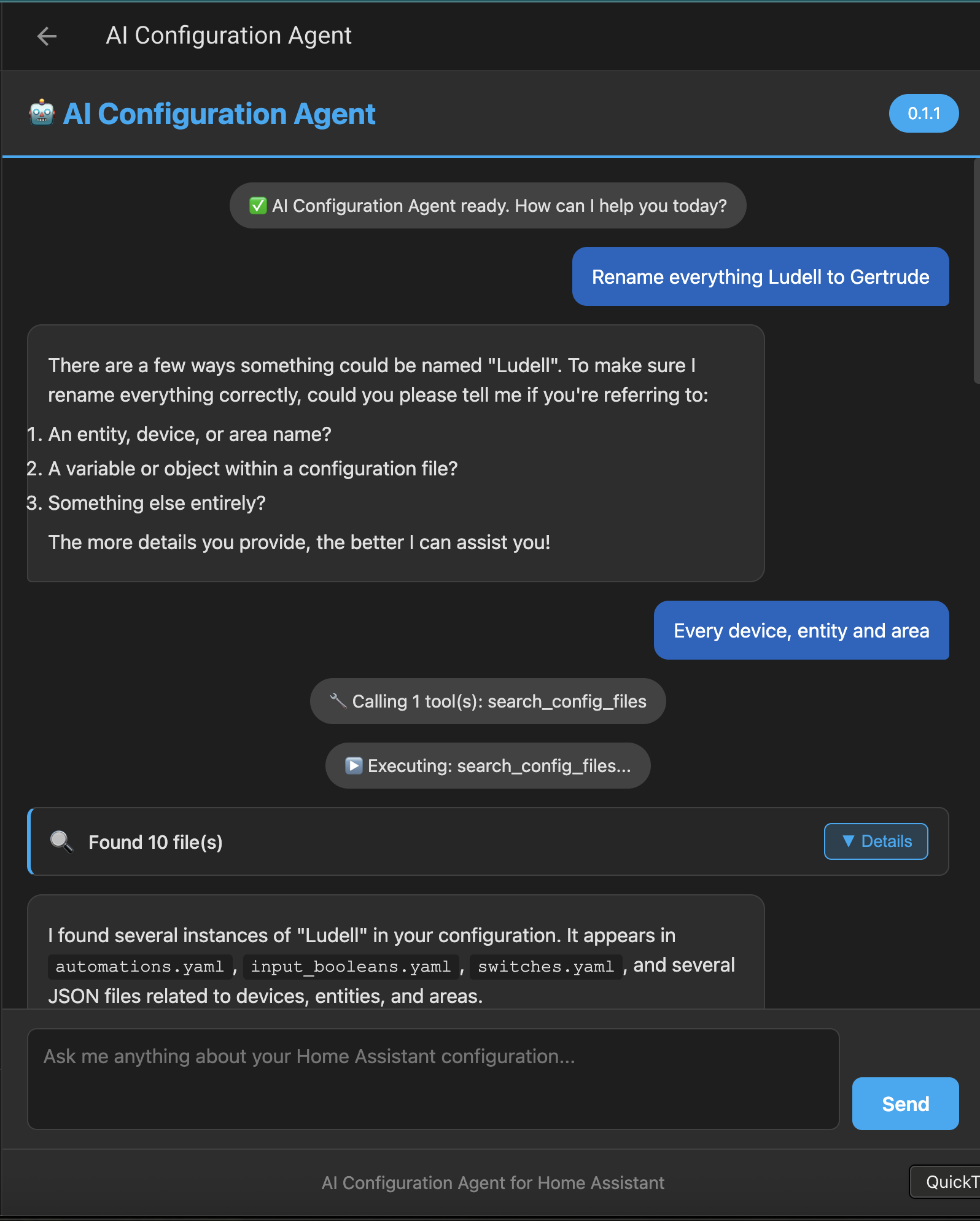
I’m excited to share a new add-on I’ve been working on that brings AI-powered configuration management to Home Assistant. Instead of manually editing YAML files, you can now describe what you want in plain English and let an AI agent handle the technical details.
What Does It Do?
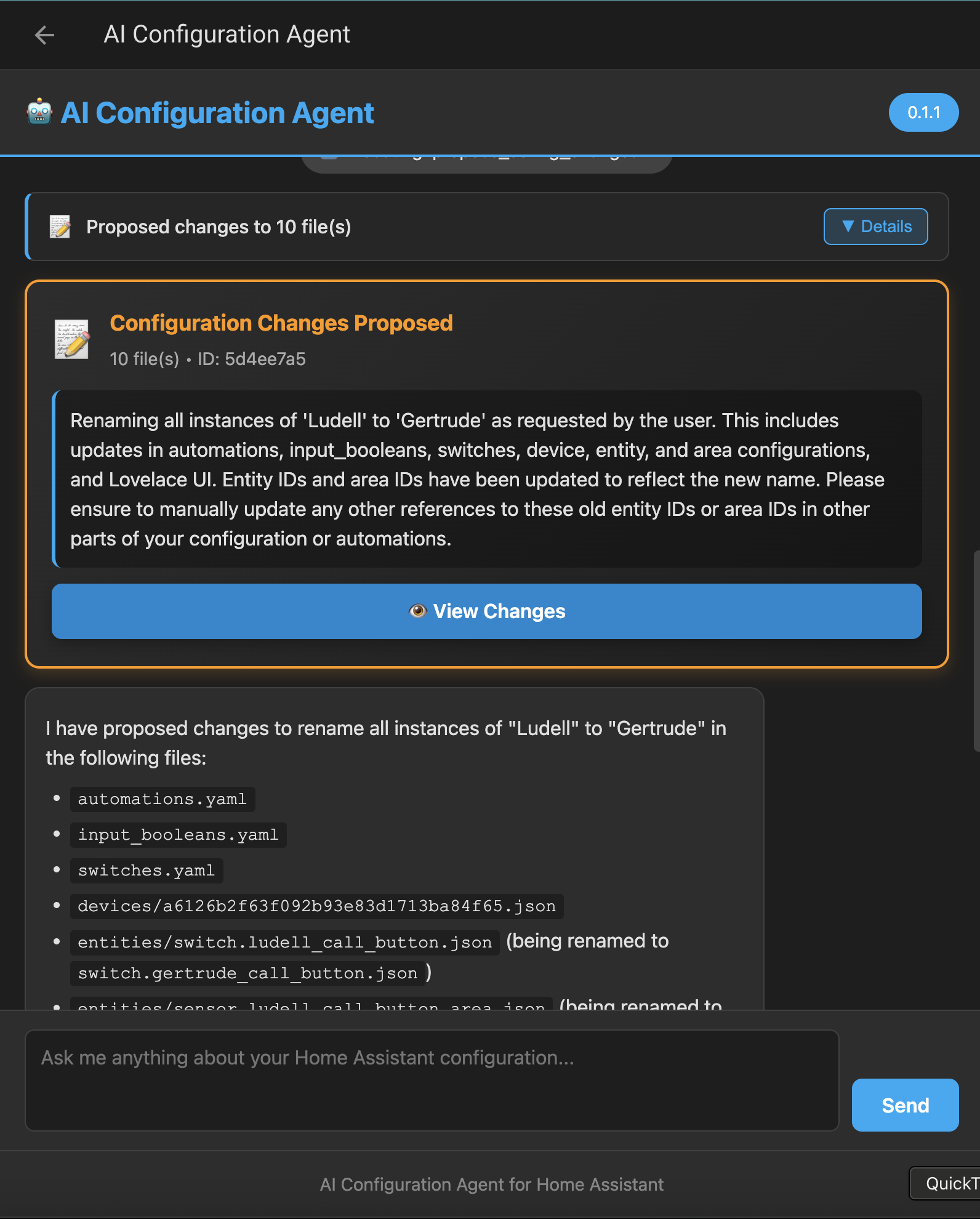
The AI Configuration Agent is a Home Assistant add-on that uses OpenAI’s Agent SDK to understand your configuration requests and safely modify your Home Assistant setup. Think of it as having an expert assistant who knows YAML, understands Home Assistant conventions, and can explain or modify your configuration on demand. Not only can it modify the YAML configuration files but it can also modify Dashboards and other entities configured in the UI.
Ask it things like:
- “Rename everything with Mary/mary to Ludell/ludell”
- “Add an automation to turn off all lights at midnight”
- “Show me all automations that use the motion sensor in the living room”
- “Create a script that announces when someone arrives home”
- “Explain what my existing bedroom automation does”
- “Add a notification when the front door is left open for 5 minutes”
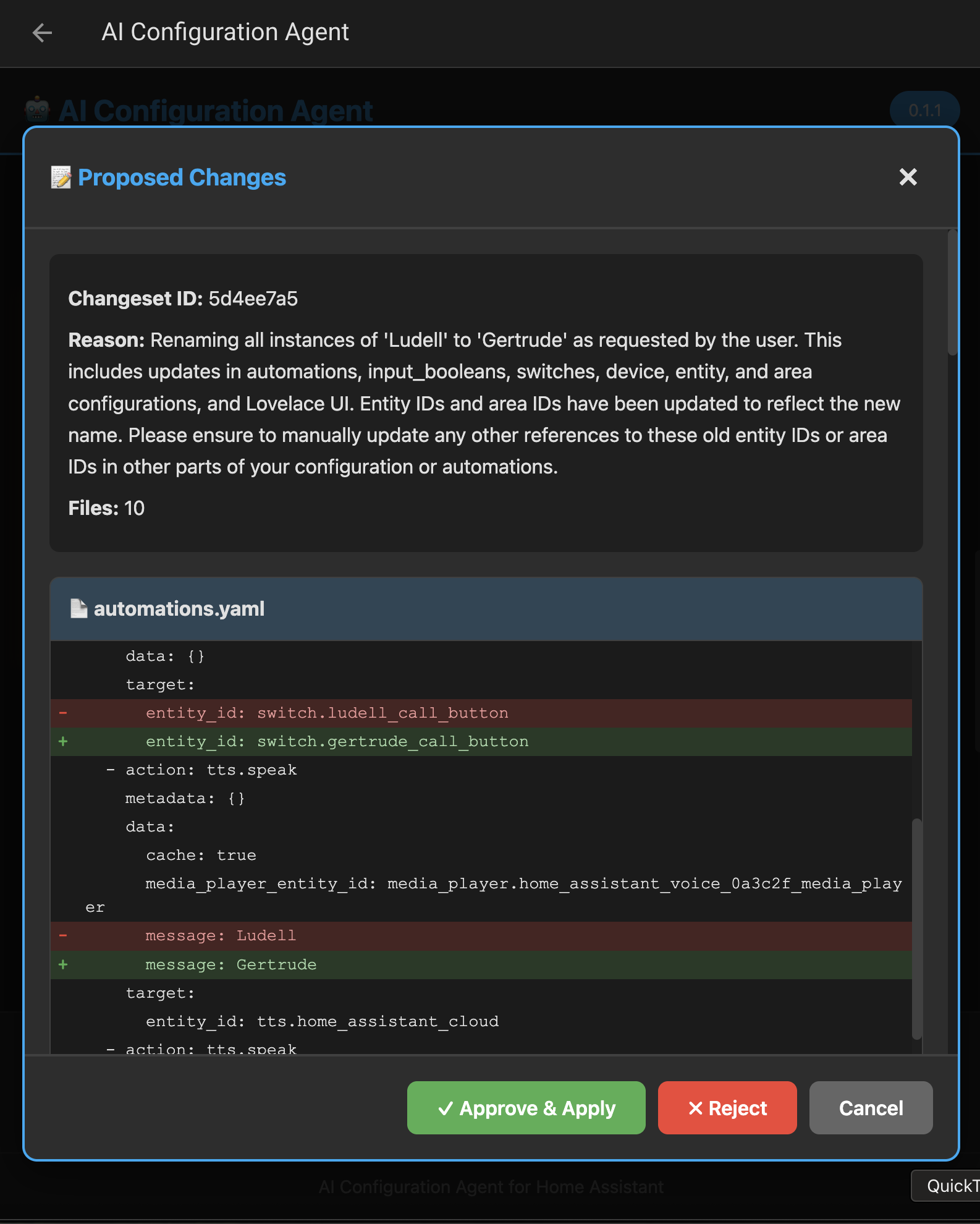
The agent analyzes your request, reads your current configuration, generates the necessary changes, and shows you a beautiful diff for approval before applying anything.
 Key Features
 Natural Language Interface
No more memorizing YAML syntax or Home Assistant conventions. Just describe what you want in plain language through a clean web interface.
 Review & Approve Workflow
Every configuration change is presented with a side-by-side diff showing exactly what will change. You approve or reject before anything touches your files.
 Safety First
- Automatic backups before every change
- YAML syntax validation
- Home Assistant configuration validation (
check_config) - Atomic file writes (never corrupt files)
- Rollback on validation failure
- Path traversal protection
- AppArmor sandboxing
 Preserves Your Formatting
Uses ruamel.yaml to maintain comments, formatting, and structure in your existing files. Changes are surgical - only modifying what’s necessary.
 Works With Any OpenAI-Compatible API
- Default: OpenAI GPT-5
- Custom endpoint support (OpenRouter, Anthropic, Azure, local models via Ollama)
- Configurable model selection
 Installation
Requirements
- Home Assistant OS, Supervised, or Container
- OpenAI API key (or compatible endpoint)
Steps
- Add the repository
- Go to Settings → Add-ons → Add-on Store → ⋮ Menu → Repositories
- Add:
https://github.com/yinzara/ha-config-ai-agent
- Install the add-on
- Find “AI Configuration Agent” in your add-on store
- Click Install
- Configure
- Open the add-on configuration tab
- Add your OpenAI API key
- (Optional) Customize model and endpoint
- Click Save
- Start
- Go to the Info tab
- Click Start
- Enable Start on boot (recommended)
- Access
- Click Open Web UI or find it in your sidebar
 Configuration Options
openai_api_url: "https://api.openai.com/v1"  # API endpoint
openai_api_key: "sk-..."                      # Your API key
openai_model: "gpt-4o"                        # Model to use
log_level: "info"                             # Logging verbosity
max_backups: 10                               # Backup retention
auto_approve: false                           # NEVER enable unless testing
Using Alternative Providers
OpenRouter (100+ models):
openai_api_url: "https://openrouter.ai/api/v1"
openai_api_key: "sk-or-v1-..."
openai_model: "google/gemini-2.5-flash"
Local Ollama:
openai_api_url: "http://your-ollama-server:11434/v1"
openai_api_key: "ollama"
openai_model: "llama3.1:70b"
Azure OpenAI:
openai_api_url: "https://your-resource.openai.azure.com/openai/deployments/your-deployment"
openai_api_key: "your-azure-key"
openai_model: "gpt-4"
 Example Use Cases
1. Creating Automations
You: "Create an automation that turns on the porch light at sunset and turns it off at 11 PM"

Agent: *Reads configuration.yaml and automations.yaml*
       *Generates new automation with proper triggers and actions*
       *Shows diff with added YAML*

You: *Approves*

Agent: ✅ Automation added successfully! Would you like me to explain how it works?
2. Debugging Configurations
You: "Why isn't my bedroom motion automation working?"

Agent: *Reads automations.yaml*
       I found your bedroom automation. I notice a few issues:
       1. The entity_id has a typo: 'binary_sensor.bedroom_motion_senson' should be 'sensor'
       2. The automation is currently disabled

       Would you like me to fix these issues?
3. Batch Operations
You: "Add a notification to all my door automations when I'm away"

Agent: *Analyzes all automations*
       I found 3 door-related automations. I'll add a condition to check if you're away
       and include a notification action to each. Here are the changes...
4. Learning Home Assistant
You: "Explain what template sensors are and show me examples from my config"

Agent: *Educational explanation + examples from your actual configuration*
 Security Considerations
- Authentication: Uses Home Assistant’s built-in Ingress authentication
- Sandboxing: AppArmor profile restricts file system and network access
- Validation: All changes validated before applying
- Backups: Automatic timestamped backups (configurable retention)
- Approval Required: No changes happen without explicit user approval
- Secrets Detection: Warns about hardcoded passwords/tokens in AI-generated configs
- Path Protection: Prevents directory traversal attacks
- Read-only by default: Analyzer agent cannot modify files
Important: Your OpenAI API key is stored in the add-on configuration (not accessible to the AI agent). API calls are made server-side. Your configuration never leaves your network except as LLM prompts.
 Contributing
This add-on is open source! Contributions welcome:
- GitHub: github.com/yinzara/ha-config-ai-agent
- Issues: Report bugs or request features
- Discussions: Share your use cases and tips
- Pull Requests: Code contributions appreciated
 Documentation
 FAQ
FAQ
Q: Does this replace manual YAML editing? A: No! It’s a helper tool. You can always edit files manually. The add-on is best for routine tasks, learning, or when you want to move fast.
Q: What if the AI makes a mistake? A: You review every change before it’s applied. If something goes wrong after approval, automatic backups make rollback easy.
Q: How much does it cost? A: The add-on is free. You pay for OpenAI API usage (~$0.01-0.10 per request depending on model). Or use free alternatives like local Ollama models.
Q: Can I use this without internet? A: Yes, if you use a local model via Ollama or similar. The add-on itself runs entirely locally.
Q: Will this work with my custom components? A: The AI understands standard Home Assistant conventions. Custom component support depends on how well-documented they are in the training data.
Q: What about secrets.yaml? A: The agent can read secrets.yaml (with permission) but is trained to suggest !secret references instead of hardcoding sensitive values.
 Acknowledgments
Built with:
- OpenAI Agents SDK - Agent orchestration
- ruamel.yaml - YAML round-trip editing
- FastAPI - Backend framework
- Diff2Html - Beautiful diffs
Inspired by the amazing Home Assistant community and the need to make configuration more accessible to everyone.
Feedback & Support
I’d love to hear your thoughts, use cases, and suggestions!
- This Thread: Share your experience below
- GitHub Issues: For bugs and feature requests
Try it out and let me know what you think. I’m especially interested in hearing about:
- Creative use cases I didn’t anticipate
- Configuration patterns that work particularly well (or don’t)
- Ideas for future agent capabilities
- Integration suggestions
Screenshots
Happy automating! 


 If you would like to propose a PR changing documentation to better reflect knowledge cut-off I’d be happy to review it. My system prompt is shared and configurable in the add on so if you don’t like what I choose, you can feel free to modify it to your hearts content.