So I first struggled endlessly getting what I wanted using the excellent usernein/tailwindcss-template-card) not the I did not get there in the end, but then I wanted a second card in the same style. And in the end I ended up making my own new custom lovelace card for my need, included blueprints (untested) for the advanced automations I have setup that use the cards. And even shared the automations in there whole.
See more on Personal Github, here you will also find the gists and automations
Blueprints
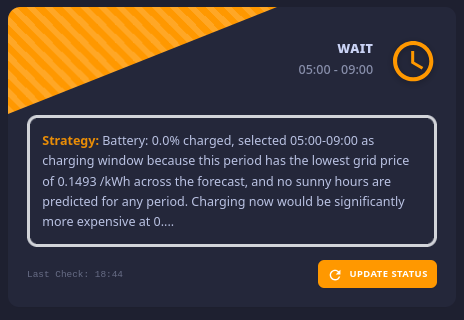
EV Charging: AI Energy Strategist
Find the correct gist on my github johnneerdael/ev-charging-001.yaml
Integrations Used
johnneerdael/Lynk-Co-HA (up to date integration for the EU Lynk & CO from yours truely)
LLM Vision
Pirate-Weather/pirate-weather-ha or any other weather provider with hourly forecasts and sun conditions in it
Frigate or any camera integration that can determine if your car is home
Build-in Sun Integration for next-setting and next-rising time (after all there is no sun at night)
A AI Task integration (I used Google Gemini) this is going to analyze the data to recommend a charging slot
A input_button helper
####Garbage Collection: Vision Verification
Find the correct gist on my github johnneerdael/garbage-collection.yaml
Integrations Used
LLM Vision
Frigate or any camera integration that can physically see your garbage bins
A TTS provider and speakers to send notifications to
Optional: A controllable light to take better snapshots of the garbage bins, my automation knows exactly which bins are out based on the color and we have 4
Automations (gists - not made from blueprint):
EV Charging Automation: johnneerdael/a71b316da3ece86165fe3ae4a9668023
Garbage Collection Automation: johnneerdael/f1907f11554b50ee9eee3391987f9092
Note due to being new I can’t add more links or credit people better, sorry!
Next let’s see if i can manage to get a fully functional shadcn/ui HA Card to see if the sky is the limit Progress is here but non-functional atm: shadcn/ui Home Assistant Card
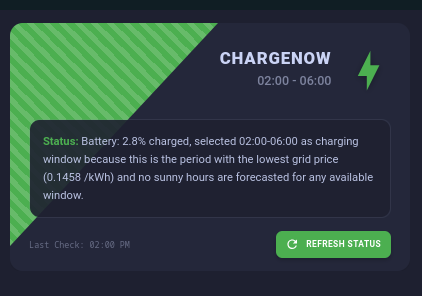
New up to date description: A flexible Home Assistant Lovelace card with a distinctive banner design (that can be disabled) for displaying entity states. This card excels at displaying “Call to Action” information—situations where the user needs to know something immediately or do something specific. Because of the distinct banner style and the ability to map colors to a flexible number of states, it works best for cards that should support 2 or more different types of states differently. Unique is that the card has no limit to the number of states or associated state colors that you want to report on.
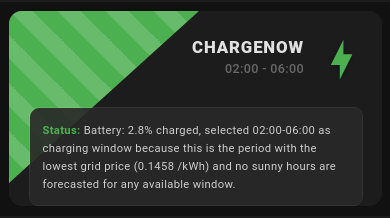
Had to respond since I haven’t been sitting still. I basically added tons of configuration options in the WebUI. You can now toggle the triangular accent on or off, change both the height and the width of it over the entire card length and height, made that status-box have a configurable opacity setting and made the title and subtitle font (CHARGENOW and time window is this example) adjustable… And for who wasn’t aware, the card has been designed to work with multiple states, you can map these state values to a colormap all from the UI which allows you have your card completely transformed in looks depending on the status. Combined with features like AI entity tasks you can also populate the box with extremely unique and difference text based on the state.
Also I believe the card might seem a bit complex at start, and people might struggle thinking of use cases, so I’ve outlined around 20 possible use-cases for the card in my readme but I will add them here to
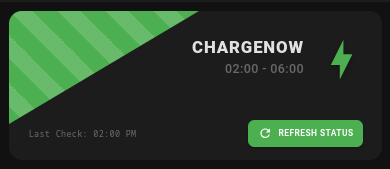
You can also make the card more compact by disabling the status box and the footer (or one or the other), below some simple examples of the same card with different UI settings.
This card excels at displaying “Call to Action” information—situations where the user needs to know something immediately or do something specific. Because of the distinct banner style and the ability to map colors to urgency, it works best for binary or ternary states (Good/Warning/Critical).
Home Maintenance & Chores
Washer/Dryer Status
State:Running / Finished / Idle
Banner: “LAUNDRY COMPLETE” (Green) vs “WASHING” (Blue)
Subtitle: “Cycle finished 10m ago” or “Time remaining: 15m”
Status Text: “Please move clothes to dryer.”
Dishwasher Cycle
State:Clean / Dirty / Running
Banner: “DISHES CLEAN” (Green) vs “RUNNING” (Blue)
Subtitle: “Ready to empty”
Status Text: “Cycle finished at 19:30.”
HVAC Filter Replacement
State:OK / Replace Soon / Overdue
Banner: “FILTER REPLACE” (Red) vs “AIR SYSTEM OK” (Green)
Subtitle: “Runtime: 300 hours”
Status Text: “Airflow restriction detected. Order generic size 20x20x1.”
Robotic Vacuum
State:Docked / Cleaning / Stuck / Bin Full
Banner: “ROBOROCK STUCK” (Red) or “CLEANING” (Blue)
Subtitle: “Location: Living Room”
Status Text: “Main brush entangled” or “Returning to dock to empty bin.”
Security & Safety
Perimeter/Window Monitor
State:Secure / Open / Raining & Open
Banner: “CLOSE WINDOWS” (Red) vs “HOUSE SECURE” (Green)
Subtitle: “Rain detected”
Status Text: “Master Bedroom window is currently open while it is raining.”
Garage Door Monitor
State:Closed / Open < 10m / Left Open
Banner: “GARAGE LEFT OPEN” (Red/Stripe)
Subtitle: “Open for 45 minutes”
Status Text: “No motion detected in garage. Tap to close.”
Smart Lock / Guest Access
State:Locked / Unlocked / Jammed
Banner: “FRONT DOOR UNLOCKED” (Orange)
Subtitle: “Auto-lock disabled”
Status Text: “Unlocked by ‘Cleaner Code’ at 10:00 AM.”
Leak Detection System
State:Dry / Leak Detected
Banner: “WATER LEAK DETECTED” (Red/Stripe)
Subtitle: “Location: Basement”
Status Text: “Main water valve has been shut off automatically.”
Environment & Health
Air Quality (CO2/PM2.5)
State:Good / Moderate / Unhealthy
Banner: “AIR QUALITY POOR” (Purple)
Subtitle: “CO2: 1200ppm”
Status Text: “Ventilation required. Open a window or boost HVAC fan.”
Plant Care (Aggregated)
State:Thriving / Thirsty / Fertilize
Banner: “WATER PLANTS” (Blue)
Subtitle: “3 Plants Critical”
Status Text: “Peace Lily and Monstera moisture levels below 15%.”
Pollen/Allergy Forecast
State:Low / High / Extreme
Banner: “HIGH POLLEN ALERT” (Orange)
Subtitle: “Tree Pollen: High”
Status Text: “Keep windows closed today. Air purifier set to High.”
Energy & Network
Grid Power Status (Solar)
State:Importing / Exporting / Peak Rate
Banner: “FREE ENERGY” (Green) vs “PEAK RATE” (Red)
Subtitle: “Solar Export: 3.2kW”
Status Text: “Great time to run the dishwasher or charge the car.”
Home Battery Backup
State:Charging / Discharging / Grid Outage
Banner: “RUNNING ON BATTERY” (Orange/Stripe)
Subtitle: “Grid Power Lost”
Status Text: “Est. runtime: 4 hours. Heavy loads (AC) disabled.”
Network/Server Health
State:Online / Offline / Degraded
Banner: “INTERNET DOWN” (Red)
Subtitle: “WAN IP Unreachable”
Status Text: "UDM Pro has been offline for 5 minutes. Attempting reboot.
3D Printer Status
State:Printing / Finished / Error
Banner: “PRINT COMPLETE” (Green)
Subtitle: “File: Bracket_v2.gcode”
Status Text: “Bed cooled to 30°C. Safe to remove object.”
Family & Lifestyle
Commute Traffic
State:Clear / Moderate / Heavy
Banner: “HEAVY TRAFFIC” (Red)
Subtitle: “+25 mins delay”
Status Text: “Accident on I-95. Suggest taking alternate route via Highway 1.”
Mail/Package Delivery
State:Empty / Mail Arrived / Package Retrieved
Banner: “YOU’VE GOT MAIL” (Yellow)
Subtitle: “Vibration detected”
Status Text: “Mailbox opened at 14:05. Not yet retrieved.”
Family Presence / House Mode
State:Home / Away / Vacation / Guest
Banner: “GUEST MODE ACTIVE” (Purple)
Subtitle: “Automations Paused”
Status Text: “Lighting motion sensors disabled. Alarm auto-arm disabled.”
Medication/Vitamin Reminder
State:Taken / Due / Missed
Banner: “TAKE MEDICATION” (Red)
Subtitle: “Morning Dose”
Status Text: “Button last pressed yesterday. Please acknowledge.”
Groceries / Shopping List
State:Empty / Items Pending
Banner: “SHOPPING NEEDED” (Blue)
Subtitle: “5 items on list”
Status Text: “Milk, Eggs, Bread. Tap to view full Todoist list.”
 Progress is here but non-functional atm:

 Home Maintenance & Chores
 Security & Safety
 Environment & Health
 Energy & Network
 Family & Lifestyle