The .ino code
// ESP32_IR_Blaster.ino
// Version 10.3 - Manual Code Entry Addition
// A hobby project for controlling IR devices with Home Assistant integration

// --- PRIVATE VARIABLES (EDIT THESE) ---
const char* ssid = "YourWiFiSSID"; // Replace with your Wi-Fi SSID
const char* password = "YourWiFiPassword"; // Replace with your Wi-Fi password
const char* mqtt_server = "192.168.x.x"; // Replace with your MQTT broker IP
const int mqtt_port = 1883;
const char* mqtt_user = "YourMQTTUser"; // Replace with your MQTT username
const char* mqtt_password = "YourMQTTPassword"; // Replace with your MQTT password
const char* mqtt_client_id = "irblaster"; // Replace if needed
const char* mqtt_status_topic = "irblaster/status"; // Replace if needed
const char* mqtt_command_topic = "irblaster/command"; // Replace if needed
IPAddress local_IP(192, 168, 1, 100); // Replace with desired ESP32 static IP
IPAddress gateway(192, 168, 1, 1); // Replace with your network gateway
IPAddress subnet(255, 255, 255, 0); // Replace with your subnet mask

// --- PIN DEFINITIONS ---
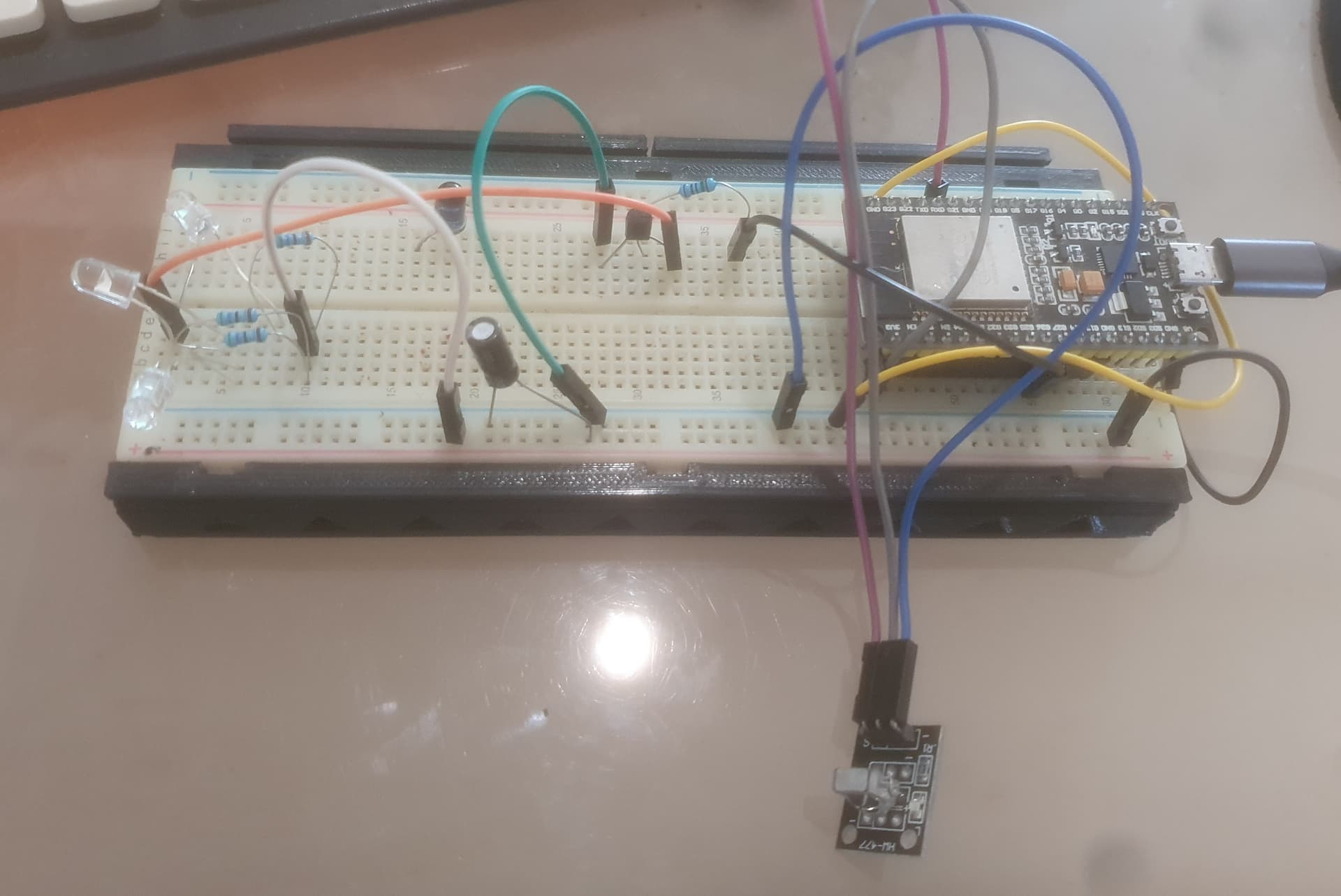
const int IR_RECEIVE_PIN = 21;
const int IR_SEND_PIN = 27;

// --- INCLUDES ---
#include <Arduino.h>
#include <IRremote.h>
#include <SPIFFS.h>
#include <ArduinoJson.h>
#include <vector>
#include <algorithm>
#include <WiFi.h>
#include <WebServer.h>
#include <ArduinoOTA.h>
#include <WiFiClient.h>
#include <PubSubClient.h>

// --- GLOBAL OBJECTS ---
WebServer server(80);
WiFiClient espClient;
PubSubClient mqttClient(espClient);

// --- CONSTANTS ---
const int APP_RAW_BUFFER_LENGTH = 1024;

// --- DATA STRUCTURE ---
struct IRCode {
  String name;
  decode_type_t protocol;
  uint64_t decodedRawData;
  uint16_t rawDataArray[APP_RAW_BUFFER_LENGTH];
  uint16_t rawDataLength;
};

// --- GLOBAL VARIABLES ---
std::vector<IRCode> learnedCodes;
StaticJsonDocument<8192> jsonDoc;

// --- FORWARD DECLARATIONS ---
void saveCode(const IRCode& code);
void doSend(const String& name);
bool doLearn(const String& name);
bool doLearnRaw(const String& name);
void doErase(const String& name);
void reconnectMQTT();
void mqttCallback(char* topic, byte* payload, unsigned int length);
void handleRoot();
void handleSend();
void handleLearn();
void handleLearnRaw();
void handleAdd();
void handleErase();
void handleRelearn();
void handleNotFound();
void publishMqttDiscovery();
String sanitizeForMqtt(const String& input);

// --- SETUP ---
void setup() {
    Serial.begin(115200);
    delay(1000);
    Serial.println("\n--- IR Remote (v10.3 - Manual Code Entry Addition) ---");
    IrReceiver.begin(IR_RECEIVE_PIN, DISABLE_LED_FEEDBACK);
    IrSender.begin(IR_SEND_PIN, DISABLE_LED_FEEDBACK, 0);
    if (!SPIFFS.begin(true)) { Serial.println("FATAL: SPIFFS Mount Failed"); return; }
    Serial.println("SPIFFS mounted successfully.");
    File root = SPIFFS.open("/");
    File file = root.openNextFile();
    while(file) {
        if (!file.isDirectory() && String(file.name()).endsWith(".ir")) {
            Serial.print("  Loading file: "); Serial.println(file.name());
            jsonDoc.clear();
            DeserializationError error = deserializeJson(jsonDoc, file);
            if (!error) {
                IRCode loadedCode;
                memset(loadedCode.rawDataArray, 0, sizeof(loadedCode.rawDataArray));
                loadedCode.name = jsonDoc["name"].as<String>();
                loadedCode.protocol = (decode_type_t)jsonDoc["protocol"].as<int>();
                if (loadedCode.protocol == UNKNOWN) {
                    loadedCode.rawDataLength = jsonDoc["rawDataLength"];
                    JsonArray rawDataJson = jsonDoc["rawDataArray"];
                    copyArray(rawDataJson, loadedCode.rawDataArray);
                } else {
                    loadedCode.decodedRawData = jsonDoc["rawData"].as<uint64_t>();
                }
                learnedCodes.push_back(loadedCode);
            }
        }
        file = root.openNextFile();
    }
    WiFi.config(local_IP, gateway, subnet);
    WiFi.setHostname("irblaster");
    WiFi.begin(ssid, password);
    while (WiFi.status() != WL_CONNECTED) { delay(500); Serial.print("."); }
    Serial.println("\nWiFi connected! IP: " + WiFi.localIP().toString());
    mqttClient.setServer(mqtt_server, mqtt_port);
    mqttClient.setBufferSize(1024);
    mqttClient.setCallback(mqttCallback);
    ArduinoOTA.begin();
    server.on("/", HTTP_GET, handleRoot);
    server.on("/send", HTTP_GET, handleSend);
    server.on("/learn", HTTP_POST, handleLearn);
    server.on("/learnraw", HTTP_POST, handleLearnRaw);
    server.on("/add", HTTP_POST, handleAdd);
    server.on("/erase", HTTP_GET, handleErase);
    server.on("/relearn", HTTP_GET, handleRelearn);
    server.onNotFound(handleNotFound);
    server.begin();
    Serial.println("HTTP server and OTA Ready.");
}

// --- MAIN LOOP ---
void loop() {
    if (!mqttClient.connected()) { reconnectMQTT(); }
    mqttClient.loop();
    ArduinoOTA.handle();
    server.handleClient();
}

// --- MQTT and COMMAND FUNCTIONS ---
void mqttCallback(char* topic, byte* payload, unsigned int length) {
  String message = "";
  for (unsigned int i = 0; i < length; i++) { message += (char)payload[i]; }
  Serial.printf("MQTT Message arrived [%s]: %s\n", topic, message.c_str());
  if (strcmp(topic, mqtt_command_topic) == 0) { doSend(message); }
}

void reconnectMQTT() {
    Serial.print("Attempting MQTT connection...");
    if (mqttClient.connect(mqtt_client_id, mqtt_user, mqtt_password, mqtt_status_topic, 0, true, "offline")) {
        Serial.println("connected");
        mqttClient.publish(mqtt_status_topic, "online", true);
        mqttClient.subscribe(mqtt_command_topic);
        Serial.println("Subscribed to command topic.");
        delay(1000);
        publishMqttDiscovery();
    } else {
        Serial.printf("failed, rc=%d try again in 5 seconds\n", mqttClient.state());
        delay(5000);
    }
}

// --- IR FUNCTIONS ---
bool doLearn(const String& name) {
    Serial.print("Learning standard code for '"); Serial.print(name); Serial.println("'. Point remote and press the button now...");
    decode_results results;
    IrReceiver.resume();
    unsigned long startTime = millis();
    while (millis() - startTime < 10000) {
        if (IrReceiver.decode(&results)) {
            if (results.value != REPEAT) {
                IRCode newCode = {name, results.decode_type, results.value};
                saveCode(newCode);
                bool found = false;
                for (auto& code : learnedCodes) { if (code.name.equalsIgnoreCase(name)) { code = newCode; found = true; break; } }
                if (!found) { learnedCodes.push_back(newCode); }
                Serial.println("\nSUCCESS: Code learned and saved!");
                publishMqttDiscovery();
                IrReceiver.resume();
                return true;
            }
            IrReceiver.resume();
        }
        delay(10);
    }
    Serial.println("\nERROR: Learning timed out.");
    return false;
}

bool doLearnRaw(const String& name) {
    Serial.print("Learning RAW code for '"); Serial.print(name); Serial.println("'. Point remote and press button now...");
    decode_results results;
    IrReceiver.resume();
    unsigned long startTime = millis();
    while (millis() - startTime < 10000) {
        if (IrReceiver.decode(&results)) {
            Serial.println("Signal received. Saving as RAW data regardless of protocol.");
            if (results.rawlen >= APP_RAW_BUFFER_LENGTH) {
                Serial.println("ERROR: IR signal is too long for the buffer.");
                IrReceiver.resume(); return false;
            }
            IRCode rawCode;
            rawCode.name = name; rawCode.protocol = UNKNOWN; rawCode.rawDataLength = results.rawlen;
            for (int i = 0; i < rawCode.rawDataLength; i++) { rawCode.rawDataArray[i] = results.rawbuf[i]; }
            saveCode(rawCode);
            bool found = false;
            for (auto& code : learnedCodes) { if (code.name.equalsIgnoreCase(name)) { code = rawCode; found = true; break; } }
            if (!found) { learnedCodes.push_back(rawCode); }
            Serial.println("\nSUCCESS: Code learned and saved as RAW!");
            publishMqttDiscovery();
            IrReceiver.resume();
            return true;
        }
        delay(10);
    }
    Serial.println("\nERROR: Learning timed out.");
    return false;
}

void doSend(const String& name) {
    for (const auto& code : learnedCodes) {
        if (code.name.equalsIgnoreCase(name)) {
            Serial.print("Sending command '"); Serial.print(name); Serial.println("'...");
            if (code.protocol == UNKNOWN) { IrSender.sendRaw(code.rawDataArray, code.rawDataLength, 38); }
            else {
                switch(code.protocol) {
                    case NEC: IrSender.sendNEC(code.decodedRawData, 32); break;
                    case SONY: IrSender.sendSony(code.decodedRawData, 12); break;
                    case SAMSUNG: IrSender.sendSAMSUNG(code.decodedRawData, 32); break;
                    case JVC: IrSender.sendJVC(code.decodedRawData, 16, false); break;
                    default: Serial.println("Protocol not supported."); break;
                }
            }
            return;
        }
    }
    Serial.print("Error: No code found with the name '"); Serial.print(name); Serial.println("'.");
}

// --- HELPER FUNCTIONS ---
void doErase(const String& name) {
    String filename = "/" + name + ".ir";
    if (SPIFFS.exists(filename)) {
        String object_id = sanitizeForMqtt(name);
        String configTopic = "homeassistant/button/" + String(mqtt_client_id) + "/" + object_id + "/config";
        mqttClient.publish(configTopic.c_str(), "", true);
        SPIFFS.remove(filename);
        learnedCodes.erase(std::remove_if(learnedCodes.begin(), learnedCodes.end(), [&](const IRCode& code){ return code.name.equalsIgnoreCase(name); }), learnedCodes.end());
        Serial.print("Code '"); Serial.print(name); Serial.println("' has been erased.");
        publishMqttDiscovery();
    }
}

void saveCode(const IRCode& code) {
    String filename = "/" + code.name + ".ir";
    File file = SPIFFS.open(filename, "w");
    if (!file) { Serial.println("Error saving code."); return; }
    jsonDoc.clear();
    jsonDoc["name"] = code.name;
    jsonDoc["protocol"] = (int)code.protocol;
    if (code.protocol == UNKNOWN) {
        jsonDoc["rawDataLength"] = code.rawDataLength;
        JsonArray rawArray = jsonDoc.createNestedArray("rawDataArray");
        for (int i = 0; i < code.rawDataLength; i++) { rawArray.add(code.rawDataArray[i]); }
    } else {
        jsonDoc["rawData"] = code.decodedRawData;
    }
    serializeJson(jsonDoc, file);
    file.close();
}

String sanitizeForMqtt(const String& input) {
    String output = input;
    output.toLowerCase();
    output.replace(" ", "_");
    return output;
}

void publishMqttDiscovery() {
    Serial.println("Publishing MQTT Discovery messages for all buttons...");
    for (const auto& code : learnedCodes) {
        String object_id = sanitizeForMqtt(code.name);
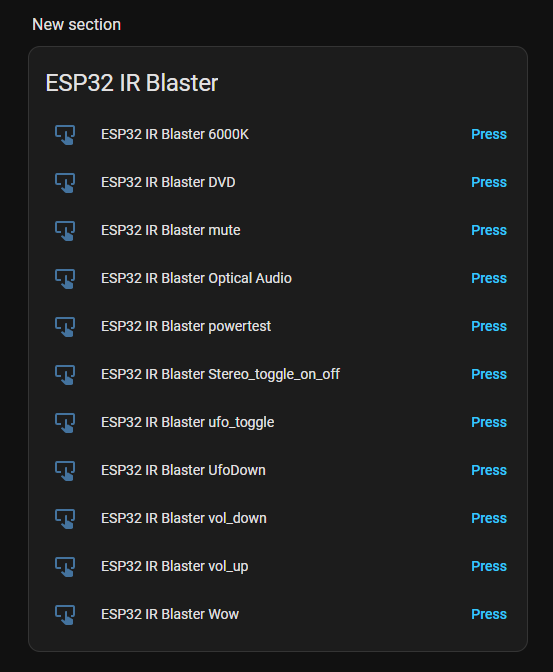
        String configTopic = "homeassistant/button/" + String(mqtt_client_id) + "/" + object_id + "/config";
        StaticJsonDocument<512> doc;
        doc["name"] = code.name;
        doc["unique_id"] = String(mqtt_client_id) + "_" + object_id;
        doc["command_topic"] = mqtt_command_topic;
        doc["payload_press"] = code.name;
        doc["availability_topic"] = mqtt_status_topic;
        JsonObject device = doc.createNestedObject("device");
        device["identifiers"] = mqtt_client_id;
        device["name"] = "ESP32 IR Blaster";
        device["manufacturer"] = "Espressif";
        device["model"] = "ESP32-WROOM-32";
        device["sw_version"] = "10.3-HA-Theme-Final";
        String jsonBuffer;
        serializeJson(doc, jsonBuffer);
        mqttClient.publish(configTopic.c_str(), jsonBuffer.c_str(), true);
    }
    Serial.println("MQTT Discovery messages published.");
}

void handleAdd() {
    if (server.hasArg("name") && server.hasArg("protocol") && server.hasArg("code_data")) {
        String name = server.arg("name");
        String protocolStr = server.arg("protocol");
        String codeData = server.arg("code_data");
        IRCode newCode;
        newCode.name = name;
        if (protocolStr == "NEC") {
            newCode.protocol = NEC;
        } else if (protocolStr == "SONY") {
            newCode.protocol = SONY;
        } else if (protocolStr == "SAMSUNG") {
            newCode.protocol = SAMSUNG;
        } else if (protocolStr == "JVC") {
            newCode.protocol = JVC;
        } else if (protocolStr == "UNKNOWN") {
            newCode.protocol = UNKNOWN;
        } else {
            server.sendHeader("Location", "/?status=error&message=Invalid+protocol", true);
            server.send(302, "text/plain", "");
            return;
        }
        if (newCode.protocol != UNKNOWN) {
            codeData.trim();
            if (codeData.startsWith("0x") || codeData.startsWith("0X")) {
                codeData = codeData.substring(2);
            }
            char* endPtr;
            newCode.decodedRawData = strtoull(codeData.c_str(), &endPtr, 16);
            if (*endPtr != '\0') {
                server.sendHeader("Location", "/?status=error&message=Invalid+hex+code", true);
                server.send(302, "text/plain", "");
                return;
            }
        } else {
            String rawData = codeData;
            rawData.trim();
            int index = 0;
            int start = 0;
            newCode.rawDataLength = 0;
            memset(newCode.rawDataArray, 0, sizeof(newCode.rawDataArray));
            while (index < rawData.length() && newCode.rawDataLength < APP_RAW_BUFFER_LENGTH) {
                int comma = rawData.indexOf(',', index);
                if (comma == -1) {
                    comma = rawData.length();
                }
                String value = rawData.substring(index, comma);
                value.trim();
                newCode.rawDataArray[newCode.rawDataLength] = value.toInt();
                if (newCode.rawDataArray[newCode.rawDataLength] == 0 && value != "0") {
                    server.sendHeader("Location", "/?status=error&message=Invalid+raw+data", true);
                    server.send(302, "text/plain", "");
                    return;
                }
                newCode.rawDataLength++;
                index = comma + 1;
            }
            if (newCode.rawDataLength == 0 || newCode.rawDataLength >= APP_RAW_BUFFER_LENGTH) {
                server.sendHeader("Location", "/?status=error&message=Invalid+raw+data+length", true);
                server.send(302, "text/plain", "");
                return;
            }
        }
        saveCode(newCode);
        bool found = false;
        for (auto& code : learnedCodes) {
            if (code.name.equalsIgnoreCase(name)) {
                code = newCode;
                found = true;
                break;
            }
        }
        if (!found) {
            learnedCodes.push_back(newCode);
        }
        publishMqttDiscovery();
        server.sendHeader("Location", "/?status=success&message=Code+added", true);
        server.send(302, "text/plain", "");
    } else {
        server.sendHeader("Location", "/?status=error&message=Missing+parameters", true);
        server.send(302, "text/plain", "");
    }
}

void handleRoot() {
  String page = R"=====(
<!DOCTYPE html>
<html>
<head>
    <title>ESP32 IR INTERFACE</title>
    <meta name='viewport' content='width=device-width, initial-scale=1'>
    <style>
        :root {
            --ha-background: #111111; --ha-card-background: #282828; --ha-primary-text-color: #E1E1E1; --ha-secondary-text-color: #9B9B9B;
            --ha-accent-color: #03A9F4; --ha-green-color: #4CAF50; --ha-amber-color: #FF9800; --ha-red-color: #F44336;
            --ha-border-color: #3E3E3E; --ha-input-fill-color: #3E3E3E;
        }
        body { font-family: -apple-system, BlinkMacSystemFont, "Segoe UI", Roboto, sans-serif; background-color: var(--ha-background); color: var(--ha-primary-text-color); margin: 0; padding: 12px; }
        .container { max-width: 800px; margin: auto; }
        .card { background-color: var(--ha-card-background); border-radius: 12px; padding: 24px; margin-bottom: 20px; box-shadow: 0 2px 4px rgba(0,0,0,0.2); }
        header { text-align: center; padding-bottom: 16px; }
        header h1 { margin: 0; font-weight: 400; letter-spacing: 0.5px; }
        h2 { font-weight: 500; letter-spacing: 0.2px; padding-bottom: 8px; border-bottom: 1px solid var(--ha-border-color); margin-top: 0; }
        .learn-section form { display: flex; gap: 10px; margin-bottom: 12px; }
        .learn-section input[type='text'], .learn-section select { flex-grow: 1; padding: 12px; border: 1px solid var(--ha-border-color); border-radius: 8px; background-color: var(--ha-input-fill-color); color: var(--ha-primary-text-color); font-size: 1em; }
        .learn-section input[type='submit'] { padding: 12px 20px; border: none; background-color: var(--ha-accent-color); color: white; border-radius: 8px; cursor: pointer; font-size: 1em; font-weight: 500; }
        .code-list { list-style: none; padding: 0; }
        .code-item { display: flex; justify-content: space-between; align-items: center; padding: 16px 0; border-bottom: 1px solid var(--ha-border-color); }
        .code-item:last-child { border-bottom: none; }
        .code-details .code-name { font-weight: 500; font-size: 1.1em; }
        .actions { display: flex; align-items: center; gap: 8px; }
        .actions a { text-decoration: none; padding: 10px 18px; color: white; border-radius: 8px; font-size: 0.9em; font-weight: 500; white-space: nowrap; text-align: center; }
        .send-btn { background-color: var(--ha-green-color); }
        .relearn-btn { background-color: var(--ha-amber-color); }
        .erase-btn { background-color: var(--ha-red-color); }
        #toast { display: none; position: fixed; top: 20px; left: 50%; transform: translateX(-50%); padding: 16px 32px; border-radius: 12px; color: white; font-size: 1.2em; font-weight: 500; z-index: 1000; box-shadow: 0 4px 8px rgba(0,0,0,0.3); }
        #toast.success { background-color: var(--ha-green-color); }
        #toast.fail { background-color: var(--ha-red-color); }
        #toast.learn { background-color: var(--ha-accent-color); }
        @media (max-width: 600px) {
            body { padding: 8px; } .card { padding: 16px; } .code-item { flex-direction: column; align-items: stretch; gap: 15px; }
            .actions { flex-direction: row; justify-content: space-around; width: 100%;} .actions a { flex-grow: 1; }
        }
    </style>
</head>
<body>
    <div class='container'>
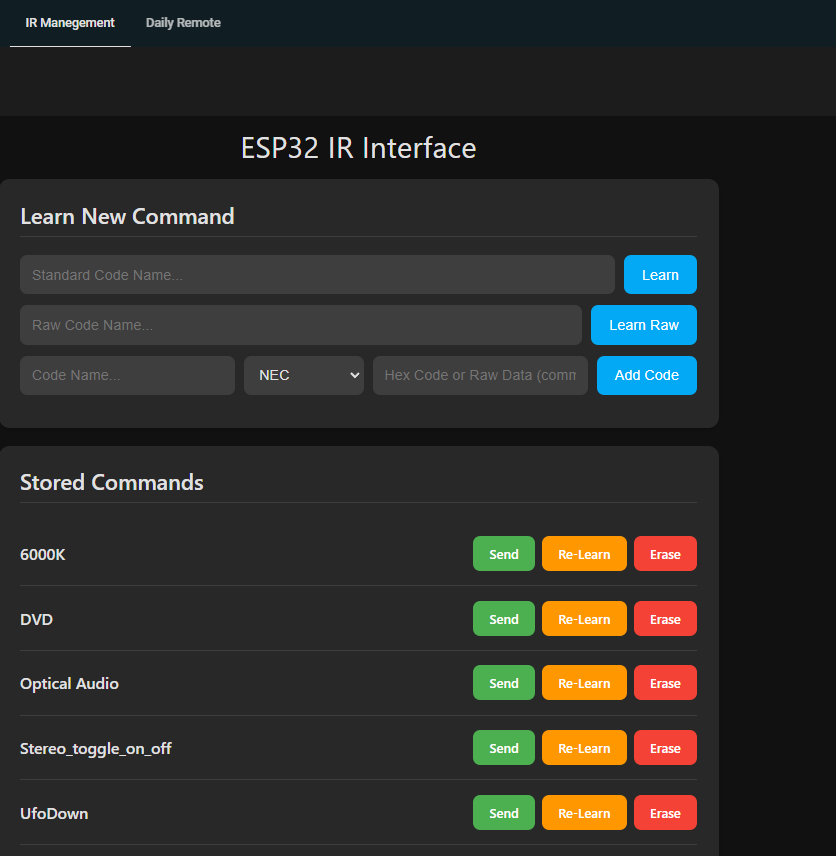
        <header><h1>ESP32 IR Interface</h1></header>
        <div class="card">
            <h2>Learn New Command</h2>
            <div class='learn-section'>
                <form id='learnForm' action='/learn' method='POST'>
                    <input type='text' name='name' placeholder='Standard Code Name...' required>
                    <input type='submit' value='Learn'>
                </form>
                <form id='learnRawForm' action='/learnraw' method='POST'>
                    <input type='text' name='name' placeholder='Raw Code Name...' required>
                    <input type='submit' value='Learn Raw'>
                </form>
                <form id='addForm' action='/add' method='POST'>
                    <input type='text' name='name' placeholder='Code Name...' required>
                    <select name='protocol' required>
                        <option value='NEC'>NEC</option>
                        <option value='SONY'>Sony</option>
                        <option value='SAMSUNG'>Samsung</option>
                        <option value='JVC'>JVC</option>
                        <option value='UNKNOWN'>Raw</option>
                    </select>
                    <input type='text' name='code_data' placeholder='Hex Code or Raw Data (comma-separated)' required>
                    <input type='submit' value='Add Code'>
                </form>
            </div>
        </div>
        <div class="card">
            <h2>Stored Commands</h2>
            <ul class='code-list'>
)=====";

  if (learnedCodes.empty()) {
    page += "<li>No codes stored. Use the forms above to learn a new command.</li>";
  } else {
    std::sort(learnedCodes.begin(), learnedCodes.end(), [](const IRCode& a, const IRCode& b){ return a.name < b.name; });
    for (const auto& code : learnedCodes) {
      page += "<li class='code-item'><div class='code-details'><div class='code-name'>" + code.name + "</div></div>";
      page += "<div class='actions'><a href='/send?name=" + code.name + "' class='send-btn'>Send</a><a href='/relearn?name=" + code.name + "' class='relearn-btn' onclick=\"showToast('Awaiting IR Signal...', 'learn');\">Re-Learn</a><a href='/erase?name=" + code.name + "' class='erase-btn' onclick='return confirm(\"Are you sure?\");'>Erase</a></div></li>";
    }
  }

  page += R"=====(
            </ul>
        </div>
    </div>
    <div id="toast"></div>
    <script>
        function showToast(message, type, duration = 2000) {
            const toast = document.getElementById("toast");
            toast.textContent = message;
            toast.className = type;
            toast.style.display = 'block';
            if (type === 'learn') {
                document.querySelector('.container').style.opacity = '0.3';
            } else {
                setTimeout(() => {
                    toast.style.display = 'none';
                    window.location.href = '/';
                }, duration);
            }
        }
        document.querySelectorAll('form').forEach(form => {
            form.addEventListener('submit', function() {
                showToast('Processing...', 'learn');
            });
        });
        window.onload = function() {
            const params = new URLSearchParams(window.location.search);
            if (params.has('status')) {
                let message = params.get('message') || '';
                if (params.get('status') === 'success') {
                    showToast(message || 'Success: Code Stored!', 'success');
                } else if (params.get('status') === 'timeout') {
                    showToast(message || 'Failure: Learning Timed Out', 'fail');
                } else if (params.get('status') === 'error') {
                    showToast(message || 'Failure: Invalid Input', 'fail');
                }
            }
        };
    </script>
</body>
</html>
)=====";
  server.send(200, "text/html", page);
}

void handleLearn() {
    if (server.hasArg("name")) {
        bool success = doLearn(server.arg("name"));
        if (success) {
            server.sendHeader("Location", "/?status=success", true);
        } else {
            server.sendHeader("Location", "/?status=timeout", true);
        }
        server.send(302, "text/plain", "");
    }
}

void handleLearnRaw() {
    if (server.hasArg("name")) {
        bool success = doLearnRaw(server.arg("name"));
        if (success) {
            server.sendHeader("Location", "/?status=success", true);
        } else {
            server.sendHeader("Location", "/?status=timeout", true);
        }
        server.send(302, "text/plain", "");
    }
}

void handleSend() { if (server.hasArg("name")) { doSend(server.arg("name")); server.sendHeader("Location", "/", true); server.send(302, "text/plain", ""); } }
void handleErase() { if (server.hasArg("name")) { doErase(server.arg("name")); server.sendHeader("Location", "/", true); server.send(302, "text/plain", ""); } }
void handleRelearn() { if (server.hasArg("name")) { String name = server.arg("name"); bool isRaw = false; for (const auto& code : learnedCodes) { if (code.name.equalsIgnoreCase(name)) { if (code.protocol == UNKNOWN) { isRaw = true; } break; } } if (isRaw) { handleLearnRaw(); } else { handleLearn(); } } }
void handleNotFound() { server.send(404, "text/plain", "Not found"); }