Just got myself a Roomba Plus 405 at - as I think - a good price during the Amazon Prime days.
Reasonably impressed by the device, not so much by the app
As I ran my old Roomba 675 almost exclusively via the HA Integration, I thought I’ll give that a try for the new machine as well.
I got the BLID and the Password but can’t seem to be able to find the right sequence or combination of
the app being on or off,
the machine running or being paused,
the device being docked or undocked, etc.
for the integration to accept the password.
Did anybody recently manage to add a relatively new Roomba to their HA setup?
So, I’ve tried a few more things bust had no success so far, e.g. leaving the app off for 12h, taking the Roomba off the charging station and sending it back home.
This also included removing my old Roomba 675 and adding it back in by using the standard integration, i.e. adding the integration again from scratch and using the old Roomba’s password - worked like a charm.
can you PLEASE tell me how you got the BLID and password for the 405? I’ve spent my entire sunday trying to use the python Roomba980 library and the dorita980 library to accomplish this but:
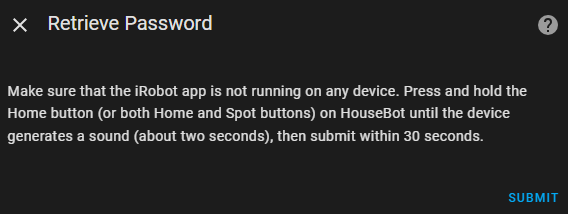
I don’t know if holding the home button puts the device in pairing mode, or if you can even put it in pairing mode at all.
I can’t seem to get anything to cough up the BLID and password from inside the device.
You are the only person who has seemed to accomplish this and it is driving me mad. Please god help me.
That’s the whole point:
I can’t get it into ‘pairing mode’.
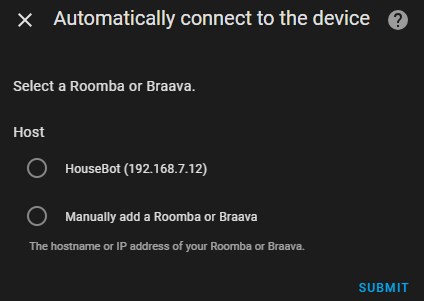
I have the BLID and the password - never seen an option to enter the BLID anywhere, though - but when the system comes back with the password screen, even after discovering the IP address of my Roomba, it doesn’t accept the password.
My typical steps - amongst many other efforts - after accepting the provided IP address or entering it myself:
Maybe one of the issues is that the 405 only has two buttons, a Home and an On/Off/Power one - and pressing the Home button for anything longer than 2 seconds initiates the factory reset procedure.
Hi Chairstacker. Have you made any progress with this? I’m in the same place - got the Plus 405 during Prime Days and am just now trying to integrate. I had no problem integrating my i7+, but am hitting exactly the same walls you did trying to integrate the Plus 405. HomeAssistant has no problem finding the device, but my attempts to supply the password and complete the integration have failed.
I saw an article somewhere suggesting a factory reset on the Roomba might work. I’ve been hesitant to take that annoying step. Have you tried that?
Unfortunately, the 405 doesn’t seem to work with this integration.
Since I opened this thread, the following comment has been added in the integration page:
"It currently does NOT work with the newer x05 Wi-Fi models, such as Roomba 105, 405, and 505. "
Had I known this upfront I might have gone with the Roborock equivalent



 maybe someday I guess.