I have set up a camera that will be pointing at my boat, and I’d like to have the card fill up the dashboard page where I watch it. But I can’t seem to do that. Here’s the code:
type: picture-elements
entity: camera.batkamera_stream0_0
camera_image: camera.batkamera_stream0_0
camera_view: live
style:
  width: 200%
  border: 2px solid red
  border-radius: 10%
elements:
  - type: icon
    icon: mdi:arrow-up
    style:
      background: rgba(255, 255, 255, 0.35)
      right: 25px
      bottom: 50px
    tap_action:
      action: call-service
      service: onvif.ptz
      service_data:
        device_id: 634fd116f09069a261a348cd97a37cd8
        move_mode: ContinuousMove
        tilt: UP
  - type: icon
    icon: mdi:arrow-down
    style:
      background: rgba(255, 255, 255, 0.35)
      right: 25px
      bottom: 0px
    tap_action:
      action: call-service
      service: onvif.ptz
      service_data:
        device_id: 634fd116f09069a261a348cd97a37cd8
        move_mode: ContinuousMove
        tilt: DOWN
  - type: icon
    icon: mdi:arrow-left
    style:
      background: rgba(255, 255, 255, 0.35)
      right: 50px
      bottom: 25px
    tap_action:
      action: call-service
      service: onvif.ptz
      service_data:
        device_id: 634fd116f09069a261a348cd97a37cd8
        move_mode: ContinuousMove
        pan: LEFT
  - type: icon
    icon: mdi:arrow-right
    style:
      background: rgba(255, 255, 255, 0.35)
      right: 0px
      bottom: 25px
    tap_action:
      action: call-service
      service: onvif.ptz
      service_data:
        device_id: 634fd116f09069a261a348cd97a37cd8
        move_mode: ContinuousMove
        pan: RIGHT
  - type: icon
    icon: mdi:arrow-top-left
    style:
      background: rgba(255, 255, 255, 0.35)
      right: 50px
      bottom: 50px
    tap_action:
      action: call-service
      service: onvif.ptz
      service_data:
        device_id: 634fd116f09069a261a348cd97a37cd8
        move_mode: ContinuousMove
        tilt: UP
        pan: LEFT
  - type: icon
    icon: mdi:arrow-top-right
    style:
      background: rgba(255, 255, 255, 0.35)
      right: 0px
      bottom: 50px
    tap_action:
      action: call-service
      service: onvif.ptz
      service_data:
        device_id: 634fd116f09069a261a348cd97a37cd8
        move_mode: ContinuousMove
        tilt: UP
        pan: RIGHT
  - type: icon
    icon: mdi:arrow-bottom-left
    style:
      background: rgba(255, 255, 255, 0.35)
      right: 50px
      bottom: 0px
    tap_action:
      action: call-service
      service: onvif.ptz
      service_data:
        device_id: 634fd116f09069a261a348cd97a37cd8
        move_mode: ContinuousMove
        tilt: DOWN
        pan: LEFT
  - type: icon
    icon: mdi:arrow-bottom-right
    style:
      background: rgba(255, 255, 255, 0.35)
      right: 0px
      bottom: 0px
    tap_action:
      action: call-service
      service: onvif.ptz
      service_data:
        device_id: 634fd116f09069a261a348cd97a37cd8
        move_mode: ContinuousMove
        tilt: DOWN
        pan: RIGHT
  - type: icon
    icon: mdi:camera
    title: "TODO: snapshot (in SD?)"
    style:
      background: rgba(255, 255, 255, 0.35)
      bottom: 25px
      right: 25px
    tap_action:
      action: call-service
      service: camera.record
      service_data:
        device_id: 634fd116f09069a261a348cd97a37cd8
It looks like this in a regular Chrome window (just laying in the window, which is why the image is so weird, you can only see the roof of my boat). Obviously the “style” part for the camera does nothing:
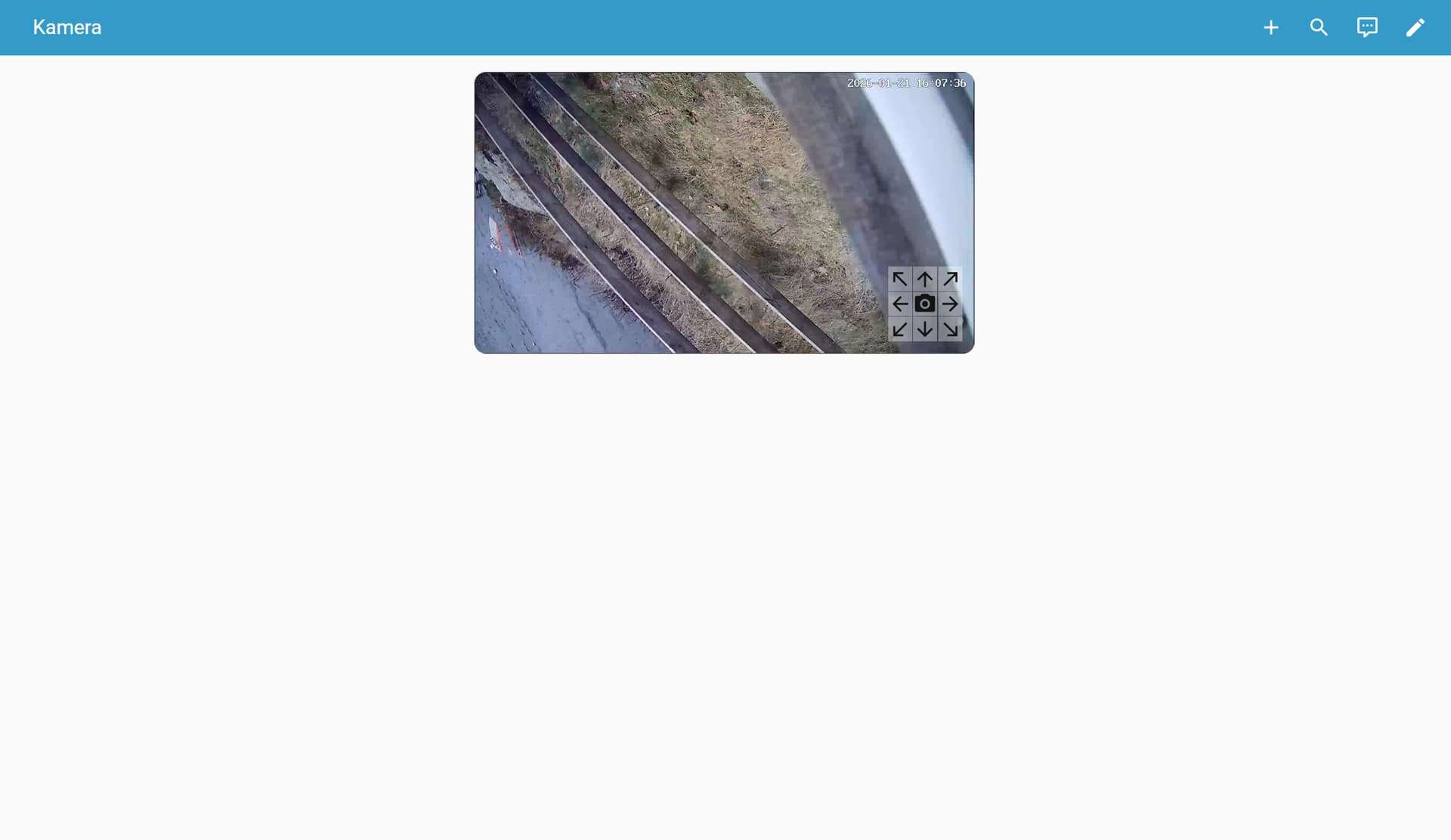
Is there something I can do to fix this?
 Not that it would be a problem anyway, if somebody actually manages to crack both my pfSense firewall and the strong (10 characters plus) password on the Hass instance they have my permission to do anything, including setting of the siren in the middle of the night!