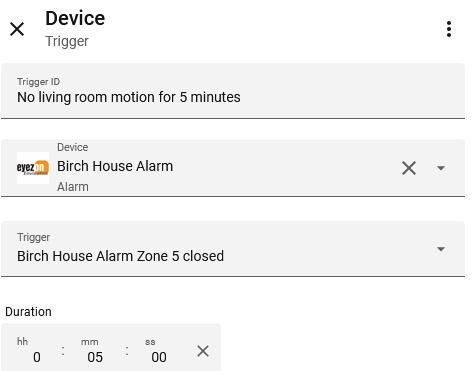
I am still learning Home Assistant and would like some advice on setting up a fairly simple automation the most efficient way.
I have a motion sensor wired to my alarm panel. The alarm panel is integrated with HA. When there is no motion the sensor is "normally closed." I created an automation to 1. turn the ceiling lights on dim late at night when motion is detected so I don't stub my toe in the dark and 2. turn the lights off again after 5 minutes of no motion. It's the second part I have a question about.
I set up an automation with two triggers which I gave separate trigger IDs. The first trigger is motion sensed, the second trigger is no motion sensed for 5 minutes. Then I added a condition that it be between midnight and 5 a.m. For actions, I made two options.The first is if motion sensed (i.e the first trigger is activated) turn the lights on 20%. So far so good.
The second is if no motion is sensed for 5 minutes (i.e. the second trigger) turn the lights off. My concern about this is that normally no motion is detected so it seems like HA will be constantly counting 5 minute intervals and constantly sending "off" commands to the lights. To mitigate this, I added a condition to the second trigger that the ceiling lights be on, so the action is if the ceiling lights are on and there is no motion sensed for 5 minutes turn the lights off. Even with that it still seems like HA will consistently be counting 5 minute intervals until the lights are triggered off.
So, is there a better way to do the second part of this automation like "if the state of the motion sensor toggles from open (detecting motion) to closed (no motion) and stays closed for 5 minutes" then turn off the lights so it only starts counting the 5 minute intervals when the state of the sensor toggles from open to closed? I'm not sure HA gives me an option to base things on the sensor changing states as opposed to being in a particular state of open or closed.
Also, even done that way, the sensor is unlikely to just toggle once as I move about the room. It is probably going to toggle several times so the count will keep restarting and the lights might go off after the first time 5 minutes elapses, go right back on again, off again etc.
What is the best way to do the second part of this automation?
use the preformatted text feature and paste what you have so far - someone will help. Its way too hard to guess without seeing what you've done so far.
It always makes it easier for us to give advice specific to your situation if you share the properly-formatted configuration of your automation or script.
Depending on how the automation is designed, that's probably not how it works... so you probably don't need to worry about that.
You may want to review Automation Modes. Again, whether that applies to your situation will depend on the design of the automation.
I now following and responding as that is basically what I have setup for our front porch light. At night it shuts off, but it if detects motion then I turn it on. My turn it off automation is basically after there is no longer motion for 5 minutes.
So now you have me thinking is there a better way.
I would probably move the is_on condition into the sequence instead of in the Choose Option's conditions, but it should be fine the way you have it. Moving the condition into the sequence means the Option will be chosen just based on the Trigger condition. It's not really an issue in this example, but it's best practice to avoid using overly-exclusive Option conditions in case your Choose has a default sequence.
Since you have used specific triggers you don't need to worry about that. Your trigger is initiated by the state changing from on to off, HA is not continuously polling and counting/timing.
Thanks. For future reference, how can I tell if the trigger is initiated by the state of something changing as opposed to just being in a particular state? Sometimes it is fairly obvious, but in this instance it looked like the trigger was simply the state of the sensor and whether it was detecting motion and not whether it changed from detecting motion to not detecting motion. See the screen shot showing as "alarm zone 5 closed" (not "alarm zone 5 closes"). I can imagine similar things like light is on vs light turns on.
There are no triggers that are initiated by an entity "just being in a particular state". The specific Device trigger you used is really just "user friendly" wrapper around a State trigger. State triggers are all based on state_changedEvents.