I kept using an LLM to answer questions about my house that did not need an LLM. “Is the laundry done but still sitting in the machine” is a judgement, not an essay, and paying for a paragraph of generated text to get one number back felt like the wrong shape.
So I built an integration for TypeSafe Jev, which is a decision model rather than a chat model. You give it a typed question and it hands back a probability, one of your options, or a score. Nothing is generated, so there is nothing to parse and nothing to hallucinate.
What you actually do with it
Three things.
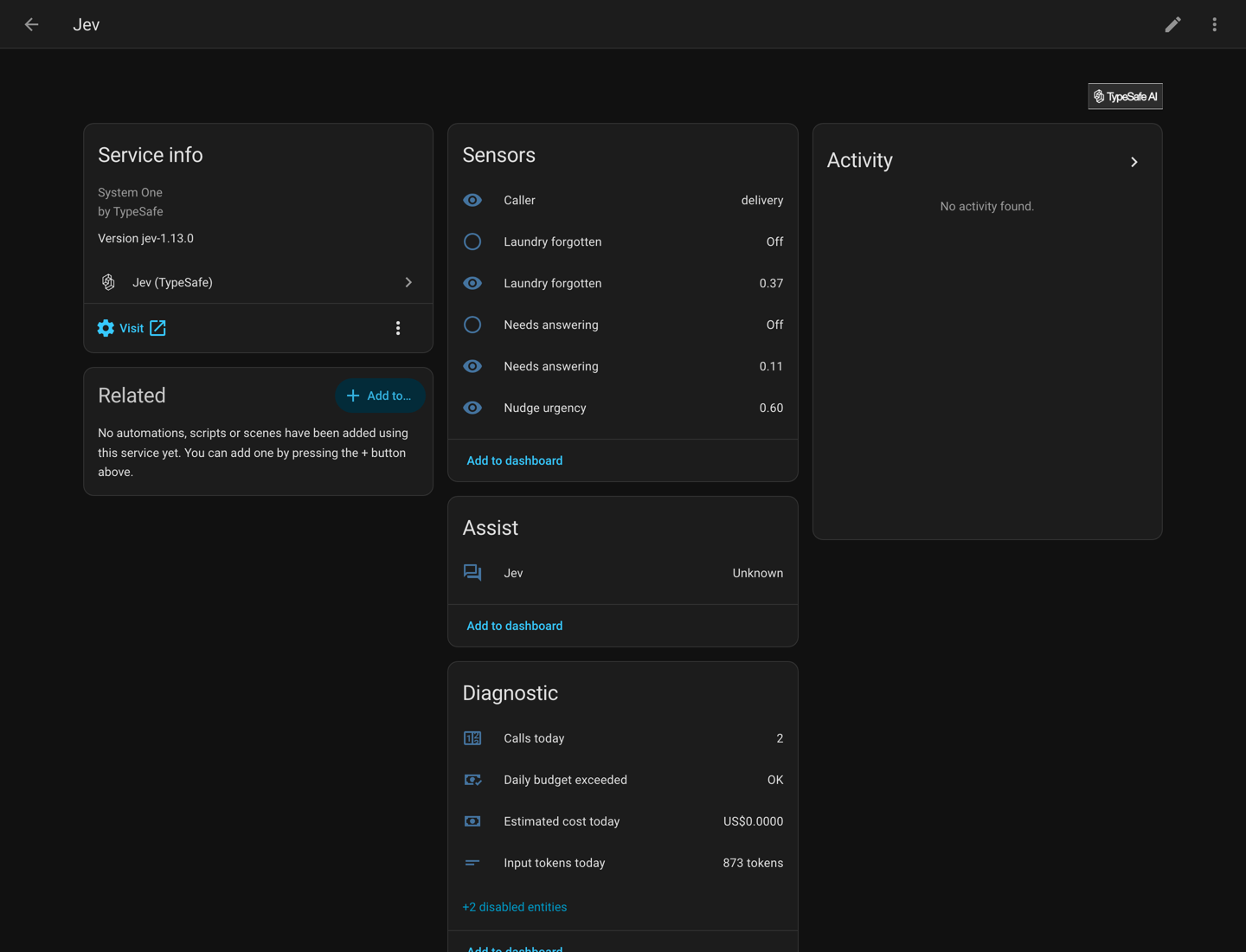
Questions become sensors. Add one in the UI, pick what it should look at, and you get a sensor holding a number from 0 to 1. Set a threshold and you also get a binary sensor to trigger on.
Four actions for automations. jev.noul, jev.choice, jev.score and jev.ask, each returning the answer as a response variable. They take the normal target picker, so you select entities or an area and it builds the state for you instead of you writing a template.
A conversation agent for Assist. This one surprised me. It routes a spoken command in one request, maps it onto Home Assistant’s own intents, and hands anything it is not sure about to a fallback agent. About $0.00006 a command.
The bit I like most
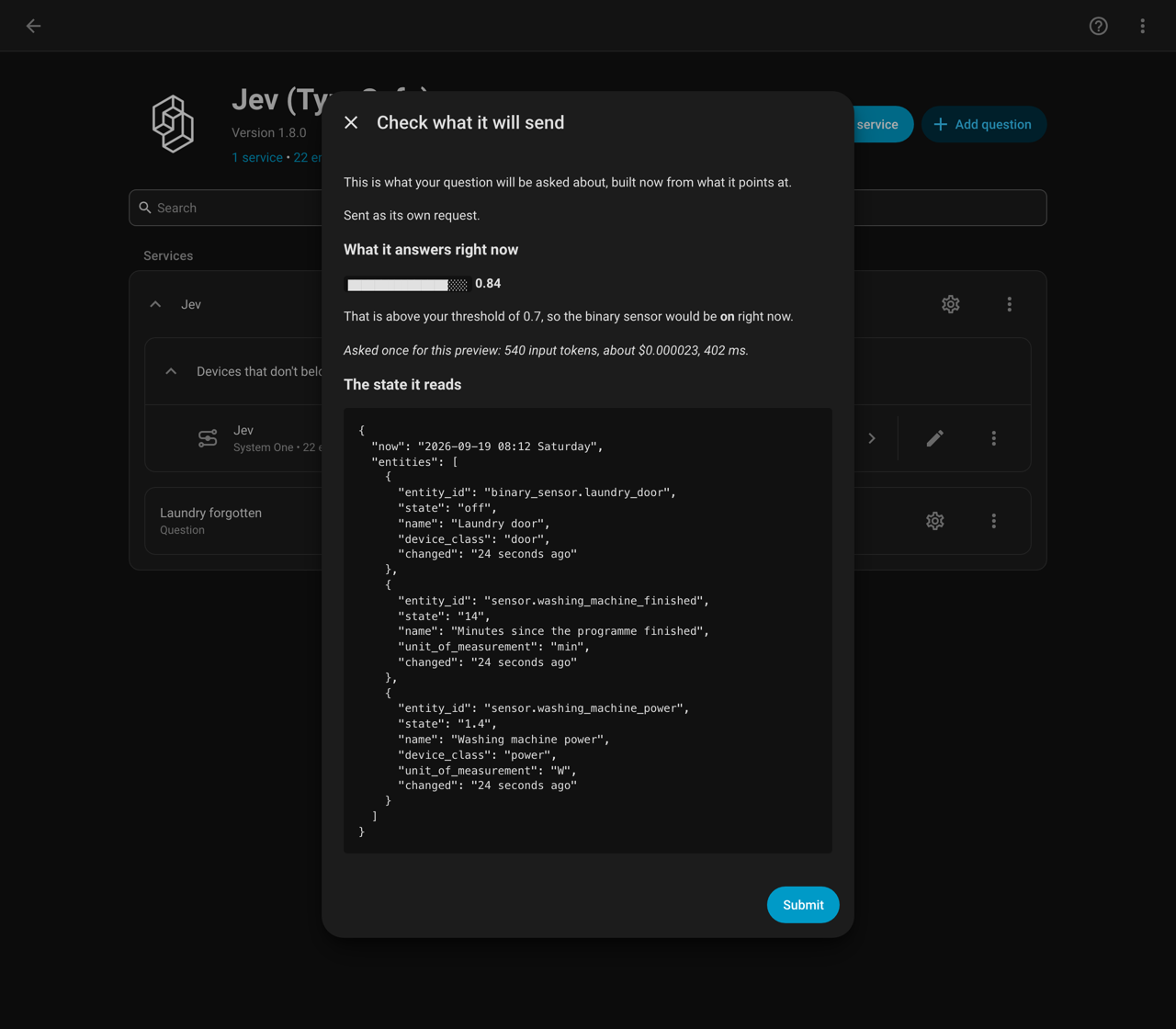
Before a question saves, it shows you the state it will send and asks the question once, so you can see what it answers before the sensor exists.
Here is a simple one. The washing machine is drawing 1.4 W, the door is shut, and it finished 14 minutes ago:
And a more involved one. Four options, and it hands back the whole distribution rather than just a winner. This is my cable modem, where the signal to noise ratio has drifted under the healthy 33 dB and the upstream power is close to its ceiling:
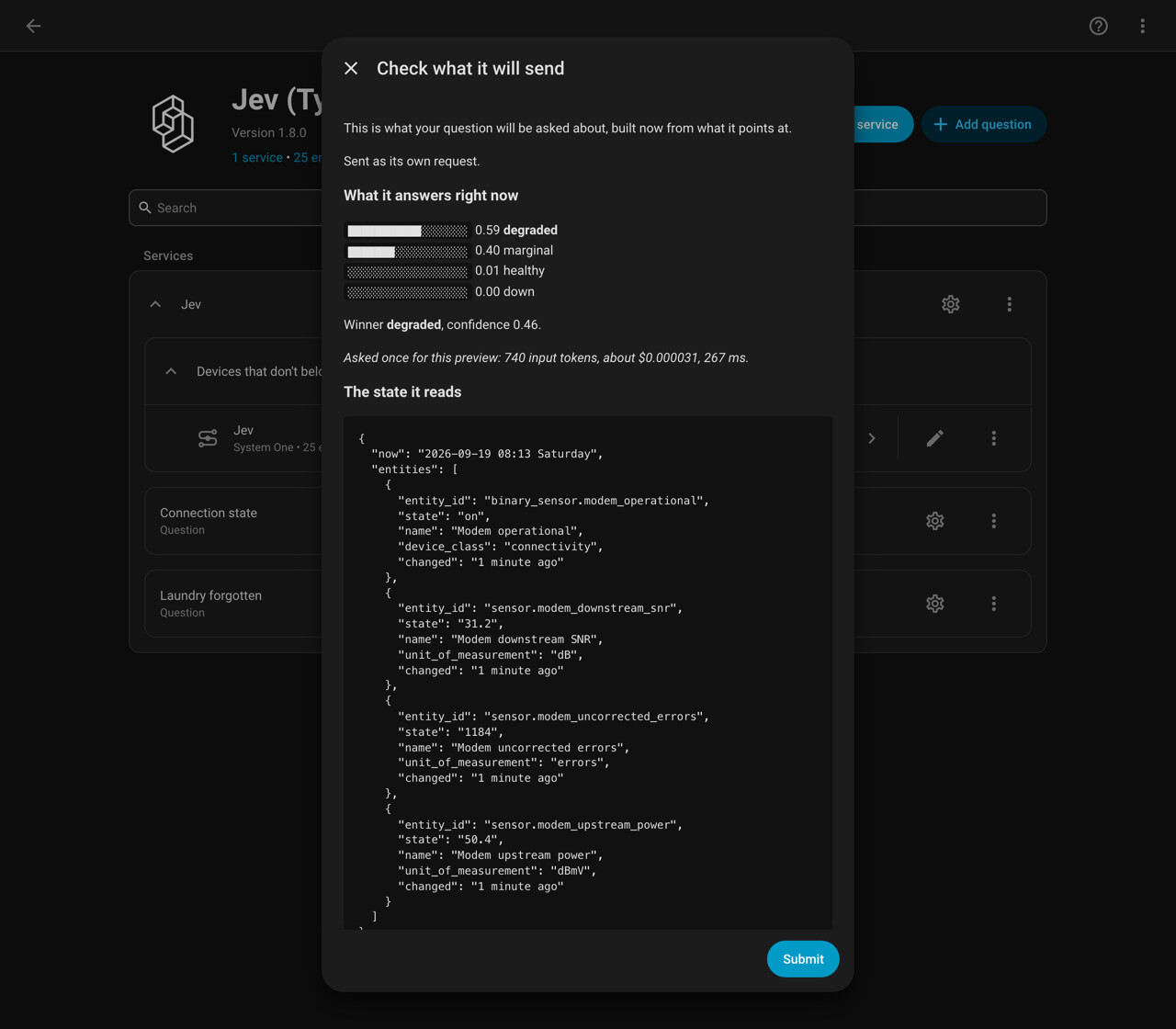
Look at that second answer for a second. It says degraded at 0.59 with marginal right behind at 0.40, and a confidence of 0.46. It is telling me the data is genuinely ambiguous instead of picking one and sounding sure about it. That is the whole reason the actions hand back a confidence figure: my automation can insist on 0.8 before it wakes anybody up.
The trial answer costs between 350 and 876 input tokens depending on how much you point it at, so somewhere between $0.000015 and $0.000037. The footer on that screen tells you exactly what it spent. I have clicked it a few hundred times while writing questions and it has cost me less than a cent.
Where it gets interesting
The thing that changed how I write automations is that extra questions are nearly free. So instead of asking one thing and calling back for more, you ask everything you might need in one go and throw most of it away.
- action: jev.ask
  response_variable: jev
  target:
    entity_id: sensor.intercom_transcript
  data:
    questions:
      caller:
        type: choice
        instructions: Who is at the door?
        criteria:
          delivery: A courier dropping off a parcel
          visitor: Someone the household knows
          sales: An unsolicited caller
      answer_now:
        type: noul
        instructions: Does someone need to go to the door right now?
      urgency:
        type: score
        instructions: How quickly does this need a person?
        criteria: [Never, Whenever, Within the hour, Right now]
One request, three answers, about 300 ms. Then you branch on them:
- choose:
    - conditions: "{{ jev.answers.caller.confidence > 0.8 and jev.answers.answer_now.noul > 0.7 }}"
      sequence:
        - action: light.turn_on
          target: { entity_id: light.hall }
        - action: notify.mobile_app
          data:
            message: "{{ jev.answers.caller.choice }} at the door, {{ jev.answers.urgency.nearest_level }}"
    - conditions: "{{ jev.answers.caller.confidence > 0.8 }}"
      sequence:
        - action: logbook.log
          data: { name: Doorbell, message: "{{ jev.answers.caller.choice }}, no answer needed" }
  default:
    - action: notify.mobile_app
      data:
        message: "Someone at the door, not sure who. Read it as {{ jev.answers.caller.choice }} at {{ jev.answers.caller.confidence }}."
That default branch is the part I would not have bothered with before. When it is not sure, it says so out loud rather than silently doing nothing, and an automation that quietly does nothing is the hardest kind to debug.
The same shape works for anything where you are currently writing a pile of nested template conditions and still getting it wrong: is this notification worth interrupting someone for, is this a real alert or noise, is the house in a state where I should start the dishwasher.
Some numbers
I measured these against the live API from a normal connection here in the Netherlands, rather than taking the vendor page at its word.
- 250 to 580 ms warm, 700 to 900 ms on the first call after it has been idle. TypeSafe publishes 70 to 500 ms, presumably measured next door to their own servers.
- Adding questions is nearly free. Three questions took 712 ms, a hundred took 714. Adding a second call is what costs you.
- One entity in the state is about 66 input tokens.
There is one finding that changed how I write questions. Jev makes a judgement, it does not do arithmetic. Hand it a power reading and expect it to work out which side of a threshold that falls on and you will be disappointed. Five runs each on an idle machine and a running one: the readings on their own separated the two cases by 0.21. Adding “this machine draws under 5 W when idle and over 300 W while a programme runs” to the background field took that to 0.60, and doing the comparison in Jinja instead took it to 0.69. Either fix roughly triples it, and they do not stack, so do one.
What it is not good at
- Answers come with no reasoning, so there is nothing to audit afterwards.
- Confidence has no published calibration. Treat 0.9 as higher than 0.6, not as right nine times out of ten.
- It is not for safety decisions. A probability with no explanation should not be holding a lock or a heater.
- The conversation agent does on, off, toggle, brightness and state questions. Everything else goes to the fallback agent.
Installing
Needs HA 2026.9 or newer and an API key from TypeSafe. The key is the only thing it asks for.
Not in the HACS default list yet, so add it as a custom repository: HACS, three dot menu, Custom repositories, paste https://github.com/AboveColin/HA-Jev, type Integration. The HACS submission is open, so those steps should go away eventually.
Docs are at jev.cdevries.dev and there are fifteen worked examples in the repo, four of them pairing Jev with an LLM for the cases where you genuinely want prose.
I am not affiliated with TypeSafe. Happy to answer questions, and I am curious what other people end up asking their houses.