Curious if anyone has come across this water meter. It looks like it uses AMI in the 912.5, 915 or 918.5mHz ranges but is likely encrypted in the US.
It does have a IR interface. Is there an existing solution to interface?
I think it is somewhat well documented, so someone can probably make a solution.
Here is the data sheet (page 11 have a link to some communication definitions):
I found the US version of this PDF which I thought was awesome public documentation compared to other vendors.
It looks like US versions are AMI/AMR and require encryption so that would prevent us from reading over the air with a RTL-SDR tuner, correct? That is why I was thinking of the IR route.
Yup, its end-to-end encrypted according to the last page of this document.
http://nebula.wsimg.com/7d2656826012565cc861c868eff245a9?AccessKeyId=600D44B24C0D0D458B22&disposition=0&alloworigin=1
Looks like there is only the optical access for a local solution, since the end-to-end encrypted traffic goes directly to Kamstrups hosting center and not even to your provider.
Maybe your provider has a cloud solution that you can access.
Any ideas for an optical/IR solution?
Not really, but you need to figure out what setup the optical interface is using.
In the datasheet it looked like there were different ones to be chosen by the installer technician.
Maybe this could inspire some hardware setup.
Just got a new Kamstrup FlowIQ 2200 water meter installed yesterday (residing in Denmark). I’ve read numerous threads about the Multical21/Flow IQ2200 meters inability to continously read via the IR optical interface, as this is somewhat throttled by the meter firmware to limit battery usage. Perhaps I’m just lucky or perhaps the newer meter versions doesn’t have this previous fw restriction ?
So far I’ve done some 800+ reads last 48 hours and I’m still reading registers without issues every 5 minutes. I’m using the cenobitedk ESPHome component as base to read the meter. Using same component with identical hardware to read my district heating Multical 602 meter as well.
Searched for available Multical21 / FlowIQ 2200 registers. So far I’ve not been able to find any relevant data related to the actual registers. I’m particularly interested in the status/info register 0x0044 (leak, burst, reverse, tamper) and the inlet water temperature (average). No temperature data registered in the ‘usual’ 0x0056, 0x0057 & 0x0058 registers.
Can anyone shead light on the structure of the info register. I guess it’s an event bit register ?
And if anyone has located the water temp. register, that would be great as well 
Hi Henning.
Trying to use the same component from GitHub - cenobitedk/esphome_multical402: Kamstrup Multical 402 for esphome.
will need some help from you. Are you using the esp01s that comes standard with these IR readers from ebay or did you use the esp8266 d1 mini or some other ?
Thanks
Hi’
Currently I’m using ESP8266 Wemos D1 minis. But almost any ESP version should work. I got a couple of the esp01s lying around somewhere. Haven’t tested these yet though.
That’s great. Do you know exactly which pcb you have ?
I have tried with esp01s, WeMos d1 and also 12f. Nothing seems to be sending anything to the infrared LEDs.
Apparently I need to try a different one. Do you have a link of the pcb?
Colud you share your code for esphome and Kamstrup flowiq 2200 meter ?
I have been searching a bit for the past days and I am pretty sure that this is the component to use, with the custom function. :
https://esphome.io/components/sensor/kamstrup_kmp.html
Registers can be found here:
Were you able to eventualy get the FlowIQ 2200 readings ?
I’m just starting out trying to take readings from my different utilities and my water meter was recently changed to the kamstrup Flowiq 2200.
Was anyone able to confirm what hardware and config works reliably with this. I would be very interested in making a similar setup.
A bit late reply.
I got it working. Purchased this IR ESP reader and flashed esphome onto it.
The IR was really sensitive, so I had to put tape over the diodes and create smaller holes.
Can you share your ESPHome config? I have a FlowIQ 2200 and I’m trying to read the data but without much luck.
Thanks!
esphome:
  name: flowiq2200
  friendly_name: Flowiq2200

esp8266:
  board: esp01_1m

# Enable logging
logger:
  baud_rate: 0

# Enable Home Assistant API
api:
  encryption:
    key: "xxx"

ota:
  - platform: esphome
    password: "xxx"

wifi:
  ssid: !secret wifi_ssid
  password: !secret wifi_password

  # Enable fallback hotspot (captive portal) in case wifi connection fails
  ap:
    ssid: "Flowiq2200 Fallback Hotspot"
    password: "xxx"

captive_portal:

mdns:
  disabled: false

web_server:
  port: 80

uart:
  baud_rate: 1200
  stop_bits: 2
  tx_pin: GPIO1  # TXD (Hardware Serial)
  rx_pin: GPIO3  # RXD (Hardware Serial)

sensor:
  - platform: kamstrup_kmp
    update_interval: 15s
    #temp_diff:
    #  name: Heat Temperature Difference
    custom:
      - name: Battery days left
        command: 0x0246 # reg 582
        unit_of_measurement: "days"
        accuracy_decimals: 1
        state_class: "total"
      - name: Volume
        command: 0x0044 # reg 68
        unit_of_measurement: "m³"
        accuracy_decimals: 5
        state_class: "total_increasing"
        device_class: "water"
      - name: Flow
        command: 0x004A # reg 74
        unit_of_measurement: "L/h"
        accuracy_decimals: 3
        state_class: "measurement"
        device_class: "volume_flow_rate"
      - name: Water temperature
        command: 0x0124 # reg 292
        unit_of_measurement: "°C"
        accuracy_decimals: 2
        state_class: "measurement"
        device_class: "temperature"


# --------------------------------------------------
# Wifi signal sensors
# --------------------------------------------------
  - platform: wifi_signal
    name: "Diag : WiFi Signal dB"
    id: wifi_signal_db
    update_interval: 60s
    entity_category: "diagnostic"

  - platform: copy
    source_id: wifi_signal_db
    name: "Diag : WiFi Signal Percent"
    filters:
      - lambda: return min(max(2 * (x + 100.0), 0.0), 100.0);
    unit_of_measurement: "Signal %"
    entity_category: "diagnostic"

# --------------------------------------------------
# Reset button
# --------------------------------------------------
button:
  - platform: restart
    name: "Ctrl : Device Restart"

text_sensor:
  - platform: wifi_info
    ip_address:
      name: "Diag : IP Address"
    ssid:
      name: "Diag : Connected SSID"
    mac_address:
      name: "Diag : Mac Address"
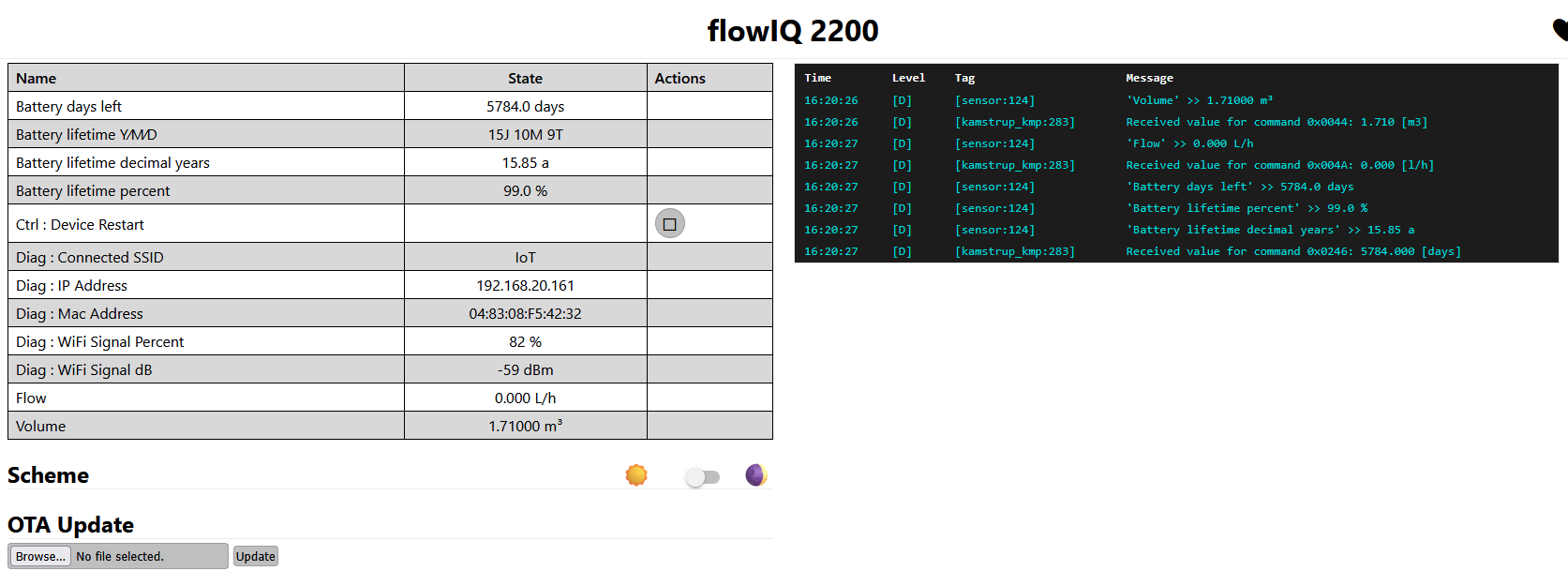
Also got it working!
TX has to be masked, as the signal is too “bright”. My solution for now: white electrical tape in front of the TX “hole”. Rx can stay as it is.
I will drop more details, as soon as the installation is finalized.
esphome:
  name: flowiq-2200
  friendly_name: flowIQ 2200

esp8266:
  board: esp01_1m

logger:
  baud_rate: 0

api:
  encryption:
    key: "your key"

ota:
  - platform: esphome
    password: "your password"

wifi:
  ssid: !secret wifi_ssid
  password: !secret wifi_password

  ap:
    ssid: "Flowiq-2200 Fallback Hotspot"
    password: "12345678"

captive_portal:

mdns:
  disabled: false

web_server:
  port: 80

uart:
  baud_rate: 1200
  stop_bits: 2
  tx_pin: GPIO1
  rx_pin: GPIO3

sensor:
  - platform: kamstrup_kmp
    id: kamstrup_live
    update_interval: 120s
    custom:
      - name: Volume
        command: 0x0044 # reg 68
        unit_of_measurement: "m³"
        accuracy_decimals: 5
        state_class: "total_increasing"
        device_class: "water"

      #- name: Flow
      #  command: 0x004A # reg 74
      #  unit_of_measurement: "L/h"
      #  accuracy_decimals: 3
      #  state_class: "measurement"
      #  device_class: "volume_flow_rate"

      #- name: Water temperature
      #  command: 0x0124 # reg 292
      #  unit_of_measurement: "°C"
      #  accuracy_decimals: 2
      #  state_class: "measurement"
      #  device_class: "temperature"

      - name: Battery days left
        id: battery_days
        command: 0x0246 # reg 582
        unit_of_measurement: "days"
        accuracy_decimals: 1

  - platform: copy
    source_id: battery_days
    name: "Battery lifetime percent"
    unit_of_measurement: "%"
    accuracy_decimals: 1
    filters:
      - lambda: |-
          float pct = (x / (16.0 * 365.0)) * 100.0;
          if (pct < 0.0) return 0.0;
          if (pct > 100.0) return 100.0;
          return pct;

  - platform: copy
    source_id: battery_days
    name: "Battery lifetime decimal years"
    unit_of_measurement: "a"
    accuracy_decimals: 2
    filters:
      - lambda: return x / 365.0;

  - platform: wifi_signal
    name: "Diag : WiFi Signal dB"
    id: wifi_signal_db
    update_interval: 60s
    entity_category: diagnostic

  - platform: copy
    source_id: wifi_signal_db
    name: "Diag : WiFi Signal Percent"
    unit_of_measurement: "%"
    entity_category: diagnostic
    filters:
      - lambda: return min(max(2 * (x + 100.0), 0.0), 100.0);

button:
  - platform: restart
    name: "Ctrl : Device Restart"

text_sensor:
  - platform: wifi_info
    ip_address:
      name: "Diag : IP Address"
    ssid:
      name: "Diag : Connected SSID"
    mac_address:
      name: "Diag : Mac Address"

  - platform: template
    name: "Battery lifetime Y/M/D"
    update_interval: 60s
    lambda: |-
      if (isnan(id(battery_days).state) || id(battery_days).state < 0) {
        return {"unknown"};
      }

      int total_days = (int) roundf(id(battery_days).state);

      int years = total_days / 365;
      int rem_days = total_days % 365;
      int months = rem_days / 30;
      int days = rem_days % 30;

      char buffer[32];
      sprintf(buffer, "%dJ %dM %dT", years, months, days);
      return {buffer};
Very nice. I tired getting it working last week but had no luck. Did you put the tape on the TX “hole” on the meter or the ESP?
Also, are you willing to share the 3D print?