I wanted a calm, always-on Home Assistant panel for my desk, and my Kobo Clara Colour was sitting there with a great e-ink screen. So I built Kobo HA Dashboard: a native dashboard that runs on the Kobo itself, plus a desktop tool that builds and installs it for you. It’s open source (MIT): github.com/armamut/kobo-ha-dashboard
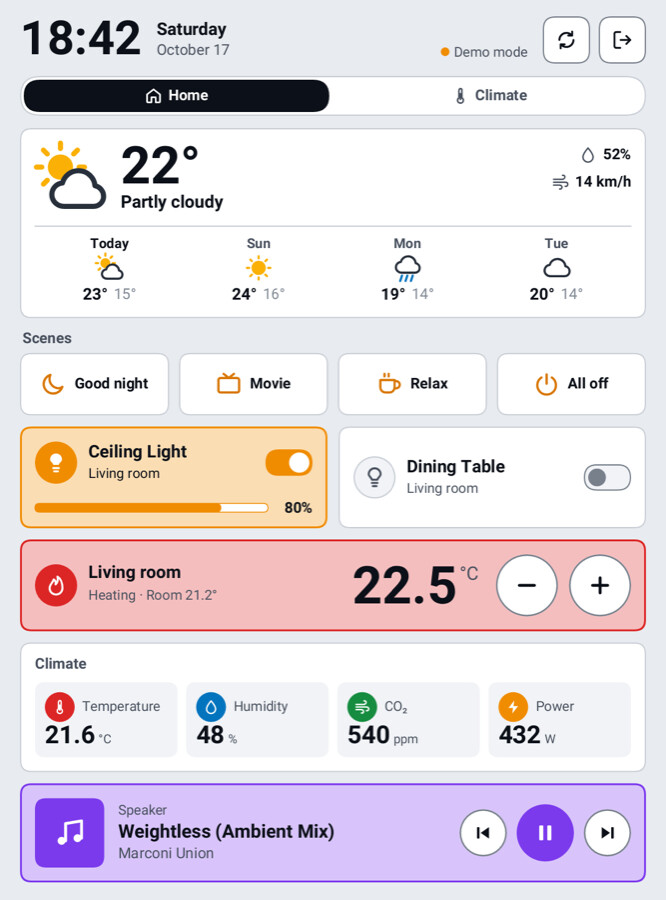
What it does
- Cards for lights, switches, fans, thermostats (+/- buttons), sensors with 24-hour graphs, sensor grids, media players, weather with a 5-day forecast, and scene/script buttons
- Made for e-ink: large type, colours that survive the Kaleido filter, partial refreshes only where something changed
- Frontlight button, with optional auto-off after 30 s to 10 min without taps (a tap brings it back)
- 11 languages (English, Deutsch, Français, Español, Italiano, Nederlands, Português, Polski, Türkçe, 日本語, 简体中文), portrait or landscape, four themes
- Exit with the on-screen button or the power button; the Kobo’s reader resumes where you left it
Setup tool (macOS, Windows, Linux)
- Download the package for your computer from Releases and run it; it opens in your browser.
- Enter your HA URL and a long-lived token (the ? button explains how to get one), then click Create from Home Assistant. It builds pages from your areas and skips technical entities like child locks and status LEDs.
- Rearrange cards with a pixel-exact preview. Nothing is written until you click Save; undo/redo and the last 20 saved versions are there if you break something.
- Connect the Kobo over USB and click Install. If NickelMenu isn’t on the Kobo yet, the tool installs it too (official v0.6.0, checksum-verified).
Good to know
- Tested on the Kobo Clara Colour. Clara BW, Libra Colour and other models should work but are untested; reports with your
.kobo-ha/dashboard.logare very welcome. - Use HA’s IP address: the Kobo can’t resolve
.localnames (the tool warns you and suggests the IP). - The Kobo doesn’t sleep while the dashboard is open, so for a wall or desk panel keep it on a charger or use the light auto-off.
- Built together with Claude Code (Anthropic’s AI coding assistant).
Feedback, bug reports and translation fixes are all welcome!
Short version for MobileRead
Kobo HA Dashboard is an open-source Home Assistant panel that runs natively on Kobo e-readers. It draws straight to the framebuffer with the MediaTek/NXP e-ink refresh ioctls and reads the touch screen and power button. While it runs, it pauses Nickel and its sickel watchdog (pausing Nickel alone makes the Kobo reboot), then resumes both on exit, even after a crash. A desktop setup tool for macOS, Windows and Linux generates the dashboard from Home Assistant and installs it over USB, including NickelMenu v0.6.0 (checksum-verified) if it’s missing.
Tested on the Clara Colour (firmware 4.46). Other MediaTek and i.MX models should work but are untested, so logs from other devices are welcome. Frontlight control uses mxc_msp430.0 and Nickel’s FrontLightLevel, following KOReader.
Code and downloads: GitHub - armamut/kobo-ha-dashboard: Home Assistant Dashboard for Kobo E-Reader · GitHub