Mactomik
April 24, 2024, 1:21pm
22
Hi,
Played with V300 C8 controller. If anybody need Komfovent external CO2 sensor (connected to C8 terminal pin 3-5 with wire) I managed to get the reading out by adding this sensor:
# Komfovent CO2 air quality sensor
    - name: "Komfovent Air CO2 sensor 'ppm"
      address: 951
      data_type: uint16
      scale: 1
      unit_of_measurement: "ppm"
      state_class: measurement
      scan_interval: 30
2 Likes
Is it possible to use komfovent switches in automations? I don’t see them in the UI and in YAML it requires device and entity id? Where should I add them?
Can you please post a screenshot with automation example? What do you write to modbus?
I was able to make it work:
That will put unit to “Away” mode value 1.
1 Like
Dai1
September 27, 2024, 3:41pm
28
Hello, can you help me integrate it my home assistant?
lnagel
March 6, 2025, 8:11pm
29
Hello! I shared this another thread, but it might be an easier way to get Komfovent data into your HA setup
Hello! Many people have shared their yaml configs here earlier, which has been a great help. However I was personally looking for a more out of the box support for the Komfovent devices, so I’ve spent some time to write a full integration for the C6, C6M and C8 modules. This is very easily installable if you have HACS set up. Please keep in mind that this is an early release still, but any help and feedback is appreciated.
[homeassistant]
Contribute to lnagel/hass-komfovent development by creating an account on GitHub.
2 Likes
runnerM
May 29, 2025, 5:12am
31
Finally someone smart has found time. So much thanks Inagel!!!
2 Likes
gabrio79
June 24, 2025, 1:17pm
32
hello, do you have also lovelace setup to share with us?
lnagel
June 25, 2025, 12:31pm
33
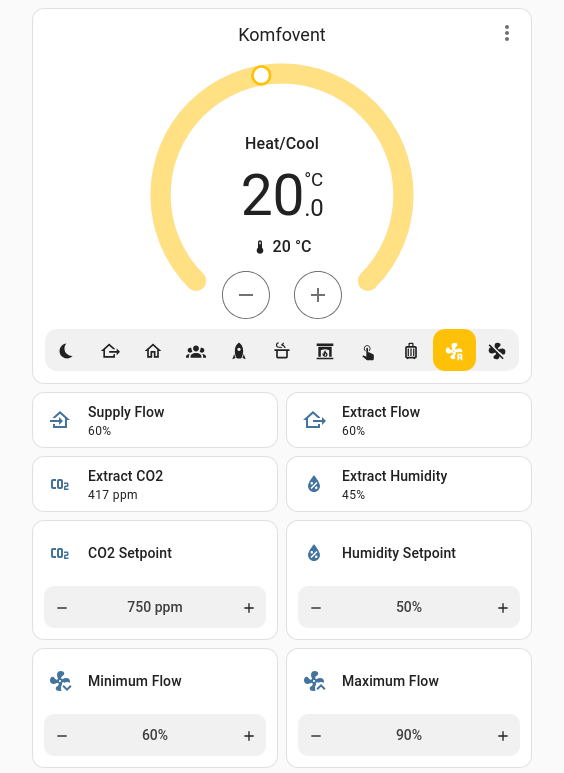
Try something like this:
views:
  - title: Home
    sections:
      - type: grid
        cards:
          - type: thermostat
            entity: climate.komfovent
            features:
              - style: icons
                type: climate-preset-modes
          - type: tile
            entity: sensor.komfovent_supply_flow
            features_position: bottom
            vertical: false
            name: Supply Flow
            icon: mdi:home-import-outline
          - type: tile
            entity: sensor.komfovent_extract_flow
            features_position: bottom
            vertical: false
            name: Extract Flow
            icon: mdi:home-export-outline
          - type: tile
            entity: sensor.komfovent_extract_co2
            features_position: bottom
            vertical: false
            name: Extract CO2
          - type: tile
            entity: sensor.komfovent_extract_humidity
            features_position: bottom
            vertical: false
            name: Extract Humidity
          - features:
              - type: numeric-input
                style: buttons
            type: tile
            entity: number.komfovent_aq_co2_setpoint
            features_position: bottom
            vertical: false
            name: CO2 Setpoint
            hide_state: true
          - features:
              - type: numeric-input
                style: buttons
            type: tile
            entity: number.komfovent_aq_humidity_setpoint
            features_position: bottom
            vertical: false
            name: Humidity Setpoint
            hide_state: true
          - features:
              - type: numeric-input
                style: buttons
            type: tile
            entity: number.komfovent_aq_minimum_intensity
            features_position: bottom
            vertical: false
            hide_state: true
            name: Minimum Flow
            icon: mdi:fan-chevron-down
          - features:
              - type: numeric-input
                style: buttons
            type: tile
            entity: number.komfovent_aq_maximum_intensity
            features_position: bottom
            vertical: false
            hide_state: true
            name: Maximum Flow
            icon: mdi:fan-chevron-up
1 Like
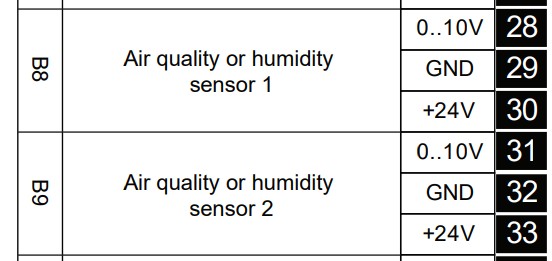
Hi everyone!
I’d like to ask for some help. I have a machine equipped with a C6 controller, into which I installed 2 humidity sensors. How can I retrieve the sensor data through the Modbus connection? Thanks!