Replaces this, which I cannot yet edit.
This takes a person and device and uses labels to provide app notifications when the person enters a zone that shares a label with a to-do list, e.g., a shopping list at a grocery store. But it’s much more (see comments).
V1 note: Secondary notifications don’t automatically clear, working on that for v1.1, plus adding more control over secondary notifications. It works, but it’s noisier than I’d like.
blueprint:
name: "Label-Based Zone List Notifications" #v1.0
description: >
Notifies a tracked person when they arrive at a zone whose label
matches a to-do list's label, with a dynamic per-zone dashboard,
live updates while shopping, and departure/welcome-home reminders.
The dynamic dashboard feature (level 2) requires auto-entries and browser-mod.
domain: automation
homeassistant:
min_version: "2026.7.0"
input:
# --- LEVEL 1: Basics ---
level_1:
name: "Level 1: Basic Configuration"
icon: mdi:numeric-1-box
collapsed: false
input:
person_target:
name: Target Person
description: >
The specific person entity the automation will track.
selector:
entity:
domain: person
notify_device:
name: Notification Device
description: >
The mobile device for primary notifications.
selector:
device:
integration: mobile_app
enable_exit_reminders:
name: Enable Exit & Home Reminders (Optional)
description: >
Toggle to enable the 1-item departure prompt and the
'Welcome Home' reminder.
default: false
selector:
boolean:
# --- LEVEL 2: Dashboard ---
level_2:
name: "Level 2: Dynamic Dashboard"
icon: mdi:numeric-2-box
collapsed: true
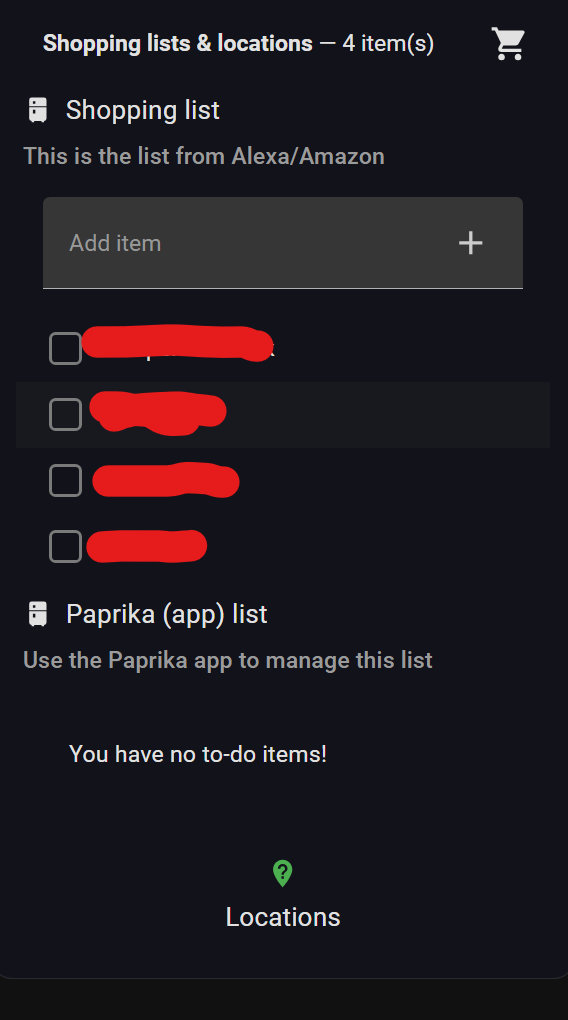
description: |
This automation only sends notifications and populates the Text
Helper below - the actual dashboard view that displays the list
is a separate Lovelace view you create yourself, on any
dashboard you like. Add it as a new view, filling in:
- `[[YOUR PATH HERE]]` with this view's own path
- `[[YOUR HELPER HERE]]` with the Text Helper's entity_id
(without the `input_text.` prefix)
- `[[YOUR LIST DASHBOARD HERE]]` with a link to wherever you
keep the full, unfiltered list(s) (shown when nothing matches)
The Refresh button uses the `browser_mod` HACS integration -
drop that card if you don't have it installed.
```yaml
views:
- type: panel
path: [[YOUR PATH HERE]]
title: Lists
icon: mdi:list-box-outline
cards:
- type: custom:auto-entities
card:
type: vertical-stack
card_param: cards
filter:
template: >
{% set raw = states('input_text.[[YOUR HELPER HERE]]') %} {% set ns =
namespace(cards=[]) %}
{% if raw not in ['unknown', 'unavailable', 'none', ''] %}
{% for entity in raw.split(',') | map('trim') | reject('eq', '') | list %}
{% if entity.startswith('todo.')
and states(entity) not in ['unknown', 'unavailable']
and states(entity) | int(0) > 0 %}
{% set ns.cards = ns.cards + [{
'type': 'todo-list',
'entity': entity,
'hide_completed': true,
'hide_section_headers': true
}] %}
{% endif %}
{% endfor %}
{% endif %}
{{ ns.cards }}
else:
type: vertical-stack
cards:
- type: markdown
content: >
You are either not at a labeled area or there is nothing on the
list(s). Click <a href="[[YOUR LIST DASHBOARD HERE]]">here</a>
to see all the lists available.
- type: button
name: Refresh
icon: mdi:refresh
tap_action:
action: perform-action
perform_action: browser_mod.refresh
data:
browser_id: this
```
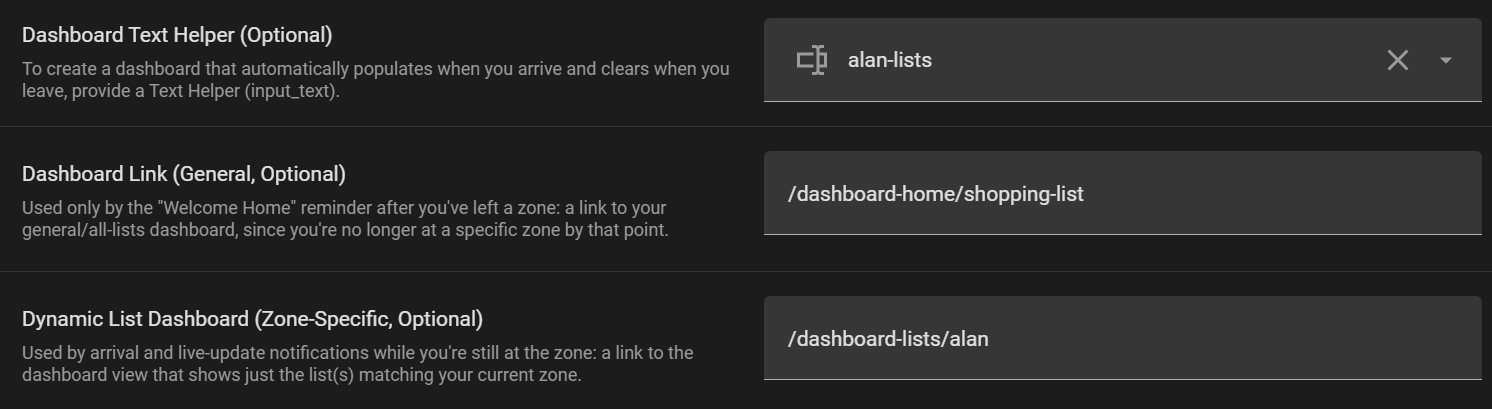
Once created, that view's URL is what goes in "Dynamic List
Dashboard (Zone-Specific)" below.
input:
dashboard_helper:
name: Dashboard Text Helper (Optional)
description: >
To create a dashboard that automatically populates when you
arrive and clears when you leave, provide a Text Helper
(input_text).
default: ""
selector:
entity:
domain: input_text
dashboard_link:
name: Dashboard Link (General, Optional)
description: >
Used only by the "Welcome Home" reminder after you've left a
zone: a link to your general/all-lists dashboard, since you're
no longer at a specific zone by that point.
default: ""
selector:
text:
dynamic_list_dashboard:
name: Dynamic List Dashboard (Zone-Specific, Optional)
description: >
Used by arrival and live-update notifications while you're
still at the zone: a link to the dashboard view that shows
just the list(s) matching your current zone.
default: ""
selector:
text:
# --- ADVANCED OPTIONS ---
advanced_options:
name: "Advanced Options"
icon: mdi:cog-outline
collapsed: true
input:
zone_label:
name: Limit to these labels... (Optional)
description: >
Optionally select a label to restrict the automation. Leave blank
to use all labels when zone and list labels match.
default: ""
selector:
label:
secondary_notify_device:
name: Secondary Notification Target (Optional)
description: >
Optionally notify another person when the tracked person
arrives at a labeled zone. NOTE: unlike the primary
notification, this one is a plain message only (no sticky
persistence, no "Open Lists" button) - the mechanism that
supports those extras can't safely target an optional
device without risking a blank value breaking automation
setup entirely.
default: ""
selector:
entity:
filter:
domain: notify
integration: mobile_app
live_update_delay:
name: Live Update Delay (Optional)
description: >
Time to wait before batching list updates. If someone else
(or Alexa) checks off an item while you are at the store, the
automation waits for this batching window to close, then silently
updates your lock screen notification with the new list.
default: 20
selector:
number:
min: 1
max: 300
step: 1
unit_of_measurement: seconds
mode: box
zone_departure_timeout:
name: Zone Departure Timeout (Optional)
description: >
Maximum time to wait for departure from the zone.
default: 4
selector:
number:
min: 1
max: 24
step: 1
unit_of_measurement: hours
mode: box
home_arrival_timeout:
name: Welcome Home Timeout (Optional)
description: >
Maximum time after departure to wait for a return home.
default: 9
selector:
number:
min: 1
max: 24
step: 1
unit_of_measurement: hours
mode: box
variables:
person_entity: !input person_target
person_user_id: "{{ state_attr(person_entity, 'user_id') }}"
zone_label_input: !input zone_label
dashboard_helper: !input dashboard_helper
dashboard_link: !input dashboard_link
dynamic_list_dashboard: !input dynamic_list_dashboard
enable_reminders: !input enable_exit_reminders
# Primary uses !input notify_device directly as a device_id in the
# device actions below (device: selector, required so it's never
# blank). Device actions need an explicit `actions: []` on every step
# that doesn't use real action buttons - HA rejects a step where that
# key is simply absent.
#
# Secondary is deliberately scoped down: being optional, it can't use
# the device-action format at all (an empty device_id breaks blueprint
# setup even when guarded by a runtime "if" - the check happens at
# config-generation time, not runtime). notify.send_message is used
# instead, since its target.entity_id is evaluated at runtime rather
# than substituted statically - but that action's schema only accepts
# message/title, no platform-specific extras (tag/sticky/actionable
# buttons), so secondary trades those away for reliability. Full
# parity would need the legacy per-device notify service instead, but
# that service's name isn't reliably derivable from any selector value
# (it's fixed at the device's original registration and doesn't track
# later renames) - only a free-text field can supply it correctly.
secondary_notify_device: !input secondary_notify_device
live_update_delay_seconds: !input live_update_delay
zone_departure_timeout_hours: !input zone_departure_timeout
home_arrival_timeout_hours: !input home_arrival_timeout
mode: parallel
max: 10
triggers:
- trigger: state
entity_id: !input person_target
not_to:
- "unknown"
- "unavailable"
- "not_home"
- "home"
id: "zone_arrival"
# Leaving home is a natural "fresh start" point: clear any stale
# notification from a prior visit that's still sitting on the phone
# (e.g. one whose Path 2 run never got to its own cleanup - departure
# timeout, HA restart mid-run, etc).
- trigger: state
entity_id: !input person_target
to: "not_home"
id: "left_home"
# Only To-do actions which modify a list are monitored.
- trigger: event
event_type: call_service
event_data:
domain: todo
service: add_item
id: "live_update"
- trigger: event
event_type: call_service
event_data:
domain: todo
service: update_item
id: "live_update"
- trigger: event
event_type: call_service
event_data:
domain: todo
service: remove_item
id: "live_update"
- trigger: event
event_type: call_service
event_data:
domain: todo
service: remove_completed_items
id: "live_update"
actions:
- choose:
# ==========================================
# PATH 1: LIVE UPDATES
# ==========================================
- conditions:
- condition: trigger
id: "live_update"
# Ignore changes made by the tracked person.
- condition: template
value_template: >
{{ trigger.event.context.user_id != person_user_id }}
- condition: template
value_template: >
{{ dashboard_helper | string | trim != ''
and states(dashboard_helper)
not in ['unknown', 'unavailable', 'none', ''] }}
sequence:
- delay:
seconds: "{{ live_update_delay_seconds | int(20) }}"
- condition: template
value_template: >
{{ states(dashboard_helper)
not in ['unknown', 'unavailable', 'none', ''] }}
- variables:
active_lists: >
{{ states(dashboard_helper).split(',')
| map('trim')
| reject('eq', '')
| list }}
- condition: template
value_template: >
{{ active_lists | length > 0 }}
- action: todo.get_items
target:
entity_id: "{{ active_lists }}"
data:
status: "needs_action"
response_variable: batch_items
- variables:
updated_text: >
{% set ns = namespace(items=[]) %}
{% for list_id, list_data in batch_items.items() %}
{% for item in list_data.get('items', []) %}
{% set ns.items = ns.items + ['- ' ~ item.summary] %}
{% endfor %}
{% endfor %}
Someone updated the list. Here is the updated list:
{{ ns.items | join('\n') }}
- choose:
- conditions:
- condition: template
value_template: >
{{ dynamic_list_dashboard | trim != '' }}
sequence:
- device_id: !input notify_device
domain: mobile_app
type: notify
message: "{{ updated_text }}"
data:
tag: "zone_list_notification"
sticky: true
actions:
- action: "URI"
title: "Open Lists"
uri: "{{ dynamic_list_dashboard }}"
default:
- device_id: !input notify_device
domain: mobile_app
type: notify
message: "{{ updated_text }}"
data:
tag: "zone_list_notification"
sticky: true
actions: []
# ==========================================
# LEFT HOME: CLEAR ANY STALE NOTIFICATION
#
# Catches cases where a prior visit's own cleanup never ran (e.g.
# the departure wait hit its timeout and gave up, or HA restarted
# mid-run) - leaving home is a clean, unambiguous point to make
# sure nothing from this automation is still sitting on the phone.
# ==========================================
- conditions:
- condition: trigger
id: "left_home"
sequence:
- device_id: !input notify_device
domain: mobile_app
type: notify
message: "clear_notification"
data:
tag: "zone_list_notification"
actions: []
# ==========================================
# PATH 2: ARRIVAL -> DEPARTURE -> HOME
# ==========================================
- conditions:
- condition: trigger
id: "zone_arrival"
sequence:
- variables:
arrival_zone_state: "{{ trigger.to_state.state }}"
# HA 2026 zone tracking exposes the actual zone entity/entities
# in the Person's in_zones attribute.
zone_entity: >
{% set zones = state_attr(person_entity, 'in_zones') %}
{% if zones and zones | length > 0 %}
{{ zones[0] }}
{% else %}
none
{% endif %}
- condition: template
value_template: >
{{ zone_entity != 'none' }}
- variables:
matching_labels: >
{% set zone_labels = labels(zone_entity) | list %}
{% if zone_label_input | trim != '' %}
{{ [zone_label_input]
if zone_label_input in zone_labels
else [] }}
{% else %}
{{ zone_labels }}
{% endif %}
- condition: template
value_template: >
{{ matching_labels | length > 0 }}
- variables:
target_lists: >
{% set ns = namespace(lists=[]) %}
{% for label in matching_labels %}
{% for entity in label_entities(label) %}
{% if entity.startswith('todo.')
and entity not in ns.lists %}
{% set ns.lists = ns.lists + [entity] %}
{% endif %}
{% endfor %}
{% endfor %}
{{ ns.lists }}
- condition: template
value_template: >
{{ target_lists | length > 0 }}
- action: todo.get_items
target:
entity_id: "{{ target_lists }}"
data:
status: "needs_action"
response_variable: initial_items
- variables:
active_count: >
{% set ns = namespace(count=0) %}
{% for list_id, list_data in initial_items.items() %}
{% set ns.count =
ns.count + (list_data.get('items', []) | length) %}
{% endfor %}
{{ ns.count }}
list_text: >
{% set ns = namespace(items=[]) %}
{% for list_id, list_data in initial_items.items() %}
{% for item in list_data.get('items', []) %}
{% set ns.items = ns.items + ['- ' ~ item.summary] %}
{% endfor %}
{% endfor %}
{{ ns.items | join('\n') }}
- condition: template
value_template: >
{{ active_count | int(0) > 0 }}
- if:
- condition: template
value_template: >
{{ dashboard_helper | string | trim != '' }}
then:
- action: input_text.set_value
target:
entity_id: "{{ dashboard_helper }}"
data:
value: "{{ target_lists | join(',') }}"
# ==========================================
# PRIMARY ARRIVAL NOTIFICATION
# ==========================================
- choose:
- conditions:
- condition: template
value_template: >
{{ dynamic_list_dashboard | trim != '' }}
sequence:
- device_id: !input notify_device
domain: mobile_app
type: notify
title: >
List for {{ state_attr(zone_entity, 'friendly_name') }}
message: >
You have {{ active_count }} items:
{{ '\n' }}{{ list_text }}
data:
tag: "zone_list_notification"
sticky: true
actions:
- action: "URI"
title: "Open Lists"
uri: "{{ dynamic_list_dashboard }}"
default:
- device_id: !input notify_device
domain: mobile_app
type: notify
title: >
List for {{ state_attr(zone_entity, 'friendly_name') }}
message: >
You have {{ active_count }} items:
{{ '\n' }}{{ list_text }}
data:
tag: "zone_list_notification"
sticky: true
actions: []
# ==========================================
# SECONDARY ARRIVAL NOTIFICATION
#
# Plain message only - see the variables-block comment above
# for why (notify.send_message's schema has no room for
# sticky/tag/actionable-button extras). Guarded by the "if" so
# it's a no-op, never evaluated, when left blank.
# ==========================================
- if:
- condition: template
value_template: >
{{ secondary_notify_device | string | trim != '' }}
then:
- action: notify.send_message
target:
entity_id: "{{ secondary_notify_device }}"
data:
title: >
{{ state_attr(person_entity, 'friendly_name') }}
is at
{{ state_attr(zone_entity, 'friendly_name') }}
message: >
Here is the current list:
{{ '\n' }}{{ list_text }}
# Wait for actual departure. If the configured maximum wait
# expires, stop this visit run rather than waiting forever.
- wait_template: >
{{ states(person_entity) != arrival_zone_state }}
timeout:
hours: "{{ zone_departure_timeout_hours | int(4) }}"
continue_on_timeout: false
# Dismiss the sticky "List for <zone>" notification now that
# we've left — otherwise it just sits on the phone forever.
# Same race guard as the helper-clear below: if a direct jump
# into a new labeled zone already repopulated the dashboard
# helper, a fresh notification for that zone has already
# replaced this one, so don't clear it out from under it.
- if:
- condition: template
value_template: >
{{ dashboard_helper | string | trim == ''
or states(dashboard_helper)
== (target_lists | join(',')) }}
then:
- device_id: !input notify_device
domain: mobile_app
type: notify
message: "clear_notification"
data:
tag: "zone_list_notification"
actions: []
# Snapshot remaining items BEFORE wiping the helper.
- action: todo.get_items
target:
entity_id: "{{ target_lists }}"
data:
status: "needs_action"
response_variable: exit_items
- variables:
exit_count: >
{% set ns = namespace(count=0) %}
{% for list_id, list_data in exit_items.items() %}
{% set ns.count =
ns.count + (list_data.get('items', []) | length) %}
{% endfor %}
{{ ns.count }}
last_item_name: >
{% set ns = namespace(name='') %}
{% for list_id, list_data in exit_items.items() %}
{% for item in list_data.get('items', []) %}
{% set ns.name = item.summary %}
{% endfor %}
{% endfor %}
{{ ns.name }}
last_item_uid: >
{% set ns = namespace(uid='') %}
{% for list_id, list_data in exit_items.items() %}
{% for item in list_data.get('items', []) %}
{% set ns.uid = item.uid %}
{% endfor %}
{% endfor %}
{{ ns.uid }}
last_item_list: >
{% set ns = namespace(entity='') %}
{% for list_id, list_data in exit_items.items() %}
{% if list_data.get('items', []) | length > 0 %}
{% set ns.entity = list_id %}
{% endif %}
{% endfor %}
{{ ns.entity }}
# Only clear the helper if it still contains the lists from this
# visit. This avoids wiping a helper that another parallel zone
# arrival has already repopulated.
- if:
- condition: template
value_template: >
{{ dashboard_helper | string | trim != ''
and states(dashboard_helper)
== (target_lists | join(',')) }}
then:
- action: input_text.set_value
target:
entity_id: "{{ dashboard_helper }}"
data:
value: ""
# ==========================================
# SECONDARY DEPARTURE NOTIFICATION
# ==========================================
- if:
- condition: template
value_template: >
{{ secondary_notify_device | string | trim != '' }}
then:
- action: notify.send_message
target:
entity_id: "{{ secondary_notify_device }}"
data:
message: >
{{ state_attr(person_entity, 'friendly_name') }} has left
{{ state_attr(zone_entity, 'friendly_name') }}
# ==========================================
# 1-ITEM DEPARTURE PROMPT
# ==========================================
- choose:
- conditions:
- condition: template
value_template: >
{{ enable_reminders
and exit_count | int(0) == 1 }}
sequence:
- variables:
action_yes: "{{ 'MARK_DONE_' ~ context.id }}"
action_no: "{{ 'LEAVE_OPEN_' ~ context.id }}"
exit_prompt_tag: >
{{ 'zone_exit_prompt_' ~ context.id }}
- device_id: !input notify_device
domain: mobile_app
type: notify
message: >
Did you get {{ last_item_name }}?
I can check it off for you.
data:
tag: "{{ exit_prompt_tag }}"
sticky: true
actions:
- action: "{{ action_yes }}"
title: "Yes"
- action: "{{ action_no }}"
title: "No"
- wait_for_trigger:
- trigger: event
event_type: mobile_app_notification_action
event_data:
action: "{{ action_yes }}"
id: "yes"
- trigger: event
event_type: mobile_app_notification_action
event_data:
action: "{{ action_no }}"
id: "no"
- trigger: state
entity_id: !input person_target
to: "home"
id: "home"
timeout:
minutes: 5
continue_on_timeout: true
# Clear the stale Yes/No prompt after an answer,
# arrival home, or expiration.
- device_id: !input notify_device
domain: mobile_app
type: notify
message: "clear_notification"
data:
tag: "{{ exit_prompt_tag }}"
actions: []
- choose:
- conditions:
- condition: template
value_template: >
{{ wait.trigger is not none
and wait.trigger.id == 'yes' }}
sequence:
- action: todo.update_item
target:
entity_id: "{{ last_item_list }}"
data:
item: "{{ last_item_uid }}"
status: completed
# Re-query after the exit prompt.
- action: todo.get_items
target:
entity_id: "{{ target_lists }}"
data:
status: "needs_action"
response_variable: post_prompt_items
- variables:
remaining_count: >
{% set ns = namespace(count=0) %}
{% for list_id, list_data in post_prompt_items.items() %}
{% set ns.count =
ns.count + (list_data.get('items', []) | length) %}
{% endfor %}
{{ ns.count }}
# ==========================================
# WELCOME HOME REMINDER
# ==========================================
- choose:
- conditions:
- condition: template
value_template: >
{{ enable_reminders
and remaining_count | int(0) > 0 }}
sequence:
# The Person may already have arrived home during
# the 1-item prompt.
- if:
- condition: template
value_template: >
{{ states(person_entity) != 'home' }}
then:
- wait_for_trigger:
- trigger: state
entity_id: !input person_target
to: "home"
timeout:
hours: >
{{ home_arrival_timeout_hours | int(9) }}
continue_on_timeout: true
- condition: template
value_template: >
{{ wait.trigger is not none }}
- choose:
- conditions:
- condition: template
value_template: >
{{ dashboard_link | trim != '' }}
sequence:
- device_id: !input notify_device
domain: mobile_app
type: notify
title: "Got everything?"
message: >
Please take a minute and update the lists
data:
tag: "zone_list_notification"
sticky: true
actions:
- action: "URI"
title: "Open Lists"
uri: "{{ dashboard_link }}"
default:
- device_id: !input notify_device
domain: mobile_app
type: notify
title: "Got everything?"
message: >
Please take a minute and update the lists
data:
tag: "zone_list_notification"
sticky: true
actions: []