That’s what I did, actually: the robot was on its own AP that my Pi was running, so everything it sent or received went through tcpdump on the Pi, not the app side. What arrives at the robot is a TLS stream from an Alibaba IP on port 19973 (about 200 packets in that session) plus MQTT-over-TLS on 1883, and that’s the whole list. So yes, the command does reach it, but inside TLS, and the robot has no way to trust a CA of mine, so I can’t get inside it. I’d love to be wrong if you know a trick for that.
You’re right, and I was wrong about X10: that list goes up to X60 now and has several X50 variants on it. Mine identifies as r2501p, which isn’t on the list as of today, but the Dreamehome config flow logs the model id of anything it rejects, so I’ll install the beta and either it just shows up or I’ll have the exact id to ask for. Either way I’ll report back here.
Korean apartments come with a thing called a wallpad, a wall-mounted panel near
the entrance that controls the whole flat: lights, heating, gas valve, standby
power outlets, the intercom, and the elevator. Mine is an EzVille unit from
2016. Everything hangs off one RS-485 bus behind it.
That last part matters. When SmartThings left (see the previous post), the
wallpad was the only way to reach my ceiling lights and the elevator, and there
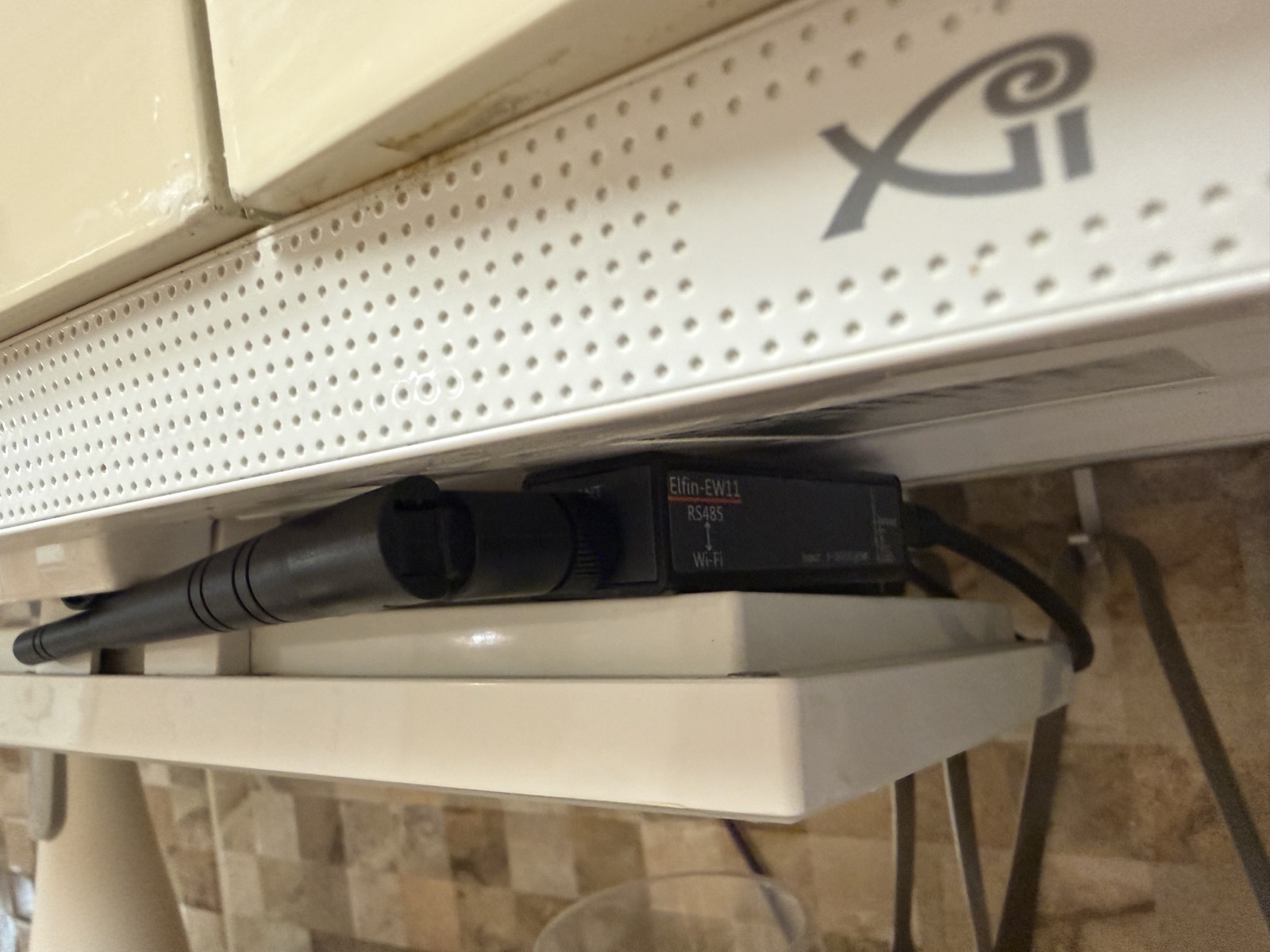
is no API. So: a twenty-dollar Elfin EW11 RS-485-to-WiFi bridge wired behind the panel,
and a lot of staring at hex dumps.
First rule I set before touching anything: RX only. The same wire that carries
“light 2 on” also carries the gas valve and the elevator. I wasn’t going to
transmit a single byte until I understood the bus completely.
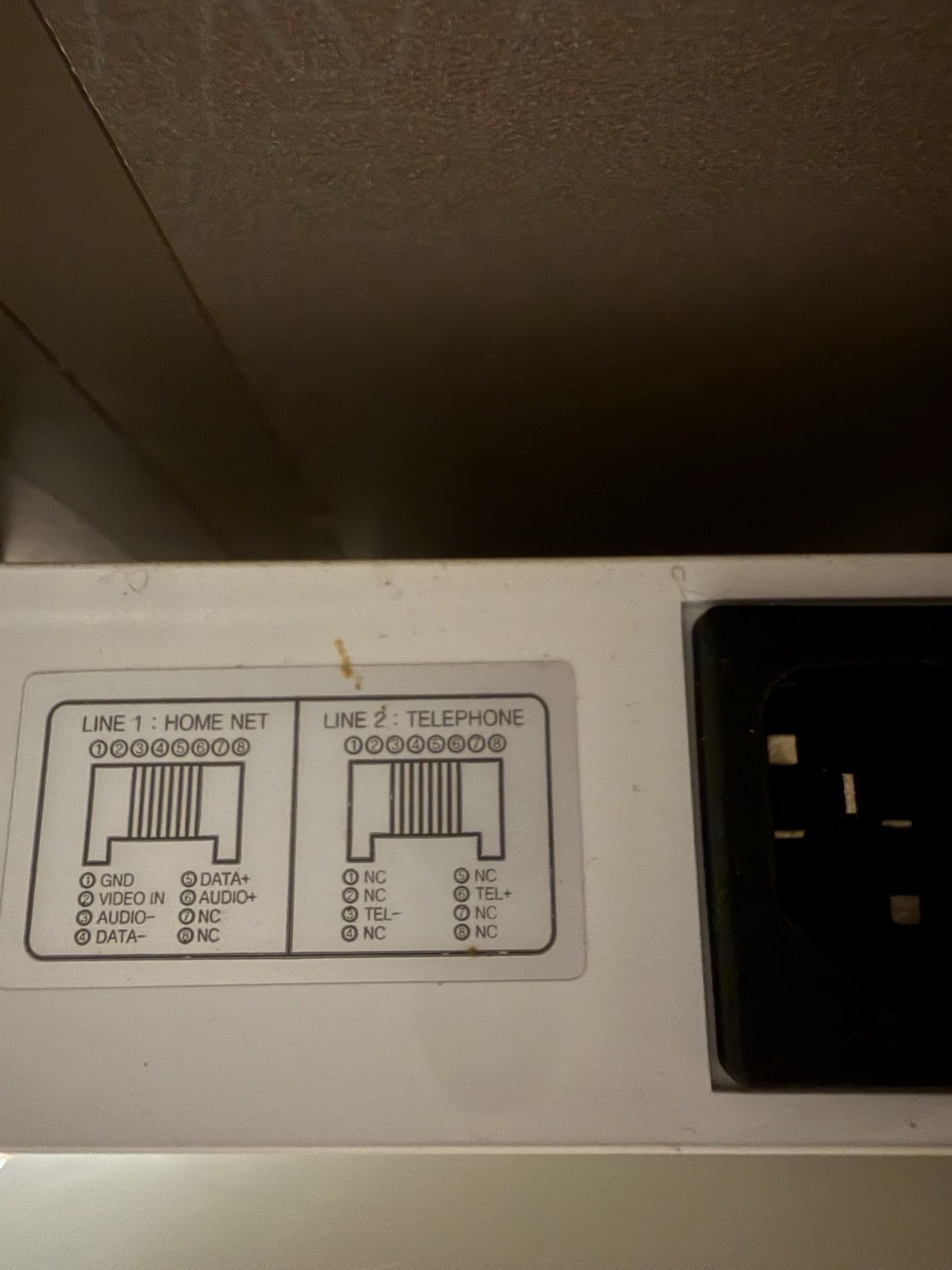
The tap itself is less dramatic than it sounds. The kitchen sub-phone (a little
intercom unit with the apartment brand on it) has an RJ45 socket labeled LINE1:
HOME NET, and the pinout is printed right on the unit’s sticker - pin 4 DATA-,
pin 5 DATA+. That’s the RS-485 pair, sitting on the jack’s center twisted pair.
Nothing gets cut: a cheap RJ45 splitter feeds the sub-phone exactly as before
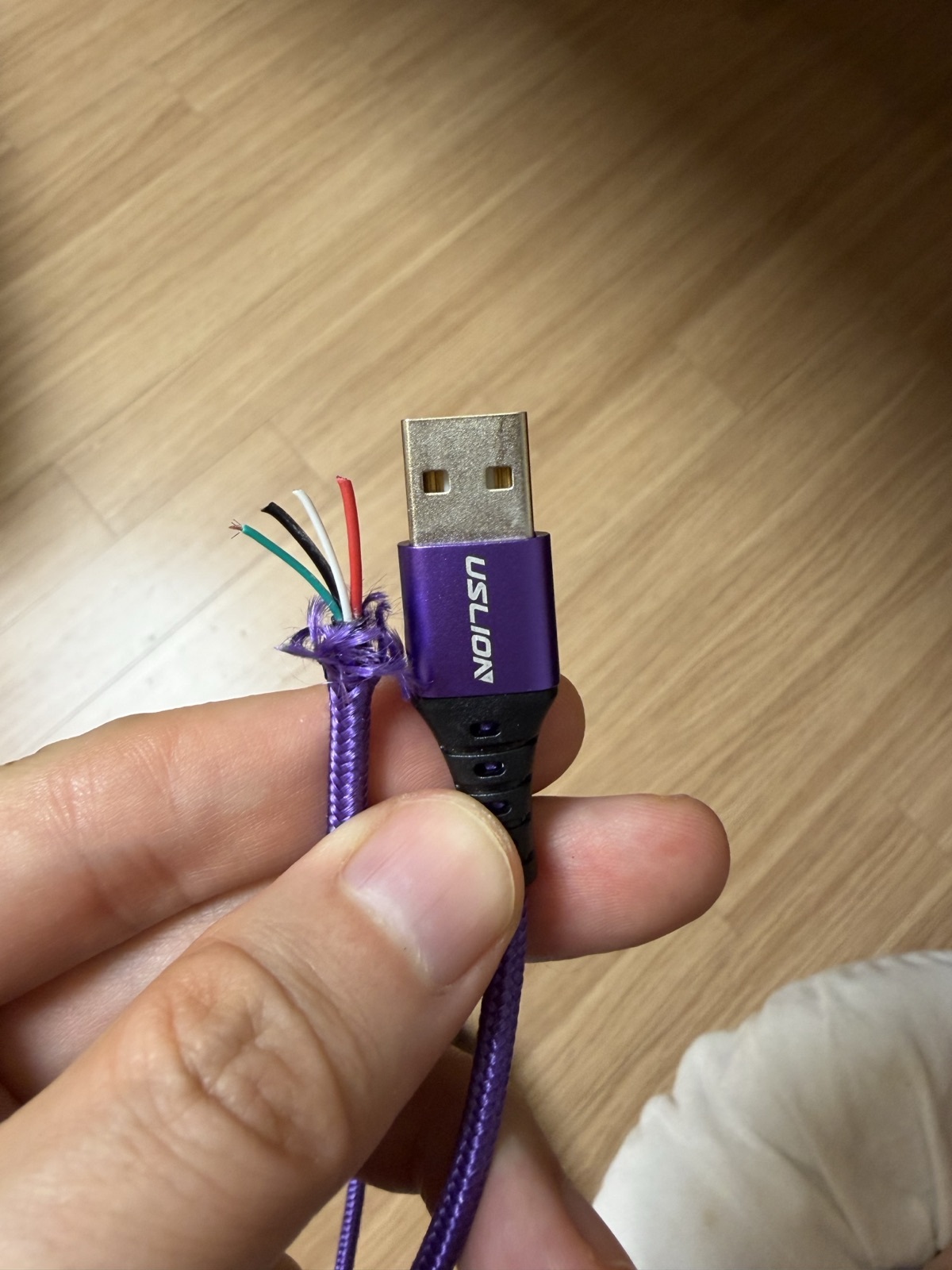
and the branch goes to the EW11. For hookup wire I sacrificed a purple USB
cable from the drawer. I also bought a multimeter for this job and, in the end,
never opened it - the label had already told me everything.
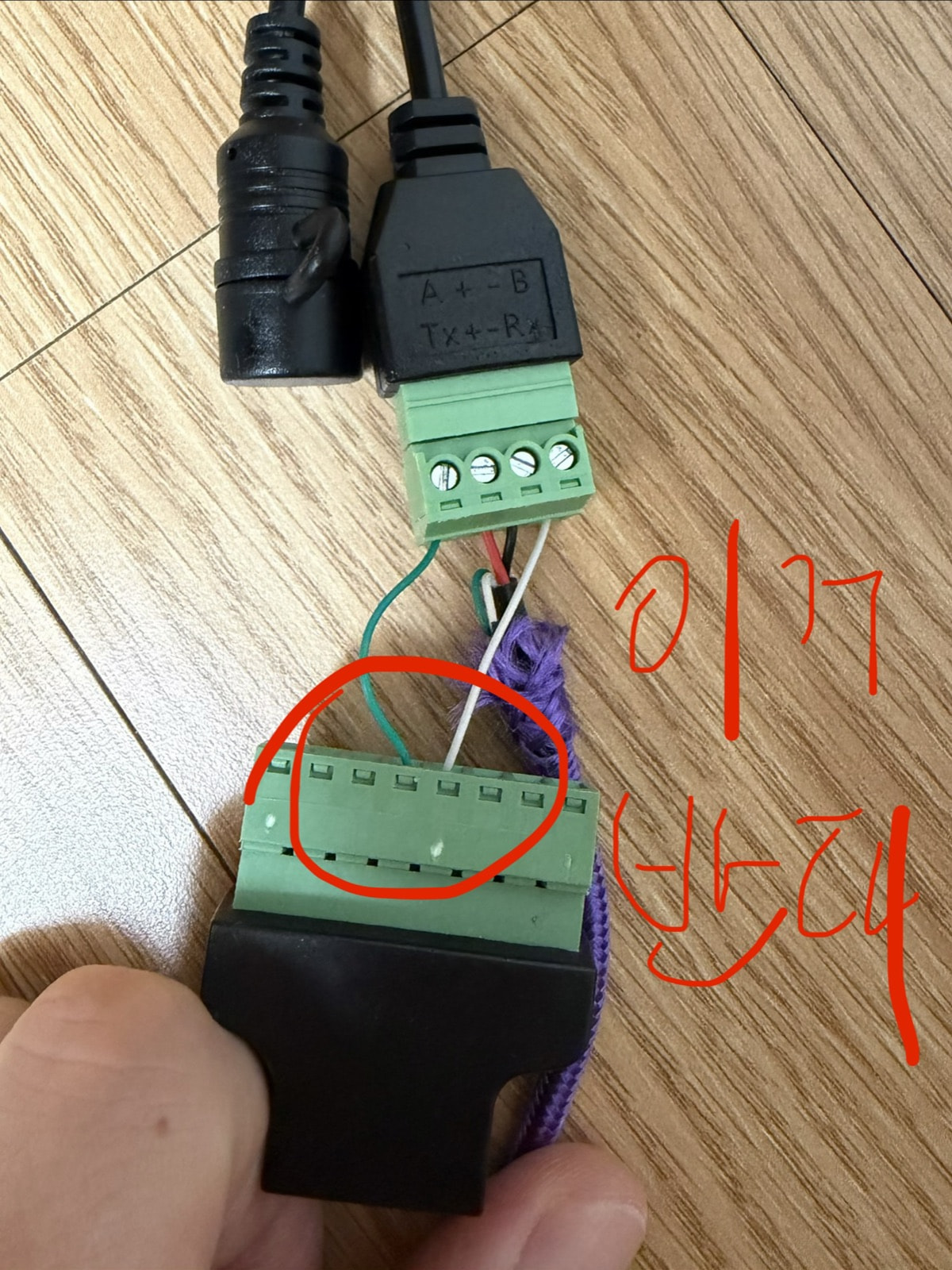
First contact was a mess though. Bytes flowed at a steady 166 B/s and every one
of them was garbage. My assumption was that a swapped A/B pair would read as
all zeroes, and that assumption is just wrong - a UART re-arms after the line
returns high, so a swapped pair gives you plausible-looking framing garbage,
not silence. What settled it: I took the captured stream offline, inverted the
bits, reframed, and suddenly there were clean 10-byte packets with fixed fields
and a counter ticking up. A and B were swapped. Fifty-fifty coin flip, lost it,
swapped two wires in the terminal, instantly clean. (Also brute-forced 11 baud
combinations to be sure: 9600 8N1 and nothing else comes close.)
After that the frame format cracked fairly quickly:
F7 <dev> <id> <cmd> <len> <data...> <xor> <add>

xor = XOR of everything from F7 through data
add = low byte of the sum including xor
I validated it against 1,707 frames from a 60 second capture, 0.1% mismatch. Good
enough to trust.
There are two community repos for this wallpad family, and I owe both of them
days of saved work. Interesting detail though: they disagree with each other, and
with my bus. One has the right thermostat device id (0x36) but only covers
lights and heating. The other covers everything but defines the thermostat as
0x35, and actually contradicts its own docs, which say 0x36. My bus says 0x36.
If you do this, do your own capture and treat every repo as a hint.
What fell out of a few nights of RX:
Lights. Device 0x0E, one group per switch plate, payload is just [error]
[ch1] [ch2]…, 01 on, 00 off. I mapped channels to rooms by toggling one
switch at a time and reading timestamps. Ten channels on the bus, but only seven
usable, because three fixtures have dead bulbs we never bothered replacing.
I didn’t expose those three to HA. What exists on the bus and what you can
actually use are different lists.
Power. Device 0x50 turned out to be eleven standby-power outlets, three
bytes per outlet, and one of them updates about once a second, sitting between
0.66 and 0.79 whatever the time of day. My guess is that’s the fridge and TV
outlet, but the wallpad doesn’t say. The unit isn’t documented anywhere either,
my best guess is amps. Funny part: I’d been told not to bother clamping a CT meter on the
breaker panel, and it turns out the wallpad had live power metering all along.
(These two entities later grew to 36% of my recorder database, but that’s
another story.)
The elevator. Device 0x33 carries a bitmask: 0x04 normal, 0x02 away, 0x20
elevator called, 0x80 elevator arrived. The arrived bit isn’t in either repo.
The call bit only stays up for 2 seconds, so if you poll you’ll miss it - you
have to read the stream. Call-to-arrival at my floor is 37 seconds, so HA now
sends a Telegram ping when the car actually arrives. You press call, put your
shoes on, and walk out when the phone buzzes.
Then the good part, calling it. I assumed there’d be a control command and
spent a while looking for one. There isn’t. The wallpad never sends a call
command on this bus. Instead the 0x33 module reports “I’ve been pressed” as a
status frame, and the wallpad sees that report and does the calling itself. So
you don’t command anything. You impersonate the module. I recorded the exact
status frame from a real button press, replayed those ten bytes once, and 41
seconds later the elevator was at my floor. Same timing as a human press. It’s
now a momentary switch in HA, exposed through Matter, so “hey Google, call the
elevator” works from the kitchen.
Safety, because gas valve: my bridge has an assembly whitelist that only allows
composing frames for 0x0E (lights). The elevator TX is a single hardcoded byte
string, the recorded one, nothing else. The gas valve and the intercom’s
door-open command aren’t registered at all. The door-open packet is actually
documented in one of the repos and it’s tempting (auto-open the lobby door when
I approach), but an unlock command on a shared bus is where I stopped. Maybe
after the baby arrives and my risk appetite changes. Probably not.
Two things I couldn’t get. Aircon power: the units are ducted system AC on
their own circuit straight from the breaker panel, no outlet, not on this bus,
so the standby-power trick can’t see them. And heating is confirmed present
(device 0x36, four zones) but untested, because testing a boiler in a Korean
summer is its own kind of stupid. That one waits for winter.
Next up: the promised story of the Zigbee dongle that kept dropping itself into
bootloader mode, and the 60 lines of Python that fixed what no setting could.
Back to the dongle from the first post, the one that died on every Z2M start with SRSP - SYS - getExtAddr after 6000ms. I said the cause was buried in zigbee-herdsman and darkly funny. It is, and it took me longer to get the story straight than to find the workaround, so here’s the version I can back with logs.
The dongle itself was fine. Opening the serial port from Python with termios in raw mode and sending SYS_VERSION (FE 00 21 02 23) gets a proper reply at 115200: FE 0A 61 02 02 01 02 07 01 ..., Z-Stack 2.7.1, the same version Z2M reports once it’s up. At 9600 there’s silence, at 38400 and 57600 garbage.
Now the herdsman side. znp.js runs skipBootloader() right after the port opens. It pings the chip with a 250 ms timeout. If that fails it writes a 0xEF magic byte (the old CC2531 trick) and pings again. If that fails too it logs “Skip bootloader for CC2652/CC1352” and, if it opened a real serial port, drops DTR and pulses RTS once, low-high-low with 150 ms waits. That sequence is meant for the zzh-p.
Both of those pings still fail today, on a setup that works. My startup:
Opening TCP socket with 127.0.0.1:20108
Socket connected
Socket ready
Writing CC2530/CC2531 skip bootloader payload
Skip bootloader for CC2652/CC1352
zigbee-herdsman started (resumed)
Same two failures, same two lines, then it comes up. The only thing the TCP path skips is the DTR/RTS block, because it’s inside if (this.serialPort). Serial: dies. TCP: lives. So the toggle is the suspect, and this week I checked one more thing: what the control lines look like when a port is simply opened. TIOCMGET right after open() says 0x0006, DTR and RTS both asserted, and the dongle answers SYS_VERSION happily in that state. So it isn’t the lines being high that kills it. It’s the edge herdsman creates afterwards. Where those lines go on this board I haven’t verified with a probe, and why only macOS trips over it (people run this dongle on Linux all day) I don’t know.
The workaround is a Python bridge: opens /dev/cu.usbserial-* in raw mode, never issues a modem-line command, listens on 127.0.0.1:20108, and Z2M’s config says serial.port: tcp://127.0.0.1:20108. Correction to the first post, where I called it 60 lines: it was 91 lines of code, 128 with comments, and it’s 106 now. I undersold it by half.
Since 26 August there hasn’t been a single getExtAddr timeout in the logs, with 32 Zigbee devices on it. But the bridge has two real weaknesses, and I found both by going back through the logs for this post.
One: it serves one connection at a time. If a second Z2M instance comes up while the first is attached, the kernel completes its TCP connect, Z2M logs “Socket connected”, and then nothing arrives. It dies with ping after 6000ms, which looks exactly like a dead adapter. That happened on 5 September when two instances overlapped.
Two: it could crash. setsockopt(TCP_NODELAY) sat outside the try block, so a client that connected and immediately reset got an EINVAL that nobody caught and the whole process exited. The next Z2M start got ECONNREFUSED. That’s also in the 5 September logs, I reproduced it this week with a linger-0 close, and moving one line inside the try fixed it.
Deploying that fix cost me the most embarrassing outage of the series. I restarted the bridge, Z2M dropped as expected, and then refused to come back: ZDO - extAddGroup {"endpoint":242,"groupid":2948} failed with 0xb2: APS_TABLE_FULL, on the very first attempt. I don’t know why the table was full after a week of uptime. What cleared it was sending SYS_RESETREQ through the bridge myself (FE 01 41 00 00 40), the dongle answered with a reset indication, Z2M came up, no re-pairing needed. Four minutes and thirteen seconds without Zigbee. Two later restarts done in order (stop Z2M, stop bridge, start bridge, start Z2M) took 47 and 49 seconds.
The other traps, all measured or reproduced unless noted:
- Node 20.9 dies with
ERR_IMPORT_ASSERTION_TYPE_MISSING, because Z2M’sindex.jsdoesimport("./package.json", {with: {type: "json"}})and 20.9 only knowsassert. Z2M 2.13 wants^22.2 || ^24 || ^26. /dev/tty.*opened blocking hangs for over six seconds waiting for carrier detect (I killed it there)./dev/cu.*opens in 20 ms. Usecu.- Port 8080 was already taken, so the frontend lives on 8099.
- An old docker Z2M container kept restarting every minute (no USB in the VM) and polluted the logs. Removing it was half the battle. (Not reproduced, it’s gone.)
- The device path is built from the USB port location; moving the dongle changed
usbserial-1140to1120. (From my notes, not re-tested.) - Z2M keeps ten log directories. Restart it ten times while debugging and your older logs are gone. I did exactly that and had to recover them from launchd’s stdout file.
I haven’t filed any of this upstream. If there’s a Z2M or herdsman setting that leaves DTR and RTS alone, the bridge is unnecessary and I’d like to hear about it. And if anyone wants the script, say so and I’ll paste it.
That’s what I ended up doing, I put the robot alone on a throwaway AP with the phone and watched everything it received. It only ever talked to Alibaba, a custom TLS service on 19973 and MQTT over TLS on 1883, and the phone never sent it a single packet directly, even with an mDNS reflector running. It does answer CoAP on UDP 5683, but every path I tried came back 4.04 and a full TCP scan only turned up port 53, which resets on connect. So the commands do arrive, they just arrive inside TLS from the cloud.
Reporting back on #23. I put the v2.0.0b25 beta on a throwaway HA instance rather than the one running the flat, logged in with the Dreamehome account, and the X50s Pro Master (r2501p, firmware 4.3.9_2532) showed up straight away: 253 entities, 148 with live values and the rest per-room controls for rooms that aren’t on my map, plus a working map camera. Then I sent it a segment clean for the kitchen: it washed the mops, left the dock, covered 5 m² in 4 minutes with every position sample inside the kitchen polygon, and docked itself. Cloud only, but the whole loop works, and it’s on the main instance now.
Major update to LocalThings today. Now you can easily add your Samsung smart appliances locally to Home Assistant. All you need is the IP address. No Keys are required.
I will add support for Dreame to my card soon.
Updated to 0.27.0 tonight and the fridge came through fine, 31 entities with live power readings. The washer is still a no though: it’s a 2025-model WD80, and after the update it refused both the new self-signed leaf and the fridge’s reused one on port 49154 with handshake_failure. Issue 435 on their GitHub, which covers that server-authenticated washer family, is still open, so this release doesn’t reach it yet.
Correction to my post above. I said the fridge came through fine on LocalThings 0.27.0. It did, for about 27 hours. Then it stopped updating. The power reading just stayed at 66 W instead of going unavailable, and I didn’t notice for 4.5 days. I only saw it today when I checked the last update times. In the same period the SmartThings cloud integration recorded 399 updates from the same fridge.
My HA runs in Docker behind NAT (Colima on the Mac), not on host networking. LocalThings picks a fixed UDP source port for each appliance, 61079 for my fridge. Today, from inside the HA container, a ClientHello from port 61079 got no answer 3 times out of 3, and one from a random port got a HelloVerifyRequest every time. From the Mac itself, port 61079 got a reply 3 out of 3. A full handshake with my cert also completed, twice from the Mac with openssl and twice from the container on a random port.
Reload didn’t fix it. Updating to 0.31.0 with a full HA restart didn’t either. Same port every time. Then I disabled the integration for about 4 minutes and enabled it again, and the fridge was reporting again within a minute.
While it was failing the integration retried about every 42 seconds from that same port. I don’t know what killed the flow in the first place, or whether the stuck part was in the NAT or in the fridge’s own peer table. I couldn’t read the conntrack table in the VM.
Two mistakes of mine. I had nothing watching for stale values on those entities. And at first I thought the poller was dead because docker logs showed nothing, but HA writes to home-assistant.log, and with debug logging on the failures were all there.
A week after Oct 1, my SmartThings integration still works and I haven’t paid anything. The fridge power sensor through the cloud got 58 to 108 updates a day from Oct 1 to Oct 6 (UTC days). The week before it was 72 to 106. Since Oct 1 it also went quiet three times for over 6 hours, about 7, 9.5 and 11 hours. Gaps that long aren’t new. September had six, and the longest was about 10.7 hours. But three in one week is more often than in September. It’s only one week so far. During the three October gaps the same fridge on LocalThings changed over 300 times in each, so the power wasn’t just staying the same. HA didn’t restart during those three gaps, and nothing about them showed up in the log at the default warning level. Since I got LocalThings unstuck on Oct 1, it never went 30 minutes without an update.
Same here, it’s now Oct 16th and my SmartThings integration still works. The thing I really didn’t want to lose was the fridge power consumption and I’m fine with it reporting less times during the day vs simply stopping and having to pay (which I won’t). So far I’m happy it’s still working!
Same here, mine still works too. From Oct 7 to Oct 16 (UTC) the cloud fridge sensor got 56 to 105 updates a day. But five times it went more than 6 hours without one, the longest about 22 hours. The same fridge on LocalThings kept updating through all of those, about once a minute, though it did freeze for 4.5 days from Sep 26 to Oct 1.
Update: it seems that the API has finally been closed. As of midnight Oct 23rd my SmartThings integration has stopped reporting any values.
My SmartThings cloud fridge power sensor got a new value at 11:18 UTC today (Oct 23). Since Oct 1 (UTC) that sensor has frozen at its last value for more than 6 hours 11 times, the longest about 22 hours, while LocalThings showed the same fridge’s power changing hundreds of times. Each time it came back with no restart or reload. But in 6 of those 11 gaps other SmartThings entities kept updating, the fridge door sensors in 5 and my washer in 4, so in those it was only the fridge’s power reports stopping, not the whole integration. I don’t know if yours is the same thing.
Thanks for mentioning LocalThings, I had no idea this even existed! Seems my fridge’s power consumption came back after about 12h without reporting but the doors have stopped reporting state as of 10pm yesterday and are not updating at all.
Does LocalThings better than the official integration?
I have been using localthings for more than 3 months now - works perfectly with my fridge.