scottsuch
November 12, 2025, 1:00am
1
I have a few automations that depend on the state of my TV being detected as off. This seems to have broken perhaps in the latest release as the last time my automations that depend on this check was November 5th.
My automations that fire when the TV is turned off do work but the detection of “off” state aren’t working. Is anyone else having this issue? Is there anything you’d like me to provide to help troubleshoot?
When i try to test the state I get “CONDITION DID NOT PASS.”
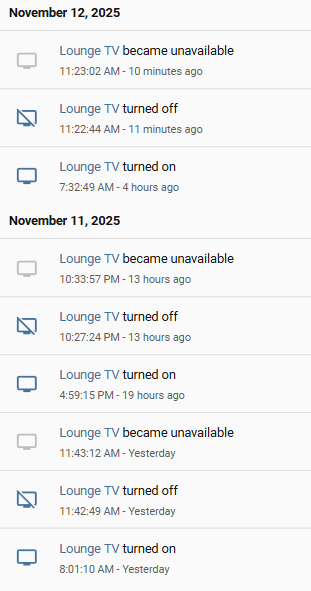
Just a quick look at mine, it seems to flick to Unavailable shortly after being Off:
OLED65C8PTA on firmware v05.50.70
Look like this issue could be related:
opened 02:13AM - 06 Nov 25 UTC
integration: webostv
If you are affected by this issue you are missing an automation to turn on the T… V, follow https://www.home-assistant.io/integrations/webostv#turn-on-automation-trigger to create an automation, most commons ones are using WOL (which you probably used before just with a custom component)
<img width="900" height="654" alt="Image" src="https://github.com/user-attachments/assets/407927bd-cad4-434d-a481-5f44a5e56f6c" />
### The problem
Hello, I just updated HA to 2025.11 and since the update both my LG screens fails to work with HA anymore. They were just fine prior the update.
Reloading the integration seems to fix the issue for a few seconds, then both devices go back to 'unavailable'.
Logs under System \ Logs show:
```
Logger: frontend.js.modern.202511050
Source: components/system_log/__init__.py:331
First occurred: 15:51:32 (4 occurrences)
Last logged: 18:00:12
Uncaught error from Firefox 144.0 on Windows 10 Error: Failed to execute 'define' on 'CustomElementRegistry': the name "lg-remote-control-editor" has already been used with this registry 68965/</A.prototype.define (node_modules/@webcomponents/scoped-custom-element-registry/src/scoped-custom-element-registry.ts:180:12) ct/< (/hacsfiles/LG-WebOS-Remote-Control/lg-remote-control.js:30:100) t (/hacsfiles/LG-WebOS-Remote-Control/lg-remote-control.js:1:250) /hacsfiles/LG-WebOS-Remote-Control/lg-remote-control.js:272:27
```
### What version of Home Assistant Core has the issue?
core-2025.11.0
### What was the last working version of Home Assistant Core?
core-2025.10.4
### What type of installation are you running?
Home Assistant OS
### Integration causing the issue
webostv
### Link to integration documentation on our website
https://www.home-assistant.io/integrations/webostv/
### Diagnostics information
Logger: frontend.js.modern.202511050
Source: components/system_log/__init__.py:331
First occurred: 15:51:32 (4 occurrences)
Last logged: 18:00:12
Uncaught error from Firefox 144.0 on Windows 10 Error: Failed to execute 'define' on 'CustomElementRegistry': the name "lg-remote-control-editor" has already been used with this registry 68965/</A.prototype.define (node_modules/@webcomponents/scoped-custom-element-registry/src/scoped-custom-element-registry.ts:180:12) ct/< (/hacsfiles/LG-WebOS-Remote-Control/lg-remote-control.js:30:100) t (/hacsfiles/LG-WebOS-Remote-Control/lg-remote-control.js:1:250) /hacsfiles/LG-WebOS-Remote-Control/lg-remote-control.js:272:27
### Example YAML snippet
```yaml
```
### Anything in the logs that might be useful for us?
```txt
I've read the release notes of 2025.11 "The state of LG webOS TV media player entities that do not have an automation trigger to turn on the device will be set to unavailable instead of off."
I do have a script tho, that handles powering on/off one of the two devices. It still shows as unavailable with the newest update.
I dot NOT have an automation for powering the second device, as I've been using a simple 'button' with wake-on-lan to turn it on.
Do I really need to create bogus automations just to circumvent this issue? It seems overkilling to me and I do not understand the logic for marking the devices 'unavailable' now, instead of 'off'
```
### Additional information
_No response_
WallyR
November 12, 2025, 6:54am
3
There were a break change in one of the latest HA core updates.
Hello!
I had the same issue and I’ve found the answer here: LG WebOS becomes "unavailable" after latest update
Hope it can help you also!