Light switch HTTP relay control broken

So I have a number of matrix keypad switches that I built some time ago and I have them set up to send HTTP requests to sonoff relay modules to turn things on or off. Dummy me did an update of all of my devices and now my switches won’t turn on the relays. Here is an example of some of the code that used to work but now doesn’t.

  - platform: matrix_keypad
    id: key4
    key: "*"
    name: light_off
    on_press:
      then:
        - if:
            condition:
              wifi.connected:
            then:
              - http_request.get: http://192.168.1.31/light/light/turn_on
            else:
              - logger.log: 
                  format: "Error sending http_request: Wifi not connected"
                  level: WARN
  - platform: matrix_keypad
    id: key5
    key: 0
    name: light_on
    on_press:
      then:
        - if:
            condition:
              wifi.connected:
            then:
              - http_request.get: http://192.168.1.31/light/light/turn_off
            else:
              - logger.log: 
                  format: "Error sending http_request: Wifi not connected"
                  level: WARN

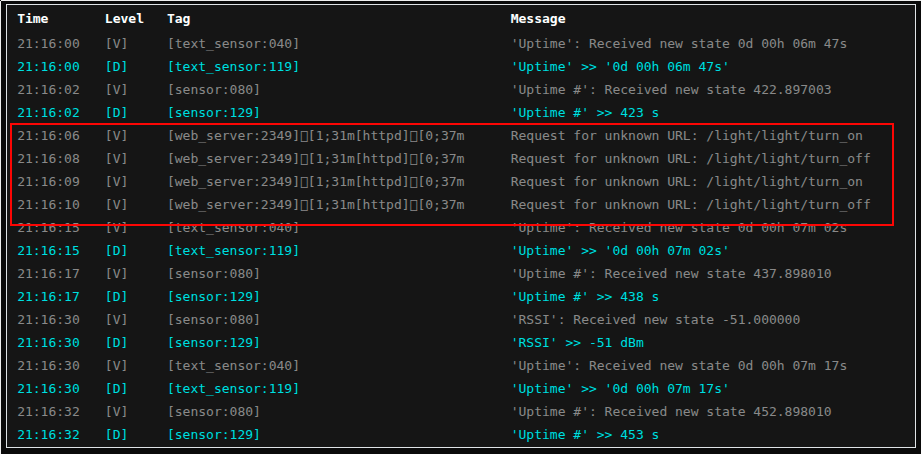
This is a screenshot from the log of the receiving Sonoff device.

Can anyone point me to what I need to change to make this work again? Let me know if you need more information from me.

Kind of desperate here.

Thanks in advance.

Maybe see the webserver changes in 2026.1

I read through that, but didn’t see a solution in that info. This is the YAML that I have for the dual Sonoff relay, all I nee to know is how to turn the light or fan on with either a POST or GET request,

output:
  - platform: gpio
    pin: GPIO14
    id: gpio_14
  - platform: gpio
    pin: GPIO27
    id: gpio_27

light:
  - platform: status_led
    name: "LED"
    id: led_status
    pin:
      number: GPIO13
      inverted: True
    internal: True

  - platform: binary
    name: "Light"
    output: gpio_14
    id: relay_light

fan:
  - platform: binary
    name: "Fan"
    output: gpio_27
    id: relay_fan

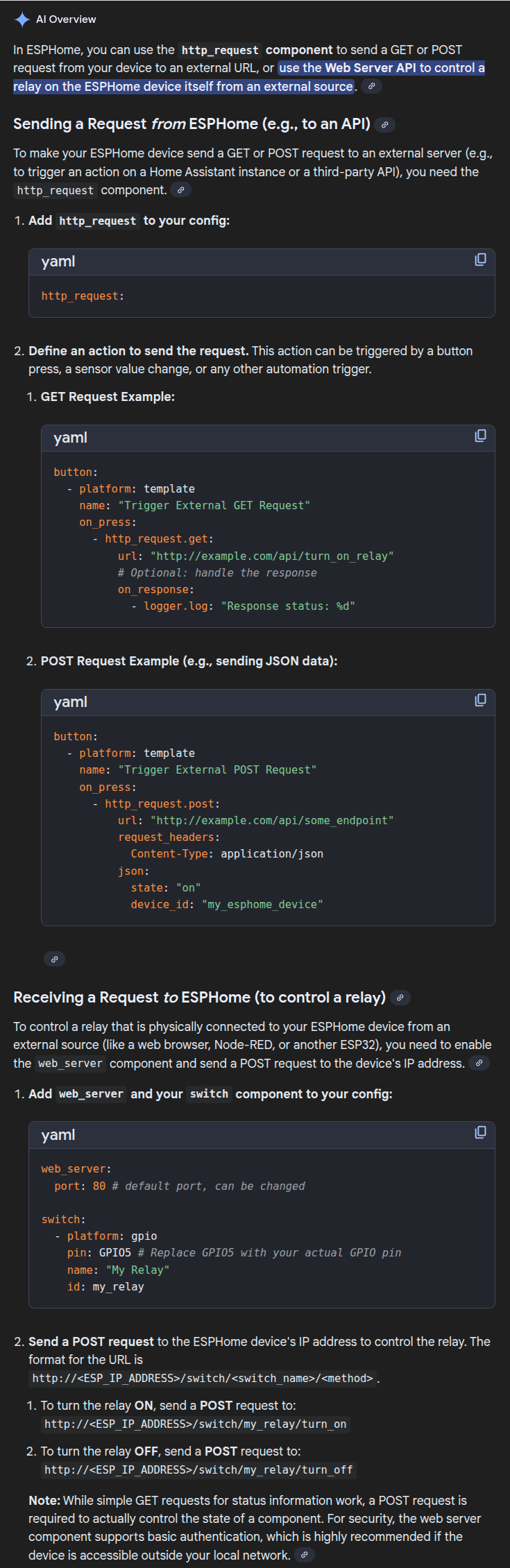
So for anyone that stumbles on this, I found my working solution. Apparently with the recent changes to ESPHome, in order to do actual device control, ESPHome requires that to be done through a POST request. You can no longer do it through the simple GET request method that I was originally using. I found this info through a google search and this is what the AI posted. I have it as a screenshot because I couldn’t find a single URL with this information.

Here are the changes I made to the YAML code to send the POST request. This code has been tested and is verified as working.

  - platform: matrix_keypad
    id: key4
    key: "*"
    name: light_off
    on_press:
      then:
        - if:
            condition:
              wifi.connected:
            then:
              - http_request.post: 
                  url: "http://192.168.1.31/light/light/turn_on"
                  request_headers:
                    Content-Type: application/json
                  json:
                    state: "on"
                    device_id: "relay_light"
            else:
              - logger.log: 
                  format: "Error sending http_request: Wifi not connected"
                  level: WARN
  - platform: matrix_keypad
    id: key5
    key: 0
    name: light_on
    on_press:
      then:
        - if:
            condition:
              wifi.connected:
            then:
              - http_request.post: 
                  url: "http://192.168.1.31/light/light/turn_off"
                  request_headers:
                    Content-Type: application/json
                  json:
                    state: "off"
                    device_id: "relay_light"
            else:
              - logger.log: 
                  format: "Error sending http_request: Wifi not connected"
                  level: WARN

OK, slight correction. After installing the above cod, it did wor, however after looking at the loga on the Sonoff as I was pushing the buttons, I noticed it was saying that the JSON headers were incorrect and that the URL format of “/light/light/turn_on” was depreciated. It said to use the entity name instead which is ACTALLY, “/light/Light/turn_on”. Notice the capital L. So here is what is now working with no log errors.
  - platform: matrix_keypad
    id: key4
    key: "*"
    name: light_on
    on_press:
      then:
        - if:
            condition:
              wifi.connected:
            then:
              - http_request.post: 
                  url: "http://192.168.1.31/light/Light/turn_on"
            else:
              - logger.log: 
                  format: "Error sending http_request: Wifi not connected"
                  level: WARN
  - platform: matrix_keypad
    id: key5
    key: 0
    name: light_off
    on_press:
      then:
        - if:
            condition:
              wifi.connected:
            then:
              - http_request.post: 
                  url: "http://192.168.1.31/light/Light/turn_off"
            else:
              - logger.log: 
                  format: "Error sending http_request: Wifi not connected"
                  level: WARN

You find it also on esphome documentation…
Web Server API - ESPHome - Smart Home Made Simple