If You read the Info in Your “listed” Repos, you find that the latest(3) is a “Fork” from the one above(2), so they a basically the same, there are multiple Forks of this Local-Tuya, I Don’t know whether the first is a “Fork” as it’s not mentioned, although the this Author refers to (2), if things don’t work for you in His “make-all” (1)
( Read all details in these pages, to get an idea of which to choose )
What you also should is, look at i.e update-times of files-folders, features etc, i the various Repos, to get an idea how often it’s updated/maintained ( this is also a point, in choosing ), other good point is, SEARCH in this Forum, and get an idea of which seems most common, and which is maintained/discussed etc.
(2) has for long time been the most used, and discussed here in the Forum, however the author seems to be “occupied” elsewhere in life.
However a “New” Fork of same ( same as 2 and 3 ) has recently been “showing up”, and this author is actively using the Integration, so it seems like a “promising” choice, in my opinion.
And He also has Opened a Dedicated Topic/Project here in the Forum, where people can share there thoughts, configs etc. and get help
I use make-all, but I also have rospogrigio installed too.
I find rospogrigio confusing to use, because it goes through a process of setting up each entity within a device (eg. a button that also has temperature, battery, etc). It undoubtedly has more flexibility for devices that are not pre-defined, but I haven’t needed that yet.
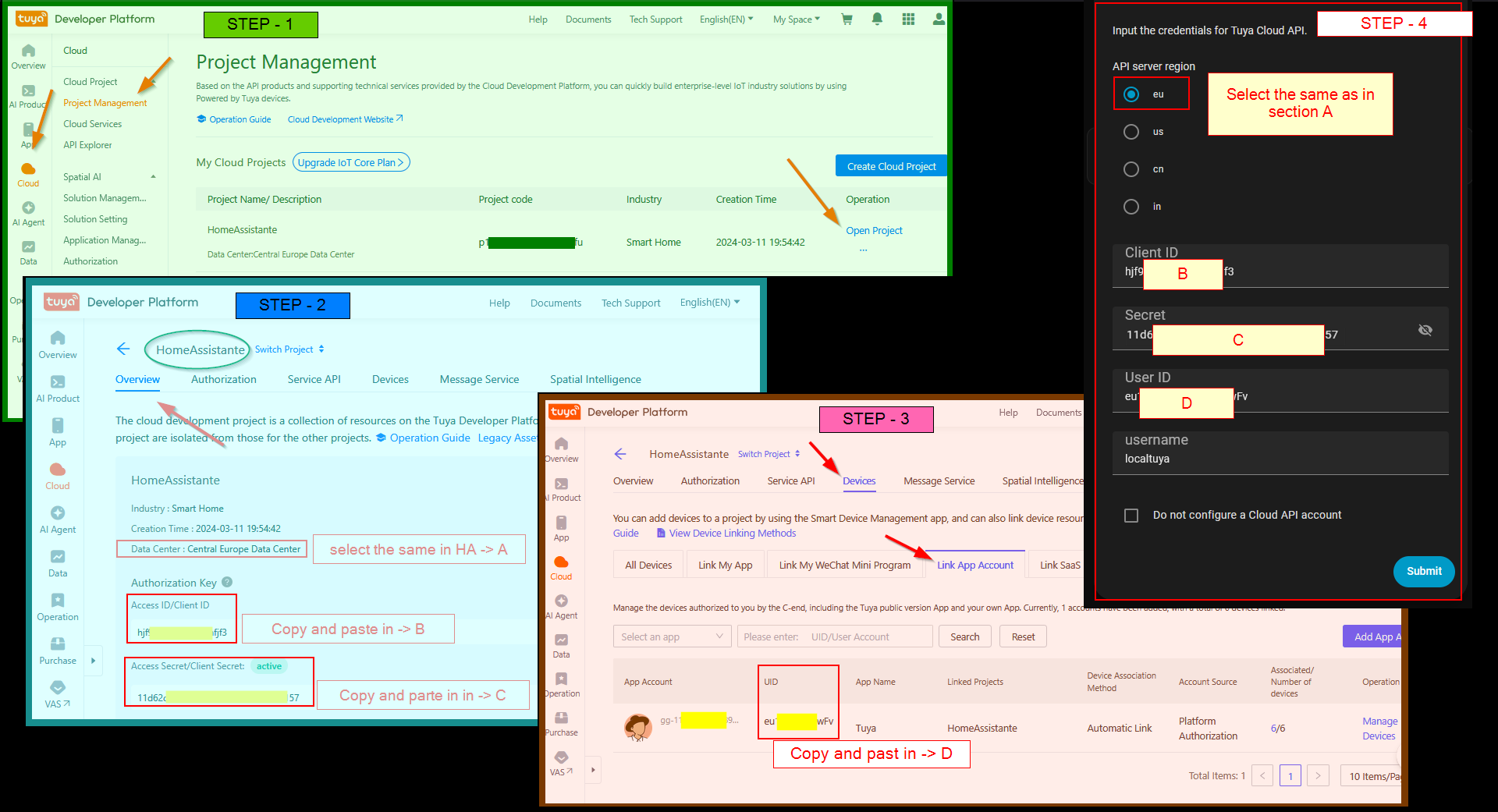
On the other hand, make-all generally seems to work for all my devices. I say “generally” because it’s not unusual for it to take a few attempts to initially add a new device. The main difficulty is finding the device id and key, which is why I have left rospogrigio installed. I can pretend to add the device using that integration, just to get the needed details, and paste them into make-all.
I know this is an old post but I found it very useful and think others may too. I have only basic knowledge of Home Assistant and therefore please forgive any thing in the following which should be obvious. I have been running the original /rospogrigio/localtuya for some time now. I have just 13 devices. I have been seeing an increasing number of errors in my logs some of which related to this version using code/methods that will be deprecated next year.
I tried Tuya Local but it didn’t support any of my devices (mainly Antela plugs with energy monitoring). My Tuya subscription expired (again) and so I thought I would just dump these plugs and move to Zigbee or at least WiFi plugs that don’t require an internet connection. But I thought I would just try one last bit of research and fo7nd this thread. I saw @boheme61 reference to the xZetsubou fork (for which much thanks) and noted it is still regularly maintained so thought I would give it a whirl.
I made sure I had a current backup and installed as per the instructions. Much to my surprise instead of installing a separate integration it replaced the original fork. This is probably just my lack of knowledge about Git hub and forks (?) but also to my surprise it just worked. No configuration required as it just picked up on all the devices already installed - and most importantly no errors (or at least none that I count resolve to my satisfaction.
I haven’t tried the leeyuentuen fork which may also fix these issues.
Anyway thanks to @rh22 for originating this post. It’s saved me much money and hassle at least for a time…