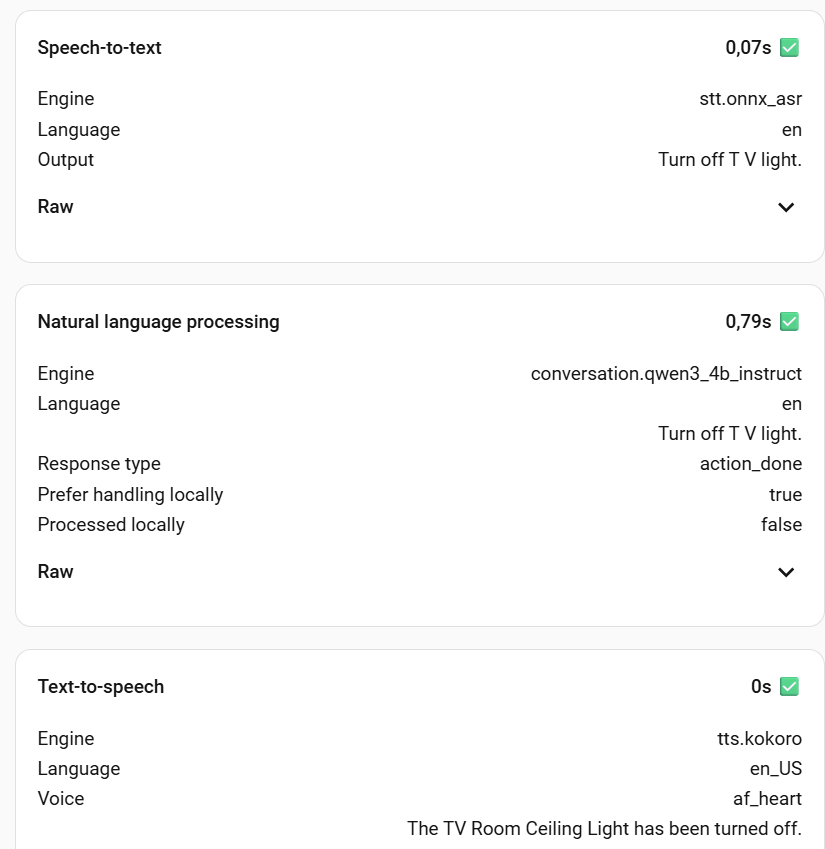
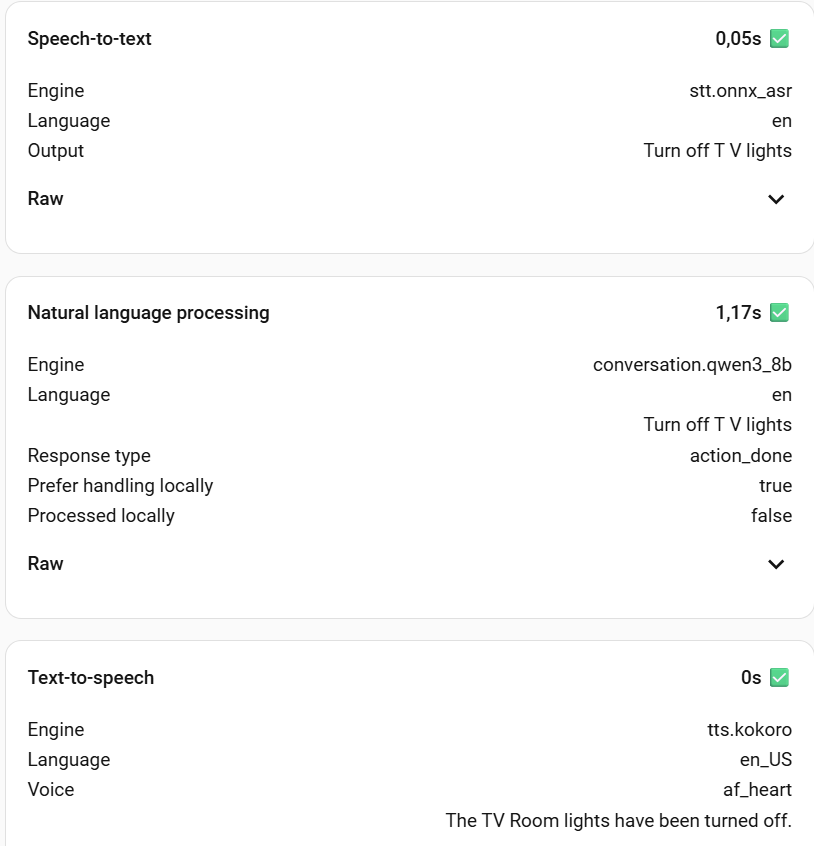
I want to share my current setup for a fully local voice assistant running on Proxmox. The interesting aspect is that I’ve managed to leverage a single NVIDIA RTX 3060 12GB card to run all three core voice components.
The entire stack is deployed within Proxmox VE on a single node, using separate, LXC containers that all share access via PCIe Passthrough. This allows for a fast, private, and fully self-hosted conversational experience.
Conversation Agent: Ollama
Speech-to-Text (STT): wyoming-onnx-asr
Text-to-Speech (TTS): wyoming-kokoro
Here is the approximate memory consumption across the three services:
wyoming-kokoro: 2206MiB (17% of VRAM)
wyoming-onnx-as: 3352MiB (27% of VRAM)
Ollama : Uses the remaining VRAM. It can fit (barely) Qwen3 8B while Qwen3 4B Instruct leaves a lot of free space
If you are interested in replicating this, I can provide more detailed information on how I configured the LXC containers and related services for shared GPU access. Ollama was pretty easy, onnx-asr not that hard while kokoro required a bit of code rework of wyoming-kokoro-torch but now is full working (on the GPU) including the streaming.
I’d be very interested in your notes about kokoro and onnx-asr. I don’t have a dedicated GPU, and I hadn’t heard of either of those projects - I’ve just been running wyoming-piper and wyoming-whisper (meant for low-power systems) because they were simple containers I could get running w/out any real effort and just work… but I’d like to try out something different especially if it might be better.
Also, was there any reason to running these in LXC’s and not as docker containers, or is it just that you don’t run containers?
I am also curious about how you shared the GPU - I would like to eventually build a better home server with some GPUs, and didn’t know if they could be shared or not.
The overall goal was to aim for as low latency as possible fully leveraging the GPU resources while keeping high quality:
On kokoro (vs piper): On a GPU-accelerated setup, Kokoro delivers a more natural, higher-fidelity audio output. It supports streaming the response piece-by-piece as the LLM generates the text, which is crucial for achieving extremely low conversational latency.
On ONNX-ASR (vs whisper): ONNX-ASR is not a model but a standard format and runtime used to aggressively optimize ASR models (like Whisper) to run at their peak speed using the full capabilities of the GPU. This optimization ensures the Speech-to-Text phase is near-instantaneous, eliminating a critical source of conversational delay.
My home lab runs on Proxmox, and wherever possible, I choose LXC over VM.
LXC vs. VM: The reason for choosing LXC is that it allows multiple containers to share the same GPU resources by granting access to the host’s drivers, whereas a VM requires exclusive hardware passthrough.
LXC vs. Docker (Inside LXC): The reason for avoiding Docker inside the LXC is to achieve near-bare-metal performance and simplified, low-overhead GPU resource sharing. Running nested virtualization with Docker adds an unnecessary layer of overhead that would counteract the goal of minimum latency.
how is your qwen instance setup (context window size)
how many entities are you exposing
and how many tools/scripts intents do you have
(I’m trying to get a feel for how big you can go in your setup - context window is going to bite you in this config… so how many entities do you expose to assist)
Let me clarify: I’m at the beginning of my voice assistant journey. So far, I’ve focused on understanding the required components, available options, deployment methods, and which workloads can be offloaded to the GPU. Since I didn’t find any reference for an LXC-based deployment of the component I’m using (aside from Ollama), I decided to share what I’ve put together. Wyoming-Kokoro was particularly tricky to set up.There doesn’t seem to be a GPU based working example available, so I had to fork an existing project and add CUDA support.
My current setup may not be the final target. Both ONNX-ASR and Kokoro also run decently on CPU, so in case of VRAM constraints, I may adjust the configuration. Removing the dependency on the GPU node would allow them to run on any node in my Proxmox cluster. That would be ideal for a high-availability deployment (I know… probably overkill, but still interesting to me).
Getting back to the questions: the 3060 has 12GB, and my Qwen model currently runs with the default configuration. Entities should be around 20–30, but I’m moving soon to a new house where I’m building a fairly extensive Zigbee network, so the number will increase. I don’t have any tools or scripts yet, that’s what I’ll be looking into next.
Hello, and thanks a lot for sharing your experience. I’m at the very beginning of setting up the same kind of functionnality and I’m really impressed by what you achieved so far. For now I’m only running ollama on a vm under proxmox but since I don’t have any dedicated gpu yet, it 's running under pure cpu (host).
My first question would be to know why you didn’t use assist ? Is it because piper and whisper were the only available options ? Is it because you want to have a kind of personnal assistant, beyond the only domotic scope ?
I don’t see anything where they say they ARENT using assist. Everything I see there is the local components for assist. It’s similar to how I have Friday setup. Local components do not mean not using assist.
Hi, could you give me a write-down of how you installed onnx-asr? kokoro was not an issue with the steps provided on the github, but with onnx-asr I am a bit stuck…
@Reini79 Sorry for the delay…I was on a Christmas break, and then I moved to a new house. Setting up all the entities and devices again took some time, and over the past week I had finally time to reorganize the local voice assistants components from scratch.
I created two repositories to automate the deployment of Wyoming for Kokoro TTs and ONNX-ASR STT. Currently, they can be deployed as a Home Assistant app and/or via Docker, but not as standalone/native servers. This type of deployment allows easy access to the GPU for offloading workloads, with a fallback to CPU if a GPU is not available.
Thanks, in the meantime I somehow managed - have them running in a proxmox LXC with my nvidia passthrough. TTS works super, STT I honestly almost never use, can’t tell
Thank you for putting in so much work here. I’ve also been working on this topic for a few days, as Piper doesn’t suit me at the moment. The languages available in German just don’t sound good.
I have a GPU server here (with RTX3090) and other services (Ollama, LibreChat, etc.) are also running on it.
Since I primarily work on a Docker basis, I was wondering if you plan to release containers for this? That would fit better into my current ecosystem
@Buddinski88 My setup is Proxmox/LXC-based, and what I shared here is designed around my needs. Using Docker in Proxmox is totally doable, and GPU passthrough should work fine as well, but to me it would just add an extra layer to my stack. Definitely pros and cons to doing that, but the LXC approach just works for me.
The good news is that there are plenty of Docker-based implementations of similar services. Maybe not all have an add-on or app ready to deploy in HA, but if you know Docker, that shouldn’t be a problem…just search GitHub, and you’ll find what you’re looking for.