localTuya LSC Power Plug w/ Power Meter EU

I configured this device with localTuya as a switch with attributes for current (DP18) and voltage (DP20) and added power (DP19) as a power type sensor and “add electricity” (DP17) as a energy type sensor.
Then I defined an separate sensor to sum-up the “add electricity” sensor as blow. It kind of works, but it is not completely accurate as it sometimes misses an addition when the “add electricity” updates with the same value as before. Not sure what to do next.
Also, I don’t see the localTuya entities for this device listed under HA\Developer Tools\Statistics. When the entities are not included in the recorder integration, where does it store its data?

configuration.yaml:

input_number:
  pp1_previous_add_value:
    name: PP1 Add Value
    min: 0
    max: 100000
    mode: box
  pp1_energy_value:
    name: PP1 Energy Value
    min: 0
    max: 10000000
    mode: box

sensor:
  - platform: template
    sensors:
      pp1_energy:
        friendly_name: "PP1 Energy"
        unique_id: pp1_energy
        unit_of_measurement: "Wh"
        device_class: energy 
        value_template: >
          {{ states('input_number.pp1_energy_value') | int(0) }}

automations.yaml:

alias: PP1 Energy
description: ""
triggers:
  - minutes: /5
    trigger: time_pattern
conditions:
  - condition: template
    value_template: >-
      {{ states('sensor.pp1_add_electricity') | int(0) !=
      states('input_number.pp1_previous_add_value') | int(0) }}
actions:
  - data:
      entity_id: input_number.pp1_previous_add_value
      value: "{{ states('sensor.pp1_add_electricity') | int(0) }}"
    action: input_number.set_value
  - data:
      entity_id: input_number.pp1_energy_value
      value: >-
        {{ states('sensor.pp1_energy') | int +
        states('sensor.pp1_add_electricity') | int }}
    action: input_number.set_value
mode: single
Appearantly I was using the old way of doing things in my configuration.yaml. Here is the better one:

configuration.yaml:

input_number:
  pp1_energy_value:
    name: PP1 Energy Value
    min: 0
    max: 10000000
    mode: box

 template:
  - sensor:
    - name: "PP1 Energy"
      unique_id: pp1_energy
      unit_of_measurement: "Wh"
      device_class: energy 
      state_class: total_increasing
      state: "{{ states('input_number.pp1_energy_value') | int(0) }}"

automations.yaml:

- id: ''
  alias: PP1 Energy
  description: ''
  triggers:
  - entity_id: sensor.pp1_add_electricity
    trigger: state
  actions:
  - data:
      entity_id: input_number.pp1_energy_value
      value: '{{ states(''input_number.pp1_energy_value'') | int + states(''sensor.pp1_add_electricity'')
        | int(0) }}'
    action: input_number.set_value
  mode: single

Although it’s much simpler and works better (the pp1_energy sensor is now listed in HA\Developer Tools\Statistics) it’s still not flawless. I still miss one or two daily updates of the add_electricity DP as the tuya cloud app reports an higher energy value. Anybody any thoughts?

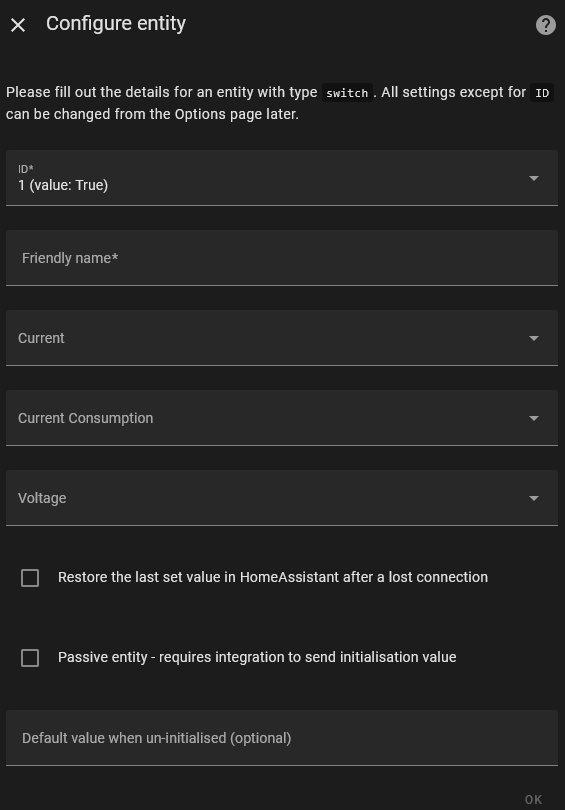
@Dax1900 can you explain in a bit more detail how you did this? When I add my smart plug, I am prompted with this config window in the local tuya integration:

According to your description above, I’d have to set Current to 18 (value: 0) and Voltage to 20 (value:2414). I guess the value for Current is just the currently measured value for current (zero, because turned off?) and the value for voltage is ~240V *10?

“Current consumption” would then refer to the power draw and would have to be set as 19 (value: 0)

If I do this, then I do see Current, Voltage and Current Consumptions as Attributes of the switch, but they are not present as sensor entities :thinking: