Hello, I hope someone will guide me for a right solution/workaround.
I’m using HA for 4+years now but only for like month or so I’m seeing an issue with being “At home”/“Away” randomly changes, even if I’m not moving. Needless to say this “breaks” many of my automations which relay on my/others presence at home.
It seems to be a general Android issue as I can also see my location being reported approx. 30-40m outside my home in other apps. HA Companion app has access/permission to use exact location and running in the background (flushing cache did not help). I also tried to compensate the drift extending the radius of my home zone but this did not help either (it seems to be ignored by HA, why?). The only thing I can do I to open Google Maps (or any other location driven application) and after a few seconds my location is being corrected to my precise location.
The issue is also present on my my wife’s and 2 kids phones.
All are Android devices (Android 11/13/15).
The issue is present on every phone. GPS does not work indoors. It requires a clear view of the sky.
So indoors your phone uses wifi lookup and cell tower triangulation, which is much less accurate.
A better way to determine if you are home or not is to check which wifi network your phones are connected to. The companion app provides a sensor for this.
At least for my case GPS does work indoors, simply launching Google Maps proves that. I’ve just downloaded GPS Test to do (my) sanity check; 33 satellites in view, in use 15+, worst case accuracy +/-10m on the ground floor (but +/-4-6m on avg), and average SNR 26-33 depending on where I’m in the house. After launching GPS Test on my phone I’ve accessed HA via computer and my location in HA has been updated accordingly - to my almost exact location. And again I’ve moved to “At home” from being “Away” state. I did not access HACA on my phone at this time; just GPS Test app. Weird, ha?
I know there are plenty of ways (more or less reliable) to determine if I’m in my house or even in which room of the house. But this is not the question about it.
Thanks for the sensors tip; it might be on to something. Looking at HACA sensors I can see that my phone’s High Accuracy Mode and Interval sensors say “Unknown”, which is probably not expected. Has HACA lost its ability to pull down precise location? Permission are there, settings are there (btw. HACA is the only app allowed to access precise location while being run in the background) but if that’s true it would explain my recent issues. With no application that would enforce precise location, after a few minutes phone location is going to be approx only (>100m radius), and garbage is reported to HA.
Responding to myself. The only issue at my home zone.
I spent whole week comparing to other places (my workplace, kids’ school) and no issues there. Location tracking is very solid, no major drifting or jumps. For most of the time phones are left alone and not used extensively (especially while kids are at school). Not to mention my office building or school is giving the worse GPS signal quality. But still, on Thursday a moved around my office complex and I was able to track my location in HA with decent accuracy.
So what gives? What is causing the drift at home zone? I have no clue.
Anywhere else location is correct, tracking is also decent. As workaround I “moved” my home zone somewhere in between my actual location and reported location (mostly due to home zone radius did not cover the drift - another issue - but it should, also increasing it did not had any effect, if it would I’d never noticed the issue).
Again - this never happened until last month or so.
For most of the time so far my location has been reported exactly at my house premises (black frame) only with very occasional jumps. Thought about jamming but is it likely if while any GPS app is active, location is fixed and reported correctly on map in matter of seconds? Also drift is always in the same direction, I presume with jamming on it would be more random drift?
Same issue, but it is not too long since it started, tho very annoying. Puts me in away mode and turns off all the lights when my wife is not home. She have a newer iPhone i have s22 plus.
Anything else i can do to find out what the issue is?
Tom already posted a few good ways to get around it.
Other than those… Remove the roof of the house to get a better view of the sky.
You can also increase the home zone size.
You could make your automation not trigger unless you have been away for a longer period of time.
You could create a zone outside home that is a buffer zone which your automations does not trigger in.
barmazu Same issue here - only affects home zone occupancy. Radius set to 300m and some devices are outside the zone almost 50% of the time when stationary at home. The “distance from home” gradually drifts from 0 to up to 800m and then snaps back, sometimes after hours - not a satellite reception issue. All phone settings and permissions are correct. Using different trackers (Find My, iCloud3, etc) no drift occurs. I have solved the problem by using 3 trackers and setting a template to return true if ANY show the locations of any tracked device in the home zone. Still, it is a poor showing, what?
There is definitely something broken. Today, I monitored the Home Assistant sensors closely. At one stage, the actual phone tracker (device_tracker.name) on one phone showed it as “home” but the occupancy of the home zone (zone.home) was still returned as Zero. I have also noted that zone.home sometimes oscillates between values rapidly (sometimes at 2 minute intervals) despite no phone movement. When explicitly setting a reliable tracker in the “People” settings page, zone.home does not to follow that setting, perhaps opting for the broken erroneous tracker regardless??
My workaround still works because it ignores zone.home and, being a wild card template, if I add another user to the home it will automagically also registers with the template. Instead it generates new “myzone.location” devices that I can use instead of the ones provided by HomeAssistant geolocation allowing me to dispense with the zone.* entities in automations until they are fixed.
As barmazu has mentioned, it seems that this problem has only been present for a month or two.
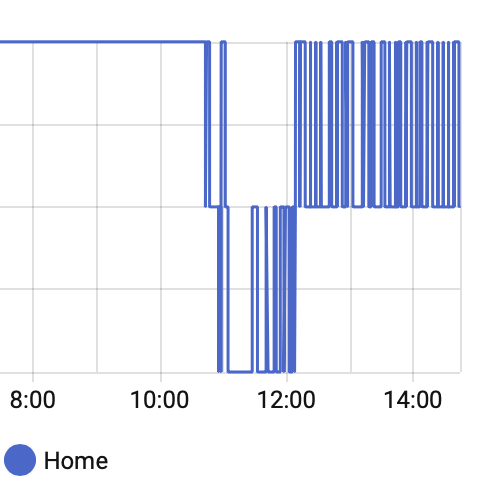
Below is a history graph of zone.home. We left home at 11, went well beyond the home zone and returned at 12.
It sounds like you have defined a zone that overlaps with your home location. You should not define any zone for home, this is done by HA automatically.
ps. the problems may be caused by wifi accesspoints nearby that have a wrong GPS location attached to them in databases by Google, Apple etc. When at home, as said, you have no accurate GPS. Google and Apple deploy databases with known GPS locations of wifi access points. If people owning these wifi accesspoints move to a location nearby, the databases may be off for months.
Also check your phone settings. Are the settings to improve accuracy enabled (i.e. using cell towers, wifi, etc) or disabled? Did the companion app get full access to accurate location, also when running in the background?
Did you register your wifi SSID with the companion app to allow it to use wifi to determine if you are home?
Did you add extra trackers for persons that can help determining if you are home (e.g. from your access point, bluetooth, etc?)
Are there any device trackers listed for your person that are not provinding proper location (e.g. ipad, etc)?
Edwin_D Nope - using the HA defined home zone.
I have used the map page to increase the size of the predefined home zone from 100m to higher values to no apparent effect. I have other user defined zones that encompass home but home is the one giving errors.
I have all phone settings as recommended.
I have no WiFi access points around other than my home one. SSID is registered.
iCloud3 extra tracker installed - it works but is ignored completely by zone.home despite being added as a tracker on the People page.
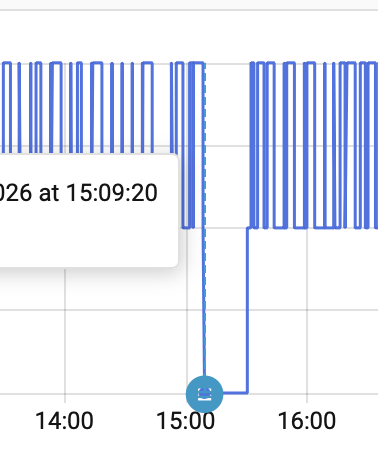
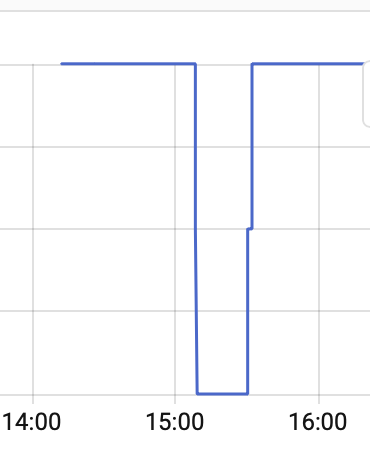
Couple of history graph excerpts below. One shows number of people in zone.home; the other in my own myzone.home template derived from iCloud3 tracker entities.
All other devices running HA app are stationary at home (3 Macs) - their trackers are not listed in People Page.
I have to ask. Do you maybe have another device (like a tablet or some old mobile) which is currently signed into your account or someone else’s user account?
Remember it is the persons locations only being tracked by zones. And the person location is determined by its device trackers. Until you can show person locations don’t match with what the zones say then you know to look at zones. If the persons locations are off, you need to look at the trackers themselves.
Note that the persons attribute of the zone lists the persons that are counted.
Mmmmh. I have had a thorough look. One of my Macs had location settings enabled for HA. This may be the problem with HA getting into trouble when it wakes ups or goes to sleep?? I have now ensured that ALL stationary devices have location permissions disabled, leaving only the phones and will see what happens. Thanks. P
I strongly suggest you create a separate user for that device. That is the way HA is pushing towards, whether you agree with it or not.
Trying to keep on top of permissions means you’ll have to check after every device update for the rest of your life. Setting a separate user and making sure that user has no device tracker assigned takes 5 minutes of your time, once.
@ShadowFist@Edwin_D, I think I have cracked it. The way HA handles overlapping and or concentric zones does not behave as I had expected. I seem to have forgotten to set the extra concentric zones as “passive”.
Initially, I tried all your suggestions: All Macs were now logged in as a new, different, untracked user with no tracking enabled on login. Confirmed that no device_tracker or location entities were present for that account or for those devices. The new account is not listed as a Person. For good measure, I quit all running instances of the HA app on all the Macs. There were then only two tracked accounts on the HA system each using 1 phone only. HA mobile Apps were enabled and the mobile trackers produced were present and enabled. All phone and HA App settings triple checked and correct.
Despite this, the mobile trackers continually bounced in and out of zone.home like a yoyo every 3-5 minutes! The iCloud3 tracker, on the other hand, remained rock solid and accurate. Both mobile and iCloud3 trackers were enabled under “People” but the iCloud tracker is completely ignored by zone.home, it seemed to follow only the mobile tracker. Removing the mobile device_tracker from a Person and leaving only the iCloud tracker made no difference.
I then decided to delete all extra zones other than “Home”. These were concentric zones around home to give multiple geofencing options. Bingo, all the jitters stopped.
Thus I have changed my automations to initial Home and Away automations dealing with entering and leaving the home zone and, rather than fiddling with more zones and configuring entry/exit triggers, I have rewritten the rest of the geofencing automations in terms of “distance from home” rather than being “in a zone” and, so far, these are working as expected. The logic is simpler anyway…