We use the Home Assistant application for tracking our whereabouts (Android and IOS), and only when we are both not home (unless I have my"Guest Mode" turned on) then the automations know to turn off all lights, HVAC etc.
It has been pretty much 100% rock solid stable for my android phone. For my wife’s iPhone however it’s another story. When she comes home every once in a while it still shows her as “Away” (or visa-versa - “Home” when she is away). That’s no problem with here incorfectly being reported as “Away” - until I leave - then HA sees that we are both “Away” and turns off all the lights - regardless of whether she is watching TV, in the shower, cooking, whatever. WAF goes back down to -1,000%.
I was thinking, whenever either of us leaves we each always have our keys with us. I would rather have some sort of a little device on each keychain to rely upon instead. The only issue is it should not be something that needs to be recharged very often… and it does need to be small-ish…
I do have a bunch of Shelly GEN2 devices in the house, so a Shelly BLU device of some sort possibly?
Yeah, iPhones are bad for wifi tracking because of how often they drop off.
You could use PebbleBee or Tile trackers. I have both but I’m moving over to PebbleBee. I haven’t added the PebbleBee trackers to HA yet but the Tile ones are currently working well.
The above would be able to use these to improve the BLE detection range other than just whatever Bluetooth you might have on the HA server machine.
To make sure they are detected reliably, I have a BT dongle on my HA server and I added the bluetooth proxy components to 4 ESPHome devices that I already had running.
The battery life depends on how you set up the transmission power and frequency, but ours have been running for 2 years now on the original batteries. I did turn the tx power down on ours so that the tags are only detected in a radius of only about 10m from the exterior the of house… which is more than enough for my uses.
O.M.G. this is so fantastic! Now I just have to stumble through how to do this. One last question, @tom_l sorry for more questions as I am not well versed in this area, the Shelly devices I have which are acting as BLE gateways for the Shelly BLU devices, since it is Bluetooth, don’t they have to all be paired with the Mobile phones as well and do the Shelly devices support acting as a gateway for other non-shelly devices?
You only need one BLE proxy near the entrance to mark you as home. The GPS will then catch up. See 6 and 7 here: Person - Home Assistant though for BLE not router tracker.
Also you can do it the other way around. If your Phone detects a BLE tag it will cause a location update. 2nd item in the location update reason list here: Location | Home Assistant Companion Docs
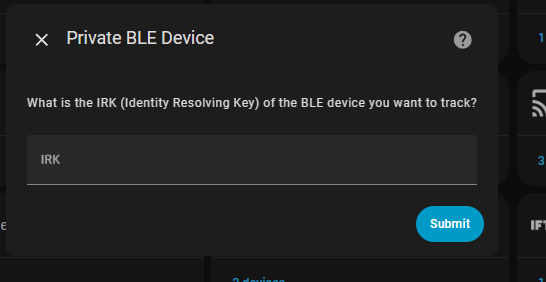
ChatGPT is telling me there is no way to get the Identity Resolving Key (IRK) from my unlocked Samsung Galaxy S23 (Verison) phone, the btsnoop_hci.log does not exist anywhere on the phone accoring to adb when I have the bluettoth log and USB debug turned on and pair a device - while connected to the phone from a PC.
Also Chatgpt tells me it’s impossioble to get the irk for an iphone because that is completely locked down. Sigh.
Thanks for your help @tom_l … When I get a chance later I’ll pair the iPhone to the windows machine and then look in the windows machine as per the instructions, they didn’t make that clear.
My statements after that about the android - any ideas?
@tom_l thank you Tom and others here, I have the location tracking (Home/Away) for each the person now working for four entities for each of us. The above method for the BLE IRK was incorrect, I have posted al my details and the results below. The four entities for each person I am using are three types:
GPS (through the Home Assistant App on each phone)
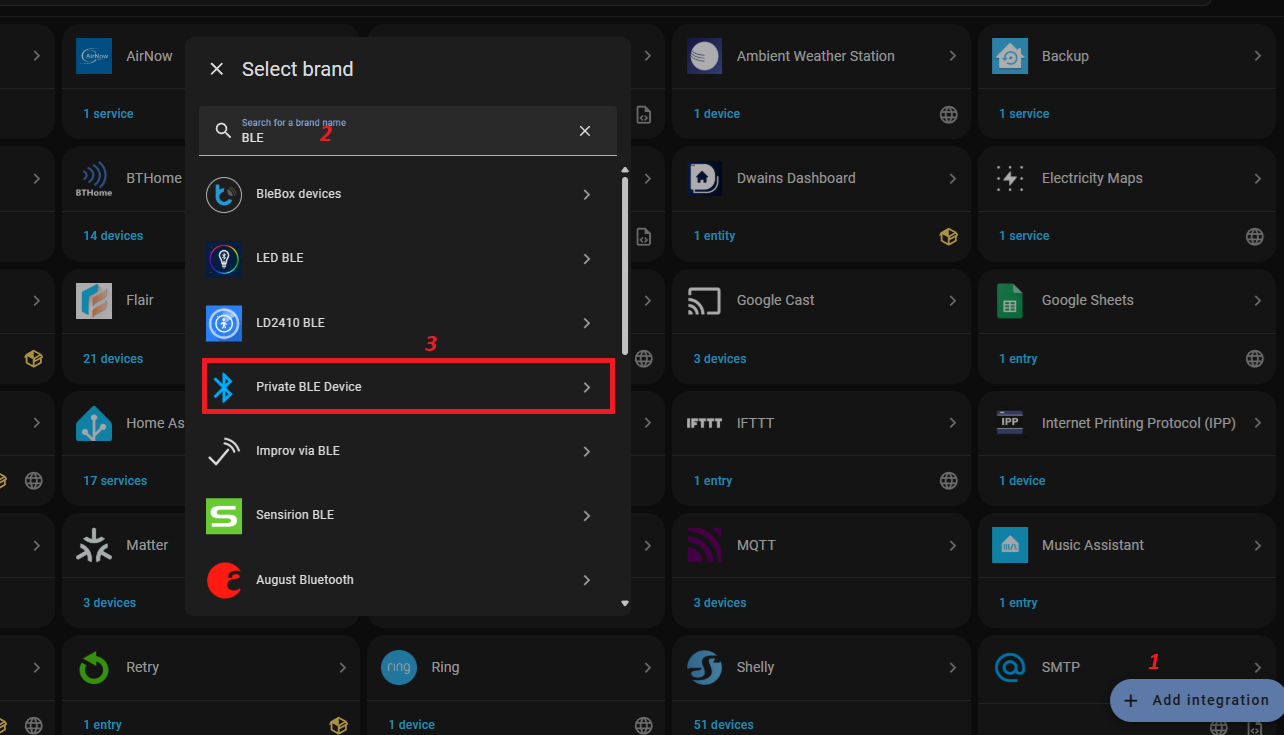
BLE (through the “Private BLE Device” integration for each of our phones)
Router (through the Official TP-LInk Integration)
Router (through the HACS TP-Link Integration)
Notes to get this to work most easily:
For the WiFi (router) portion, due to my WiFi setup here to ensure there is no issue, all phones involved have to stay with one WiFi SSID, have a static IP address, and have static MAC addresses. It appears that even if your router keeps the IP the same for the device with a radndomized mac address that will not work as both TP-Link integrations I am using - HACS (which has many moire attributes exposed) and Official - they both rely upon the Mac address as an entity identifier.
For the BLE setup to get the IRK for each phone (android and IOS), the easiest way to obtain it (for me) is to temporarily connect to teach with a Windows PC (you need administrator rights). Private BLE Device - Home Assistant
Then go into “entities” and rename the sensors (name and entity) you are going to use for the person location tracking to make it easier for later configuration. The below setting is a little “sticky” in that when people leave home it takes a short time to mark the person as “Away” but that is fine as my preference is to only have update to “Home” happen as soon as possible (since my automations are only based upon when people leave but my main concern is never to have someone still being marled as “Away” when they have in fact arrived home). For readability of mhy screen snapshot and the code below, for each sensor I am using for the person entity I named the entities ending with:
For testing purposes, I have set up a markdown card (screen shots and code below).
The card is realtime dynamically sorted (newest activity on top) and shows the cell phone related inmformation for testing purposes - all the details each separated by a blank line only for each location sensor and the people sensors. I have it set to show only the items that are “Home” as well. Quite handy! (You have to click on the image to be able to read it.)
Here is the code for the card that I am using, you will need to change the things I have excluded so that you don’t see a bunch of unnecessary things that are on your network (all the ble gateways etc.).
{% set sensor_issues = states
   | selectattr('state', 'in', ['Home','home'])
   | rejectattr('name', 'search', 'Shelly|Leviton|MBR|Switch|router|EAP|RPI|Fax|PI4|ESP8266|PI5|Outlet|Thermostat|Chromecast|Yolink|Ooma|Joey|iPad|Basement|Omada|Doorbell|Hopper|Flair|MASTER|ER707-M2')
   | sort(attribute='last_changed', reverse=true)
   | list %}
{% if sensor_issues | length > 0 %} {% for s in sensor_issues %} {{ as_local(s.last_changed).strftime('%I:%M:%S %p') }}:
{{ s.name }} ({{ s.entity_id }} ):
{{ s }}

{% endfor %} {% else %} Nothing to see here, occupants not home! {% endif %}
I will finish up my testing and add one more edit to the bottom of this before marking this as solved!
…
As promised:
It is now working properly. The most important thing, that the wife’s status changing to home (even with an iphone that is in a purse and asleep, not used for hours) - works very well. As soon as she gets near the house - her status now changes from not_home to home. Rock solid. Our phones are relying upon 4 sensors which are all working properly to make everything pretty sold - GPS, BLE, and ROUTER (two: a native TP-LInk Integration, and also a HACS TP-Link integration). So thrilled!
@KruseLuds I have a bit of hard time understanding what you’re trying to achieve with the sensor.
But if you’re trying to know if someone is home, then this might be some inspiration. Here’s an anonymized snippet from my yaml package setup.
Using the old style group syntax you’re able to group different kinds of entities, so I can still override the “home” state where necessary. The family sensor tells me if anybody is home or not in this way.