I created a board that has a cold and warm white cob strip, as well as an individually addressable led strip attached. I have created a cold + warm white component using the cwww platform as well as a fastled led strip using the fastled_clockless platform. These show up as two entities in HA.
I use this light as normal desk lighting, but also as a signal light
However, I’d like combine both, such that if I turn on the color light, the white lights go out (otherwise the color seems washed out). And when I turn off the color light, the white lights go back to their previous state (whether on or off). So basically I want some boolean operation on the “on” state:
- white lights: white_on && !color_on
- color light: color_on
I don’t think I am looking to combine both entities into one, like for example the rgbww component and using the color_interlock configuration, as while that does work when setting the color mode on, it won’t switch back when turning off the color light. I may be able to fix that using HA and ad hoc scenes, but I’d prefer to fix this in esphome, so that is “just works” in HA.
Any ideas?
This is exactly what the bare basic automations are for and they are edplained in the documentation as well there are lots of examples to look at too.
So, you want color Off when White turns On… It shows you in the documentation.
Thanks, but that is not quite the solution. I may not have explained it well enough, let me try again
- When white is on and the color is turned on, I want white to turn off (to see the color). This can be done with an action, but (a minor) problem is that HA then also reports the white light as off. If I (or an automation) then turns white on, it will be set on while there is still color showing
- When the color is turned off, I want the white light to go on again. But only if it should be on according to HA.
The problem with actions is that they work on state transitions and also actually set the light entity on or off.
The boolean expressions illustrate the case well:
- white lights: white_on && !color_on
- color light: color_on
I should have added that I want the white_on and color_on states to be reported in HA.
I don’t quite see how I can resolve this using automations in esp-home. White I tried, for example is keeping a global variable that tracks the state of the white light and depending on its state toggle the white light when color changes. However, as soon as that happens, the global variable also switches
I think your making this far more complicated than it actually is. You just need to add a condition to each light.
If white is turned On while Color is On…turn color off
If color is turned On while white is On… turn white off
I dont understand why the states showing the light is Off in HA is a problem when you keep saying you want to turn the opposite light Off.
That being said, in another paragraph your claiming the states are also not being tracked by HA…
Your not making much sense.
One of the use cases is the following
- At 6:30 AM, a HA automation checks if garbage is collected today, if so, it turns the colored light in my office on as an indicator
- When I enter my office and turn on the lights, an automation triggers that turns on the white light in the same fixture, washing out the color
- When I am done bringing the garbage out, I can confirm a notification on my phone, which sets a “garbage due” helper in HA to false and subsequently turns off the colored light
- In step 2, I want the white light to not be set on, as the colored light already shows.
- In step 3, I want the white light to be set on after the color turns off, to correctly reflect the state it was set to in step 2
However, there is also the scenario where step 2 is skipped and I have already confirmed that the garbage is out. In that case, the color turns off in step 3 and that’s it. As the ceiling lights are still off, I don’t want the white light to turn on. Of course when I turn the ceiling lights on later, I want the white light to follow
The other scenario is when the white light is already on and the colored light is set, which happens during working hours when a meeting is due in 5 minutes. In that case I want the white light to turn off when the color comes on, and back on when the meeting is over and the color turns off again. In this case, if in the meantime the ceiling lights were turned off, I don’t want the white light to come on again.
The last bit is why I was seeking to “decouple” the entity state in HA from the actual light state in esp-home. So that I (or an automation) can turn off the white light at any time (also when the colored light is on) and have an effect even after the colored light switches off.
I hope that clarifies it a bit
Ok, that detailed explanation really helps, now im with you and see whats going on. In the future you might want to start with something like that and also you need to post your config. Without seeing it, i can only assume there is only 1 esp board here and it controls both lights?
Can you go ahead smd post your esphome config and yaml/config for the HA automations you have that control these lights?
Thanks for that, I do have a tendency to skip steps when making a point.
The esphome config is the following (omitted the networking stuff, also omitted a bluetooth proxy, ble tracker and touch component - the desk light is becoming extremely versatile):
output:
  - platform: ledc
    pin: GPIO13
    id: channel13
    frequency: 19531Hz
    min_power: 0.25
  - platform: ledc
    pin: GPIO14
    id: channel14
    frequency: 19531Hz
    min_power: 0.25
light:
  - platform: cwww
    id: "white"
    name: "testboard-a"
    cold_white: channel17
    warm_white: channel18
    cold_white_color_temperature: 4000 K
    warm_white_color_temperature: 3000 K
    constant_brightness: true
    default_transition_length: 0.5s
    gamma_correct: 1
  - platform: fastled_clockless
    chipset: WS2812
    pin: GPIO25
    num_leds: 46
    rgb_order: GRB
    name: "testboard-strip"
    default_transition_length: 0s
    effects:
      - ...
This results in two light entities in HA:
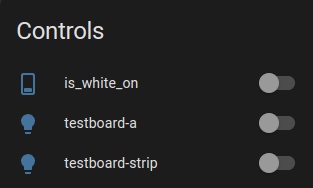
The first entity is a result of my expermiments, which are the following modifications:
# an extra global and switch to "bring it to HA" and see what its doing:
globals:
  - id: white_on
    type: bool
    restore_value: true

switch:
  - platform: template
    name: is_white_on
    turn_on_action:
      - globals.set:
          id: white_on
          value: 'true'
    turn_off_action:
      - globals.set:
          id: white_on
          value: 'false'
    lambda: |-
      return id(white_on);

# adjustments in the light components:
light:
  - platform: cwww
    id: "white"
    name: "testboard-a"
    cold_white: channel17
    warm_white: channel18
    cold_white_color_temperature: 4000 K
    warm_white_color_temperature: 3000 K
    constant_brightness: true
    default_transition_length: 0.5s
    gamma_correct: 1
    on_turn_on:
      then:
        - lambda: |-
            id(white_on) = true;
    on_turn_off:
      then:
        - lambda: |-
            id(white_on) = false;
  - platform: fastled_clockless
    chipset: WS2812
    pin: GPIO25
    num_leds: 46
    rgb_order: GRB
    name: "testboard-strip"
    default_transition_length: 0s
    on_turn_on:
      then:
        - lambda: |-
            if (id(white_on)) {
              id(white).turn_off().perform();
            }
    on_turn_off:
      then:
        - lambda: |-
            if (id(white_on)) {
              id(white).turn_on().set_brightness(1.0).perform();
            }
These changes now do what I want except for one issue: the white_on global is also set to off when the white turns off as a result of the action of the color strip, which is logical. When I turn the switch on in HA while the color is on (and the white off), the white correcly comes on when I turn off the color
That networking stuff is super important. Probably a good idea to add that stuff as well as address, banking information, debit card pin number… You know, the usual stuff… ; )
Kidding!!
So, everything is working now except the global isnt restoring the correct state?
Almost. I need that, but also make sure white does not come on while the color is on (in step 2 in the above) and then indeed somehow capture that change and restore to white on when the color goes off (in step 3 in the above)
I found a hacky solution that currently does what I want
- I created 2 more ledc output channels to unused gpio pins
- I created an additional cwww component, using those 2 output channels
- I created a global boolean to store whether the color light is on, as well as a switch to control it. I added handlers to this switch that change out the output channels of the cwww lights:
globals:
  - id: color_on
    type: bool
    restore_value: true

switch:
  - platform: template
    id: is_color_on
    name: is_color_on
    internal: True
    turn_on_action:
      - globals.set:
          id: color_on
          value: 'true'
      - lambda: |-
            auto *cwww_a = (esphome::cwww::CWWWLightOutput *) id(white_a).get_output();
            cwww_a->set_cold_white(id(channel14));
            cwww_a->set_warm_white(id(channel13));
            auto *cwww_b = (esphome::cwww::CWWWLightOutput *) id(white_b).get_output();
            cwww_b->set_cold_white(id(channel17));
            cwww_b->set_warm_white(id(channel18));
            cwww_b->write_state(id(white_b));
    turn_off_action:
      - globals.set:
          id: color_on
          value: 'false'
      - lambda: |-
            auto *cwww_a = (esphome::cwww::CWWWLightOutput *) id(white_a).get_output();
            cwww_a->set_cold_white(id(channel17));
            cwww_a->set_warm_white(id(channel18));
            auto *cwww_b = (esphome::cwww::CWWWLightOutput *) id(white_b).get_output();
            cwww_b->set_cold_white(id(channel14));
            cwww_b->set_warm_white(id(channel13));
            cwww_a->write_state(id(white_a));
    lambda: |-
      return id(color_on);
So I basically have 2 cwww lights, each hold their own state. The second is always of and hidden from HA, but I could add that and have it in a dimmed state or somthing. The core idea is to change the hardware output pins from one to the other when the color comes on and back when it goes off. This is done by actions on the color light:
light:
  - platform: fastled_clockless
    chipset: WS2812
    pin: GPIO25
    num_leds: 46
    rgb_order: GRB
    name: "testboard-strip"
    default_transition_length: 0s
    on_turn_on:
      then:
        - switch.turn_on: is_color_on
    on_turn_off:
      then:
        - switch.turn_off: is_color_on
    effects:
      ...
It took my quite a bit of debugging and looking at the api docs, so by now I may just as well create a custom light component that has a “mute” and “unmute” method on it or something. which may be a bit cleaner.
Anyways, this nicely fits my use cases. When the color signal light comes on, the white light goes out, but its state is kept in HA (and also on the esp). So then the signal is on for a while, and in the meantime the light is switched off, the light stays off when the color signal switches to off.